
مستشعر بصري#
مقدمة#
The optical class is used to access data from the Optical Sensor. It uses reflected light to detect objects, identify colors, and measure brightness and hue.
مُنشئ الفئة#
optical Optical = optical(index);
مُدمِّر الفئة#
يدمر الكائن البصري optical.
virtual ~optical();
حدود#
المعلمة |
يكتب |
وصف |
|---|---|---|
|
|
المنفذ الذكي الذي يتصل به المستشعر البصري، مكتوبًا على النحو التالي: |
أمثلة#
// Create an optical instance in Port 1
optical Optical1 = optical(PORT1);
الدوال الأعضاء#
The optical class includes the following member functions:
setLight— يقوم بتشغيل أو إيقاف تشغيل مؤشر LED الخاص بالمستشعر البصري.setLightPower— يحدد مستوى طاقة الضوء للمستشعر البصري.isNearObject— تُرجع ما إذا كان المستشعر البصري يكتشف وجود جسم ضمن النطاق أم لا.colorname— Returns the color detected by the Optical Sensor.brightness— تُرجع كمية الضوء المنعكس من الجسم.hue— تُرجع اللون الذي تم اكتشافه بواسطة المستشعر البصري.objectDetected— يسجل دالة ليتم استدعاؤها عندما يكتشف المستشعر البصري وجود جسم.objectLost— يسجل دالة يتم استدعاؤها عندما يفقد المستشعر البصري كائنًا.
Before calling any optical member functions, an optical instance must be created, as shown below:
/* This constructor is required when using VS Code.
Optical Sensor configuration is generated automatically
in VEXcode using the Device Menu. Replace the values
as needed. */

// Create an optical object in Port 1
optical Optical1 = optical(PORT1);
setLight#
يُشغّل أو يُطفئ مؤشر LED الخاص بالمستشعر البصري. يساعد هذا الضوء المستشعر البصري على اكتشاف الأجسام والألوان بشكل أوضح.
Available Functionsvoid setLight(ledState state);
المعلمة |
يكتب |
وصف |
|---|---|---|
|
|
يُشغّل أو يُطفئ مؤشر LED. |
هذه الدالة لا تُرجع قيمة.
Examples// Turn on LED with previous intensity.
Optical.setLight(ledState::on);
setLightPower#
يحدد هذا الخيار مدى سطوع ضوء المستشعر البصري. يساعد الضوء المستشعر البصري على اكتشاف الأجسام والألوان بشكل أكثر وضوحًا.
نسبة أعلى تجعل الضوء أكثر سطوعاً. نسبة أقل تجعل الضوء أقل سطوعاً.
إذا كان ضوء المستشعر البصري مطفأً، فإن ضبط طاقة الضوء فوق 0% سيؤدي إلى تشغيل الضوء.
إذا كان ضوء المستشعر البصري مضاءً، فإن ضبط طاقة الضوء على 0% سيؤدي إلى إطفاء الضوء.
Available Functionsvoid setLightPower(
int32_t intensity,
percentUnits units = percent );
المعلمة |
يكتب |
وصف |
|---|---|---|
|
|
مستوى الطاقة لضبط الإضاءة من 0 إلى 100. |
|
|
The unit that represents the light intensity: |
هذه الدالة لا تُرجع قيمة.
Examples// Set the light power to 50 percent.
Optical.setLightPower(50, percent);
isNearObject#
تُرجع هذه الدالة ما إذا كان المستشعر البصري يكتشف وجود جسم ضمن نطاقه أم لا.
Available Functionsbool isNearObject();
لا تقبل هذه الدالة أي معلمات.
Return Valuesتُرجع هذه الدالة قيمة منطقية تشير إلى ما إذا تم اكتشاف جسم قريب أم لا:
true— تم اكتشاف جسم قريب.false— لم يتم اكتشاف أي جسم.
// If an object is detected by the Optical Sensor, print
// "near object".
if (Optical.isNearObject()){
  Brain.Screen.print("near object");
}
colorname#
يعيد اللون الذي تم اكتشافه بواسطة المستشعر البصري، بناءً على قيمة اللون المكتشفة.
Available Functionsvex::colorType colorname();
لا تقبل هذه الدالة أي معلمات.
Return Valuesاللون الذي تم اكتشافه بواسطة المستشعر البصري كمثال على فئة اللون.
الألوان الممكنة هي:
blue- قيمة اللون بين 196° و 229°blue_green– قيمة اللون بين 140° و 195°blue_violet– قيمة اللون بين 230° و 239°green– قيمة اللون بين 84° و 139°orange– قيمة اللون بين 21° و 30°red- قيمة اللون بين 350° و 14°red_orange– قيمة اللون بين 15° و 20°red_violet– قيمة اللون بين 281° و 350°violet– قيمة اللون بين 240° و 280°yellow– قيمة اللون بين 54° و 74°yellow_green– قيمة اللون بين 75° و 83°yellow_orange– قيمة اللون بين 31° و 53°
// Set a variable, detectColor, to the color detected by the
// Optical Sensor
colorType detectColor = Optical.colorname();

// Print the color detected by the Optical Sensor
// to the Brain's screen
Brain.Screen.print(detectColor);
brightness#
يُظهر مقدار الضوء المنعكس إلى المستشعر البصري.
نسبة أعلى تعني انعكاس المزيد من الضوء إلى المستشعر البصري. نسبة أقل تعني انعكاس كمية أقل من الضوء.
Available Functionsdouble brightness(bool bRaw = false);
المعلمة |
يكتب |
وصف |
|---|---|---|
|
|
قيمة منطقية لقراءة بيانات السطوع الخام بدلاً من النسبة المئوية. القيمة الافتراضية هي |
عدد مزدوج يمثل السطوع الذي تم اكتشافه بواسطة المستشعر البصري في النطاق 0 - 100٪، أو عدد مزدوج يمثل البيانات الأولية التي تم اكتشافها بواسطة المستشعر.
Examples// Set a variable, brightness, to the value of the brightness
// detected by the Optical Sensor
double brightness = Optical.brightness();
// Print the brightness detected by the Optical Sensor to the
// Brain's screen
Brain.Screen.print(brightness);
hue#
يعيد اللون الذي تم اكتشافه بواسطة المستشعر البصري.
اللون هو طريقة لوصف اللون باستخدام الأرقام الموجودة على عجلة الألوان.
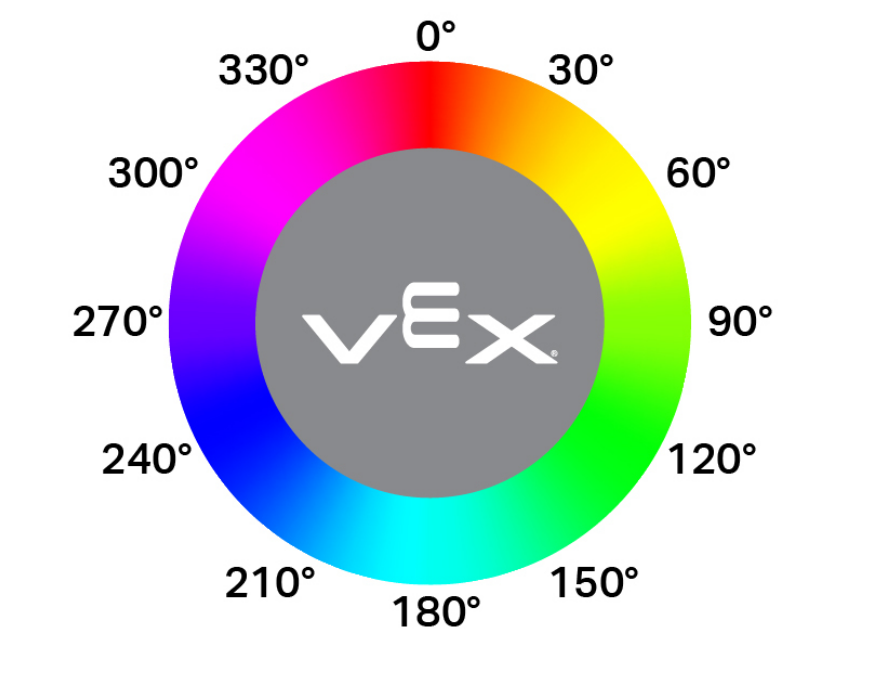
double hue();
لا تقبل هذه الدالة أي معلمات.
Return Valuesقيمة مزدوجة تمثل قيمة اللون الذي تم اكتشافه بواسطة المستشعر البصري في النطاق 0 - 359.00.
Examples// Set a variable, hue, to the value of the hue detected
// by the Optical Sensor.
double hue = Optical.hue();
objectDetected#
يسجل دالة رد نداء عند اكتشاف كائن ما.
Available Functionsvoid objectDetected(void (* callback)(void));
المعلمة |
يكتب |
وصف |
|---|---|---|
|
|
A previously defined function that executes when the Optical Sensor detects a new object. |
هذه الدالة لا تُرجع قيمة.
Examplesعرّف دالة الاستدعاء (خارج نطاق
int main())// Called when the Optical Sensor detects an object void detected() { // The Brain will print that the Optical Sensor detected an // object to the Brain's screen. Brain.Screen.print("object detected"); }قم بتسجيل دالة الاستدعاء داخل الدالة الرئيسية
int main()/* vexcodeInit() is only required when using VEXcode. Remove vexcodeInit() if compiling in VS Code. */ int main() { // Run when the Optical Sensor detects an object. Optical.objectDetected(detected); }
objectLost#
يسجل دالة رد نداء عند فقدان كائن ما.
Available Functionsvoid objectLost(void (* callback)(void));
المعلمة |
يكتب |
وصف |
|---|---|---|
|
|
A previously defined function that executes when the Optical Sensor loses a detected object. |
هذه الدالة لا تُرجع قيمة.
Examplesعرّف دالة الاستدعاء (خارج نطاق
int main())// Called when the Optical Sensor loses an object void lost() { // The Brain will print that the Optical Sensor lost an // object to the Brain's screen. Brain.Screen.print("object lost"); }قم بتسجيل دالة الاستدعاء داخل الدالة الرئيسية
int main()/* vexcodeInit() is only required when using VEXcode. Remove vexcodeInit() if compiling in VS Code. */ int main() { // Run lost when the Optical Sensor loses an object. Optical.objectLost(lost); }