
顏色感測器#
介紹#
colorsensor 類別用於存取來自顏色感測器的資料。它利用反射光來偵測物體、識別顏色以及測量亮度和色調。
類別建構函數#
colorsensor Color1 = colorsensor(index);
類別析構函數#
銷毀 colorsensor 物件並釋放相關資源。
virtual ~colorsensor();
參數#
範圍 |
類型 |
描述 |
|---|---|---|
|
|
顏色感測器連接的智慧型端口,記為 |
範例#
// Create an colorsensor instance in Port 1
colorsensor Color1 = colorsensor(PORT1);
成員功能#
colorsensor 類別包含以下成員函數:
setLight– 開啟、關閉或將顏色感應器的 LED 設定為設定的亮度等級。isNearObject– 傳回物件是否靠近顏色感測器。detects– 返回顏色感測器是否偵測到指定的顏色。colorname– 傳回顏色感測器偵測到的顏色名稱。brightness– 傳回偵測到的物件亮度。hue– 傳回偵測到的色調值。
在呼叫 colorsensor 成員函數之前,必須先建立一個 colorsensor 實例,如下所示:
/* This constructor is required when using VS Code.
Color Sensor configuration is generated automatically
in VEXcode using the Device Menu. Replace the values
as needed. */

// Create an colorsensor instance in Port 1
colorsensor Color1 = colorsensor(PORT1);
setLight#
設定顏色感測器 LED 的亮度。燈光可以幫助顏色感測器更清晰地偵測物體和顏色。
如果顏色感應器的燈熄滅,將燈光功率設定為 0% 以上即可開啟燈。
如果顏色感應器的指示燈亮著,將燈光功率設定為 0% 將關閉指示燈。
百分比越高,燈光越亮;百分比越低,燈光越暗。
Available Functions1 — 使用
ledState開啟或關閉 LED。void setLight( ledState state );
Parameters2 — 將 LED 燈調至特定亮度。
void setLight(
  int32_t      intensity,
  percentUnits units = percent );
範圍 |
類型 |
描述 |
|---|---|---|
|
|
設定 LED 的亮滅狀態。 0 |
|
|
燈光亮度級別,範圍從 0 到 100。 |
|
|
表示光照強度的單位: |
此函數不傳回值。
Examples// Set the light power to 50 percent.
Color1.setLight(50, percent);
isNearObject#
如果顏色感測器偵測到附近物體,則傳回該值。
Available Functionsbool isNearObject();
此函數不接受任何參數。
Return Values此函數傳回布林值,指示是否偵測到附近物體:
true– 顏色感測器偵測到物體。false– 顏色感應器未偵測到物體。
// If an object is detected by the Color Sensor, print
// "near object".
if (Color1.isNearObject()){
  Brain.Screen.print("near object");
}
detects#
返回顏色感測器是否偵測到指定顏色。
Available Functions1 — Detects a
colorType.bool detects( colorType color );
Parameters2 — Detects a
vex::color.bool detects( vex::color color );
參數 |
類型 |
描述 |
|---|---|---|
|
|
有效颜色:
|
|
|
有效的自訂顏色,或上面列出的預定義顏色之一。 |
true– 顏色感測器偵測顏色。false– 顏色感應器未偵測到顏色。
int main() {
  // Initializing Robot Configuration. DO NOT REMOVE!
  vexcodeInit();

  // Drive until a red object is seen
  Drivetrain.drive(forward);
  while (true) {
    if (Color1.detects(red)) {
      Drivetrain.stop();
      break;
    }
    wait(0.5, seconds);
  }
}
colorname#
傳回偵測到的最接近的匹配顏色。
Available FunctionscolorType colorname();
此函數不接受任何參數。
Return Values直接列印時,會顯示與該顏色關聯的數值:
顏色 |
數值 |
|---|---|
|
0 |
|
1 |
|
2 |
|
3 |
|
4 |
|
5 |
|
6 |
|
7 |
|
8 |
|
9 |
|
10 |
|
11 |
|
12 |
|
13 |
|
14 |
|
15 |
|
16 |
|
17 |
當在「裝置」視窗中配置顏色感測器時,VEXcode 會自動建立函數
convertColorToString此函數僅在 VEXcode IQ 專案中可用,在其他環境中無法運作。在 VEXcode 以外使用
colorname時,應直接與colorType值比較-任何以colorType::開頭的顏色(例如,colorType::green或colorType::red)。
int main() {
  // Initializing Robot Configuration. DO NOT REMOVE!
  vexcodeInit();

  // Continuously check the detected color
  while (true) {

    // Compare the color name with "red"
    if (convertColorToString(Color1.colorname()) == "red") {
      Brain.Screen.print("Red object!");
    } else {
      Brain.Screen.print("Not red");
    }

    wait(0.5, seconds);
    Brain.Screen.clearScreen();
    Brain.Screen.setCursor(1, 1);
  }
}
int main() {
  // Initializing Robot Configuration. DO NOT REMOVE!
  vexcodeInit();

  // Continuously check the detected color
  while (true) {

    // Compare the color name with the colorType
    if (Color1.colorname() == colorType::red) {
      Brain.Screen.print("Red object!");
    } else {
      Brain.Screen.print("Not red");
    }

    wait(0.5, seconds);
    Brain.Screen.clearScreen();
    Brain.Screen.setCursor(1, 1);
  }
}
brightness#
傳回物體反射的光量。
百分比越高,表示反射回顏色感測器的光線越多;百分比越低,表示反射回的光線越少。
Available Functionsdouble brightness(bool bRaw = false);
範圍 |
類型 |
描述 |
|---|---|---|
|
|
一個布林值,用於讀取原始亮度資料而不是百分比。預設值為 |
表示顏色感測器偵測到的亮度值的雙精度浮點數,範圍為 0 - 100%;或表示感測器偵測到的原始資料的雙精度浮點數。
Examples// Set a variable, brightness, to the value of the brightness
// detected by the Color Sensor
double brightness = Color1.brightness();
// Print the brightness detected by the Color Sensor to the
// Brain's screen
Brain.Screen.print(brightness);
hue#
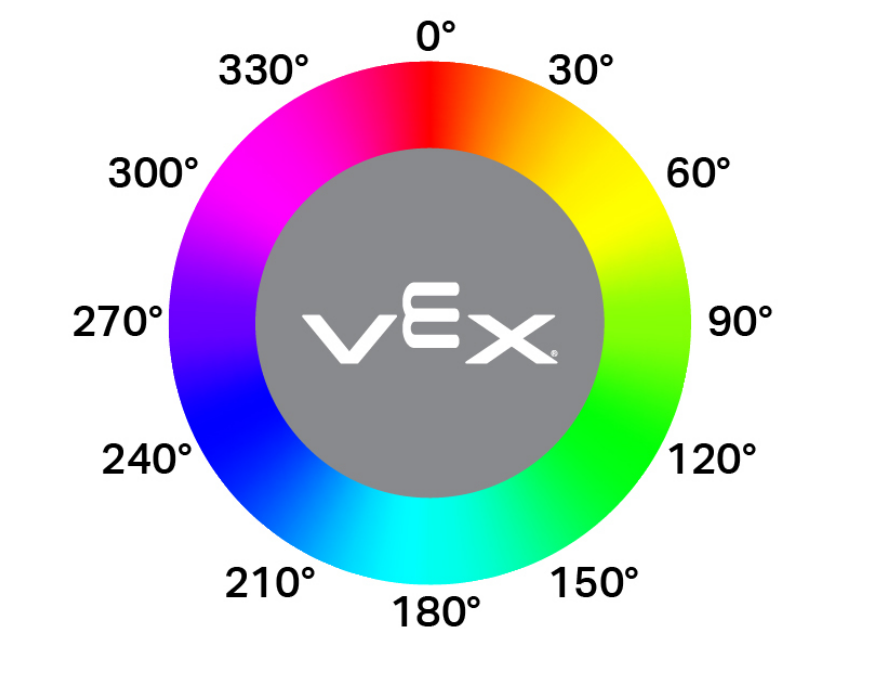
返回顏色感測器檢測到的色調。
色相是用色輪上的數字來描述顏色的一種方法。
double hue();
此函數不接受任何參數。
Return Values表示顏色感測器偵測到的色調值的雙精確度浮點數,範圍為 0 — 359.00。
Examples// Set a variable, hue, to the value of the hue detected
// by the Color Sensor.
double hue = Color1.hue();