
Αισθητήρας χρώματος#
Εισαγωγή#
Η κλάση colorsensor χρησιμοποιείται για την πρόσβαση σε δεδομένα από τον Color Sensor. Χρησιμοποιεί ανακλώμενο φως για την ανίχνευση αντικειμένων, την αναγνώριση χρωμάτων και τη μέτρηση της φωτεινότητας και της απόχρωσης.
Κατασκευαστής κλάσης#
colorsensor Color1 = colorsensor(index);
Καταστροφέας κλάσης#
Καταστρέφει το αντικείμενο colorsensor και απελευθερώνει τους σχετικούς πόρους.
virtual ~colorsensor();
Παράμετροι#
Παράμετρος |
Τύπος |
Περιγραφή |
|---|---|---|
|
|
Η Έξυπνη Θύρα στην οποία είναι συνδεδεμένος ο Αισθητήρας Χρώματος, γράφεται ως |
Παραδείγματα#
// Create an colorsensor instance in Port 1
colorsensor Color1 = colorsensor(PORT1);
Συναρτήσεις Μελών#
Η κλάση colorsensor περιλαμβάνει τις ακόλουθες συναρτήσεις-μέλη:
setLight– Ενεργοποιεί, απενεργοποιεί ή ρυθμίζει τη λυχνία LED του αισθητήρα χρώματος σε ένα καθορισμένο επίπεδο φωτεινότητας.isNearObject– Επιστρέφει εάν ένα αντικείμενο βρίσκεται κοντά στον Αισθητήρα Χρώματος.detects– Επιστρέφει εάν ένα συγκεκριμένο χρώμα ανιχνεύεται ή όχι από τον Αισθητήρα Χρώματος.colorname– Επιστρέφει το όνομα του χρώματος που ανιχνεύεται από τον Αισθητήρα Χρώματος.brightness– Επιστρέφει την ανιχνευμένη φωτεινότητα ενός αντικειμένου.hue– Επιστρέφει την ανιχνευμένη τιμή απόχρωσης.
Πριν από την κλήση οποιασδήποτε συνάρτησης μέλους colorsensor , πρέπει να δημιουργηθεί μια παρουσία colorsensor , όπως φαίνεται παρακάτω:
/* This constructor is required when using VS Code.
Color Sensor configuration is generated automatically
in VEXcode using the Device Menu. Replace the values
as needed. */

// Create an colorsensor instance in Port 1
colorsensor Color1 = colorsensor(PORT1);
setLight#
Ρυθμίζει την ισχύ φωτός της λυχνίας LED του αισθητήρα χρώματος. Το φως μπορεί να βοηθήσει τον αισθητήρα χρώματος να ανιχνεύει αντικείμενα και χρώματα με μεγαλύτερη σαφήνεια.
Εάν το φως του αισθητήρα χρώματος είναι σβηστό, η ρύθμιση της ισχύος φωτός πάνω από 0% θα ανάψει το φως.
Εάν το φως του αισθητήρα χρώματος είναι αναμμένο, η ρύθμιση της ισχύος φωτός στο 0% θα το σβήσει.
Ένα υψηλότερο ποσοστό κάνει το φως πιο φωτεινό. Ένα χαμηλότερο ποσοστό κάνει το φως πιο αμυδρό.
Available Functions1 — Ενεργοποιεί ή απενεργοποιεί τη λυχνία LED χρησιμοποιώντας την εντολή
ledState.void setLight( ledState state );
Parameters2 — Ανάβει το led σε μια συγκεκριμένη ένταση.
void setLight(
  int32_t      intensity,
  percentUnits units = percent );
Παράμετρος |
Τύπος |
Περιγραφή |
|---|---|---|
|
|
Ενεργοποιεί ή απενεργοποιεί τη λυχνία LED. |
|
|
Το επίπεδο ισχύος για να ρυθμίσετε το φως από 0 έως 100. |
|
|
Η μονάδα που αντιπροσωπεύει την ένταση του φωτός: |
Αυτή η συνάρτηση δεν επιστρέφει τιμή.
Examples// Set the light power to 50 percent.
Color1.setLight(50, percent);
isNearObject#
Επιστρέφει εάν ο αισθητήρας χρώματος ανιχνεύσει ένα κοντινό αντικείμενο.
Available Functionsbool isNearObject();
Αυτή η συνάρτηση δεν δέχεται καμία παράμετρο.
Return ValuesΑυτή η συνάρτηση επιστρέφει μια λογική τιμή που υποδεικνύει εάν ανιχνεύεται ένα κοντινό αντικείμενο:
true– Ο αισθητήρας χρώματος ανιχνεύει ένα αντικείμενο.false– Ο αισθητήρας χρώματος δεν ανιχνεύει κάποιο αντικείμενο.
// If an object is detected by the Color Sensor, print
// "near object".
if (Color1.isNearObject()){
  Brain.Screen.print("near object");
}
detects#
Επιστρέφει εάν ο αισθητήρας χρώματος ανιχνεύει ένα συγκεκριμένο χρώμα.
Available Functions1 — Detects a
colorType.bool detects( colorType color );
Parameters2 — Detects a
vex::color.bool detects( vex::color color );
Παράμετροι |
Τύπος |
Περιγραφή |
|---|---|---|
|
|
Ένα έγκυρο χρώμα:
|
|
|
Ένα έγκυρο προσαρμοσμένο χρώμα ή ένα από τα προκαθορισμένα χρώματα που αναφέρονται παραπάνω. |
true– Ο αισθητήρας χρώματος ανιχνεύει το χρώμα.false– Ο αισθητήρας χρώματος δεν ανιχνεύει το χρώμα.
int main() {
  // Initializing Robot Configuration. DO NOT REMOVE!
  vexcodeInit();

  // Drive until a red object is seen
  Drivetrain.drive(forward);
  while (true) {
    if (Color1.detects(red)) {
      Drivetrain.stop();
      break;
    }
    wait(0.5, seconds);
  }
}
colorname#
Επιστρέφει το πλησιέστερο αντίστοιχο χρώμα που εντοπίστηκε.
Available FunctionscolorType colorname();
Αυτή η συνάρτηση δεν δέχεται καμία παράμετρο.
Return ValuesΌταν εκτυπώνεται απευθείας, εμφανίζει την αριθμητική τιμή που σχετίζεται με αυτό το χρώμα:
Χρώμα |
Αριθμητική τιμή |
|---|---|
|
0 |
|
1 |
|
2 |
|
3 |
|
4 |
|
5 |
|
6 |
|
7 |
|
8 |
|
9 |
|
10 |
|
11 |
|
12 |
|
13 |
|
14 |
|
15 |
|
16 |
|
17 |
Η συνάρτηση
convertColorToStringδημιουργείται αυτόματα από το VEXcode όταν διαμορφώνεται ένας Αισθητήρας Χρώματος στο παράθυρο Συσκευές. Είναι διαθέσιμη μόνο μέσα σε έργα VEXcode IQ και δεν θα λειτουργήσει σε άλλα περιβάλλοντα.Όταν χρησιμοποιείται
colornameεκτός του VEXcode, οι συγκρίσεις θα πρέπει να γίνονται απευθείας με μια τιμήcolorType— οποιοδήποτε χρώμα που ξεκινά μεcolorType::(για παράδειγμα,colorType::greenήcolorType::red).
int main() {
  // Initializing Robot Configuration. DO NOT REMOVE!
  vexcodeInit();

  // Continuously check the detected color
  while (true) {

    // Compare the color name with "red"
    if (convertColorToString(Color1.colorname()) == "red") {
      Brain.Screen.print("Red object!");
    } else {
      Brain.Screen.print("Not red");
    }

    wait(0.5, seconds);
    Brain.Screen.clearScreen();
    Brain.Screen.setCursor(1, 1);
  }
}
int main() {
  // Initializing Robot Configuration. DO NOT REMOVE!
  vexcodeInit();

  // Continuously check the detected color
  while (true) {

    // Compare the color name with the colorType
    if (Color1.colorname() == colorType::red) {
      Brain.Screen.print("Red object!");
    } else {
      Brain.Screen.print("Not red");
    }

    wait(0.5, seconds);
    Brain.Screen.clearScreen();
    Brain.Screen.setCursor(1, 1);
  }
}
brightness#
Επιστρέφει την ποσότητα φωτός που ανακλάται από το αντικείμενο.
Ένα υψηλότερο ποσοστό σημαίνει ότι περισσότερο φως ανακλάται πίσω στον Αισθητήρα Χρώματος. Ένα χαμηλότερο ποσοστό σημαίνει ότι λιγότερο φως ανακλάται πίσω.
Available Functionsdouble brightness(bool bRaw = false);
Παράμετρος |
Τύπος |
Περιγραφή |
|---|---|---|
|
|
Μια λογική τιμή για την ανάγνωση ακατέργαστων δεδομένων φωτεινότητας αντί για ποσοστό. Η προεπιλογή είναι |
Ένα διπλό που αντιπροσωπεύει τη φωτεινότητα που ανιχνεύεται από τον αισθητήρα χρώματος στο εύρος 0 - 100% ή ένα διπλό που αντιπροσωπεύει τα ακατέργαστα δεδομένα που ανιχνεύονται από τον αισθητήρα.
Examples// Set a variable, brightness, to the value of the brightness
// detected by the Color Sensor
double brightness = Color1.brightness();
// Print the brightness detected by the Color Sensor to the
// Brain's screen
Brain.Screen.print(brightness);
hue#
Επιστρέφει την απόχρωση που ανιχνεύεται από τον αισθητήρα χρώματος.
Η απόχρωση είναι ένας τρόπος περιγραφής χρώματος χρησιμοποιώντας αριθμούς γύρω από έναν χρωματικό κύκλο.
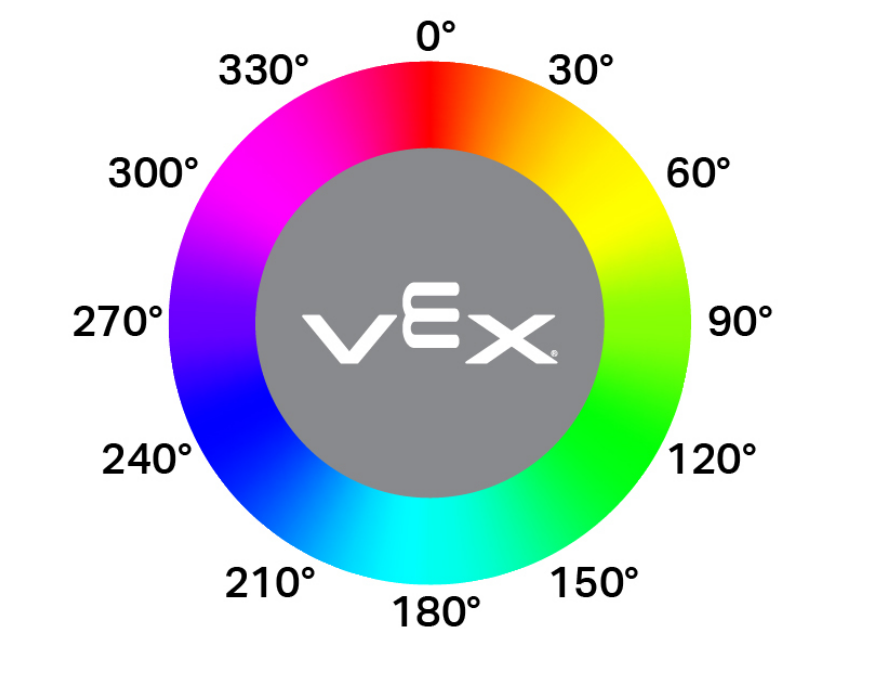
double hue();
Αυτή η συνάρτηση δεν δέχεται καμία παράμετρο.
Return ValuesΈνα διπλό που αντιπροσωπεύει την τιμή της απόχρωσης που ανιχνεύεται από τον Αισθητήρα Χρώματος στην περιοχή 0 — 359,00.
Examples// Set a variable, hue, to the value of the hue detected
// by the Color Sensor.
double hue = Color1.hue();