
Οπτικός αισθητήρας#
Εισαγωγή#
Η οπτική κλάση optical χρησιμοποιείται για την πρόσβαση σε δεδομένα από τον Οπτικό Αισθητήρα. Χρησιμοποιεί ανακλώμενο φως για την ανίχνευση αντικειμένων, την αναγνώριση χρωμάτων και τη μέτρηση της φωτεινότητας και της απόχρωσης.
Κατασκευαστής κλάσης#
optical Optical = optical(index);
Καταστροφέας κλάσης#
Καταστρέφει το οπτικό αντικείμενο optical και απελευθερώνει τους σχετικούς πόρους.
virtual ~optical();
Παράμετροι#
Παράμετρος |
Τύπος |
Περιγραφή |
|---|---|---|
|
|
Η Έξυπνη Θύρα στην οποία είναι συνδεδεμένος ο Οπτικός Αισθητήρας, γράφεται ως |
Παραδείγματα#
// Create an optical instance in Port 1
optical Optical1 = optical(PORT1);
Συναρτήσεις Μελών#
Η κλάση optical περιλαμβάνει τις ακόλουθες συναρτήσεις-μέλη:
setLight— Ενεργοποιεί ή απενεργοποιεί τη λυχνία LED του οπτικού αισθητήρα.setLightPower— Ορίζει το επίπεδο ισχύος φωτός του οπτικού αισθητήρα.isNearObject— Επιστρέφει εάν ο οπτικός αισθητήρας ανιχνεύει ένα αντικείμενο εντός εμβέλειας.colorname— Returns the color detected by the Optical Sensor.brightness— Επιστρέφει την ποσότητα φωτός που ανακλάται από το αντικείμενο.hue— Επιστρέφει την απόχρωση που ανιχνεύεται από τον οπτικό αισθητήρα.objectDetected— Καταγράφει μια συνάρτηση που θα καλείται όταν ο οπτικός αισθητήρας ανιχνεύει ένα αντικείμενο.objectLost— Καταγράφει μια συνάρτηση που θα κληθεί όταν ο οπτικός αισθητήρας χάσει ένα αντικείμενο.
Before calling any optical member functions, an optical instance must be created, as shown below:
/* This constructor is required when using VS Code.
Optical Sensor configuration is generated automatically
in VEXcode using the Device Menu. Replace the values
as needed. */

// Create an optical object in Port 1
optical Optical1 = optical(PORT1);
setLight#
Ενεργοποιεί ή απενεργοποιεί τη λυχνία LED του οπτικού αισθητήρα. Το φως μπορεί να βοηθήσει τον οπτικό αισθητήρα να ανιχνεύει αντικείμενα και χρώματα με μεγαλύτερη σαφήνεια.
Available Functionsvoid setLight(ledState state);
Παράμετρος |
Τύπος |
Περιγραφή |
|---|---|---|
|
|
Ενεργοποιεί ή απενεργοποιεί τη λυχνία LED. |
Αυτή η συνάρτηση δεν επιστρέφει τιμή.
Examples// Turn on LED with previous intensity.
Optical.setLight(ledState::on);
setLightPower#
Ορίζει πόσο έντονο είναι το φως του οπτικού αισθητήρα. Το φως μπορεί να βοηθήσει τον οπτικό αισθητήρα να ανιχνεύει αντικείμενα και χρώματα με μεγαλύτερη καθαρότητα.
Ένα υψηλότερο ποσοστό κάνει το φως πιο φωτεινό. Ένα χαμηλότερο ποσοστό κάνει το φως πιο αμυδρό.
Εάν το φως του οπτικού αισθητήρα είναι σβηστό, η ρύθμιση της ισχύος φωτός πάνω από 0% θα ανάψει το φως.
Εάν η λυχνία του οπτικού αισθητήρα είναι αναμμένη, η ρύθμιση της ισχύος του φωτός στο 0% θα το σβήσει.
Available Functionsvoid setLightPower(
int32_t intensity,
percentUnits units = percent );
Παράμετρος |
Τύπος |
Περιγραφή |
|---|---|---|
|
|
Το επίπεδο ισχύος για να ρυθμίσετε το φως από 0 έως 100. |
|
|
Η μονάδα που αντιπροσωπεύει την ένταση του φωτός: |
Αυτή η συνάρτηση δεν επιστρέφει τιμή.
Examples// Set the light power to 50 percent.
Optical.setLightPower(50, percent);
isNearObject#
Επιστρέφει εάν ο οπτικός αισθητήρας ανιχνεύει ένα αντικείμενο εντός εμβέλειας.
Available Functionsbool isNearObject();
Αυτή η συνάρτηση δεν δέχεται καμία παράμετρο.
Return ValuesΑυτή η συνάρτηση επιστρέφει μια λογική τιμή που υποδεικνύει εάν ανιχνεύεται ένα κοντινό αντικείμενο:
true— Εντοπίστηκε ένα αντικείμενο κοντά.false— Δεν ανιχνεύεται αντικείμενο.
// If an object is detected by the Optical Sensor, print
// "near object".
if (Optical.isNearObject()){
  Brain.Screen.print("near object");
}
colorname#
Επιστρέφει το χρώμα που ανιχνεύεται από τον οπτικό αισθητήρα, με βάση την τιμή απόχρωσης που ανιχνεύεται.
Available Functionsvex::colorType colorname();
Αυτή η συνάρτηση δεν δέχεται καμία παράμετρο.
Return ValuesΤο χρώμα που ανιχνεύεται από τον οπτικό αισθητήρα ως παράδειγμα της κλάσης χρώματος.
Πιθανά χρώματα είναι:
blue– Τιμή απόχρωσης μεταξύ 196° και 229°blue_green– Τιμή απόχρωσης μεταξύ 140° και 195°blue_violet– Τιμή απόχρωσης μεταξύ 230° και 239°green– Τιμή απόχρωσης μεταξύ 84° και 139°orange– Τιμή απόχρωσης μεταξύ 21° και 30°red– Τιμή απόχρωσης μεταξύ 350° και 14°red_orange– Τιμή απόχρωσης μεταξύ 15° και 20°red_violet– Τιμή απόχρωσης μεταξύ 281° και 350°violet– Τιμή απόχρωσης μεταξύ 240° και 280°yellow– Τιμή απόχρωσης μεταξύ 54° και 74°yellow_green– Τιμή απόχρωσης μεταξύ 75° και 83°yellow_orange– Τιμή απόχρωσης μεταξύ 31° και 53°
// Set a variable, detectColor, to the color detected by the
// Optical Sensor
colorType detectColor = Optical.colorname();

// Print the color detected by the Optical Sensor
// to the Brain's screen
Brain.Screen.print(detectColor);
brightness#
Επιστρέφει την ποσότητα φωτός που ανακλάται πίσω στον οπτικό αισθητήρα.
Ένα υψηλότερο ποσοστό σημαίνει ότι περισσότερο φως ανακλάται πίσω στον οπτικό αισθητήρα. Ένα χαμηλότερο ποσοστό σημαίνει ότι λιγότερο φως ανακλάται πίσω.
Available Functionsdouble brightness(bool bRaw = false);
Παράμετρος |
Τύπος |
Περιγραφή |
|---|---|---|
|
|
Μια λογική τιμή για την ανάγνωση ακατέργαστων δεδομένων φωτεινότητας αντί για ποσοστό. Η προεπιλογή είναι |
Ένα διπλό που αντιπροσωπεύει τη φωτεινότητα που ανιχνεύεται από τον οπτικό αισθητήρα στην περιοχή 0 - 100% ή ένα διπλό που αντιπροσωπεύει τα ακατέργαστα δεδομένα που ανιχνεύονται από τον αισθητήρα.
Examples// Set a variable, brightness, to the value of the brightness
// detected by the Optical Sensor
double brightness = Optical.brightness();
// Print the brightness detected by the Optical Sensor to the
// Brain's screen
Brain.Screen.print(brightness);
hue#
Επιστρέφει την απόχρωση που ανιχνεύεται από τον οπτικό αισθητήρα.
Η απόχρωση είναι ένας τρόπος περιγραφής χρώματος χρησιμοποιώντας αριθμούς γύρω από έναν χρωματικό κύκλο.
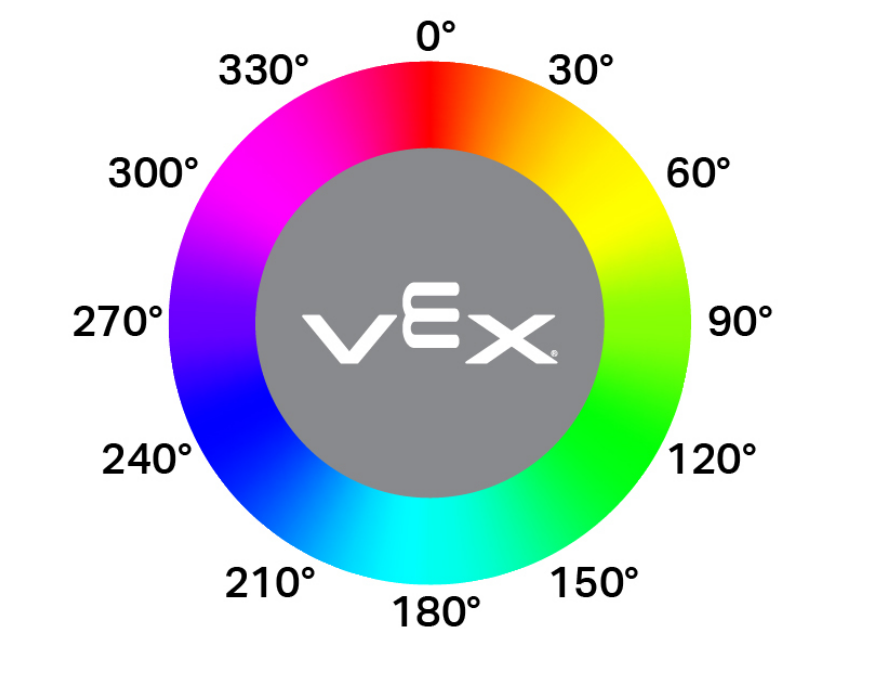
double hue();
Αυτή η συνάρτηση δεν δέχεται καμία παράμετρο.
Return ValuesΈνα διπλό που αντιπροσωπεύει την τιμή της απόχρωσης που ανιχνεύεται από τον οπτικό αισθητήρα στην περιοχή 0 — 359,00.
Examples// Set a variable, hue, to the value of the hue detected
// by the Optical Sensor.
double hue = Optical.hue();
objectDetected#
Καταγράφει μια συνάρτηση επανάκλησης για την ανίχνευση ενός αντικειμένου.
Available Functionsvoid objectDetected(void (* callback)(void));
Παράμετρος |
Τύπος |
Περιγραφή |
|---|---|---|
|
|
Μια προηγουμένως καθορισμένη συνάρτηση που εκτελείται όταν ο Οπτικός Αισθητήρας ανιχνεύει ένα νέο αντικείμενο. |
Αυτή η συνάρτηση δεν επιστρέφει τιμή.
ExamplesΟρίστε τη συνάρτηση επανάκλησης (εκτός από
int main())// Called when the Optical Sensor detects an object void detected() { // The Brain will print that the Optical Sensor detected an // object to the Brain's screen. Brain.Screen.print("object detected"); }Καταχωρίστε την επανάκληση μέσα στο
int main()/* vexcodeInit() is only required when using VEXcode. Remove vexcodeInit() if compiling in VS Code. */ int main() { // Run when the Optical Sensor detects an object. Optical.objectDetected(detected); }
objectLost#
Καταχωρεί μια συνάρτηση επανάκλησης για την περίπτωση απώλειας ενός αντικειμένου.
Available Functionsvoid objectLost(void (* callback)(void));
Παράμετρος |
Τύπος |
Περιγραφή |
|---|---|---|
|
|
Μια προηγουμένως καθορισμένη συνάρτηση που εκτελείται όταν ο Οπτικός Αισθητήρας χάνει ένα ανιχνευμένο αντικείμενο. |
Αυτή η συνάρτηση δεν επιστρέφει τιμή.
ExamplesΟρίστε τη συνάρτηση επανάκλησης (εκτός από
int main())// Called when the Optical Sensor loses an object void lost() { // The Brain will print that the Optical Sensor lost an // object to the Brain's screen. Brain.Screen.print("object lost"); }Καταχωρίστε την επανάκληση μέσα στο
int main()/* vexcodeInit() is only required when using VEXcode. Remove vexcodeInit() if compiling in VS Code. */ int main() { // Run lost when the Optical Sensor loses an object. Optical.objectLost(lost); }