
광학 센서#
소개#
optical 클래스는 광학 센서에서 데이터를 가져오는 데 사용됩니다. 이 센서는 반사광을 이용하여 물체를 감지하고, 색상을 식별하며, 밝기와 색조를 측정합니다.
클래스 생성자#
optical Optical = optical(index);
클래스 소멸자#
optical 객체를 파괴하고 관련 리소스를 해제합니다.
virtual ~optical();
매개변수#
매개변수 |
유형 |
설명 |
|---|---|---|
|
|
광학 센서가 연결된 스마트 포트는 |
예시#
// Create an optical instance in Port 1
optical Optical1 = optical(PORT1);
회원 기능#
optical 클래스에는 다음과 같은 멤버 함수가 포함됩니다.
setLight— 광학 센서의 LED를 켜거나 끕니다.setLightPower— 광학 센서의 광 전력 레벨을 설정합니다.isNearObject— 광학 센서가 범위 내에 있는 물체를 감지했는지 여부를 반환합니다.colorname— Returns the color detected by the Optical Sensor.brightness— 물체에서 반사된 빛의 양을 반환합니다.hue— 광학 센서에 의해 감지된 색조를 반환합니다.objectDetected— 광학 센서가 객체를 감지할 때 호출될 함수를 등록합니다.objectLost— 광학 센서가 객체를 잃어버렸을 때 호출될 함수를 등록합니다.
optical 함수를 호출하기 전에 아래와 같이 optical 생성해야 합니다.
/* This constructor is required when using VS Code.
Optical Sensor configuration is generated automatically
in VEXcode using the Device Menu. Replace the values
as needed. */

// Create an optical object in Port 1
optical Optical1 = optical(PORT1);
setLight#
광학 센서의 LED를 켜거나 끕니다. LED 조명은 광학 센서가 물체와 색상을 더욱 선명하게 감지하는 데 도움을 줍니다.
Available Functionsvoid setLight(ledState state);
매개변수 |
유형 |
설명 |
|---|---|---|
|
|
LED를 켜거나 끕니다. |
이 함수는 값을 반환하지 않습니다.
Examples// Turn on LED with previous intensity.
Optical.setLight(ledState::on);
setLightPower#
광학 센서의 빛 밝기를 조절합니다. 빛은 광학 센서가 물체와 색상을 더욱 선명하게 감지하는 데 도움을 줍니다.
백분율이 높을수록 빛이 더 밝아지고, 백분율이 낮을수록 빛이 더 어두워집니다.
광학 센서의 표시등이 꺼져 있는 경우, 조명 전력을 0% 이상으로 설정하면 표시등이 켜집니다.
광학 센서의 표시등이 켜져 있는 경우, 조명 전력을 0%로 설정하면 표시등이 꺼집니다.
Available Functionsvoid setLightPower(
int32_t intensity,
percentUnits units = percent );
매개변수 |
유형 |
설명 |
|---|---|---|
|
|
조명의 밝기를 0~100 사이의 값으로 설정할 수 있는 전력 레벨입니다. |
|
|
빛의 강도를 나타내는 단위: |
이 함수는 값을 반환하지 않습니다.
Examples// Set the light power to 50 percent.
Optical.setLightPower(50, percent);
isNearObject#
광학 센서가 범위 내에서 물체를 감지했는지 여부를 반환합니다.
Available Functionsbool isNearObject();
이 함수는 매개변수를 받지 않습니다.
Return Values이 함수는 근처에 물체가 감지되었는지 여부를 나타내는 부울 값을 반환합니다.
true— 근처에 물체가 감지되었습니다.false— 객체가 감지되지 않았습니다.
// If an object is detected by the Optical Sensor, print
// "near object".
if (Optical.isNearObject()){
  Brain.Screen.print("near object");
}
colorname#
광학 센서가 감지한 색조 값을 기반으로 해당 색상을 반환합니다.
Available Functionsvex::colorType colorname();
이 함수는 매개변수를 받지 않습니다.
Return Values광학 센서가 color class의 인스턴스로 감지한 색상입니다.
가능한 색상은 다음과 같습니다.
blue– 색조 값 196°~229°blue_green– 색조 값 140°~195°blue_violet– 색조 값 230°~239°green– 색조 값 84°~139°orange– 색조 값 21°~30°red– 색조 값 350°~14°red_orange– 색조 값 15°~20°red_violet– 색조 값 281°~350°violet– 색조 값 240°~280°yellow– 색조 값 54°~74°yellow_green– 색조 값 75°~83°yellow_orange– 색조 값 31°~53°
// Set a variable, detectColor, to the color detected by the
// Optical Sensor
colorType detectColor = Optical.colorname();

// Print the color detected by the Optical Sensor
// to the Brain's screen
Brain.Screen.print(detectColor);
brightness#
광학 센서로 반사되는 빛의 양을 반환합니다.
반사율이 높을수록 광학 센서로 반사되는 빛의 양이 많아지고, 반사율이 낮을수록 반사되는 빛의 양이 적어집니다.
Available Functionsdouble brightness(bool bRaw = false);
매개변수 |
유형 |
설명 |
|---|---|---|
|
|
백분율 대신 원시 밝기 데이터를 읽을지 여부를 나타내는 부울 값입니다. 기본값은 |
광학 센서가 감지한 밝기를 0~100% 범위로 나타내는 double형 값 또는 센서가 감지한 원시 데이터를 나타내는 double형 값입니다.
Examples// Set a variable, brightness, to the value of the brightness
// detected by the Optical Sensor
double brightness = Optical.brightness();
// Print the brightness detected by the Optical Sensor to the
// Brain's screen
Brain.Screen.print(brightness);
hue#
광학 센서가 감지한 색조를 반환합니다.
색조는 색상환을 중심으로 숫자를 사용하여 색을 설명하는 방법입니다.
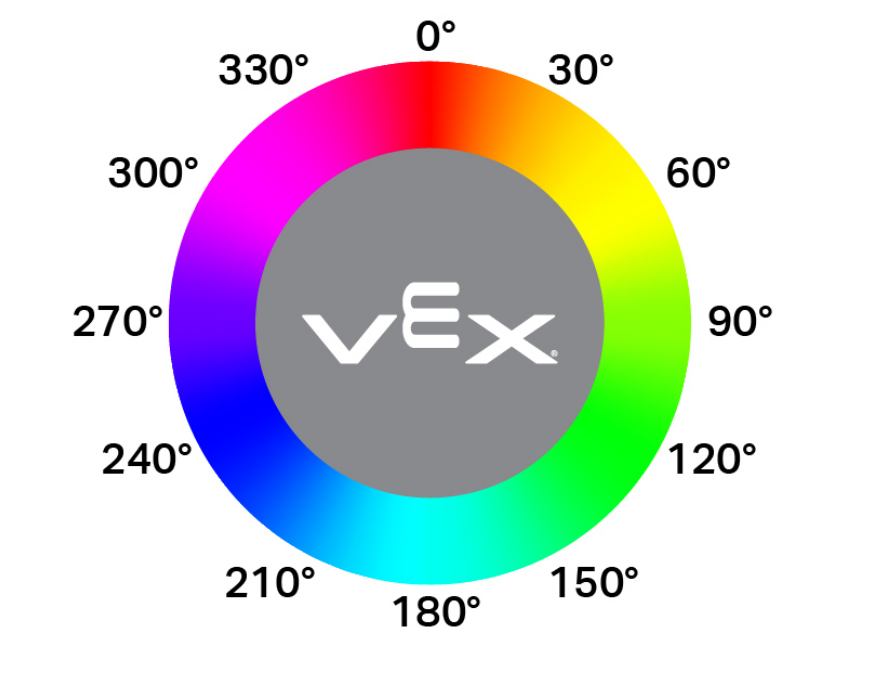
double hue();
이 함수는 매개변수를 받지 않습니다.
Return Values광학 센서가 감지한 색조 값을 나타내는 0~359.00 범위의 실수 값입니다.
Examples// Set a variable, hue, to the value of the hue detected
// by the Optical Sensor.
double hue = Optical.hue();
objectDetected#
객체가 감지되었을 때 호출될 콜백 함수를 등록합니다.
Available Functionsvoid objectDetected(void (* callback)(void));
매개변수 |
유형 |
설명 |
|---|---|---|
|
|
광학 센서가 새 객체를 감지할 때 실행되는 이전에 정의된 함수입니다. |
이 함수는 값을 반환하지 않습니다.
Examples콜백 함수를 정의하십시오(
int main()외부).// Called when the Optical Sensor detects an object void detected() { // The Brain will print that the Optical Sensor detected an // object to the Brain's screen. Brain.Screen.print("object detected"); }
int main()내부에 콜백을 등록합니다./* vexcodeInit() is only required when using VEXcode. Remove vexcodeInit() if compiling in VS Code. */ int main() { // Run when the Optical Sensor detects an object. Optical.objectDetected(detected); }
objectLost#
객체가 손실되었을 때 호출될 콜백 함수를 등록합니다.
Available Functionsvoid objectLost(void (* callback)(void));
매개변수 |
유형 |
설명 |
|---|---|---|
|
|
광학 센서가 감지된 객체를 놓쳤을 때 실행되는 이전에 정의된 함수. |
이 함수는 값을 반환하지 않습니다.
Examples콜백 함수를 정의하십시오(
int main()외부).// Called when the Optical Sensor loses an object void lost() { // The Brain will print that the Optical Sensor lost an // object to the Brain's screen. Brain.Screen.print("object lost"); }
int main()내부에 콜백을 등록합니다./* vexcodeInit() is only required when using VEXcode. Remove vexcodeInit() if compiling in VS Code. */ int main() { // Run lost when the Optical Sensor loses an object. Optical.objectLost(lost); }