
เซ็นเซอร์แสง#
การแนะนำ#
คลาสออปติคอล optical ใช้สำหรับเข้าถึงข้อมูลจาก เซ็นเซอร์ออปติคอล โดยใช้แสงสะท้อนในการตรวจจับวัตถุ ระบุสี และวัดความสว่างและเฉดสี
คอนสตรัคเตอร์คลาส#
optical Optical = optical(index);
ตัวทำลายคลาส#
ทำลายวัตถุ optical และปล่อยทรัพยากรที่เกี่ยวข้อง
virtual ~optical();
พารามิเตอร์#
พารามิเตอร์ |
พิมพ์ |
คำอธิบาย |
|---|---|---|
|
|
พอร์ตอัจฉริยะที่เชื่อมต่อกับเซ็นเซอร์แสง จะเขียนในรูปแบบ |
ตัวอย่าง#
// Create an optical instance in Port 1
optical Optical1 = optical(PORT1);
ฟังก์ชันสมาชิก#
คลาสออปติคอล optical ประกอบด้วยฟังก์ชันสมาชิกต่อไปนี้:
setLight— เปิดหรือปิดไฟ LED ของเซ็นเซอร์แสงsetLightPower— ตั้งค่าระดับพลังงานแสงของเซ็นเซอร์แสงisNearObject— ส่งคืนว่าเซ็นเซอร์แสงตรวจพบวัตถุภายในระยะหรือไม่colorname— Returns the color detected by the Optical Sensor.brightness— ส่งคืนปริมาณแสงที่สะท้อนจากวัตถุhue— ส่งคืนค่าสีที่ตรวจพบโดยเซ็นเซอร์แสงobjectDetected— ลงทะเบียนฟังก์ชันที่จะถูกเรียกเมื่อเซ็นเซอร์แสงตรวจพบวัตถุobjectLost— ลงทะเบียนฟังก์ชันที่จะถูกเรียกเมื่อเซ็นเซอร์แสงสูญเสียวัตถุ
ก่อนเรียกใช้ฟังก์ชันสมาชิก optical ใดๆ จะต้องสร้างอินสแตนซ์ optical ก่อน ดังแสดงด้านล่าง:
/* This constructor is required when using VS Code.
Optical Sensor configuration is generated automatically
in VEXcode using the Device Menu. Replace the values
as needed. */

// Create an optical object in Port 1
optical Optical1 = optical(PORT1);
setLight#
ตั้งค่าไฟ LED ของเซ็นเซอร์แสงให้เปิดหรือปิด แสงไฟจะช่วยให้เซ็นเซอร์แสงตรวจจับวัตถุและสีได้ชัดเจนยิ่งขึ้น
Available Functionsvoid setLight(ledState state);
พารามิเตอร์ |
พิมพ์ |
คำอธิบาย |
|---|---|---|
|
|
ตั้งค่าสถานะไฟ LED ว่าจะเปิดหรือปิด |
ฟังก์ชันนี้ไม่ส่งค่ากลับ
Examples// Turn on LED with previous intensity.
Optical.setLight(ledState::on);
setLightPower#
ตั้งค่าความสว่างของแสงจากเซ็นเซอร์แสง แสงจะช่วยให้เซ็นเซอร์แสงตรวจจับวัตถุและสีได้ชัดเจนยิ่งขึ้น
เปอร์เซ็นต์ที่สูงขึ้นจะทำให้แสงสว่างมากขึ้น เปอร์เซ็นต์ที่ต่ำลงจะทำให้แสงสว่างน้อยลง
หากไฟแสดงสถานะของเซ็นเซอร์แสงดับอยู่ การปรับกำลังไฟให้สูงกว่า 0% จะทำให้ไฟแสดงสถานะติดขึ้น
หากไฟแสดงสถานะของเซ็นเซอร์แสงติดอยู่ การตั้งค่ากำลังไฟเป็น 0% จะทำให้ไฟแสดงสถานะดับลง
Available Functionsvoid setLightPower(
int32_t intensity,
percentUnits units = percent );
พารามิเตอร์ |
พิมพ์ |
คำอธิบาย |
|---|---|---|
|
|
สามารถปรับระดับความสว่างได้ตั้งแต่ 0 – 100 |
|
|
The unit that represents the light intensity: |
ฟังก์ชันนี้ไม่ส่งค่ากลับ
Examples// Set the light power to 50 percent.
Optical.setLightPower(50, percent);
isNearObject#
ส่งคืนค่าว่าเซ็นเซอร์แสงตรวจจับวัตถุที่อยู่ในระยะได้หรือไม่
Available Functionsbool isNearObject();
ฟังก์ชันนี้ไม่รับพารามิเตอร์ใดๆ
Return Valuesฟังก์ชันนี้จะส่งคืนค่าบูลีนที่ระบุว่าตรวจพบวัตถุที่อยู่ใกล้เคียงหรือไม่:
true— ตรวจพบวัตถุอยู่ใกล้เคียงfalse— ไม่พบวัตถุ
// If an object is detected by the Optical Sensor, print
// "near object".
if (Optical.isNearObject()){
  Brain.Screen.print("near object");
}
colorname#
ส่งคืนสีที่ตรวจจับได้โดยเซ็นเซอร์แสง โดยอิงตามค่าเฉดสีที่ตรวจพบ
Available Functionsvex::colorType colorname();
ฟังก์ชันนี้ไม่รับพารามิเตอร์ใดๆ
Return Valuesสีที่ตรวจพบโดยเซ็นเซอร์แสงเป็นอินสแตนซ์ของ คลาสสี
สีที่เป็นไปได้ ได้แก่:
blue– ค่าสีระหว่าง 196° ถึง 229°blue_green– ค่าเฉดสีระหว่าง 140° ถึง 195°blue_violet– ค่าสีระหว่าง 230° ถึง 239°green– ค่าสีระหว่าง 84° ถึง 139°orange– ค่าสีระหว่าง 21° ถึง 30°red– ค่าสีระหว่าง 350° ถึง 14°red_orange– ค่าเฉดสีระหว่าง 15° ถึง 20°red_violet– ค่าสีระหว่าง 281° ถึง 350°violet– ค่าสีระหว่าง 240° ถึง 280°yellow– ค่าสีระหว่าง 54° ถึง 74°yellow_green– ค่าสีระหว่าง 75° ถึง 83°yellow_orange– ค่าเฉดสีระหว่าง 31° ถึง 53°
// Set a variable, detectColor, to the color detected by the
// Optical Sensor
colorType detectColor = Optical.colorname();

// Print the color detected by the Optical Sensor
// to the Brain's screen
Brain.Screen.print(detectColor);
brightness#
ส่งคืนค่าปริมาณแสงที่สะท้อนกลับไปยังเซ็นเซอร์แสง
เปอร์เซ็นต์ที่สูงขึ้นหมายความว่ามีแสงสะท้อนกลับไปยังเซ็นเซอร์แสงมากขึ้น เปอร์เซ็นต์ที่ต่ำลงหมายความว่ามีแสงสะท้อนกลับน้อยลง
Available Functionsdouble brightness(bool bRaw = false);
พารามิเตอร์ |
พิมพ์ |
คำอธิบาย |
|---|---|---|
|
|
ค่าบูลีนสำหรับอ่านข้อมูลความสว่างดิบแทนที่จะเป็นเปอร์เซ็นต์ ค่าเริ่มต้นคือ |
ค่าตัวเลขทศนิยมสองตำแหน่งที่แสดงค่าความสว่างที่ตรวจจับได้โดยเซ็นเซอร์แสงในช่วง 0 - 100% หรือค่าตัวเลขทศนิยมสองตำแหน่งที่แสดงข้อมูลดิบที่ตรวจจับได้โดยเซ็นเซอร์
Examples// Set a variable, brightness, to the value of the brightness
// detected by the Optical Sensor
double brightness = Optical.brightness();
// Print the brightness detected by the Optical Sensor to the
// Brain's screen
Brain.Screen.print(brightness);
hue#
ส่งคืนค่าสีที่ตรวจจับได้โดยเซ็นเซอร์แสง
เฉดสี คือวิธีการอธิบายสีโดยใช้ตัวเลขรอบวงล้อสี
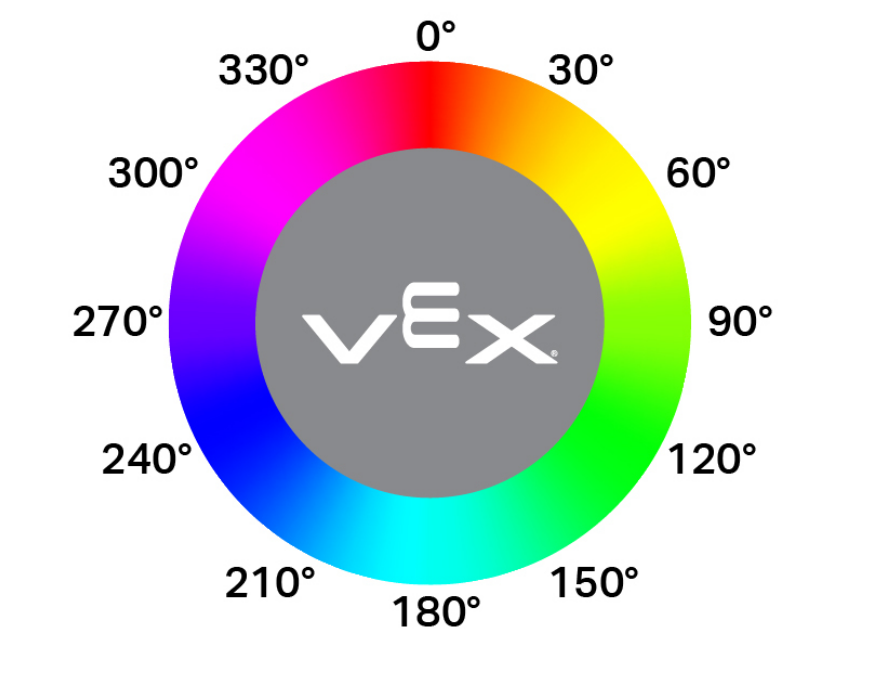
double hue();
ฟังก์ชันนี้ไม่รับพารามิเตอร์ใดๆ
Return Valuesค่าตัวเลขทศนิยมที่แสดงค่าเฉดสีที่ตรวจจับได้โดยเซ็นเซอร์แสงในช่วง 0 — 359.00
Examples// Set a variable, hue, to the value of the hue detected
// by the Optical Sensor.
double hue = Optical.hue();
objectDetected#
ลงทะเบียนฟังก์ชันเรียกกลับ (callback function) สำหรับกรณีที่ตรวจพบวัตถุ
Available Functionsvoid objectDetected(void (* callback)(void));
พารามิเตอร์ |
พิมพ์ |
คำอธิบาย |
|---|---|---|
|
|
A previously defined function that executes when the Optical Sensor detects a new object. |
ฟังก์ชันนี้ไม่ส่งค่ากลับ
Examplesกำหนดฟังก์ชันเรียกกลับ (นอก
int main())// Called when the Optical Sensor detects an object void detected() { // The Brain will print that the Optical Sensor detected an // object to the Brain's screen. Brain.Screen.print("object detected"); }ลงทะเบียนฟังก์ชันเรียกกลับภายใน
int main()/* vexcodeInit() is only required when using VEXcode. Remove vexcodeInit() if compiling in VS Code. */ int main() { // Run when the Optical Sensor detects an object. Optical.objectDetected(detected); }
objectLost#
ลงทะเบียนฟังก์ชันเรียกกลับสำหรับกรณีที่วัตถุสูญหาย
Available Functionsvoid objectLost(void (* callback)(void));
พารามิเตอร์ |
พิมพ์ |
คำอธิบาย |
|---|---|---|
|
|
A previously defined function that executes when the Optical Sensor loses a detected object. |
ฟังก์ชันนี้ไม่ส่งค่ากลับ
Examplesกำหนดฟังก์ชันเรียกกลับ (นอก
int main())// Called when the Optical Sensor loses an object void lost() { // The Brain will print that the Optical Sensor lost an // object to the Brain's screen. Brain.Screen.print("object lost"); }ลงทะเบียนฟังก์ชันเรียกกลับภายใน
int main()/* vexcodeInit() is only required when using VEXcode. Remove vexcodeInit() if compiling in VS Code. */ int main() { // Run lost when the Optical Sensor loses an object. Optical.objectLost(lost); }