
光センサー#
導入#
optical クラスは、光学センサーからのデータにアクセスするために使用されます。反射光を利用して物体を検出し、色を識別し、明るさと色相を測定します。
クラスコンストラクタ#
optical Optical = optical(index);
クラスデストラクタ#
optical オブジェクトを破壊し、関連するリソースを解放します。
virtual ~optical();
パラメータ#
パラメータ |
タイプ |
説明 |
|---|---|---|
|
|
光センサーが接続されているスマートポートは、 |
例#
// Create an optical instance in Port 1
optical Optical1 = optical(PORT1);
メンバーの機能#
optical クラスには、以下のメンバ関数が含まれます。
setLight— 光学センサーの LED をオンまたはオフにします。setLightPower— 光学センサーの光パワーレベルを設定します。isNearObject— 光学センサーが範囲内の物体を検出したかどうかを返します。colorname— Returns the color detected by the Optical Sensor.brightness— オブジェクトから反射された光の量を返します。hue— 光学センサーによって検出された色相を返します。objectDetected— 光学センサーが物体を検出したときに呼び出される関数を登録します。objectLost— 光学センサーが物体を失ったときに呼び出される関数を登録します。
optical メンバー関数を呼び出す前に、以下に示すようにインスタンスを作成する必要があります optical
/* This constructor is required when using VS Code.
Optical Sensor configuration is generated automatically
in VEXcode using the Device Menu. Replace the values
as needed. */

// Create an optical object in Port 1
optical Optical1 = optical(PORT1);
setLight#
光学センサーのLEDをオンまたはオフに設定します。このライトは、光学センサーが物体や色をより鮮明に検出するのに役立ちます。
Available Functionsvoid setLight(ledState state);
パラメータ |
タイプ |
説明 |
|---|---|---|
|
|
Sets the LED on or off. |
この関数は値を返しません。
Examples// Turn on LED with previous intensity.
Optical.setLight(ledState::on);
setLightPower#
光学センサーの光の明るさを設定します。この明るさによって、光学センサーは物体や色をより鮮明に検出できるようになります。
パーセンテージが高いほど光は明るくなり、パーセンテージが低いほど光は暗くなります。
光学センサーのライトが消灯している場合、ライトの出力を0%以上に設定するとライトが点灯します。
光学センサーのライトが点灯している場合、ライトの出力を0%に設定するとライトが消灯します。
Available Functionsvoid setLightPower(
int32_t intensity,
percentUnits units = percent );
パラメータ |
タイプ |
説明 |
|---|---|---|
|
|
ライトの明るさを0~100の範囲で設定します。 |
|
|
光の強度を表す単位: |
この関数は値を返しません。
Examples// Set the light power to 50 percent.
Optical.setLightPower(50, percent);
isNearObject#
光学センサーが範囲内の物体を検出したかどうかを返します。
Available Functionsbool isNearObject();
この関数は引数を受け付けません。
Return Valuesこの関数は、近くの物体が検出されたかどうかを示すブール値を返します。
true:近くに物体が検出されました。false— オブジェクトが検出されませんでした。
// If an object is detected by the Optical Sensor, print
// "near object".
if (Optical.isNearObject()){
  Brain.Screen.print("near object");
}
colorname#
光学センサーによって検出された色相値に基づいて、検出された色を返します。
Available Functionsvex::colorType colorname();
この関数は引数を受け付けません。
Return Values光学センサーによって検出された色は、color class のインスタンスです。
選択可能な色は以下のとおりです。
blue– 色相値が196°~229°blue_green– 色相値が140°~195°blue_violet– 色相値が230°~239°green– 色相値が84°~139°orange– 色相値が21°~30°red– 色相値が350°~14°red_orange– 色相値が15°~20°red_violet– 色相値が281°~350°violet– 色相値が240°~280°yellow– 色相値が54°~74°yellow_green– 色相値が75°~83°yellow_orange– 色相値が31°~53°
// Set a variable, detectColor, to the color detected by the
// Optical Sensor
colorType detectColor = Optical.colorname();

// Print the color detected by the Optical Sensor
// to the Brain's screen
Brain.Screen.print(detectColor);
brightness#
光学センサーに反射された光の量を返します。
パーセンテージが高いほど、光学センサーに反射される光の量が多くなります。パーセンテージが低いほど、反射される光の量が少なくなります。
Available Functionsdouble brightness(bool bRaw = false);
パラメータ |
タイプ |
説明 |
|---|---|---|
|
|
輝度データをパーセンテージではなく生データとして読み込むためのブール値。デフォルト値は |
光学センサーによって検出された明るさを表すdouble型の値(0~100%の範囲)、またはセンサーによって検出された生データを表すdouble型の値。
Examples// Set a variable, brightness, to the value of the brightness
// detected by the Optical Sensor
double brightness = Optical.brightness();
// Print the brightness detected by the Optical Sensor to the
// Brain's screen
Brain.Screen.print(brightness);
hue#
光学センサーによって検出された色相を返します。
色相とは、色相環上の数字を用いて色を表現する方法のことです。
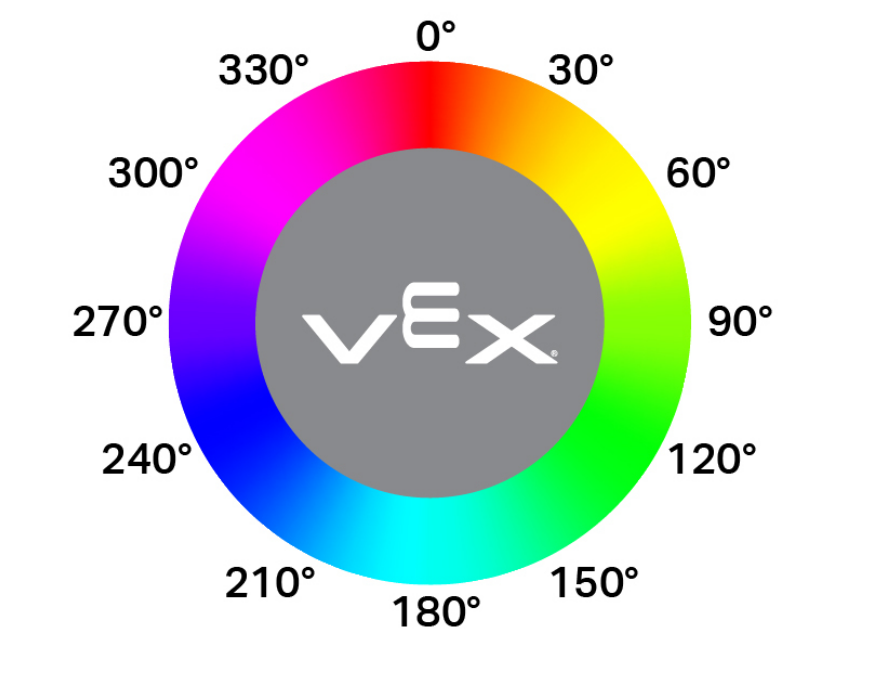
double hue();
この関数は引数を受け付けません。
Return Values光学センサーによって検出された色相の値を表すdouble型の値(範囲は0~359.00)。
Examples// Set a variable, hue, to the value of the hue detected
// by the Optical Sensor.
double hue = Optical.hue();
objectDetected#
オブジェクトが検出されたときに呼び出されるコールバック関数を登録します。
Available Functionsvoid objectDetected(void (* callback)(void));
パラメータ |
タイプ |
説明 |
|---|---|---|
|
|
光学センサーが新しい物体を検出したときに実行される、事前に定義された関数。 |
この関数は値を返しません。
Examplesコールバック関数を定義します(
int main()の外側)// Called when the Optical Sensor detects an object void detected() { // The Brain will print that the Optical Sensor detected an // object to the Brain's screen. Brain.Screen.print("object detected"); }コールバックを登録する
int main()/* vexcodeInit() is only required when using VEXcode. Remove vexcodeInit() if compiling in VS Code. */ int main() { // Run when the Optical Sensor detects an object. Optical.objectDetected(detected); }
objectLost#
オブジェクトが失われたときに呼び出されるコールバック関数を登録します。
Available Functionsvoid objectLost(void (* callback)(void));
パラメータ |
タイプ |
説明 |
|---|---|---|
|
|
光学センサーが検出対象物を失ったときに実行される、事前に定義された関数。 |
この関数は値を返しません。
Examplesコールバック関数を定義します(
int main()の外側)// Called when the Optical Sensor loses an object void lost() { // The Brain will print that the Optical Sensor lost an // object to the Brain's screen. Brain.Screen.print("object lost"); }コールバックを登録する
int main()/* vexcodeInit() is only required when using VEXcode. Remove vexcodeInit() if compiling in VS Code. */ int main() { // Run lost when the Optical Sensor loses an object. Optical.objectLost(lost); }