
Ojo#
Introducción#
El sensor ocular VEX GO puede detectar objetos y colores. También puede informar sobre la cantidad de luz que se refleja hacia el sensor y el valor de tono del color detectado.
El sensor ocular cuenta con una luz que se puede encender o apagar para ayudarle a ver objetos y colores con mayor claridad. Además, el sensor ocular puede utilizar un rango cercano o lejano para detectar objetos a diferentes distancias.
El sensor ocular se puede colocar en diferentes posiciones según la configuración. Por ejemplo, en la configuración Code Base 2.0 - Eye Forward, el sensor ocular apunta hacia adelante. En las configuraciones Code Base 2.0 - Eye Down, Code Base 2.0 - Eye + Electromagnet y Super Code Base 2.0, el sensor ocular apunta hacia abajo.
A continuación se muestra una lista de todos los bloques disponibles:
establecer luz del ojo — Enciende o apaga la luz del sensor ocular.
establecer rango de detección ocular — Establece hasta qué distancia el sensor ocular puede detectar un objeto.
establecer potencia de luz del ojo — Establece el nivel de potencia de luz del sensor ocular.
ojo encontró un objeto — Informa si el sensor ocular detecta o no un objeto dentro del alcance.
el ojo detecta color — Informa si el sensor ocular detecta un color específico.
brillo ocular — Informa el brillo detectado por el sensor ocular.
tono del ojo — Informa el tono detectado por el sensor ocular.
fijar la luz de los ojos#
El bloque set eye light activa o desactiva la luz del sensor ocular. Esta luz ayuda al sensor a detectar objetos y colores con mayor claridad.
establecer luz del sensor [encendido v]
Parámetros |
Descripción |
|---|---|
estado |
Estado de la luz del sensor ocular: encendida o apagada. |
Ejemplo
cuando inicie :: hat events
[Build Used: Code Base 2.0 - Eye Forward]
[Turn the light on and off.]
por siempre
establecer luz del sensor [encendido v]
esperar [2] segundos
establecer luz del sensor [apagado v]
esperar [2] segundos
establecer el rango de los ojos#
El bloque de pila establecer rango de detección ocular establece a qué distancia puede estar un objeto del sensor ocular antes de que pueda ser detectado.
Cada proyecto comienza con el sensor ocular configurado de forma predeterminada en el rango lejano.
establecer sensor a rango [cerca v]
Parámetros |
Descripción |
|---|---|
rango |
Rango de detección de objetos del sensor ocular. Cerca detecta objetos a una distancia de hasta 18 milímetros, mientras que lejos detecta objetos a una distancia de hasta 40 milímetros. |
Ejemplo
cuando inicie :: hat events
[Build Used: Code Base 2.0 - Eye Forward]
[Drive to an object with different ranges.]
establecer sensor a rango [lejos v]
conducir [adelante v]
esperar hasta <¿sensor encontró un objeto?>
conducir [marcha atrás v] por [100] [mm v] ▶
esperar [1] segundos
[Closer detection range.]
establecer sensor a rango [cerca v]
conducir [adelante v]
esperar hasta <¿sensor encontró un objeto?>
detener conducción
ajuste de la potencia de la luz ocular#
El bloque configurar potencia de la luz del sensor ocular ajusta el brillo de la luz del sensor ocular. Esta luz ayuda al sensor a detectar objetos y colores con mayor claridad.
Un porcentaje mayor hace que la luz sea más brillante. Un porcentaje menor hace que la luz sea más tenue.
Si la luz del sensor ocular está apagada, al configurar la potencia de la luz por encima del 0% se encenderá la luz.
Si la luz del sensor ocular está encendida, al ajustar la potencia de la luz al 0%, esta se apagará.
establecer potencia de luz del sensor a [50] %
Parámetros |
Descripción |
|---|---|
brillo |
El nivel de brillo al que se ajustará la luz del sensor ocular, de 0% a 100%. Utilice números enteros. |
Ejemplo
cuando inicie :: hat events
[Build Used: Code Base 2.0 - Eye Forward]
[Turn on the light at different brightnesses.]
establecer potencia de luz del sensor a [25] %
esperar [2] segundos
establecer potencia de luz del sensor a [50] %
esperar [2] segundos
establecer potencia de luz del sensor a [100] %
El ojo encontró un objeto#
El bloque booleano eye found an object informa si el sensor ocular detecta o no un objeto dentro del alcance.
Verdadero — El sensor ocular detecta un objeto.
Falso — El sensor ocular no detecta ningún objeto.
El rango de detección se puede cambiar usando el bloque establecer rango de ojo.
<¿sensor encontró un objeto?>
Parámetros |
Descripción |
|---|---|
Este bloque no tiene parámetros. |
Ejemplo
cuando inicie :: hat events
[Build Used: Code Base 2.0 - Eye Forward]
[Drive forward until an object is detected.]
conducir [adelante v]
esperar hasta <¿sensor encontró un objeto?>
detener conducción
El ojo detecta el color.#
El bloque booleano detección de color por el ojo informa si el sensor ocular detecta un color específico, basándose en el valor de tono detectado.
Verdadero — El sensor ocular detecta el color seleccionado.
Falso — El sensor ocular no detecta el color seleccionado.
El sensor ocular funciona mejor cuando el objeto está lo suficientemente cerca como para detectarlo y la iluminación es buena.
Para comprobar el valor de tono exacto detectado por el sensor ocular, utilice el bloque de informe eye hue.
<¿sensor detecta [rojo v]?>
Parámetros |
Descripción |
|---|---|
color |
Color que el sensor ocular debe detectar:
|
Ejemplo
cuando inicie :: hat events
[Build Used: Super Code Base 2.0]
[Drive forward until a Green Disk is detected.]
conducir [adelante v]
esperar [0.2] segundos
esperar hasta <¿sensor detecta [verde v]?>
detener conducción
brillo de los ojos#
El bloque de indicadores de brillo ocular informa sobre la cantidad de luz que se refleja de vuelta al sensor ocular, como un porcentaje del 0 % al 100 %.
Un porcentaje más alto significa que se refleja más luz hacia el sensor ocular. Un porcentaje más bajo significa que se refleja menos luz.
(brillo del sensor en %)
Parámetros |
Descripción |
|---|---|
Este bloque no tiene parámetros. |
Ejemplo
cuando inicie :: hat events
[Build Used: Super Code Base 2.0]
[Monitor the brightness until a Red Disk is detected.]
conducir [adelante v]
repetir hasta <¿sensor detecta [rojo v]?>
limpiar todas las filas
imprimir (brillo del sensor en %) ▶
esperar [0.1] segundos
fin
detener conducción
tono de ojos#
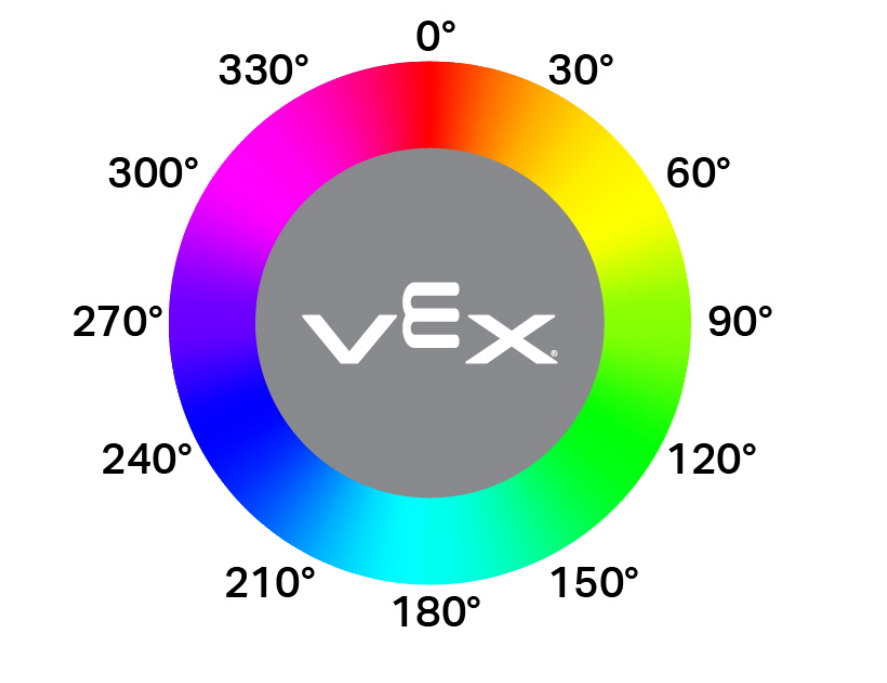
El bloque de informe tono ocular informa el tono detectado por el sensor ocular como un número de 0 a 359 grados.
El matiz es una forma de describir el color utilizando números alrededor de una rueda de colores.
(tono del sensor en grados)
Parámetros |
Descripción |
|---|---|
Este bloque no tiene parámetros. |
Ejemplo
cuando inicie :: hat events
[Build Used: Code Base 2.0 - Eye Forward]
[Display the hue of a pink GO piece.]
por siempre
limpiar todas las filas
si <[10] [math_less_than v] (tono del sensor en grados) [math_less_than v] [40]> entonces
imprimir [Pink!] ▶
si no
imprimir [Not pink.] ▶