
AIビジョンセンサー#
導入#
aivision クラスは、V5 AIビジョンセンサーからのデータの制御とアクセスに使用されます。AIビジョンセンサーは、以下のものを検出できます。
AIによる分類(ゲームオブジェクトなど)
AprilTag IDs
カスタムカラーシグネチャー
カスタムカラーコード
位置、サイズ、向き、分類ID、信頼度スコアなどのオブジェクトデータを提供します。
センサーは、VEXcode 内の AI Vision Utility で選択されたオンボード AI モデルを使用して視覚情報を処理します。選択されたモデルによって、センサーが検出できる AI 分類が決まります。VS Code を使用する場合は、プログラムで使用する前に、まず VEXcode で AI モデルを設定する必要があります。検出されたオブジェクトは、takeSnapshot が呼び出された後、objects 配列を通じて返されます。
クラスコンストラクタ#
aivision(
  int32_t index,
  Args&... sigs );
パラメータ#
パラメータ |
タイプ |
説明 |
|---|---|---|
|
|
AIビジョンセンサーが接続されているスマートポートは、 |
|
|
センサーに登録する検出タイプを1つ以上指定します。
|
関連クラス#
AIビジョンセンサーは、以下の関連クラスを使用します。
aivision::colordesc— AI ビジョンセンサーが検出できるカラーシグネチャを定義します。aivision::codedesc— 複数aivision::colordescオブジェクトで構成されるカラーコードを定義します。
aivision::colordesc#
aivision::colordesc クラスは、AI ビジョンセンサーのカラーシグネチャを定義します。
カラーシグネチャとは、AIビジョンセンサーが検出できる特定の色を表すものです。これらのシグネチャにより、センサーは色に基づいて物体を識別し、追跡することができます。
AIビジョンセンサーには、最大7つのカラーシグネチャを一度に保存できます。
カラーシグネチャは、takeSnapshot で使用され、一致する色のオブジェクトをリアルタイムで検出します。
クラスコンストラクタ
aivision::colordesc(
  int32_t index,
  uint8_t red,
  uint8_t green,
  uint8_t blue,
  float   hangle,
  float   hdsat );
パラメータ
パラメータ |
タイプ |
説明 |
|---|---|---|
|
|
カラーシグネチャのインデックス(1~7)。同じインデックスで2つのシグネチャを作成すると、以前のシグネチャは上書きされます。 |
|
|
赤色の値は0~255の範囲です。 |
|
|
緑色の値は0~255の範囲です。 |
|
|
青色の値は0~255の範囲です。 |
|
|
許容される色相の変動範囲は1~40度です。 |
|
|
許容飽和偏差は0.10~1.00です。 |
注釈
同じインデックス
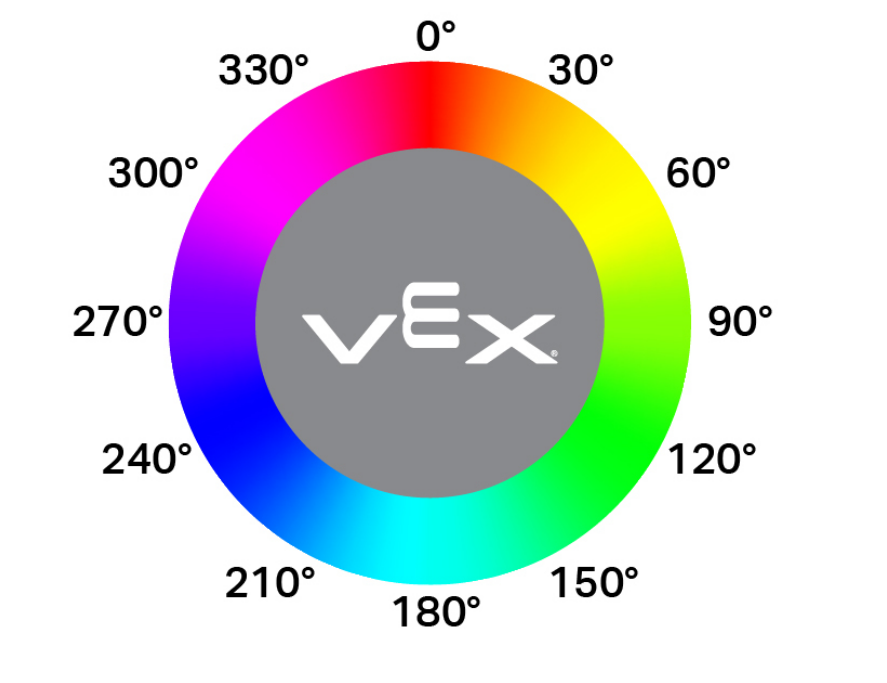
indexを持つ署名を 2 つ作成すると、後から作成された署名が先に作成された署名を上書きします。hangleパラメータは、円形カラーホイール上で許容される色相の変動範囲を表します。色相の値は、ホイール上の角度に対応します(例えば、赤は0°付近、緑は120°付近、青は240°付近)。値が大きいほど、より広い範囲の色変化を検出できます。
aivision::codedesc#
aivision::codedesc クラスは、AI ビジョンセンサーのカラーコードを定義します。
カラーコードとは、複数のカラーシグネチャを特定の順序で配置した構造化されたパターンです。これらのコードにより、AIビジョンセンサーはあらかじめ定義されたマルチカラーパターンを認識できます。
AIビジョンセンサーには、一度に最大8つのカラーコードを保存できます。
カラーコードは、takeSnapshot で使用され、特定のマルチカラーパターンを検出します。
クラスコンストラクタ
1 — 2 つの色記述子から色コードを作成します。
aivision::codedesc(
  int32_t index,
  aivision::colordesc &sig1,
  aivision::colordesc &sig2 );
2 — 3 つの色記述子からカラーコードを作成します。
aivision::codedesc(
  int32_t index,
  aivision::colordesc &sig1,
  aivision::colordesc &sig2,
  aivision::colordesc &sig3 );
3 — 4 つの色記述子からカラーコードを作成します。
aivision::codedesc(
  int32_t index,
  aivision::colordesc &sig1,
  aivision::colordesc &sig2,
  aivision::colordesc &sig3,
  aivision::colordesc &sig4 );
Parameters4 — 5 つの色記述子からカラーコードを作成します。
aivision::codedesc(
  int32_t index,
  aivision::colordesc &sig1,
  aivision::colordesc &sig2,
  aivision::colordesc &sig3,
  aivision::colordesc &sig4,
  aivision::colordesc &sig5 );
パラメータ |
タイプ |
説明 |
|---|---|---|
|
|
カラーコードのインデックス番号(1~8)。 |
|
|
カラーコードの構築に使用された、以前に作成されたカラー記述子への参照。 |
注釈
カラーコードには、少なくとも2つのカラーシグネチャが必要です。
1つのカラーコードで使用できるカラーシグネチャは最大5つです。
同じインデックス
indexを持つカラーコードを2つ作成すると、以前のものが上書きされます。
aivision::tagdesc#
特定の AprilTag ID を検出するために使用されるタグ記述子を作成します。
Available Functionstagdesc( int32_t id );
パラメータ |
タイプ |
説明 |
|---|---|---|
|
|
検出対象のAprilTag ID番号(0~36)。 |
AIモデルと分類#
AIビジョンセンサーは、特定のAI分類によってさまざまな物体を検出できます。デバイスウィンドウでAIビジョンセンサーを設定する際に選択したAI分類モデルに応じて、検出できる物体が異なります。現在利用可能なモデルは以下のとおりです。
教室の構成要素
ID番号 |
AI分類 |
|---|---|
0 |
|
1 |
|
2 |
|
3 |
|
4 |
|
5 |
|
6 |
|
7 |
|
8 |
|
VEX V5 ロボティクス競技会 ハイステークス
ID番号 |
AI分類 |
|---|---|
0 |
|
1 |
|
2 |
|
VEX V5ロボティクス競技会、延期へ
ID番号 |
AI分類 |
|---|---|
0 |
|
1 |
|
VEX V5 ロボティクス競技会オーバーライド
ID番号 |
AI分類 |
|---|---|
0 |
|
1 |
|
2 |
|
3 |
|
4 |
|
例#
// Create Color Signatures
aivision::colordesc AIVision1__greenBox(
    1,      // index
    85,     // red
    149,    // green
    46,     // blue
    23,     // hangle
    0.23 ); // hdsat

aivision::colordesc AIVision1__blueBox(
    2,      // index
    77,     // red
    135,    // green
    125,    // blue
    27,     // hangle
    0.29 ); // hdsat

// Create a Color Code from two color signatures
aivision::codedesc AIVision1__greenBlue(
    1,                    // code index
    AIVision1__greenBox,  // first color signature
    AIVision1__blueBox ); // second color signature

// Create the AI Vision Sensor instance
aivision AIVision1(
    PORT11,                  // Smart Port
    AIVision1__greenBlue,    // color code
    aivision::ALL_AIOBJS );  // enable AI Classifications
メンバーの機能#
aivision クラスには、以下のメンバ関数が含まれています。
takeSnapshot— 特定のカラーシグネチャ、カラーコード、AI分類グループ、またはAprilTag IDグループのデータをキャプチャします。installed— AI Vision SensorがV5 Brainに接続されているかどうかを返します。
takeSnapshot を呼び出した後、検出されたオブジェクトデータにアクセスするには、利用可能な Properties を使用します。
aivision メンバー関数を呼び出す前に、以下に示すように aivision インスタンスを作成する必要があります。
/* This constructor is required when using VS Code.
AI Vision Sensor configuration is generated automatically
in VEXcode using the Device Menu. Replace the values
as needed. */


// Create Color Signatures
aivision::colordesc AIVision1__greenBox(
    1,      // index
    85,     // red
    149,    // green
    46,     // blue
    23,     // hangle
    0.23 ); // hdsat

aivision::colordesc AIVision1__blueBox(
    2,      // index
    77,     // red
    135,    // green
    125,    // blue
    27,     // hangle
    0.29 ); // hdsat

// Create a Color Code from two color signatures
aivision::codedesc AIVision1__greenBlue(
    1,                    // code index
    AIVision1__greenBox,  // first color signature
    AIVision1__blueBox ); // second color signature

// Create the AI Vision Sensor instance
aivision AIVision1(
    PORT1,                   // Smart Port
    AIVision1__greenBlue,    // color code
    aivision::ALL_AIOBJS );  // enable AI Classifications
takeSnapshot#
AIビジョンセンサーから画像を取得し、選択されたAIモデルまたは設定されたカラーシグネチャを使用して処理し、 objects 配列を更新します。
各呼び出しで、最新の検出結果で objects が更新されます。オブジェクトは、インデックス 0から始まり、幅の大きい順から小さい順に並べられます。オブジェクトが検出されない場合、objectCount objectCount 0 となり objects[i].exists false falseになります。
1 — オブジェクトIDとオブジェクトタイプを使用してスナップショットを取得します。
int32_t takeSnapshot(
  uint32_t id,
  objectType type,
  uint32_t count );
2 — カラーシグネチャを使用してスナップショットを取得します。
int32_t takeSnapshot(
  const colordesc &desc,
  int32_t count = 8 );
3 — カラーコードを使用してスナップショットを撮影します。
int32_t takeSnapshot(
  const codedesc &desc,
  int32_t count = 8 );
4 — AprilTag ID を使用してスナップショットを取得します。
int32_t takeSnapshot(
  const tagdesc &desc,
  int32_t count = 8 );
5 — AI分類を使用してスナップショットを取得します。
int32_t takeSnapshot(
  const aiobjdesc &desc,
  int32_t count = 8 );
Parameters6 — オブジェクト記述子を使用してスナップショットを取得します。
int32_t takeSnapshot(
  const objdesc &desc,
  int32_t count = 8 );
パラメータ |
タイプ |
説明 |
|---|---|---|
|
|
注: VEXcode では、AI 分類名 ( blueBallVS Code では、数値 ID を使用する必要があります。 |
|
|
|
|
|
特定のオブジェクトを検出するために使用される記述子。0 takeSnapshot
|
|
|
スナップショットから保存されるオブジェクトの最大数。デフォルトは8です。 |
戻り値
指定されたシグネチャまたは検出タイプに一致する検出オブジェクトの数を表す、 int32_t を返します。
注釈
AIビジョンセンサーは、物体データにアクセスする前にスナップショットを撮影する必要があります。
objectsオブジェクトからなる配列は、呼び出しごとに更新されます。countが指定されている場合、検出された最大のオブジェクト(指定された数まで)のみが保存されます。
AIによる分類は、VEXcodeのAI Vision Utilityで選択されたモデルに依存します。
例
// Move forward if an object is detected
while (true) {
  AIVision1.takeSnapshot(aivision::ALL_AIOBJS);
  if (AIVision1.objects[0].exists) {
    Drivetrain.driveFor(forward, 50, mm);
  }
  wait(50, msec);
}
installed#
AIビジョンセンサーがV5ブレインに接続されているかどうかを返します。
利用可能な機能
bool installed();
パラメータ
この関数は引数を取りません。
戻り値
AIビジョンセンサーが接続されているかどうかを示すブール値を返します。
true— AIビジョンセンサーが接続されています。false— AIビジョンセンサーが接続されていません。
// Display a message if the AI Vision Sensor is connected
if (AIVision1.installed()){
  Brain.Screen.print("Installed!");
}
不動産#
takeSnapshot を呼び出すと、AI Vision Sensor の検出結果が更新されます。各スナップショットは、要求された AI 分類、カラーシグネチャ、カラーコード、または AprilTag ID の検出されたオブジェクトを含む objects 配列を更新します。
AI Vision データは、 AIVisionSensor.objects[index]に格納されているオブジェクトのプロパティを介してアクセスされます。ここで、 index 0から始まります。
物体は面積の大きい順から小さい順に並べられています。
AIビジョンセンサーの画像解像度は ×240ピクセル。オブジェクトの位置とサイズの値は、センサーの現在の視野に対するピクセル単位で報告されます。
以下の物件が利用可能です。
objectCount— 最新のスナップショットから検出されたオブジェクトの数を返します。largestObject— 最新のスナップショットから検出された最大のオブジェクトを選択します。objects—takeSnapshotによって更新された検出されたオブジェクトを含む配列。.exists— オブジェクトエントリに有効なデータが含まれているかどうか。.width— 検出されたオブジェクトの幅(ピクセル単位)。.height— 検出されたオブジェクトの高さ(ピクセル単位)。.centerX— オブジェクトの中心のX座標(ピクセル単位)。.centerY— オブジェクトの中心の Y 座標 (ピクセル単位)。.originX— オブジェクトの左上隅のX座標(ピクセル単位)。.originY— オブジェクトの左上隅の Y 座標 (ピクセル単位)。.angle— カラーコードまたは AprilTag ID の向き(度)。.id— 分類 ID または AprilTag ID。.score— AI分類の信頼度スコア。
objectCount#
objectCount objectCount 、 objects として返します。
AIVisionSensor.objectCount
成分 |
説明 |
|---|---|
|
AIビジョンセンサーインスタンスの名前。 |
例
// Display the number of detected objects
while (true) {
  Brain.Screen.setCursor(1, 1);
  Brain.Screen.clearLine(1);
  AIVision1.takeSnapshot(aivision::ALL_AIOBJS);
  if (AIVision1.objects[0].exists) {
    Brain.Screen.print("%d", AIVision1.objectCount);
  }
  wait(50, msec);
}
largestObject#
largestObject は、 objects 配列から検出された最大のオブジェクトを取得します。
このメソッドを使用すると、インデックスを指定せずに、 objects から常に最大のオブジェクトを取得できます。
AIVisionSensor.largestObject
成分 |
説明 |
|---|---|
|
AIビジョンセンサーインスタンスの名前。 |
例
// Display the closest AprilTag ID
while (true) {
  Brain.Screen.setCursor(1, 1);
  Brain.Screen.clearLine(1);
  AIVision1.takeSnapshot(aivision::ALL_TAGS);
  if (AIVision1.objects[0].exists) {
    Brain.Screen.print("%d", AIVision1.largestObject.id);
  }
  wait(50, msec);
}
objects#
objects は、検出されたオブジェクト プロパティの配列を返します。配列を使用して、個々のオブジェクトの特定の property 値にアクセスします。
takeSnapshot を使用した後に objects 配列に格納される各オブジェクトには、10 個のプロパティが含まれています。
id 、および score を除くすべてのプロパティ値は、takeSnapshot が使用された時点で AI Vision Sensorの視野内における検出対象物の位置とサイズを表します。これらの値は、センサーの320×240ピクセルの解像度に基づいてピクセル単位で測定されます。
AIVisionSensor.objects[index].property
成分 |
説明 |
|---|---|
|
AIビジョンセンサーインスタンスの名前。 |
|
配列内のオブジェクトインデックス。インデックスは |
|
利用可能なオブジェクトプロパティの1つ。 |
.exists#
.exists は、指定されたオブジェクト インデックスに有効な検出オブジェクトが含まれているかどうかを返します。
アクセス
SensorName.objects[index].exists
戻り値
指定されたオブジェクトインデックスに有効な検出オブジェクトが含まれているかどうかを示すブール値を返します。
-
true— A valid object exists at the specified index. -
false— No object exists at the specified index.
例
// Move forward if an object is detected
while (true) {
  AIVision1.takeSnapshot(aivision::ALL_AIOBJS);
  if (AIVision1.objects[0].exists) {
    Drivetrain.driveFor(forward, 50, mm);
  }
  wait(50, msec);
}
。幅#
.width は検出されたオブジェクトの幅を返します。
アクセス
SensorName.objects[index].width
戻り値
検出されたオブジェクトの幅をピクセル単位で表す int16_t を返します。値の範囲は 1 から 320です。
例
// Approach an object until it's at least 100 pixels wide
while (true) {
  AIVision1.takeSnapshot(aivision::ALL_AIOBJS);

  if (AIVision1.objects[0].exists) {
    if (AIVision1.objects[0].width < 100) {
      Drivetrain.drive(forward);
    } else {
      Drivetrain.stop();
    }
  } else {
    Drivetrain.stop();
  }
  wait(50, msec);
}
。身長#
.height は検出されたオブジェクトの高さを返します。
アクセス
SensorName.objects[index].height
戻り値
検出されたオブジェクトの高さをピクセル単位で表す int16_t を返します。値の範囲は 1 から 240です。
例
// Approach an object until it's at least 90 pixels tall
while (true) {
  AIVision1.takeSnapshot(aivision::ALL_AIOBJS);

  if (AIVision1.objects[0].exists) {
    if (AIVision1.objects[0].height < 90) {
      Drivetrain.drive(forward);
    } else {
      Drivetrain.stop();
    }
  } else {
    Drivetrain.stop();
  }
  wait(50, msec);
}
.centerX#
.centerX 、検出されたオブジェクトの中心の x 座標を返します。
アクセス
SensorName.objects[index].centerX
戻り値
オブジェクトの中心の x 座標をピクセル単位で表す int16_t を返します。値の範囲は 0 から 320です。
例
// Turn until an object is directly in front of the sensor
Drivetrain.setTurnVelocity(10, percent);
Drivetrain.turn(right);
while (true) {
  AIVision1.takeSnapshot(aivision::ALL_AIOBJS);

  if (AIVision1.objects[0].exists) {
    if (AIVision1.objects[0].centerX > 140 && AIVision1.objects[0].centerX < 180) {
      Drivetrain.stop();
    }
  }
  wait(10, msec);
}
.centerY#
.centerY 、検出されたオブジェクトの中心の y 座標を返します。
アクセス
SensorName.objects[index].centerY
戻り値
オブジェクトの中心のy座標をピクセル単位で表す int16_t を返します。値の範囲は 0 から 240です。
例
// Approach an object until it's close to the sensor
while (true) {
  AIVision1.takeSnapshot(aivision::ALL_AIOBJS);

  if (AIVision1.objects[0].exists) {
    if (AIVision1.objects[0].centerY < 150) {
      Drivetrain.drive(forward);
    } else {
      Drivetrain.stop();
    }
  } else {
    Drivetrain.stop();
  }
  wait(50, msec);
}
。角度#
.angle 、検出されたカラーコードまたは AprilTag ID の向きを返します。
アクセス
SensorName.objects[index].angle
戻り値
検出されたカラーコードまたは AprilTag ID の回転角度を度数で表した float の float 値を返します。値の範囲は 0 から 359.9。
例
// Turn left or right depending on how a configured
// Color Code is rotated
while (true) {
  AIVision1.takeSnapshot(AIVision1__redBlue);
  if (AIVision1.objects[0].exists) {
    if (AIVision1.objects[0].angle > 50 && AIVision1.objects[0].angle < 100) {
      Drivetrain.turn(right);
    }
    else if (AIVision1.objects[0].angle > 270 && AIVision1.objects[0].angle < 330) {
      Drivetrain.turn(left);
    }
    else {
      Drivetrain.stop();
    }
  } else {
    Drivetrain.stop();
  }
  wait(50, msec);
}
.originX#
.originX は、検出されたオブジェクトのバウンディングボックスの左上隅の x 座標を返します。
アクセス
SensorName.objects[index].originX
戻り値
オブジェクトの境界ボックスの原点の x 座標をピクセル単位で表す int16_t を返します。値の範囲は 0 から 320。
例
// Display if an object is to the left or the right
while (true) {
  Brain.Screen.clearScreen();
  Brain.Screen.setCursor(1, 1);
  AIVision1.takeSnapshot(aivision::ALL_AIOBJS);
  if (AIVision1.objects[0].exists) {
    if (AIVision1.objects[0].originX < 120) {
      Brain.Screen.print("To the left!");
    } else {
      Brain.Screen.print("To the right!");
    }
  } else {
    Brain.Screen.print("No objects");
  }
  wait(100, msec);
}
.originY#
.originY は、検出されたオブジェクトのバウンディングボックスの左上隅の y 座標を返します。
アクセス
SensorName.objects[index].originY
戻り値
オブジェクトの境界ボックスの原点の y 座標をピクセル単位で表す int16_t を返します。値の範囲は 0 から 240です。
例
// Display if an object is close or far
while (true) {
  Brain.Screen.clearScreen();
  Brain.Screen.setCursor(1, 1);
  AIVision1.takeSnapshot(aivision::ALL_AIOBJS);
  if (AIVision1.objects[0].exists) {
    if (AIVision1.objects[0].originY < 110) {
      Brain.Screen.print("Close");
    } else {
      Brain.Screen.print("Far");
    }
  }
  wait(100, msec);
}
.id#
.id 、検出された AprilTag ID または AI Classification ID を返します。
アクセス
SensorName.objects[index].id
戻り値
検出されたオブジェクトのIDを表す int32_t を返します。
AI分類の場合、これは選択されたAIモデルによって定義されたIDに対応します。
AprilTag IDの場合、これは検出されたAprilTag ID番号(0~36)を表します。
例
// Move forward when AprilTag ID 1 is detected
while (true) {
  AIVision1.takeSnapshot(aivision::ALL_TAGS);
  if (AIVision1.objects[0].exists) {
    if (AIVision1.objects[0].id == 1) {
      Drivetrain.drive(forward);
    }
  } else {
    Drivetrain.stop();
  }
  wait(50, msec);
}
。スコア#
.score 、検出された AI 分類の信頼度スコアを返します。
アクセス
SensorName.objects[index].score
戻り値
検出されたAI分類の信頼度スコアを示す int16_t を返します。
スコアが低いほど、センサーは検出された物体に対する確信度が低いことを意味し、スコアが高いほど、センサーの確信度が高いことを意味します。
例
// Display if a score is confident
while (true) {
  AIVision1.takeSnapshot(aivision::ALL_AIOBJS);

  if (AIVision1.objects[0].exists) {
    Brain.Screen.clearScreen();
    Brain.Screen.setCursor(1, 1);

    if (AIVision1.objects[0].score > 95) {
      Brain.Screen.print("Confident");
    } else {
      Brain.Screen.print("Not confident");
    }
  }
  wait(50, msec);
}