
控制器#
介绍#
V5 控制器包含按钮、两个摇杆、一个震动马达和一个屏幕。控制器方法可用于检测按钮按下、读取摇杆移动、使控制器震动、启用或禁用已配置的控制器操作、在控制器事件发生时运行函数,或在控制器屏幕上显示文本。
Configured Controller actions are controller behaviors set in the Devices menu. Use remote_control_code_enabled to temporarily enable or disable those configured actions during a project.
This page uses controller_1 as the example Controller name. Replace it with your own configured name as needed.
以下是所有可用方法的列表:
操作 — 使控制器震动或启用/禁用已配置的控制器操作。
rumble— Plays a rumble pattern on the Controller.remote_control_code_enabled— Enables or disables Controller actions configured in the Devices menu.
屏幕——在控制器屏幕上显示文本和数字。
print— Displays text, numbers, or variable values on the Controller screen.set_cursor— Moves the cursor to a specified row and column on the Controller screen.column— Returns the current cursor column on the Controller screen.row— Returns the current cursor row on the Controller screen.clear_screen— Clears the Controller screen.clear_row— Clears one row on the Controller screen.next_row— Moves the cursor to the next row on the Controller screen.
Getter 函数——读取按钮状态和摇杆位置。
.pressing— Returns whether a specified button is being pressed..position— Returns the position of a specified joystick axis.
回调函数——当控制器输入发生变化时运行的函数。
.pressed— Runs a function when a specified button is pressed..released— Runs a function when a specified button is released..changed— Runs a function when the joystick’s position changes along a specified axis.
构造函数 — 手动创建 Controller 对象。
Controller— Creates a Controller object.
行动#
rumble#
rumble plays a rumble pattern on the Controller. In the pattern string, periods are short rumbles, hyphens are long rumbles, and spaces are pauses.
Usage:
controller_1.rumble(pattern)
范围 |
描述 |
|---|---|
|
由句点、连字符和空格组成的字符串,代表隆隆声模式。 |
# Rumble the Controller with a short-short-long-long pattern
controller_1.rumble("..--")
remote_control_code_enabled#
remote_control_code_enabled is a variable that enables or disables Controller actions configured in the Devices menu. Controller configured actions are enabled by default.
Usage:
remote_control_code_enabled = state
价值 |
描述 |
|---|---|
|
启用控制器配置的操作。 |
|
禁用控制器配置的操作。 |
# Drive forward or backward using the left joystick
remote_control_code_enabled = False

while True:
    if controller_1.axis3.position() > 0:
        drivetrain.drive(FORWARD)
    elif controller_1.axis3.position() < 0:
        drivetrain.drive(REVERSE)
    # Press A to use Controller configured actions again
    elif controller_1.buttonA.pressing():
        break
    else:
        drivetrain.stop()

    wait(20, MSEC)

remote_control_code_enabled = True
屏幕#
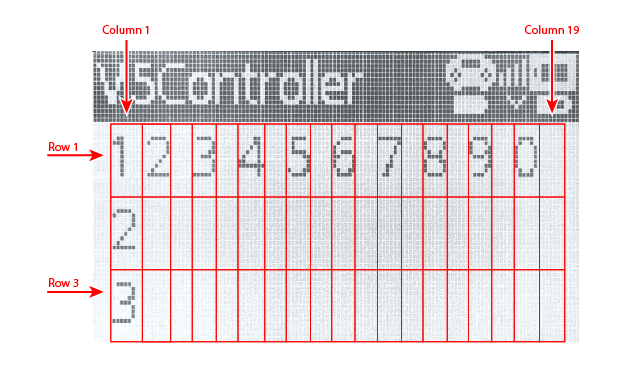
V5 控制器屏幕有 3 行 19 列,用于显示文本和数字。
print#
controller_1.screen.print displays text, numbers, or variable values on the Controller screen using the current cursor position.
Usage:
controller_1.screen.print(value, sep, precision)
范围 |
描述 |
|---|---|
|
要在控制器屏幕上显示的文本、数字或变量值。可以用逗号分隔多个值来打印它们。 |
|
Optional. A string to place between values. This must be written as a keyword argument, such as |
|
Optional. The number of decimal places to display when printing simple numbers. This must be written as a keyword argument, such as |
# Print a number on the Controller screen
controller_1.screen.print(1)
# Print multiple numbers separated by hyphens
controller_1.screen.print(1, 2, 3, 4, sep="-")
# Print a number using one decimal place
controller_1.screen.print(1 / 3, precision=1)
set_cursor#
set_cursor moves the cursor to a specified row and column on the Controller screen. The next printed value will appear at that position.
Usage:
controller_1.screen.set_cursor(row, col)
范围 |
描述 |
|---|---|
|
The row of the cursor, from |
|
The column of the cursor, from |
# Print text at row 2, column 1
controller_1.screen.set_cursor(2, 1)
controller_1.screen.print("Ready")
column#
column returns the current column where text will be printed on the Controller screen.
Usage:
controller_1.screen.column()
参数 |
描述 |
|---|---|
此方法没有参数。 |
# Print the current column number
controller_1.screen.set_cursor(2, 3)
controller_1.screen.print(controller_1.screen.column())
row#
row returns the current row where text will be printed on the Controller screen.
Usage:
controller_1.screen.row()
参数 |
描述 |
|---|---|
此方法没有参数。 |
# Print the current row number
controller_1.screen.set_cursor(2, 3)
controller_1.screen.print(controller_1.screen.row())
clear_screen#
clear_screen clears the Controller screen and moves the cursor back to the starting position.
Usage:
controller_1.screen.clear_screen()
参数 |
描述 |
|---|---|
此方法没有参数。 |
# Print text, then clear the Controller screen
controller_1.screen.print("VEX V5")
wait(2, SECONDS)
controller_1.screen.clear_screen()
clear_row#
clear_row clears one row on the Controller screen.
Usage:
controller_1.screen.clear_row(row)
范围 |
描述 |
|---|---|
|
Optional. The row to clear, from |
# Clear row 2 on the Controller screen
controller_1.screen.clear_row(2)
next_row#
next_row moves the cursor to column 1 on the next row of the Controller screen. The next printed value will appear on that row.
Usage:
controller_1.screen.next_row()
参数 |
描述 |
|---|---|
此方法没有参数。 |
# Print on two rows
controller_1.screen.print("VEX V5")
controller_1.screen.next_row()
controller_1.screen.print("Controller")
获取器#
.pressing#
.pressing returns whether a specific button on the Controller is currently being pressed. This method must be called on a specific button object, such as controller_1.buttonA.
True— The specified button is being pressed.False— The specified button is not being pressed.
用法:
此方法可以使用其中一个可用的按钮对象:
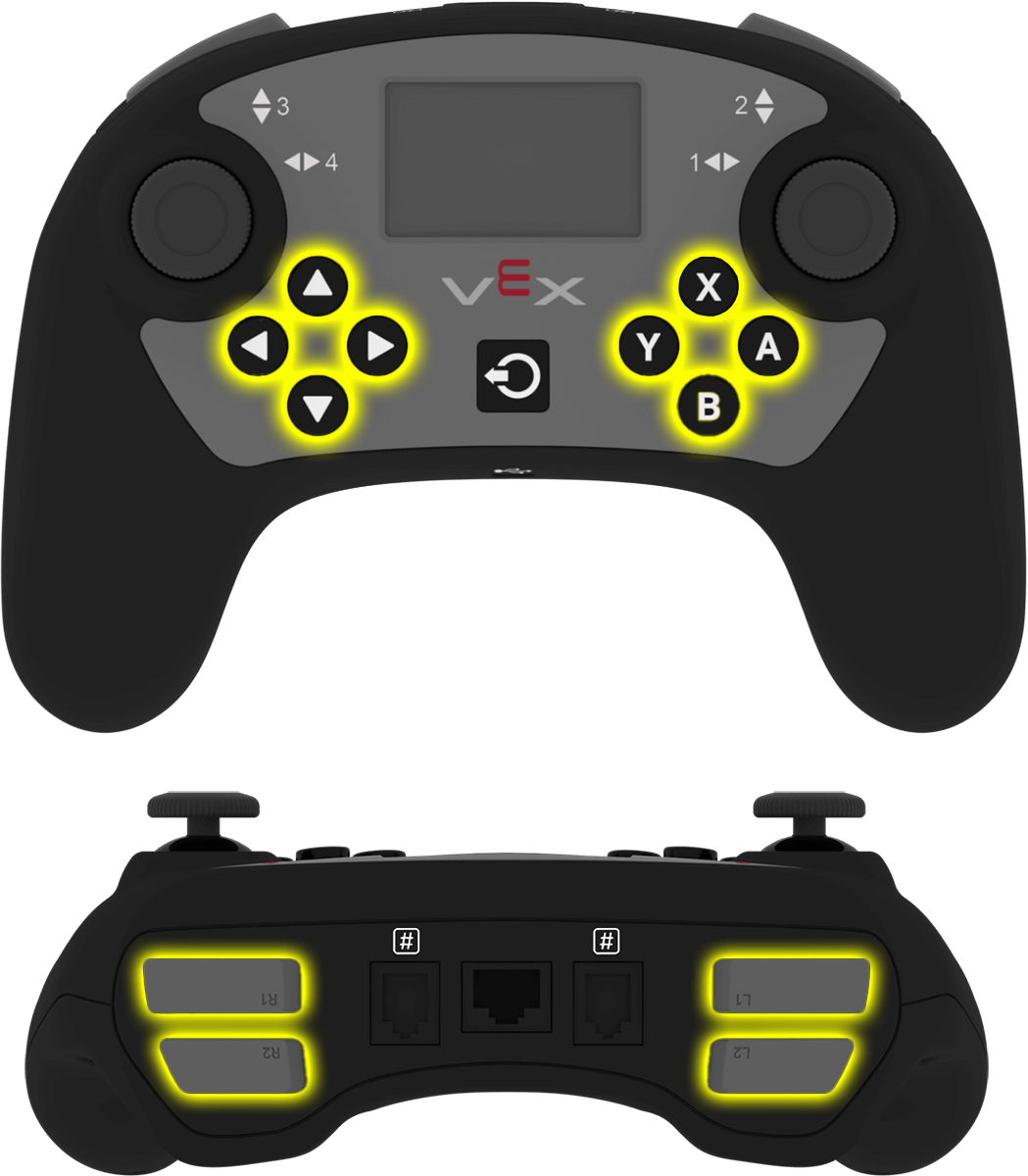
按钮 |
命令 |
|---|---|
|
|
|
|
|
|
|
|
|
|
|
|
|
|
|
|
|
|
|
|
|
|
|
|
参数 |
描述 |
|---|---|
此方法没有参数。 |
# Turn right while L1 is pressed
while True:
    if controller_1.buttonL1.pressing():
        drivetrain.turn(RIGHT)
    else:
        drivetrain.stop()

    wait(20, MSEC)
.position#
.position returns the position of a joystick axis as a number from -100 to 100.
This method must be called on a specific axis object, such as controller_1.axis1.
用法:
此方法可以使用其中一个可用的轴对象:

轴 |
命令 |
|---|---|
|
|
|
|
|
|
|
|
参数 |
描述 |
|---|---|
此方法没有参数。 |
# Turn with the left joystick
remote_control_code_enabled = False

while True:
    if controller_1.axis4.position() > 10:
        drivetrain.turn(RIGHT)
    elif controller_1.axis4.position() < -10:
        drivetrain.turn(LEFT)
    else:
        drivetrain.stop()

    wait(20, MSEC)
回调函数#
.pressed#
.pressed runs a function when the specified button is pressed. Once it is used, the function will run automatically each time that button is pressed.
用法:
此方法可以使用其中一个可用的按钮对象:
按钮 |
命令 |
|---|---|
|
|
|
|
|
|
|
|
|
|
|
|
|
|
|
|
|
|
|
|
|
|
|
|
范围 |
描述 |
|---|---|
|
预先定义的 函数,每次按下指定的按钮时运行。 |
|
可选。包含要传递给回调函数的参数的元组。有关更多信息,请参阅使用带参数的事件。 |
# Drive forward when A is pressed
def drive_forward():
    drivetrain.drive_for(FORWARD, 100, MM)

controller_1.buttonA.pressed(drive_forward)
.released#
.released runs a function when the specified button is released. Once it is used, the function will run automatically each time that button is released.
用法:
此方法可以使用其中一个可用的按钮对象:
按钮 |
命令 |
|---|---|
|
|
|
|
|
|
|
|
|
|
|
|
|
|
|
|
|
|
|
|
|
|
|
|
范围 |
描述 |
|---|---|
|
预先定义的 函数,每次释放指定的按钮时运行。 |
|
可选。包含要传递给回调函数的参数的元组。有关更多信息,请参阅使用带参数的事件。 |
# Drive backward when A is released
def back_up():
    drivetrain.drive_for(REVERSE, 100, MM)

controller_1.buttonA.released(back_up)
.changed#
.changed runs a function when the joystick’s position changes along the specified axis. Once it is used, the function will run automatically each time the joystick’s position changes along that axis.
用法:
此方法可以使用其中一个可用的轴对象:
轴 |
命令 |
|---|---|
|
|
|
|
|
|
|
|
范围 |
描述 |
|---|---|
|
预先定义的 函数,每次操纵杆的位置沿指定轴发生变化时运行。 |
|
可选。包含要传递给回调函数的参数的元组。有关更多信息,请参阅使用带参数的事件。 |
# Play a sound when the left joystick moves
def tada_sound():
    brain.play_sound(SoundType.TADA)

controller_1.axis4.changed(tada_sound)
构造函数#
Controller#
Controller creates a Controller object. Manually creating a Controller object is only needed when configuring a controller outside of VEXcode.
Usage:
Controller(controller_type)
范围 |
描述 |
|---|---|
|
Optional. The Controller type to create: |
# Create the primary Controller
controller_1 = Controller(PRIMARY)
# Create a partner Controller
controller_2 = Controller(PARTNER)