
人工智慧視覺#
介紹#
AI視覺感測器能夠偵測和追蹤物體、顏色以及AprilTag ID。這使得機器人能夠分析周圍環境、追蹤物體,並根據檢測到的視覺數據做出反應。
This page uses ai_vision_1, RED_BOX, and BOX_CODE as the example AI Vision Sensor, Color Signature, and Color Code names respectively. Replace them with your own configured names as needed.
以下是所有方法的清單:
資料擷取器 – 從 AI 視覺感測器取得資料。
take_snapshot– 擷取特定簽章的資料。installed– AI 視覺感測器是否連接到 V5 大腦。
屬性 – 從 take_snapshot 傳回的物件資料。
.exists– 物件是否存在於目前偵測中。.width– 偵測到的物件的寬度。.height– 偵測到的物體的高度。.centerX– 物件中心的 X 座標。.centerY– 物件中心的 Y 座標。.angle– 顏色代碼的方向。.originX– 物件左上角的 X 座標。.originY– 物件左上角的 Y 座標。.id– 物件的分類或標籤 ID。.score– AI 分類的信心分數。
建構函式 – 手動初始化和配置 AI 視覺感測器及其簽章。
獲取器#
take_snapshot#
take_snapshot 將 AI 視覺感測器幀中的資料過濾為單一簽名——感測器可以識別的事物的保存描述,例如預訓練物件、AprilTag ID 或配置的顏色簽名或顏色代碼——並傳回一個 元組。
要使用此方法,必須先在視覺實用程式中配置顏色簽名和顏色代碼。
The tuple stores objects ordered from largest to smallest by width, starting at index 0. Each object’s properties can be accessed using its index. An empty tuple is returned if no matching objects are detected.
Usage:
ai_vision_1.take_snapshot(SIGNATURE)
參數 |
描述 |
|---|---|
|
Filters the dataset to only include data of the given signature. Available signatures are:
|
|
可選。設定可傳回物件的最大數量,取值範圍為 1 到 24。預設值為 8。 |
# Drive forward if an object is detected
while True:
    objects = ai_vision_1.take_snapshot(AiVision.ALL_AIOBJS)
    if objects[0].exists:
        drivetrain.drive_for(FORWARD, 50, MM)
    wait(50, MSEC)
Note: The returned tuple can be sorted by any property, not just width, using Python’s sorted function. For example, sorting by AprilTag ID:
# Print each detected AprilTag ID in ascending order by ID
while True:
    apriltags = sorted(ai_vision_1.take_snapshot(AiVision.ALL_TAGS), key=id)
    for tag in apriltags:
        print(tag.id)
    wait(1, SECONDS)
或改用高度排序:
# Print each detected AprilTag ID in ascending order by height
while True:
    apriltags_by_height = sorted(ai_vision_1.take_snapshot(AiVision.ALL_TAGS), key=lambda tag: tag.height)
    for tag in apriltags_by_height:
        print(tag.height)
    wait(1, SECONDS)
人工智慧分類#
AI視覺感測器可以根據特定的AI分類檢測不同的物體。根據在「設備」視窗中配置AI視覺感測器時選擇的AI分類模型,可以偵測到不同的物體。目前可用的模型有:
課堂要素
身分證號碼 |
人工智慧分類 |
|---|---|
0 |
|
1 |
|
2 |
|
3 |
|
4 |
|
5 |
|
6 |
|
7 |
|
8 |
|
VEX V5 機器人大賽 高風險賽
身分證號碼 |
人工智慧分類 |
|---|---|
0 |
|
1 |
|
2 |
|
VEX V5 機器人競賽延期
身分證號碼 |
人工智慧分類 |
|---|---|
0 |
|
1 |
|
VEX V5 機器人競賽規則變更
身分證號碼 |
人工智慧分類 |
|---|---|
0 |
|
1 |
|
2 |
|
3 |
|
4 |
|
顏色特徵#
顏色簽名是人工智慧視覺感測器可以識別的獨特顏色。這些簽名使人工智慧視覺感測器能夠根據物體的顏色來檢測和追蹤物體。配置顏色簽名後,感測器就可以在其視野範圍內識別具有該特定顏色的物體。顏色簽名與 take_snapshot 結合使用,可以即時處理和偵測彩色物體。
若要在專案中使用已配置的顏色簽名,其名稱必須為感測器名稱,後面跟著兩個下劃線,然後再跟顏色簽名的名稱。例如: ai_vision_1__RED_BOX。
# Display if any objects match the RED_BOX signature
while True:
    brain.screen.set_cursor(1, 1)
    brain.screen.clear_row(1)
    # Change to any configured Color Signature
    red_box = ai_vision_1.take_snapshot(ai_vision_1__RED_BOX)
    if red_box[0].exists:
        brain.screen.print("Color detected!")
        wait(100, MSEC)
顏色代碼#
顏色編碼是一種結構化的模式,由按特定順序排列的顏色符號組成。這些編碼使人工智慧視覺感測器能夠識別預先定義的顏色模式。顏色編碼可用於識別複雜物件或為自主導航建立獨特的標記。
若要在專案中使用已配置的顏色代碼,其名稱必須為感測器名稱,後面跟著兩個下劃線,然後再跟著顏色代碼的名稱。例如: ai_vision_1__BOX_CODE。
# Display if any objects match the BOX_CODE code
while True:
    brain.screen.set_cursor(1, 1)
    brain.screen.clear_row(1)
    # Change to any configured Color Code
    box_code = ai_vision_1.take_snapshot(ai_vision_1__BOX_CODE)
    if box_code[0].exists:
        brain.screen.print("Code detected!")
        wait(100, MSEC)
installed#
installed 返回一個布林值,指示 AI 視覺感測器目前是否連接到 V5 大腦。
True– AI 視覺感測器已連接到 V5 大腦。FalseAI 視覺感測器未連接到 V5 大腦。
Usage:
ai_vision_1.installed()
參數 |
描述 |
|---|---|
此方法沒有參數。 |
# Display a message if the AI Vision Sensor is connected
if ai_vision_1.installed():
    brain.screen.print("Installed!")
特性#
使用 take_snapshot 後,儲存在 tuple 中的每個物件都包含十個屬性。
除 .id 和 .score 之外的所有屬性值描述了在執行 take_snapshot 操作時,AI 視覺感測器視野中偵測到的物體的位置和大小。這些值以像素為單位進行測量,基於感測器的 320 x 240 像素解析度。
.exists#
.exists 傳回一個布林值,指示索引是否存在於元組中。
True– 索引存在。False索引不存在。
# Check if at least two objects are detected
while True:
    brain.screen.clear_screen()
    brain.screen.set_cursor(1, 1)
    objects = ai_vision_1.take_snapshot(AiVision.ALL_AIOBJS)

    if objects[0].exists:
        if objects[1].exists:
            brain.screen.print("At least 2")

        else:
            brain.screen.print("Less than 2")
    wait(50, MSEC)
.width#
.width 傳回偵測到的物件在像素中的寬度,該值是 1 到 320 之間的整數。
# Approach an object until it's at least 100 pixels wide
while True:
    objects = ai_vision_1.take_snapshot(AiVision.ALL_AIOBJS)

    if objects[0].exists:
        if objects[0].width < 100:
            drivetrain.drive(FORWARD)
    else:
        drivetrain.stop()
    wait(50, MSEC)
.height#
.height 傳回偵測到的物件的高度(以像素為單位),該值是 1 到 240 之間的整數。
# Approach an object until it's at least 90 pixels tall
while True:
    objects = ai_vision_1.take_snapshot(AiVision.ALL_AIOBJS)

    if objects[0].exists:
        if objects[0].height < 90:
            drivetrain.drive(FORWARD)
    else:
        drivetrain.stop()
    wait(50, MSEC)
.centerX#
.centerX 傳回偵測到的物件中心的 x 座標(以像素為單位),該值是 0 到 320 之間的整數。
# Turn until an object is directly in front of the sensor
drivetrain.set_turn_velocity(10, PERCENT)
drivetrain.turn(RIGHT)

while True:
    objects = ai_vision_1.take_snapshot(AiVision.ALL_AIOBJS)

    if objects[0].exists:
        if 140 < objects[0].centerX < 180:
            drivetrain.stop()
    wait(10,MSEC)
.centerY#
.centerY 傳回偵測到的物件中心的 y 座標(以像素為單位),該值是 0 到 240 之間的整數。
# Approach an object until the object's center is
# high enough in the field of view
while True:
    objects = ai_vision_1.take_snapshot(AiVision.ALL_AIOBJS)

    if objects[0].exists:
        if objects[0].centerY < 150:
            drivetrain.drive(FORWARD)
    else:
        drivetrain.stop()
    wait(50, MSEC)
.angle#
.angle 傳回偵測到的顏色代碼或 AprilTag ID 的方向(以度為單位),該值是 0 到 359 之間的整數。
# Turn left or right depending on how a
# configured Color Code is rotated
while True:
    box_code = ai_vision_1.take_snapshot(ai_vision_1__BOX_CODE)

    if box_code[0].exists:
        if 50 < box_code[0].angle < 100:
            drivetrain.turn(RIGHT)

        elif 270 < box_code[0].angle < 330:
            drivetrain.turn(LEFT)

        else:
            drivetrain.stop()
    else:
        drivetrain.stop()
    wait(50, MSEC)
.originX#
.originX 傳回偵測到的物件邊界框左上角的 x 座標(以像素為單位),該值是 0 到 320 之間的整數。
# Display if an object is to the left or the right
while True:
    brain.screen.clear_screen()
    brain.screen.set_cursor(1,1)

    objects = ai_vision_1.take_snapshot(AiVision.ALL_AIOBJS)

    if objects[0].exists:
        if objects[0].originX < 120:
            brain.screen.print("To the left!")
        else:
            brain.screen.print("To the right!")
    else:
        brain.screen.print("No objects")
    wait(100, MSEC)
.originY#
.originY 傳回偵測到的物件邊界框左上角的 y 座標(以像素為單位),該值是 0 到 240 之間的整數。
# Display if an object is close or far
while True:
    brain.screen.clear_screen()
    brain.screen.set_cursor(1,1)

    objects = ai_vision_1.take_snapshot(AiVision.ALL_AIOBJS)

    if objects[0].exists:
        if objects[0].originY < 110:
            brain.screen.print("Close")
        else:
            brain.screen.print("Far")
.id#
.id 傳回偵測到的 AI 分類或 AprilTag ID 的 ID,以整數形式傳回。
對於 AprilTag ID, .id 屬性表示偵測到的 AprilTag ID 編號,範圍為 0 到 36。對於 AI 分類, .id 屬性對應於 AI 分類 部分中預先定義的 ID。
# Move forward when AprilTag ID 1 is detected
while True:
    apriltags = ai_vision_1.take_snapshot(AiVision.ALL_TAGS)

    if apriltags[0].exists:
        if apriltags[0].id == 1:
            robot.drive(FORWARD)
    else:
        drivetrain.stop()

    wait(50, MSEC)
.score#
.score 傳回偵測到的 AI 分類的置信度分數,該分數為 1 到 100 之間的整數。
分數越低,表示感測器對偵測到的物體信心越低;分數越高,表示感測器對偵測到的物體信心越高。
建構函數#
建構函數用於手動建立 AiVision Colordesc和 Codedesc 對象,這些物件對於在 VEXcode 之外配置 AI 視覺感測器是必要的。
AiVision#
AiVision 創建了一個 AI 視覺感測器。
用法
Vision(smartport, sigs)
參數 |
描述 |
|---|---|
|
AI視覺感測器連接的智慧型端口,寫成 |
|
可選。一個或多個簽名的名稱,以逗號分隔 ( |
# Create the Color Signatures
RED_BOX = Colordesc(1, 255, 0, 0, 20, 0.9)
BLUE_BOX = Colordesc(0, 26, 255, 0, 20, 0.9)

# Create the Color Code
RED_BLUE = Codedesc(RED_BOX, BLUE_BOX)

"""
Create an AI Vision Sensor with the following signatures:
- RED_BLUE
- AiVision.ALL_TAGS - for AprilTag IDs
"""
ai_vision_1 = AiVision(Ports.PORT1, RED_BLUE, AiVision.ALL_TAGS)
Colordesc#
Colordesc 建立顏色簽名。 AI 視覺感測器最多可同時儲存七個不同的顏色簽名。
Usage:
Colordesc(index, red, green, blue, hangle, hdsat)
範圍 |
描述 |
|---|---|
|
|
|
顏色的紅色值,範圍從 0 到 255。 |
|
顏色的綠色值,範圍從0到255。 |
|
顏色的藍色值,範圍從 0 到 255。 |
|
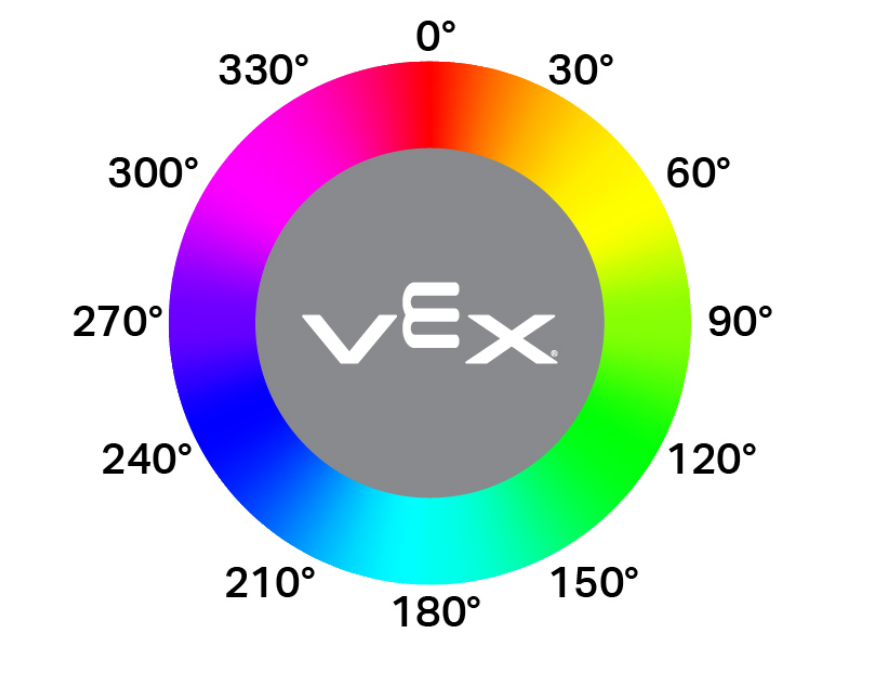
色相允許的變化範圍以色輪上的角度範圍(1-40)表示。數值越高,允許的旋轉偏差越大,偏離基準色相的幅度也越大。 |
|
允許的飽和度偏差範圍為 0.10 至 1.00。該值表示顏色可以在完整飽和度範圍內偏移的比例(例如,0.10 = ±10% 飽和度)。 |
"""
Create a Color Signature with the following values:
- index: 1
- red: 255
- green: 0
- blue: 0
- hangle: 20
- hdsat: 0.9
"""
# Create a red Color Signature
RED_BOX = Colordesc(1, 255, 0, 0, 20, 0.9)
Codedesc#
Codedesc 建立一個顏色代碼。它至少需要兩個已定義的顏色簽名才能使用。視覺感測器最多可以同時儲存八個不同的顏色代碼。
Usage:
Codedesc(sig1, sig2, sig3, sig4, sig5)
範圍 |
描述 |
|---|---|
|
先前建立的顏色簽名。 |
|
先前建立的顏色簽名。 |
|
可選。先前建立的顏色簽名。 |
|
可選。先前建立的顏色簽名。 |
|
可選。先前建立的顏色簽名。 |
# Create the Color Signatures
RED_BOX = Colordesc(1, 255, 0, 0, 20, 0.9)
BLUE_BOX = Colordesc(0, 26, 255, 0, 20, 0.9)

# Create a Color Code with the Color Signatures
BOX_CODE = Codedesc(RED_BOX, BLUE_BOX)
Tagdesc#
Tagdesc 建立一個 AprilTag ID。您可以使用它來定義可識別的 AprilTag ID,這使您的程式碼更清晰、更易於閱讀。
Usage:
Tagdesc(id)
範圍 |
描述 |
|---|---|
|
要使用的 AprilTag ID。 |
# Set AprilTag ID 7 to be the "goal"
goal = Tagdesc(7)