
人工智能视觉#
介绍#
AI视觉传感器能够检测和追踪物体、颜色以及AprilTag ID。这使得机器人能够分析周围环境、追踪物体,并根据检测到的视觉数据做出反应。
This page uses ai_vision_1, RED_BOX, and BOX_CODE as the example AI Vision Sensor, Color Signature, and Color Code names respectively. Replace them with your own configured names as needed.
以下是所有方法的列表:
数据获取器 – 从 AI 视觉传感器获取数据。
take_snapshot– 捕获特定签名的数据。installed– AI 视觉传感器是否连接到 V5 大脑。
属性 – 从 take_snapshot 返回的对象数据。
.exists– 对象是否存在于当前检测中。.width– 检测到的对象的宽度。.height– 检测到的物体的高度。.centerX– 物体中心的 X 坐标。.centerY– 物体中心的 Y 坐标。.angle– 颜色代码的方向。.originX– 对象左上角的 X 坐标。.originY– 对象左上角的 Y 坐标。.id– 对象的分类或标签 ID。.score– AI 分类的置信度得分。
构造函数 – 手动初始化和配置 AI 视觉传感器及其签名。
获取器#
take_snapshot#
take_snapshot 将 AI 视觉传感器帧中的数据过滤为单个签名——传感器可以识别的事物的保存描述,例如预训练对象、AprilTag ID 或配置的颜色签名或颜色代码——并返回一个 元组。
要使用此方法,必须先在视觉实用程序中配置颜色签名和颜色代码。
The tuple stores objects ordered from largest to smallest by width, starting at index 0. Each object’s properties can be accessed using its index. An empty tuple is returned if no matching objects are detected.
Usage:
ai_vision_1.take_snapshot(SIGNATURE)
参数 |
描述 |
|---|---|
|
Filters the dataset to only include data of the given signature. Available signatures are:
|
|
可选。设置可返回对象的最大数量,取值范围为 1 到 24。默认值为 8。 |
# Drive forward if an object is detected
while True:
    objects = ai_vision_1.take_snapshot(AiVision.ALL_AIOBJS)
    if objects[0].exists:
        drivetrain.drive_for(FORWARD, 50, MM)
    wait(50, MSEC)
Note: The returned tuple can be sorted by any property, not just width, using Python’s sorted function. For example, sorting by AprilTag ID:
# Print each detected AprilTag ID in ascending order by ID
while True:
    apriltags = sorted(ai_vision_1.take_snapshot(AiVision.ALL_TAGS), key=id)
    for tag in apriltags:
        print(tag.id)
    wait(1, SECONDS)
或者改用高度排序:
# Print each detected AprilTag ID in ascending order by height
while True:
    apriltags_by_height = sorted(ai_vision_1.take_snapshot(AiVision.ALL_TAGS), key=lambda tag: tag.height)
    for tag in apriltags_by_height:
        print(tag.height)
    wait(1, SECONDS)
人工智能分类#
AI视觉传感器可以根据特定的AI分类检测不同的物体。根据在“设备”窗口中配置AI视觉传感器时选择的AI分类模型,可以检测到不同的物体。目前可用的模型有:
课堂要素
身份证号码 |
人工智能分类 |
|---|---|
0 |
|
1 |
|
2 |
|
3 |
|
4 |
|
5 |
|
6 |
|
7 |
|
8 |
|
VEX V5 机器人大赛 高风险赛
身份证号码 |
人工智能分类 |
|---|---|
0 |
|
1 |
|
2 |
|
VEX V5 机器人竞赛延期
身份证号码 |
人工智能分类 |
|---|---|
0 |
|
1 |
|
VEX V5 机器人竞赛规则变更
身份证号码 |
人工智能分类 |
|---|---|
0 |
|
1 |
|
2 |
|
3 |
|
4 |
|
颜色特征#
颜色签名是人工智能视觉传感器可以识别的独特颜色。这些签名使人工智能视觉传感器能够根据物体的颜色来检测和跟踪物体。配置好颜色签名后,传感器就可以在其视野范围内识别具有该特定颜色的物体。颜色签名与 take_snapshot 结合使用,可以实时处理和检测彩色物体。
要在项目中使用已配置的颜色签名,其名称必须为传感器名称,后跟两个下划线,再后跟颜色签名的名称。例如: ai_vision_1__RED_BOX。
# Display if any objects match the RED_BOX signature
while True:
    brain.screen.set_cursor(1, 1)
    brain.screen.clear_row(1)
    # Change to any configured Color Signature
    red_box = ai_vision_1.take_snapshot(ai_vision_1__RED_BOX)
    if red_box[0].exists:
        brain.screen.print("Color detected!")
        wait(100, MSEC)
颜色代码#
颜色编码是一种结构化的模式,由按特定顺序排列的颜色符号组成。这些编码使人工智能视觉传感器能够识别预定义的颜色模式。颜色编码可用于识别复杂物体或为自主导航创建独特的标记。
要在项目中使用已配置的颜色代码,其名称必须为传感器名称,后跟两个下划线,再后跟颜色代码的名称。例如: ai_vision_1__BOX_CODE。
# Display if any objects match the BOX_CODE code
while True:
    brain.screen.set_cursor(1, 1)
    brain.screen.clear_row(1)
    # Change to any configured Color Code
    box_code = ai_vision_1.take_snapshot(ai_vision_1__BOX_CODE)
    if box_code[0].exists:
        brain.screen.print("Code detected!")
        wait(100, MSEC)
installed#
installed 返回一个布尔值,指示 AI 视觉传感器当前是否连接到 V5 大脑。
True– AI 视觉传感器已连接到 V5 大脑。False– AI 视觉传感器未连接到 V5 大脑。
Usage:
ai_vision_1.installed()
参数 |
描述 |
|---|---|
此方法没有参数。 |
# Display a message if the AI Vision Sensor is connected
if ai_vision_1.installed():
    brain.screen.print("Installed!")
特性#
使用 take_snapshot 后,存储在 tuple 中的每个对象都包含十个属性。
除 .id 和 .score 之外的所有属性值描述了在执行 take_snapshot 操作时,AI 视觉传感器视野中检测到的物体的位置和大小。这些值以像素为单位进行测量,基于传感器的 320 x 240 像素分辨率。
.exists#
.exists 返回一个布尔值,指示索引是否存在于元组中。
True– 索引存在。False– 索引不存在。
# Check if at least two objects are detected
while True:
    brain.screen.clear_screen()
    brain.screen.set_cursor(1, 1)
    objects = ai_vision_1.take_snapshot(AiVision.ALL_AIOBJS)

    if objects[0].exists:
        if objects[1].exists:
            brain.screen.print("At least 2")

        else:
            brain.screen.print("Less than 2")
    wait(50, MSEC)
.width#
.width 返回检测到的对象在像素中的宽度,该值是 1 到 320 之间的整数。
# Approach an object until it's at least 100 pixels wide
while True:
    objects = ai_vision_1.take_snapshot(AiVision.ALL_AIOBJS)

    if objects[0].exists:
        if objects[0].width < 100:
            drivetrain.drive(FORWARD)
    else:
        drivetrain.stop()
    wait(50, MSEC)
.height#
.height 返回检测到的对象的高度(以像素为单位),该值是 1 到 240 之间的整数。
# Approach an object until it's at least 90 pixels tall
while True:
    objects = ai_vision_1.take_snapshot(AiVision.ALL_AIOBJS)

    if objects[0].exists:
        if objects[0].height < 90:
            drivetrain.drive(FORWARD)
    else:
        drivetrain.stop()
    wait(50, MSEC)
.centerX#
.centerX 返回检测到的对象中心的 x 坐标(以像素为单位),该值是 0 到 320 之间的整数。
# Turn until an object is directly in front of the sensor
drivetrain.set_turn_velocity(10, PERCENT)
drivetrain.turn(RIGHT)

while True:
    objects = ai_vision_1.take_snapshot(AiVision.ALL_AIOBJS)

    if objects[0].exists:
        if 140 < objects[0].centerX < 180:
            drivetrain.stop()
    wait(10,MSEC)
.centerY#
.centerY 返回检测到的对象中心的 y 坐标(以像素为单位),该值是 0 到 240 之间的整数。
# Approach an object until the object's center is
# high enough in the field of view
while True:
    objects = ai_vision_1.take_snapshot(AiVision.ALL_AIOBJS)

    if objects[0].exists:
        if objects[0].centerY < 150:
            drivetrain.drive(FORWARD)
    else:
        drivetrain.stop()
    wait(50, MSEC)
.angle#
.angle 返回检测到的颜色代码或 AprilTag ID 的方向(以度为单位),该值是 0 到 359 之间的整数。
# Turn left or right depending on how a
# configured Color Code is rotated
while True:
    box_code = ai_vision_1.take_snapshot(ai_vision_1__BOX_CODE)

    if box_code[0].exists:
        if 50 < box_code[0].angle < 100:
            drivetrain.turn(RIGHT)

        elif 270 < box_code[0].angle < 330:
            drivetrain.turn(LEFT)

        else:
            drivetrain.stop()
    else:
        drivetrain.stop()
    wait(50, MSEC)
.originX#
.originX 返回检测到的对象边界框左上角的 x 坐标(以像素为单位),该值是 0 到 320 之间的整数。
# Display if an object is to the left or the right
while True:
    brain.screen.clear_screen()
    brain.screen.set_cursor(1,1)

    objects = ai_vision_1.take_snapshot(AiVision.ALL_AIOBJS)

    if objects[0].exists:
        if objects[0].originX < 120:
            brain.screen.print("To the left!")
        else:
            brain.screen.print("To the right!")
    else:
        brain.screen.print("No objects")
    wait(100, MSEC)
.originY#
.originY 返回检测到的对象边界框左上角的 y 坐标(以像素为单位),该值是 0 到 240 之间的整数。
# Display if an object is close or far
while True:
    brain.screen.clear_screen()
    brain.screen.set_cursor(1,1)

    objects = ai_vision_1.take_snapshot(AiVision.ALL_AIOBJS)

    if objects[0].exists:
        if objects[0].originY < 110:
            brain.screen.print("Close")
        else:
            brain.screen.print("Far")
.id#
.id 返回检测到的 AI 分类或 AprilTag ID 的 ID,以整数形式返回。
对于 AprilTag ID, .id 属性表示检测到的 AprilTag ID 编号,范围为 0 到 36。对于 AI 分类, .id 属性对应于 AI 分类 部分中预定义的 ID。
# Move forward when AprilTag ID 1 is detected
while True:
    apriltags = ai_vision_1.take_snapshot(AiVision.ALL_TAGS)

    if apriltags[0].exists:
        if apriltags[0].id == 1:
            robot.drive(FORWARD)
    else:
        drivetrain.stop()

    wait(50, MSEC)
.score#
.score 返回检测到的 AI 分类的置信度分数,该分数为 1 到 100 之间的整数。
得分越低,表示传感器对检测到的物体信心越低;得分越高,表示传感器对检测到的物体信心越高。
构造函数#
构造函数用于手动创建 AiVision Colordesc和 Codedesc 对象,这些对象对于在 VEXcode 之外配置 AI 视觉传感器是必要的。
AiVision#
AiVision 创建了一个 AI 视觉传感器。
用法
Vision(smartport, sigs)
参数 |
描述 |
|---|---|
|
AI视觉传感器连接的智能端口,写成 |
|
可选。一个或多个签名的名称,以逗号分隔 ( |
# Create the Color Signatures
RED_BOX = Colordesc(1, 255, 0, 0, 20, 0.9)
BLUE_BOX = Colordesc(0, 26, 255, 0, 20, 0.9)

# Create the Color Code
RED_BLUE = Codedesc(RED_BOX, BLUE_BOX)

"""
Create an AI Vision Sensor with the following signatures:
- RED_BLUE
- AiVision.ALL_TAGS - for AprilTag IDs
"""
ai_vision_1 = AiVision(Ports.PORT1, RED_BLUE, AiVision.ALL_TAGS)
Colordesc#
Colordesc 创建颜色签名。AI 视觉传感器最多可同时存储七个不同的颜色签名。
Usage:
Colordesc(index, red, green, blue, hangle, hdsat)
范围 |
描述 |
|---|---|
|
|
|
颜色的红色值,范围从 0 到 255。 |
|
颜色的绿色值,范围从0到255。 |
|
颜色的蓝色值,范围从 0 到 255。 |
|
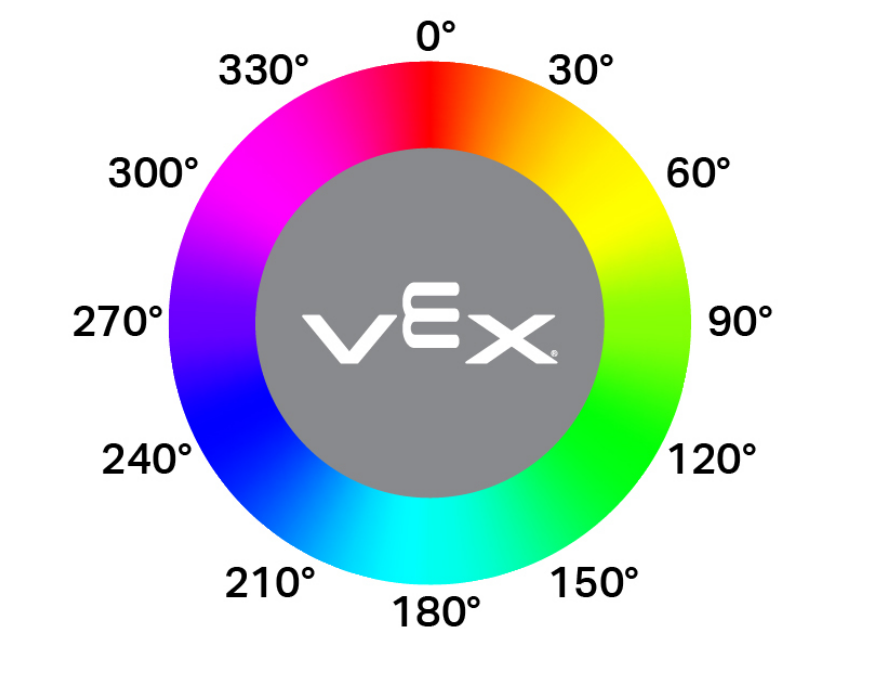
色相允许的变化范围以色轮上的角度范围(1-40)表示。数值越高,允许的旋转偏差越大,偏离基准色相的幅度也越大。 |
|
允许的饱和度偏差范围为 0.10 至 1.00。该值表示颜色可以在完整饱和度范围内偏移的比例(例如,0.10 = ±10% 饱和度)。 |
"""
Create a Color Signature with the following values:
- index: 1
- red: 255
- green: 0
- blue: 0
- hangle: 20
- hdsat: 0.9
"""
# Create a red Color Signature
RED_BOX = Colordesc(1, 255, 0, 0, 20, 0.9)
Codedesc#
Codedesc 创建一个颜色代码。它至少需要两个已定义的颜色签名才能使用。视觉传感器最多可以同时存储八个不同的颜色代码。
Usage:
Codedesc(sig1, sig2, sig3, sig4, sig5)
范围 |
描述 |
|---|---|
|
先前创建的颜色签名。 |
|
先前创建的颜色签名。 |
|
可选。先前创建的颜色签名。 |
|
可选。先前创建的颜色签名。 |
|
可选。先前创建的颜色签名。 |
# Create the Color Signatures
RED_BOX = Colordesc(1, 255, 0, 0, 20, 0.9)
BLUE_BOX = Colordesc(0, 26, 255, 0, 20, 0.9)

# Create a Color Code with the Color Signatures
BOX_CODE = Codedesc(RED_BOX, BLUE_BOX)
Tagdesc#
Tagdesc 创建一个 AprilTag ID。您可以使用它来定义可识别的 AprilTag ID,这使您的代码更清晰、更易于阅读。
Usage:
Tagdesc(id)
范围 |
描述 |
|---|---|
|
要使用的 AprilTag ID。 |
# Set AprilTag ID 7 to be the "goal"
goal = Tagdesc(7)