
控制器#
介紹#
V5 控制器包含按鈕、兩個搖桿、一個震動馬達和一個螢幕。控制器方法可用於偵測按鈕按下、讀取搖桿移動、使控制器震動、啟用或停用已配置的控制器操作、在控制器事件發生時運行函數,或在控制器螢幕上顯示文字。
已配置的控制器操作是指在「設備」選單中設定的控制器行為。使用 remote_control_code_enabled 可在專案進行期間暫時啟用或停用這些已設定的操作。
本頁面使用 controller_1 作為範例控制器名稱。請根據需要將其替換為您自己配置的名稱。
以下是所有可用方法的清單:
操作 — 使控制器震動或啟用/停用已設定的控制器操作。
rumble— 在控制器上播放震動模式。remote_control_code_enabled— 啟用或停用在「裝置」選單中配置的控制器操作。
螢幕-在控制器螢幕上顯示文字和數字。
print— 在控制器畫面上顯示文字、數字或變數值。set_cursor— 將遊標移到控制器畫面上的指定行和列。column— 返回控制器畫面上的目前遊標列。row— 返回控制器畫面上的目前遊標行。clear_screen— 清除控制器畫面。clear_row— 清除控制器螢幕上的一行。next_row— 將遊標移到控制器畫面上的下一行。
Getter 函數-讀取按鈕狀態和搖桿位置。
回調函數-當控制器輸入發生變化時執行的函數。
建構子 — 手動建立 Controller 物件。
Controller— 建立一個 Controller 物件。
行動#
rumble#
rumble 在控制器上播放震動模式。在模式字串中,句點代表短震動,連字號代表長震動,空格代表停頓。
Usage:
controller_1.rumble(pattern)
範圍 |
描述 |
|---|---|
|
由句點、連字符和空格組成的字串,代表隆隆聲模式。 |
# Rumble the Controller with a short-short-long-long pattern
controller_1.rumble("..--")
remote_control_code_enabled#
remote_control_code_enabled 變數用於啟用或停用在「裝置」選單中配置的控制器操作。預設情況下,控制器配置的操作處於啟用狀態。
Usage:
remote_control_code_enabled = state
價值 |
描述 |
|---|---|
|
啟用控制器配置的操作。 |
|
停用控制器配置的操作。 |
# Drive forward or backward using the left joystick
remote_control_code_enabled = False

while True:
    if controller_1.axis3.position() > 0:
        drivetrain.drive(FORWARD)
    elif controller_1.axis3.position() < 0:
        drivetrain.drive(REVERSE)
    # Press A to use Controller configured actions again
    elif controller_1.buttonA.pressing():
        break
    else:
        drivetrain.stop()

    wait(20, MSEC)

remote_control_code_enabled = True
螢幕#
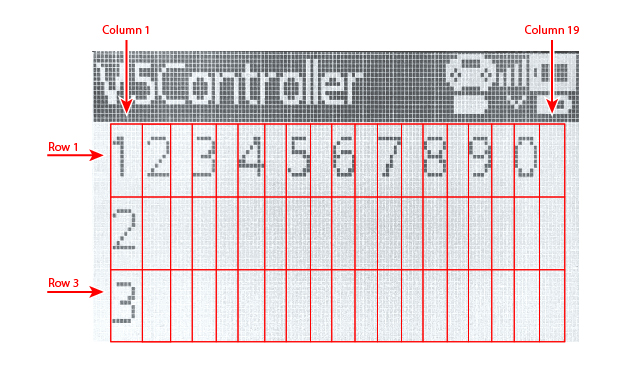
V5 控制器螢幕有 3 行 19 列,用於顯示文字和數字。
print#
controller_1.screen.print 使用目前遊標位置在控制器螢幕上顯示文字、數字或變數值。
Usage:
controller_1.screen.print(value, sep, precision)
範圍 |
描述 |
|---|---|
|
若要在控制器螢幕上顯示的文字、數字或變數值。可以用逗號分隔多個值來列印它們。 |
|
可選。用於分隔值的字串。必須寫成關鍵字參數,例如 |
|
可選。列印簡單數字時顯示的小數位數。必須以關鍵字參數的形式指定,例如 |
# Print a number on the Controller screen
controller_1.screen.print(1)
# Print multiple numbers separated by hyphens
controller_1.screen.print(1, 2, 3, 4, sep="-")
# Print a number using one decimal place
controller_1.screen.print(1 / 3, precision=1)
set_cursor#
set_cursor 將遊標移到控制器螢幕上的指定行和列。下一個列印值將顯示在該位置。
Usage:
controller_1.screen.set_cursor(row, col)
範圍 |
描述 |
|---|---|
|
遊標所在行,從 |
|
遊標所在列,從 |
# Print text at row 2, column 1
controller_1.screen.set_cursor(2, 1)
controller_1.screen.print("Ready")
column#
column 返回目前將在控制器螢幕上列印文字的列。
Usage:
controller_1.screen.column()
參數 |
描述 |
|---|---|
此方法沒有參數。 |
# Print the current column number
controller_1.screen.set_cursor(2, 3)
controller_1.screen.print(controller_1.screen.column())
row#
row 返回目前行,文字將列印在控制器螢幕上。
Usage:
controller_1.screen.row()
參數 |
描述 |
|---|---|
此方法沒有參數。 |
# Print the current row number
controller_1.screen.set_cursor(2, 3)
controller_1.screen.print(controller_1.screen.row())
clear_screen#
clear_screen 清除控制器螢幕並將遊標移回起始位置。
Usage:
controller_1.screen.clear_screen()
參數 |
描述 |
|---|---|
此方法沒有參數。 |
# Print text, then clear the Controller screen
controller_1.screen.print("VEX V5")
wait(2, SECONDS)
controller_1.screen.clear_screen()
clear_row#
clear_row 清除控制器畫面上的一行。
Usage:
controller_1.screen.clear_row(row)
範圍 |
描述 |
|---|---|
|
可選。要清除的行,從 |
# Clear row 2 on the Controller screen
controller_1.screen.clear_row(2)
next_row#
next_row 將遊標移到控制器畫面下一行的第 1 列。下一個列印值將顯示在該行。
Usage:
controller_1.screen.next_row()
參數 |
描述 |
|---|---|
此方法沒有參數。 |
# Print on two rows
controller_1.screen.print("VEX V5")
controller_1.screen.next_row()
controller_1.screen.print("Controller")
獲取器#
.pressing#
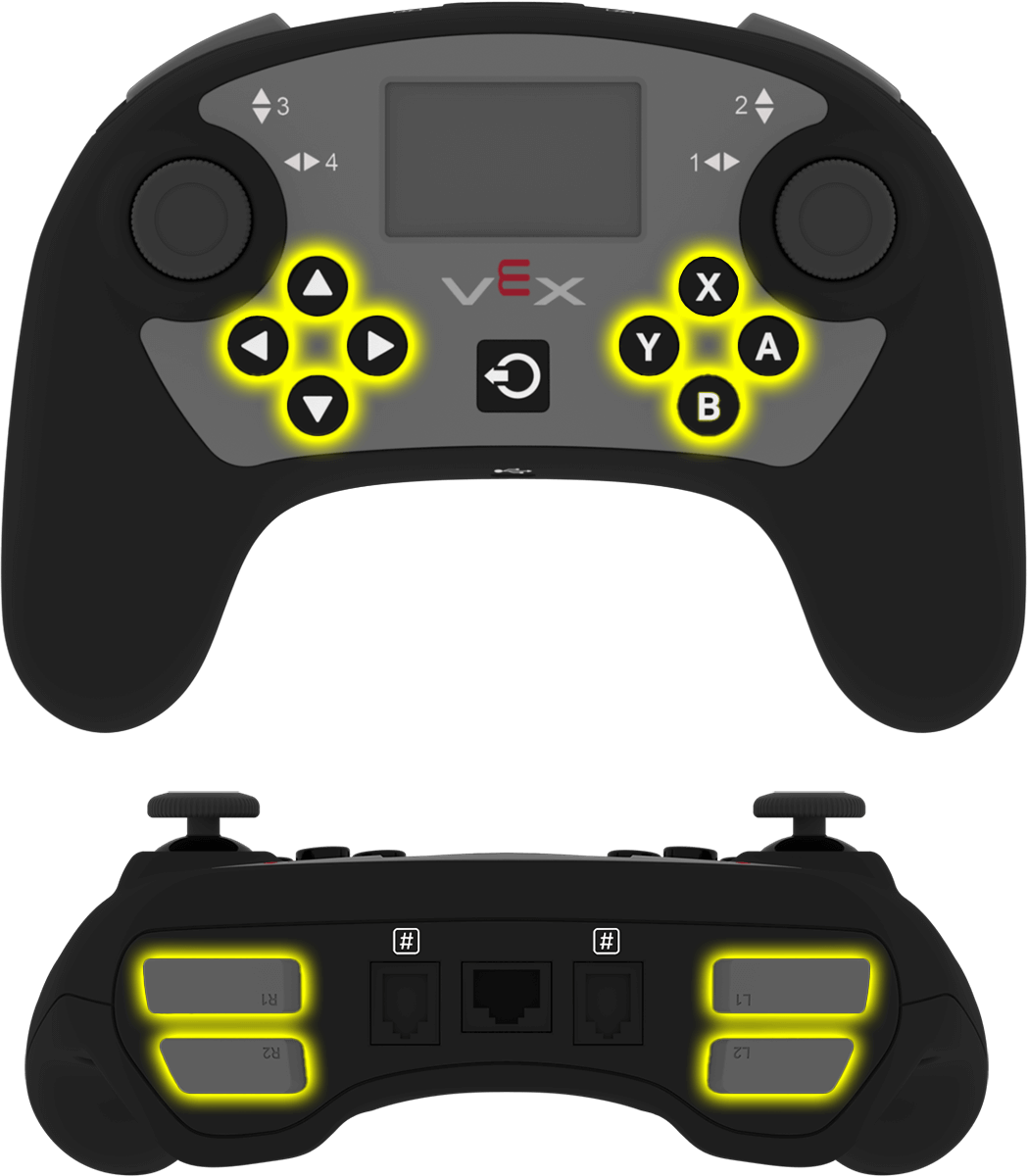
.pressing 返回控制器上的特定按鈕目前是否被按下。此方法必須在特定的按鈕物件上調用,例如 controller_1.buttonA。
True— 指定的按鈕正在被按下。False— 指定的按鈕未按下。
用法:
此方法可以使用其中一個可用的按鈕物件:
按鈕 |
命令 |
|---|---|
|
|
|
|
|
|
|
|
|
|
|
|
|
|
|
|
|
|
|
|
|
|
|
|
參數 |
描述 |
|---|---|
此方法沒有參數。 |
# Turn right while L1 is pressed
while True:
    if controller_1.buttonL1.pressing():
        drivetrain.turn(RIGHT)
    else:
        drivetrain.stop()

    wait(20, MSEC)
.position#
.position 返回操縱桿軸的位置,數值範圍為 -100 到 100。
必須在特定的軸物件上呼叫此方法,例如 controller_1.axis1。
用法:
此方法可以使用其中一個可用的軸物件:

軸 |
命令 |
|---|---|
|
|
|
|
|
|
|
|
參數 |
描述 |
|---|---|
此方法沒有參數。 |
# Turn with the left joystick
remote_control_code_enabled = False

while True:
    if controller_1.axis4.position() > 10:
        drivetrain.turn(RIGHT)
    elif controller_1.axis4.position() < -10:
        drivetrain.turn(LEFT)
    else:
        drivetrain.stop()

    wait(20, MSEC)
回呼函數#
.pressed#
.pressed 表示當指定的按鈕被按下時執行一個函數。一旦使用,每次按下該按鈕時,函數都會自動運行。
用法:
此方法可以使用其中一個可用的按鈕物件:
按鈕 |
命令 |
|---|---|
|
|
|
|
|
|
|
|
|
|
|
|
|
|
|
|
|
|
|
|
|
|
|
|
範圍 |
描述 |
|---|---|
|
預先定義的 函數,每次按下指定的按鈕時執行。 |
|
可選。包含要傳遞給回呼函數的參數的元組。有關更多信息,請參閱使用帶參數的事件。 |
# Drive forward when A is pressed
def drive_forward():
    drivetrain.drive_for(FORWARD, 100, MM)

controller_1.buttonA.pressed(drive_forward)
.released#
.released 會在指定的按鈕被釋放時運行一個函數。一旦使用,每次釋放該按鈕時,函數都會自動運行。
用法:
此方法可以使用其中一個可用的按鈕物件:
按鈕 |
命令 |
|---|---|
|
|
|
|
|
|
|
|
|
|
|
|
|
|
|
|
|
|
|
|
|
|
|
|
範圍 |
描述 |
|---|---|
|
預先定義的 函數,每次釋放指定的按鈕時都會執行。 |
|
可選。包含要傳遞給回呼函數的參數的元組。有關更多信息,請參閱使用帶參數的事件。 |
# Drive backward when A is released
def back_up():
    drivetrain.drive_for(REVERSE, 100, MM)

controller_1.buttonA.released(back_up)
.changed#
.changed 會在操縱桿沿著指定軸的位置改變時執行一個函數。一旦啟用,函數會在每次操縱桿沿著該軸的位置變化時自動運行。
用法:
此方法可以使用其中一個可用的軸物件:
軸 |
命令 |
|---|---|
|
|
|
|
|
|
|
|
範圍 |
描述 |
|---|---|
|
預先定義的 函數,每次操縱桿的位置沿著指定軸變化時運行。 |
|
可選。包含要傳遞給回呼函數的參數的元組。有關更多信息,請參閱使用帶參數的事件。 |
# Play a sound when the left joystick moves
def tada_sound():
    brain.play_sound(SoundType.TADA)

controller_1.axis4.changed(tada_sound)
建構函數#
Controller#
Controller 建立一個控制器物件。只有在 VEXcode 之外配置控制器時才需要手動建立控制器物件。
Usage:
Controller(controller_type)
範圍 |
描述 |
|---|---|
|
可選。要建立的控制器類型: |
# Create the primary Controller
controller_1 = Controller(PRIMARY)
# Create a partner Controller
controller_2 = Controller(PARTNER)