
AIビジョン#
導入#
AIビジョンセンサーは、物体、色、およびAprilTag IDを検出・追跡できます。これにより、ロボットは周囲の状況を分析し、物体を追跡し、検出された視覚データに基づいて反応することが可能になります。
このページでは、AIビジョンセンサー、カラーシグネチャ、カラーコードの名前として、それぞれ ai_vision_1、 RED_BOX、 BOX_CODE を使用しています。必要に応じて、ご自身で設定した名前に置き換えてください。
以下にすべてのメソッドの一覧を示します。
ゲッター – AIビジョンセンサーからデータを取得します。
take_snapshot– 特定の署名のデータをキャプチャします。installed– AI ビジョンセンサーが V5 Brain に接続されているかどうか。
プロパティ – take_snapshot から返されるオブジェクトデータ。
.exists– 現在の検出でオブジェクトが存在するかどうか。.width– 検出されたオブジェクトの幅。.height– 検出されたオブジェクトの高さ。.centerX– オブジェクトの中心の X 座標。.centerY– オブジェクトの中心の Y 座標。.angle– カラーコードの向き。.originX– オブジェクトの左上隅の X 座標。.originY– オブジェクトの左上隅の Y 座標。.id– オブジェクトの分類またはタグ ID。.score– AI分類の信頼度スコア。
コンストラクター – AIビジョンセンサーとそのシグネチャを手動で初期化および構成します。
ゲッター#
take_snapshot#
take_snapshot は、AI Vision Sensor のフレームからデータをフィルタリングして、単一のシグネチャ (センサーが認識できるものの保存された説明。事前学習済みのオブジェクト、AprilTag ID、構成済みのカラーシグネチャまたはカラーコードなど) を作成し、タプル を返します。
この方法で使用する前に、カラーシグネチャとカラーコードをVision Utilityで最初に設定する必要があります。
The tuple stores objects ordered from largest to smallest by width, starting at index 0. Each object’s properties can be accessed using its index. An empty tuple is returned if no matching objects are detected.
Usage:
ai_vision_1.take_snapshot(SIGNATURE)
パラメータ |
説明 |
|---|---|
|
指定されたシグネチャのデータのみを含むようにデータセットをフィルタリングします。使用可能なシグネチャは次のとおりです。
|
|
オプション。返されるオブジェクトの最大数を1~24の間で設定します。デフォルト値は8です。 |
# Drive forward if an object is detected
while True:
    objects = ai_vision_1.take_snapshot(AiVision.ALL_AIOBJS)
    if objects[0].exists:
        drivetrain.drive_for(FORWARD, 50, MM)
    wait(50, MSEC)
注: 返されたタプルは、Python の sorted を使用して、幅だけでなく任意の プロパティ でソートできます。たとえば、AprilTag ID でソートする場合:
# Print each detected AprilTag ID in ascending order by ID
while True:
    apriltags = sorted(ai_vision_1.take_snapshot(AiVision.ALL_TAGS), key=id)
    for tag in apriltags:
        print(tag.id)
    wait(1, SECONDS)
または、高さ順に並べ替えることもできます。
# Print each detected AprilTag ID in ascending order by height
while True:
    apriltags_by_height = sorted(ai_vision_1.take_snapshot(AiVision.ALL_TAGS), key=lambda tag: tag.height)
    for tag in apriltags_by_height:
        print(tag.height)
    wait(1, SECONDS)
AI分類#
AIビジョンセンサーは、特定のAI分類に基づいてさまざまな物体を検出できます。デバイスウィンドウでAIビジョンセンサーを設定する際に選択したAI分類モデルに応じて、検出される物体が異なります。現在利用可能なモデルは以下のとおりです。
教室の構成要素
ID番号 |
AI分類 |
|---|---|
0 |
|
1 |
|
2 |
|
3 |
|
4 |
|
5 |
|
6 |
|
7 |
|
8 |
|
VEX V5 ロボティクス競技会 ハイステークス
ID番号 |
AI分類 |
|---|---|
0 |
|
1 |
|
2 |
|
VEX V5ロボティクス競技会、延期へ
ID番号 |
AI分類 |
|---|---|
0 |
|
1 |
|
VEX V5 ロボティクス競技会オーバーライド
ID番号 |
AI分類 |
|---|---|
0 |
|
1 |
|
2 |
|
3 |
|
4 |
|
カラーシグネチャー#
カラーシグネチャとは、AIビジョンセンサーが認識できる固有の色です。これらのシグネチャにより、AIビジョンセンサーは色に基づいて物体を検出および追跡できます。カラーシグネチャが設定されると、センサーは視野内のその特定の色を持つ物体を識別できます。カラーシグネチャは、take_snapshot で使用され、色付き物体をリアルタイムで処理および検出します。
プロジェクトで設定済みのカラーシグネチャを使用するには、その名前はセンサー名、アンダースコア2つ、そしてカラーシグネチャ名でなければなりません。例: ai_vision_1__RED_BOX。
# Display if any objects match the RED_BOX signature
while True:
    brain.screen.set_cursor(1, 1)
    brain.screen.clear_row(1)
    # Change to any configured Color Signature
    red_box = ai_vision_1.take_snapshot(ai_vision_1__RED_BOX)
    if red_box[0].exists:
        brain.screen.print("Color detected!")
        wait(100, MSEC)
カラーコード#
カラーコードとは、特定の順序で並べられた色の特徴で構成される構造化されたパターンです。これらのコードにより、AIビジョンセンサーはあらかじめ定義された色のパターンを認識できます。カラーコードは、複雑な物体を識別したり、自律航行のための固有のマーカーを作成したりするのに役立ちます。
プロジェクトで設定済みのカラーコードを使用するには、その名前はセンサー名、アンダースコア2つ、そしてカラーコード名でなければなりません。例: ai_vision_1__BOX_CODE。
# Display if any objects match the BOX_CODE code
while True:
    brain.screen.set_cursor(1, 1)
    brain.screen.clear_row(1)
    # Change to any configured Color Code
    box_code = ai_vision_1.take_snapshot(ai_vision_1__BOX_CODE)
    if box_code[0].exists:
        brain.screen.print("Code detected!")
        wait(100, MSEC)
installed#
installed 、AI Vision Sensor が現在 V5 Brain に接続されているかどうかを示すブール値を返します。
True– AIビジョンセンサーはV5ブレインに接続されています。False– AIビジョンセンサーがV5ブレインに接続されていません。
Usage:
ai_vision_1.installed()
パラメータ |
説明 |
|---|---|
このメソッドにはパラメータがありません。 |
# Display a message if the AI Vision Sensor is connected
if ai_vision_1.installed():
    brain.screen.print("Installed!")
不動産#
take_snapshot を使用した後に タプル に格納される各オブジェクトには、10 個のプロパティが含まれています。
、.id 、.score を除くすべてのプロパティ値は take_snapshot が使用された時点で AI Vision Sensorの視野内での検出されたオブジェクトの位置とサイズを表します。これらの値は、センサーの320×240ピクセルの解像度に基づいてピクセル単位で測定されます。
.exists#
.exists 、インデックスがタプル内に存在するかどうかを示すブール値を返します。
True– インデックスが存在します。False– インデックスが存在しません。
# Check if at least two objects are detected
while True:
    brain.screen.clear_screen()
    brain.screen.set_cursor(1, 1)
    objects = ai_vision_1.take_snapshot(AiVision.ALL_AIOBJS)

    if objects[0].exists:
        if objects[1].exists:
            brain.screen.print("At least 2")

        else:
            brain.screen.print("Less than 2")
    wait(50, MSEC)
.width#
.width 、検出されたオブジェクトの幅をピクセル単位で返します。これは 1 から 320 までの整数です。
# Approach an object until it's at least 100 pixels wide
while True:
    objects = ai_vision_1.take_snapshot(AiVision.ALL_AIOBJS)

    if objects[0].exists:
        if objects[0].width < 100:
            drivetrain.drive(FORWARD)
    else:
        drivetrain.stop()
    wait(50, MSEC)
.height#
.height 、検出されたオブジェクトの高さをピクセル単位で返します。これは 1 から 240 までの整数です。
# Approach an object until it's at least 90 pixels tall
while True:
    objects = ai_vision_1.take_snapshot(AiVision.ALL_AIOBJS)

    if objects[0].exists:
        if objects[0].height < 90:
            drivetrain.drive(FORWARD)
    else:
        drivetrain.stop()
    wait(50, MSEC)
.centerX#
.centerX 、検出されたオブジェクトの中心の x 座標をピクセル単位で返します。これは 0 から 320 までの整数です。
# Turn until an object is directly in front of the sensor
drivetrain.set_turn_velocity(10, PERCENT)
drivetrain.turn(RIGHT)

while True:
    objects = ai_vision_1.take_snapshot(AiVision.ALL_AIOBJS)

    if objects[0].exists:
        if 140 < objects[0].centerX < 180:
            drivetrain.stop()
    wait(10,MSEC)
.centerY#
.centerY 、検出されたオブジェクトの中心の y 座標をピクセル単位で返します。これは 0 から 240 までの整数です。
# Approach an object until the object's center is
# high enough in the field of view
while True:
    objects = ai_vision_1.take_snapshot(AiVision.ALL_AIOBJS)

    if objects[0].exists:
        if objects[0].centerY < 150:
            drivetrain.drive(FORWARD)
    else:
        drivetrain.stop()
    wait(50, MSEC)
.angle#
.angle 、検出されたカラーコードまたは AprilTag ID の向きを度数で返します。これは 0 から 359 までの整数です。
# Turn left or right depending on how a
# configured Color Code is rotated
while True:
    box_code = ai_vision_1.take_snapshot(ai_vision_1__BOX_CODE)

    if box_code[0].exists:
        if 50 < box_code[0].angle < 100:
            drivetrain.turn(RIGHT)

        elif 270 < box_code[0].angle < 330:
            drivetrain.turn(LEFT)

        else:
            drivetrain.stop()
    else:
        drivetrain.stop()
    wait(50, MSEC)
.originX#
.originX 、検出されたオブジェクトのバウンディングボックスの左上隅の x 座標をピクセル単位で返します。これは 0 から 320 までの整数です。
# Display if an object is to the left or the right
while True:
    brain.screen.clear_screen()
    brain.screen.set_cursor(1,1)

    objects = ai_vision_1.take_snapshot(AiVision.ALL_AIOBJS)

    if objects[0].exists:
        if objects[0].originX < 120:
            brain.screen.print("To the left!")
        else:
            brain.screen.print("To the right!")
    else:
        brain.screen.print("No objects")
    wait(100, MSEC)
.originY#
.originY 、検出されたオブジェクトのバウンディングボックスの左上隅の y 座標をピクセル単位で返します。これは 0 から 240 までの整数です。
# Display if an object is close or far
while True:
    brain.screen.clear_screen()
    brain.screen.set_cursor(1,1)

    objects = ai_vision_1.take_snapshot(AiVision.ALL_AIOBJS)

    if objects[0].exists:
        if objects[0].originY < 110:
            brain.screen.print("Close")
        else:
            brain.screen.print("Far")
.id#
.id 、検出された AI 分類の ID または AprilTag ID を整数として返します。
AprilTag ID の場合、 .id プロパティは、検出された AprilTag ID 番号を 0 ~ 36 の範囲で表します。AI 分類の場合、 .id プロパティは、AI 分類 セクションで定義済みの ID に対応します。
# Move forward when AprilTag ID 1 is detected
while True:
    apriltags = ai_vision_1.take_snapshot(AiVision.ALL_TAGS)

    if apriltags[0].exists:
        if apriltags[0].id == 1:
            robot.drive(FORWARD)
    else:
        drivetrain.stop()

    wait(50, MSEC)
.score#
.score 、検出された AI 分類の信頼度スコアを 1 から 100 までの整数として返します。
スコアが低いほど、センサーは検出された物体に対する確信度が低いことを意味し、スコアが高いほど、センサーの確信度が高いことを意味します。
建設業者#
Constructors are used to manually create AiVision, Colordesc, and Codedesc objects, which are necessary for configuring the AI Vision Sensor outside of VEXcode.
AiVision#
AiVision 、AI ビジョンセンサーを作成します。
使用法
Vision(smartport, sigs)
パラメータ |
説明 |
|---|---|
|
AIビジョンセンサーが接続されているスマートポートは、 |
|
Optional. The name of one or more signatures, separated by commas (
|
# Create the Color Signatures
RED_BOX = Colordesc(1, 255, 0, 0, 20, 0.9)
BLUE_BOX = Colordesc(0, 26, 255, 0, 20, 0.9)

# Create the Color Code
RED_BLUE = Codedesc(RED_BOX, BLUE_BOX)

"""
Create an AI Vision Sensor with the following signatures:
- RED_BLUE
- AiVision.ALL_TAGS - for AprilTag IDs
"""
ai_vision_1 = AiVision(Ports.PORT1, RED_BLUE, AiVision.ALL_TAGS)
Colordesc#
Colordesc はカラーシグネチャを作成します。AIビジョンセンサーには、最大7つの異なるカラーシグネチャを同時に保存できます。
Usage:
Colordesc(index, red, green, blue, hangle, hdsat)
パラメータ |
説明 |
|---|---|
|
|
|
赤色の値(0~255)。 |
|
緑色の値(0~255)。 |
|
青色の値(0~255)。 |
|
色相環上の角度範囲(1~40度)で表した、許容される色相変動幅。値が大きいほど、基本色相からの回転偏差が大きくなります。 |
|
許容される彩度偏差は0.10から1.00までです。この値は、色が変化する可能性のある彩度範囲の割合を表します(例:0.10 = ±10%の彩度)。 |
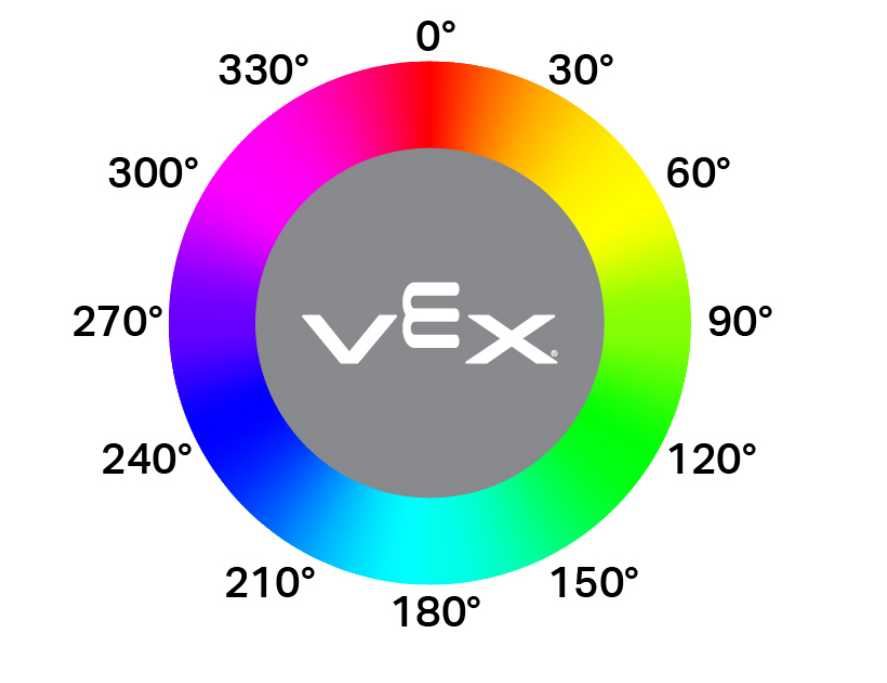
"""
Create a Color Signature with the following values:
- index: 1
- red: 255
- green: 0
- blue: 0
- hangle: 20
- hdsat: 0.9
"""
# Create a red Color Signature
RED_BOX = Colordesc(1, 255, 0, 0, 20, 0.9)
Codedesc#
Codedesc はカラーコードを作成します。使用するには、少なくとも 2 つの定義済みの カラーシグネチャ が必要です。ビジョンセンサーには、一度に最大 8 種類の異なるカラーコードを保存できます。
Usage:
Codedesc(sig1, sig2, sig3, sig4, sig5)
パラメータ |
説明 |
|---|---|
|
以前に作成された カラーシグネチャ。 |
|
以前に作成された カラーシグネチャ。 |
|
オプション。以前に作成された カラーシグネチャ。 |
|
オプション。以前に作成された カラーシグネチャ。 |
|
オプション。以前に作成された カラーシグネチャ。 |
# Create the Color Signatures
RED_BOX = Colordesc(1, 255, 0, 0, 20, 0.9)
BLUE_BOX = Colordesc(0, 26, 255, 0, 20, 0.9)

# Create a Color Code with the Color Signatures
BOX_CODE = Codedesc(RED_BOX, BLUE_BOX)
Tagdesc#
Tagdesc は AprilTag ID を作成します。これを使用すると、識別可能な AprilTag ID を定義でき、コードがより明確で読みやすくなります。
Usage:
Tagdesc(id)
パラメータ |
説明 |
|---|---|
|
使用するAprilTag ID。 |
# Set AprilTag ID 7 to be the "goal"
goal = Tagdesc(7)