
Inertial#
Introduction#
The VEX AIM Coding Robot has a built-in Inertial Sensor. This sensor measures how the robot is moving and turning.
The Inertial Sensor uses two parts to do this. The gyroscope measures turning, such as the robot’s heading, rotation, turn rate, and orientation. The accelerometer measures changes in motion, such as speeding up, slowing down, or stopping suddenly during a crash.
The Inertial blocks can be used to track turns, measure acceleration, detect crashes, and reset heading or rotation values.
Below is a list of all blocks:
Values — Report orientation and movement data.
heading — Reports the direction the robot is facing, from 0 to 359.99 degrees.
rotation — Reports how far the robot has turned.
acceleration — Reports how quickly the robot is speeding up or slowing down on the selected axis.
get turn rate — Reports how fast the robot is rotating on the selected axis.
orientation — Reports the robot’s roll, pitch, or yaw angle.
Actions — Respond to crashes or reset turn values.
when crashed — Runs attached blocks when the robot detects a sudden impact.
set crash sensitivity — Adjusts how sensitive crash detection is to impacts.
reset heading — Resets the robot’s heading value to 0 degrees.
reset rotation — Resets the robot’s rotation value to 0 degrees.
Values#
heading#
A heading is the direction the robot is facing, measured in degrees from 0 to 359.99. The heading reporter block reports the robot’s current heading.
The starting heading is 0 degrees. If the robot turns past 359.99 degrees, the heading wraps back to 0 degrees.
heading in degrees
Parameters |
Description |
|---|---|
This block has no parameters. |
Examples
  when started
  [Turn right until the heading reaches 90 degrees.]
  turn [right v]
  wait [0.05] seconds
  wait until <(heading in degrees) [math_greater_than v] [90]>
  stop all movement
  when started
  [Display the robot's heading as it is rotated by hand.]
  forever
  clear row [1] on screen
  set cursor to row [1] column [1] on screen
  print (heading in degrees) on screen ▶
  wait [0.05] seconds
rotation#
Rotation is how much the robot has turned, measured in degrees. Unlike heading, rotation can increase past 359.99 degrees or decrease below 0 degrees. At the beginning of a project, the rotation value is set to 0 degrees. The rotation reporter block reports the robot’s current rotation.
Turning right increases the rotation, and turning left decreases the rotation. For example, making two full turns to the right will report a rotation of 720 degrees. Turning one full turn to the left from 0 degrees will report a rotation of -360 degrees.
(rotation in degrees)
Parameters |
Description |
|---|---|
This block has no parameters. |
Example
  when started
  [Print the rotation value as the robot turns.]
  turn [right v] for [480] degrees ◀ and don't wait
  forever
  clear screen
  set cursor to row [1] column [1] on screen
  print (rotation in degrees) on screen ▶
acceleration#
Acceleration is how quickly the robot is speeding up or slowing down. The acceleration reporter block reports the robot’s acceleration along the selected axis, from -4.00 G to 4.00 G.
A G is a unit used to measure acceleration. 1 G is about the acceleration you feel from gravity while sitting still.
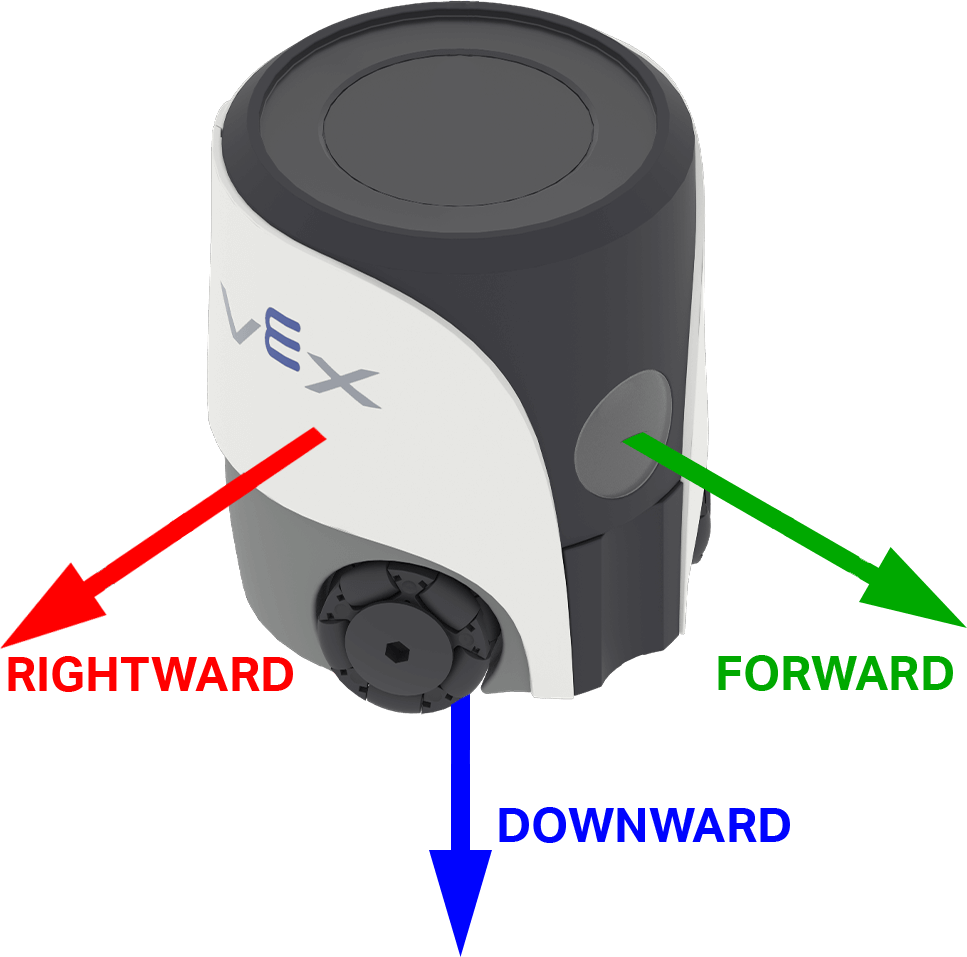
The value can be positive or negative depending on the direction of acceleration on the selected axis. On AIM, the axis options are named for directions on the robot: forward, rightward, and downward.
(acceleration of [forward v] axis in g :: custom-controller-inertial-timer)
Parameters |
Description |
|---|---|
axis |
The axis to measure acceleration on:
|
Example
  when started
  [Show the change in acceleration as the robot begins to move.]
  set cursor to row [4] column [1] on screen
  print (join [Resting: ] (acceleration of [rightward v] axis in g :: custom-controller-inertial-timer)) on screen ▶
  set cursor to next row on screen
  wait [0.5] seconds
  move [right v] for [50] [mm v] ◀ and don't wait
  wait [0.1] seconds
  print (join [Startup: ] (acceleration of [rightward v] axis in g :: custom-controller-inertial-timer)) on screen ▶
get turn rate#
Turn rate is how fast the robot is rotating. The get turn rate reporter block reports the robot’s current rotation speed along the selected axis in degrees per second (dps), as an integer.
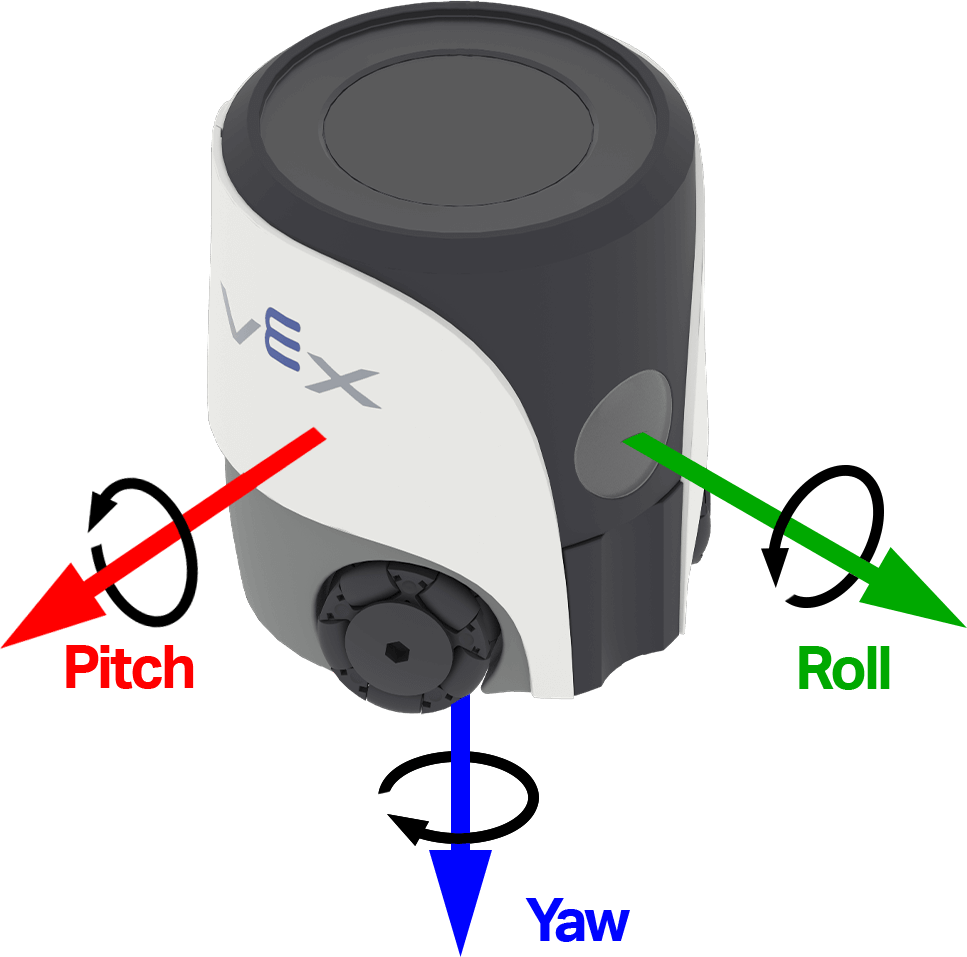
The value can be positive or negative depending on the direction the robot is rotating on that axis. The image below uses arrows to show the direction of positive rotation for roll, pitch, and yaw.
(get turn rate of [yaw v] axis in dps)
Parameters |
Description |
|---|---|
axis |
The axis to report turn rate on:
|
Example
  when started
  [Observe the yaw turn rate as the robot turns.]
  turn [right v] for [180] degrees ◀ and don't wait
  forever
  clear screen
  set cursor to row [1] column [1] on screen
  print (get turn rate of [yaw v] axis in dps) on screen ▶
orientation#
Orientation is the robot’s current angle on a selected turning axis. The orientation reporter block reports the robot’s roll, pitch, or yaw, from -180.00 to 180.00 degrees as a decimal number.
Roll, pitch, and yaw describe different ways the robot can tilt or turn. The image below uses arrows to show the direction of positive rotation for roll, pitch, and yaw.
orientation of [yaw v] in degrees
Parameters |
Description |
|---|---|
axis |
The orientation axis to report:
|
Example
  when started
  [Display the robot's orientation as it is rotated by hand.]
  forever
  clear row [1] on screen
  set cursor to row [1] column [1] on screen
  print (orientation of [roll v] in degrees) on screen ▶
  wait [0.05] seconds
Actions#
when crashed#
The when crashed hat block runs the attached stack when the robot detects a sudden impact or collision. Crash detection uses the accelerometer and the current crash sensitivity.
when crashed
Parameters |
Description |
|---|---|
This block has no parameters. |
Example
  when started
  [Start moving forward.]
  set move velocity to [100]%
  move [forward v]

  when crashed
  [Respond when a crash is detected.]
  stop all movement
  play sound [crash v] ▶
set crash sensitivity#
The set crash sensitivity stack block adjusts how much sudden acceleration is needed for the robot to detect a crash.
set crash sensitivity to [low v]
Parameters |
Description |
|---|---|
sensitivity |
How sensitive the robot is when detecting crashes:
|
Example
  when started
  [Move slowly with high crash sensitivity.]
  set move velocity to [35]%
  set crash sensitivity to [high v]
  move [forward v]

  when crashed
  [Respond when a crash is detected.]
  stop all movement
  play sound [crash v] ▶
reset heading#
The reset heading stack block resets the robot’s current heading to 0 degrees. After this block runs, the direction the robot is currently facing becomes the new 0-degree heading.
reset heading
Parameters |
Description |
|---|---|
This block has no parameters. |
Example
  when started
  [Face left before turning around.]
  turn to heading [270] degrees ▶
  reset heading
  wait [1] seconds
  turn to heading [180] degrees ▶
reset rotation#
The reset rotation stack block resets the robot’s current rotation value to 0 degrees. After this block runs, the robot tracks future turns from the new 0-degree rotation value.
reset rotation
Parameters |
Description |
|---|---|
This block has no parameters. |
Example
  when started
  [Turn for 480 degrees before resetting rotation.]
  turn [right v] for [480] degrees ▶
  reset rotation
  forever
  clear screen
  set cursor to row [1] column [1] on screen
  print (rotation in degrees) on screen ▶