
惯性仪#
简介#
VEX AIM 编程机器人内置惯性仪。该传感器用于测量机器人的运动和转向情况。
惯性仪由两部分组成。陀螺仪测量转向,例如机器人的航向、旋转、转弯速率和姿态。加速度计测量运动变化,例如加速、减速或在碰撞过程中突然停止。
惯性仪指令块可用于跟踪转弯、测量加速度、检测碰撞以及重置航向或旋转值。
以下是所有指令块的列表:
数值——报告方向和运动数据。
航向 — 报告机器人面向的方向,范围从 0 到 359.99 度。
旋转 — 报告机器人旋转了多少。
加速度 — 报告机器人在选定轴上加速或减速的速度。
获取转弯速率 — 报告机器人绕选定轴旋转的速度。
方向 — 报告机器人的横滚角、俯仰角或偏航角。
动作——应对碰撞或重置回合值。
值#
航向#
航向是指机器人面向的方向,以度为单位,范围从 0 到 359.99。航向报告模块报告机器人的当前航向。
初始航向角为0度。如果机器人转弯超过359.99度,航向角将回落至0度。
归位度数
参数 |
描述 |
|---|---|
该块没有参数。 |
示例
当开始
[Turn right until the heading reaches 90 degrees.]
[右 v] 转
等待 [0.05] 秒
等到 <(归位度数) [math_greater_than v] [90]>
停止移动
当开始
[Display the robot's heading as it is rotated by hand.]
永久循环
清除屏幕第 [1] 行
在屏幕上设定光标至 [1] 行 [1] 列
在屏幕上打印 (归位度数)▶
等待 [0.05] 秒
旋转#
旋转角度是指机器人转动的程度,以度为单位。与航向角不同,旋转角度可以超过 359.99 度,也可以低于 0 度。在项目开始时,旋转角度值设置为 0 度。旋转角度报告指令块用于报告机器人当前的旋转角度。
向右转动会增加旋转角度,向左转动会减少旋转角度。例如,向右转动两圈,旋转角度为 720 度。从 0 度向左转动一圈,旋转角度为 -360 度。
(转向角度值)
参数 |
描述 |
|---|---|
该块没有参数。 |
示例
当开始
[Print the rotation value as the robot turns.]
[右 v] 转 [480] 度 ◀ 并且不等待
永久循环
清屏
在屏幕上设定光标至 [1] 行 [1] 列
在屏幕上打印 (转向角度值)▶
加速度#
加速度是指机器人加速或减速的快慢。加速度报告指令块会报告机器人沿所选轴的加速度,范围从 -4.00 G 到 4.00 G。
G是用来测量加速度的单位。1G大约相当于你静止坐着时感受到的重力加速度。
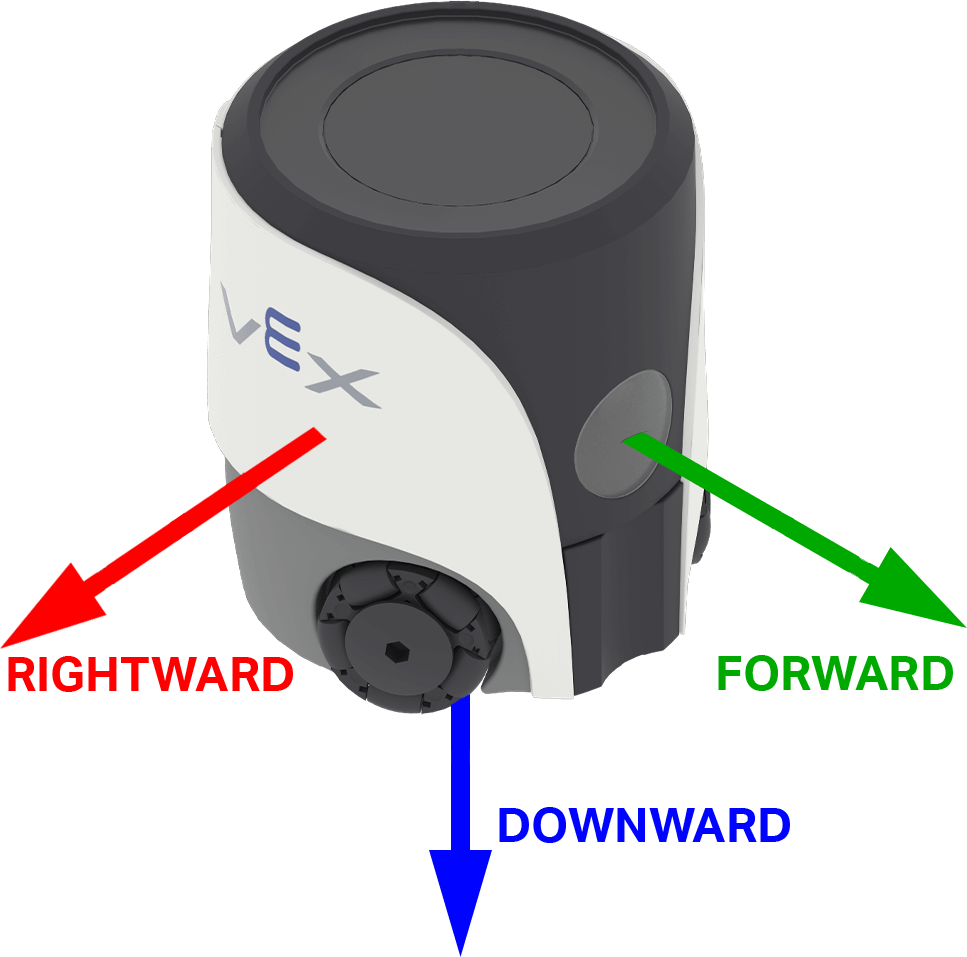
该值可以是正数也可以是负数,具体取决于所选轴上的加速度方向。在 AIM 中,轴选项以机器人的方向命名:向前、向右和向下。
([向前 v] 轴加速度值\(g\) :: custom-controller-inertial-timer)
参数 |
描述 |
|---|---|
轴 |
测量加速度的轴:
|
示例
当开始
[Show the change in acceleration as the robot begins to move.]
在屏幕上设定光标至 [4] 行 [1] 列
在屏幕上打印 (连接 [Resting: ] ([向右 v] 轴加速度值\(g\) :: custom-controller-inertial-timer))▶
在屏幕上设定光标至下一行
等待 [0.5] 秒
移动 [右 v] 到 [50] [毫米 v] ◀ 并且不等待
等待 [0.1] 秒
在屏幕上打印 (连接 [Startup: ] ([向右 v] 轴加速度值\(g\) :: custom-controller-inertial-timer))▶
获取转弯速率#
转弯速率是指机器人旋转的速度。获取转弯速率报告模块会以整数形式报告机器人沿选定轴的当前旋转速度,单位为度/秒 \(dps\)。
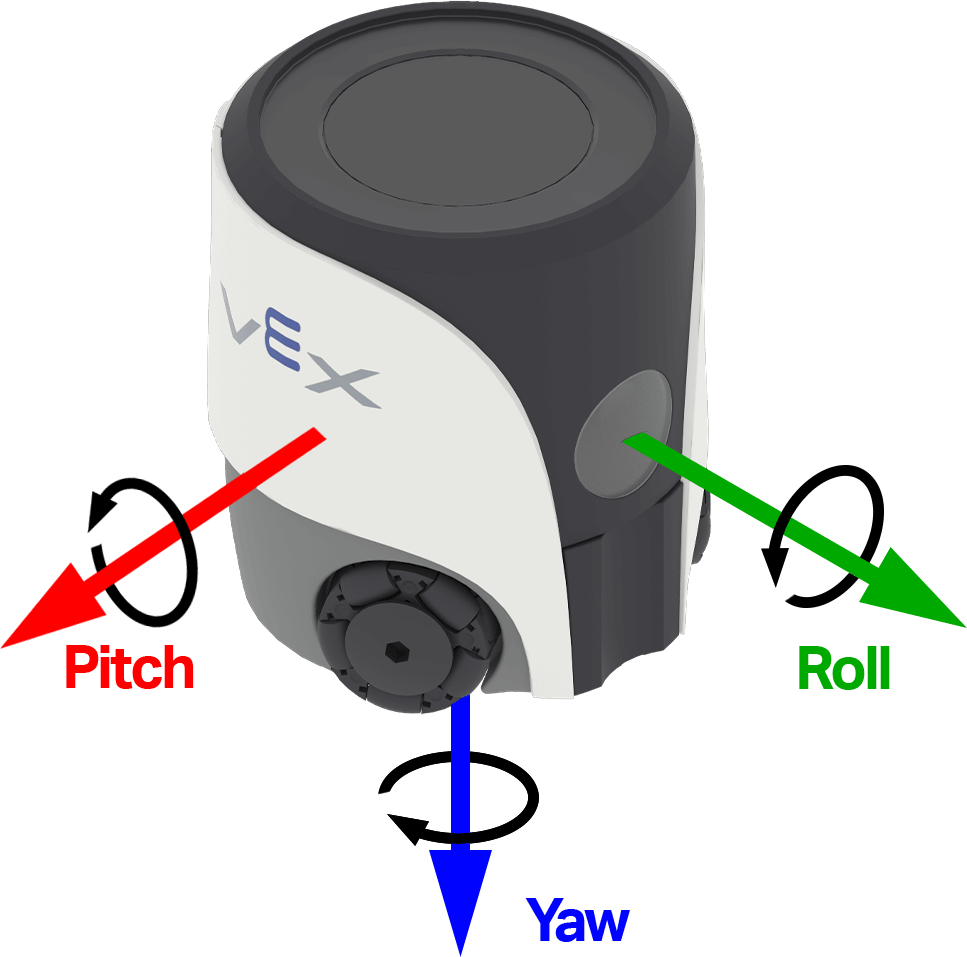
该值可以是正数也可以是负数,具体取决于机器人绕该轴旋转的方向。下图使用箭头表示横滚、俯仰和偏航的正旋转方向。
([偏转 v] 轴角速度\(dps\))
参数 |
描述 |
|---|---|
轴 |
报告转弯速率的轴:
|
示例
当开始
[Observe the yaw turn rate as the robot turns.]
[右 v] 转 [180] 度 ◀ 并且不等待
永久循环
清屏
在屏幕上设定光标至 [1] 行 [1] 列
在屏幕上打印 ([偏转 v] 轴角速度\(dps\))▶
方向#
姿态是指机器人当前在选定的转动轴上的角度。姿态报告指令块会以十进制数的形式报告机器人的横滚角、俯仰角或偏航角,范围从 -180.00 度到 180.00 度。
横滚、俯仰和偏航描述了机器人倾斜或转向的不同方式。下图使用箭头表示横滚、俯仰和偏航的正旋转方向。
[偏转 v] 偏转角度值(度)
参数 |
描述 |
|---|---|
轴 |
要报告的姿态轴:
|
示例
当开始
[Display the robot's orientation as it is rotated by hand.]
永久循环
清除屏幕第 [1] 行
在屏幕上设定光标至 [1] 行 [1] 列
在屏幕上打印 ([横滚 v] 偏转角度值(度))▶
等待 [0.05] 秒
动作#
当碰撞时#
当机器人检测到突然的冲击或碰撞时,碰撞时帽块会运行其下的指令块。碰撞检测使用加速度计和当前碰撞灵敏度。
当碰撞
参数 |
描述 |
|---|---|
该块没有参数。 |
示例
当开始
[Start moving forward.]
设定移动速度为 [100]%
移动 [向前 v]

当碰撞
[Respond when a crash is detected.]
停止移动
播放音效 [撞毁 v] ▶
设置碰撞敏感度#
设置碰撞灵敏度指令块用于调整机器人检测到碰撞所需的突然加速度。
设定碰撞灵敏度为 [低 v]
参数 |
描述 |
|---|---|
敏感度 |
机器人在检测碰撞时的敏感度:
|
示例
当开始
[Move slowly with high crash sensitivity.]
设定移动速度为 [35]%
设定碰撞灵敏度为 [高 v]
移动 [向前 v]

当碰撞
[Respond when a crash is detected.]
停止移动
播放音效 [撞毁 v] ▶
重置航向#
重置航向 指令块会将机器人的当前航向重置为 0 度。此指令块运行后,机器人当前朝向的方向将成为新的 0 度航向。
重置航向角度值
参数 |
描述 |
|---|---|
该块没有参数。 |
示例
当开始
[Face left before turning around.]
归位至 [270] 度 ▶
重置航向角度值
等待 [1] 秒
归位至 [180] 度 ▶
重置旋转#
重置旋转 指令块会将机器人的当前旋转值重置为 0 度。此指令块运行后,机器人将以新的 0 度旋转值作为基准进行后续转弯。
重置转向角度值
参数 |
描述 |
|---|---|
该块没有参数。 |
示例
当开始
[Turn for 480 degrees before resetting rotation.]
[右 v] 转 [480] 度 ▶
重置转向角度值
永久循环
清屏
在屏幕上设定光标至 [1] 行 [1] 列
在屏幕上打印 (转向角度值)▶