
Sensors#
Introduction#
The VEX AIR Drone includes an Inertial Sensor for measuring rotational movement and for detecting changes in motion as well as a Range Sensor for detecting distances. The VEX AIR Drone can also keep track of its battery levels. These sensors allow the drone to track its orientation, heading, acceleration, and distance from objects.
Below is a list of all available methods:
Inertial - Track the drone’s rotational movement.
get_rotation– Returns how much the drone has turned since it started.get_heading– Returns the current heading (0 to 359.99°).get_yaw– Returns the yaw angle (–180 to 180°).get_roll– Returns the roll angle (–180 to 180°).get_pitch– Returns the pitch angle (–180 to 180°).reset_rotation– Resets the rotation value to 0.reset_heading– Sets the current heading to 0.set_heading– Sets the heading to a specific value.get_acceleration– Returns acceleration in a specific direction.get_turn_rate– Returns turning rate in degrees per second.
Range — Detect distances from the drone’s Range Sensors.
get_distance— Returns the distance between the selected Range Sensor and the nearest detected object.
Battery - Return the drone’s battery percentage.
get_battery_level– Returns the drone’s battery level in percent.
Inertial#
get_rotation#
get_rotation returns how many degrees the drone has turned since it started. It adds up all turns and returns the total in degrees: positive for clockwise, negative for counterclockwise.
Usage:
drone.inertial.get_rotation()
Parameters |
Description |
|---|---|
This method has no parameters. |
# Display the rotation after turning
drone.take_off(climb_to=500)
drone.turn_for(LEFT, 450, 50)
print(drone.inertial.get_rotation(), end="")
drone.land()
get_heading#
get_heading returns the drone’s heading angle as a float in the range 0 to 359.99 degrees.
Usage:
drone.inertial.get_heading()
Parameters |
Description |
|---|---|
This method has no parameters. |
# Display the drone's heading after turning
drone.take_off(climb_to=500)
drone.set_turn_velocity(100)
drone.turn(RIGHT)
wait(5, SECONDS)
controller.screen.print("Heading: ")
controller.screen.print(drone.inertial.get_heading())
drone.land()
get_yaw#
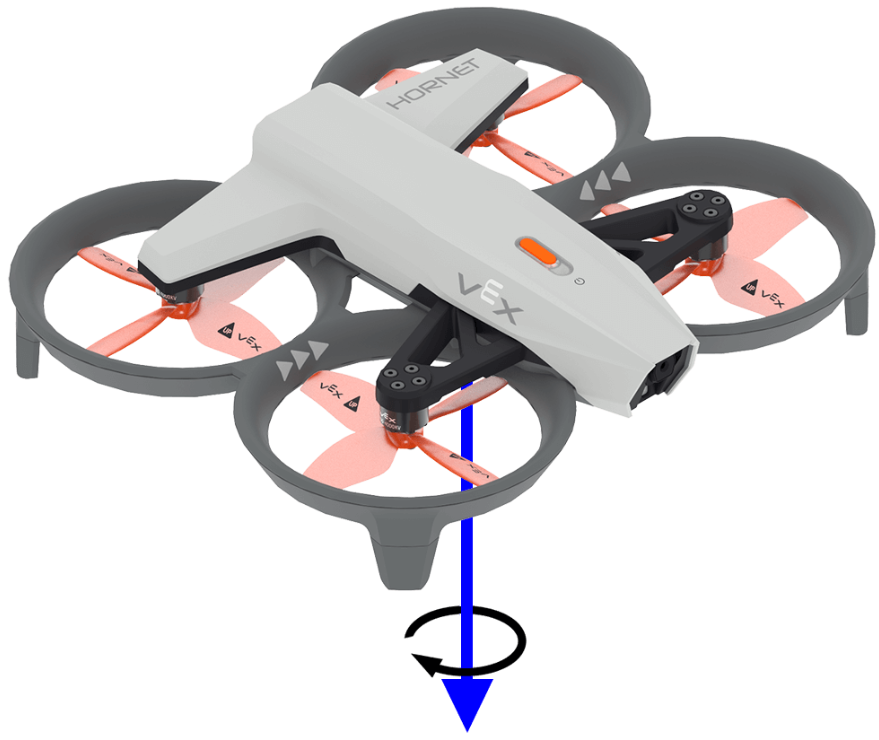
get_yaw returns the drone’s yaw angle in the range –180.0 to 180.0 degrees as a float.
The image below uses an arrow to show the direction of positive rotation for yaw.
Usage:
drone.inertial.get_yaw
Parameters |
Description |
|---|---|
This method has no parameters. |
# Display the yaw angle as you rotate the drone by hand
while True:
    controller.screen.clear_screen()
    controller.screen.set_cursor(1, 1)
    controller.screen.print("Yaw: ")
    controller.screen.print(drone.inertial.get_yaw())
    wait(0.2, SECONDS)
get_roll#
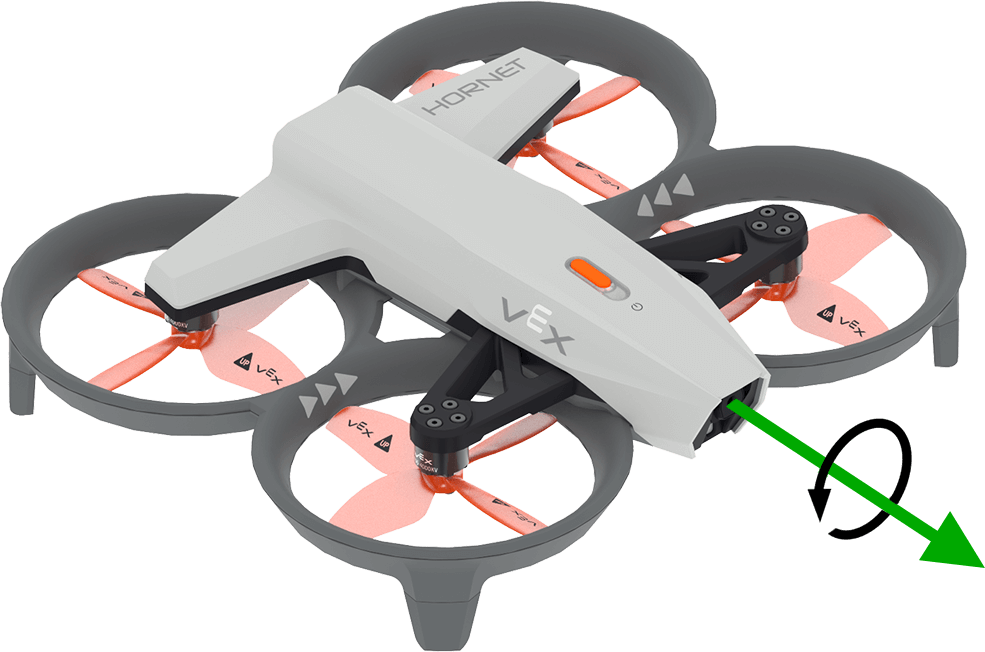
get_roll returns the drone’s roll angle in the range –180.0 to 180.0 degrees as a float.
The image below uses an arrow to show the direction of positive rotation for roll.
Usage:
drone.inertial.get_roll()
Parameters |
Description |
|---|---|
This method has no parameters. |
# Display the roll angle as you rotate the drone by hand
while True:
    controller.screen.clear_screen()
    controller.screen.set_cursor(1, 1)
    controller.screen.print("Roll: ")
    controller.screen.print(drone.inertial.get_roll())
    wait(0.2, SECONDS)
get_pitch#
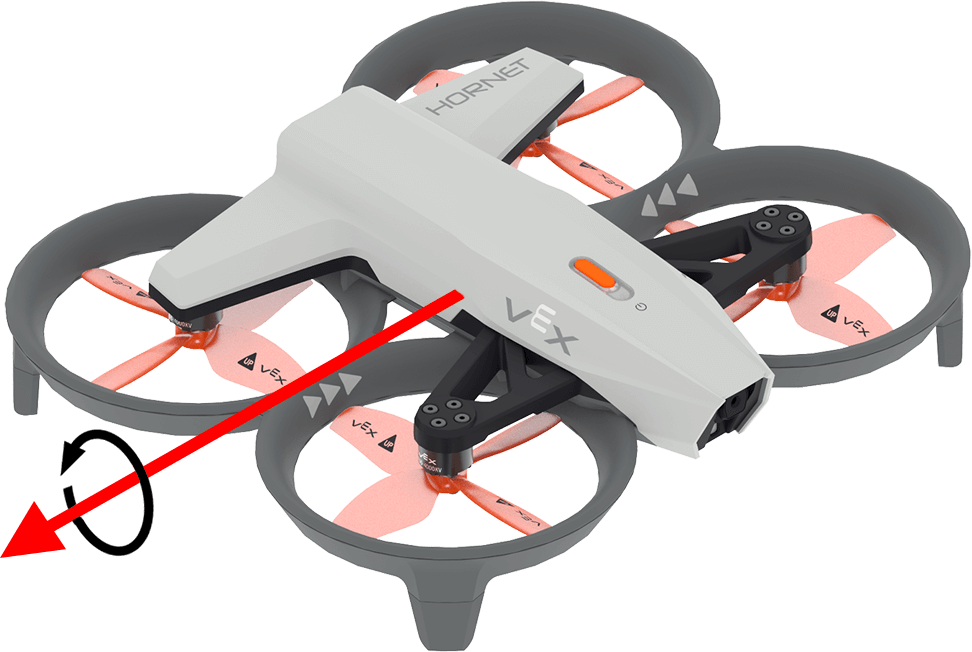
get_pitch returns the drone’s pitch angle in the range –180.0 to 180.0 degrees as a float.
The image below uses an arrow to show the direction of positive rotation for pitch.
Usage:
drone.inertial.get_pitch()
Parameters |
Description |
|---|---|
This method has no parameters. |
# Display the pitch angle as you rotate the drone by hand
while True:
    controller.screen.clear_screen()
    controller.screen.set_cursor(1, 1)
    controller.screen.print("Pitch: ")
    controller.screen.print(drone.inertial.get_pitch())
    wait(0.2, SECONDS)
reset_rotation#
reset_rotation resets the drone’s rotation value to 0 degrees.
Usage:
drone.inertial.reset_rotation()
Parameters |
Description |
|---|---|
This method has no parameters. |
# Display the new rotation after resetting
drone.take_off(climb_to=500)
drone.turn(RIGHT)
while not drone.inertial.get_rotation() > 360:
    wait(5, MSEC)
drone.hover()
drone.inertial.reset_rotation()
wait(1, SECONDS)
print(drone.inertial.get_rotation(), end="")
drone.land()
reset_heading#
reset_heading resets the drone’s heading to 0 degrees.
Usage:
drone.inertial.reset_heading()
Parameters |
Description |
|---|---|
This method has no parameters. |
# Turn to a heading, reset the heading, and turn to the same heading.
drone.take_off(climb_to=500)
drone.turn_to(heading=180, velocity=50)
wait(3,SECONDS)
drone.inertial.reset_heading()
drone.turn_to(heading=180, velocity=50)
wait(3,SECONDS)
drone.land()
set_heading#
set_heading sets the drone’s heading to a specified value in degrees.
Usage:
drone.inertial.set_heading(heading)
Parameters |
Description |
|---|---|
|
The value to use for the new heading in the range 0 to 359.99 degrees. |
# Turn to a heading, set the heading, and turn to the same heading.
drone.take_off(climb_to=500)
drone.turn_to(heading=180, velocity=50)
wait(3,SECONDS)
drone.inertial.set_heading(90)
drone.turn_to(heading=180, velocity=50)
wait(3,SECONDS)
drone.land()
get_acceleration#
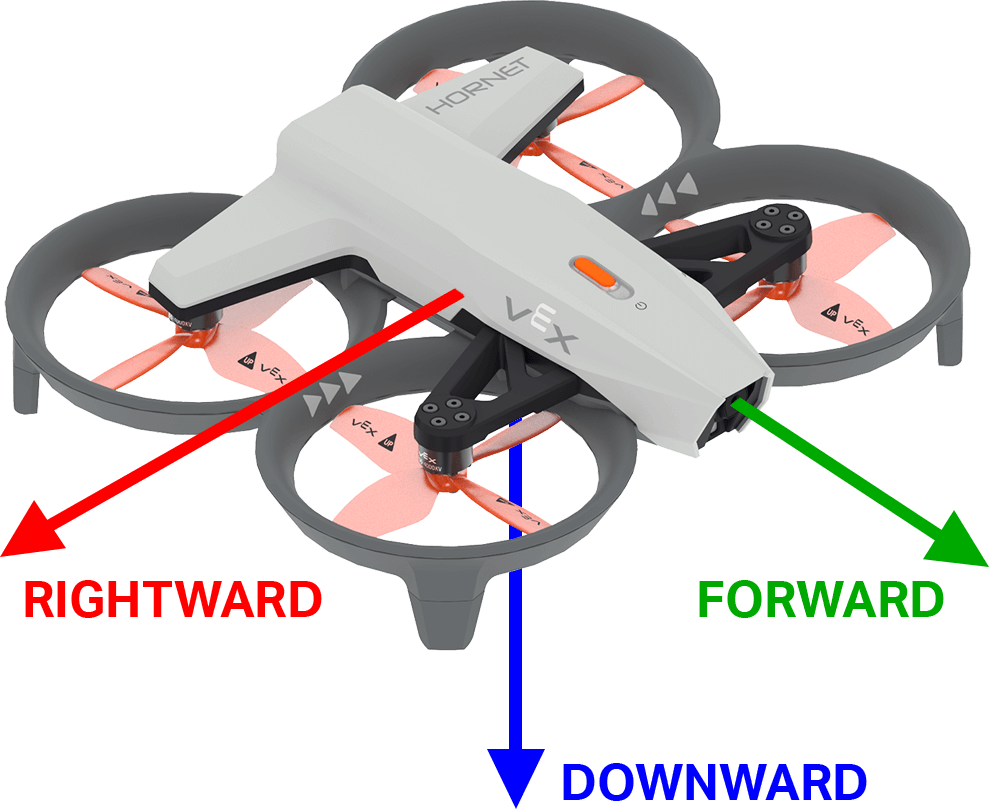
get_acceleration returns the drone’s acceleration in a specified direction. The returned value represents the rate of change in velocity, measured in units of g (where 1g ≈ 9.81 m/s²), as a float ranging from -4.00 to 4.00.
The image below uses arrows to show the direction of positive acceleration for forward and rightward, and negative acceleration for downward.
Usage:
drone.inertial.get_acceleration(type)
Parameters |
Description |
|---|---|
|
The direction of acceleration to report:
|
# Display the acceleration as the drone takes off
drone.take_off(500, wait=False)
while True:
    controller.screen.clear_screen()
    controller.screen.set_cursor(1, 1)
    controller.screen.print(drone.inertial.get_acceleration(DOWNWARD))
    wait(5, MSEC)
get_turn_rate#
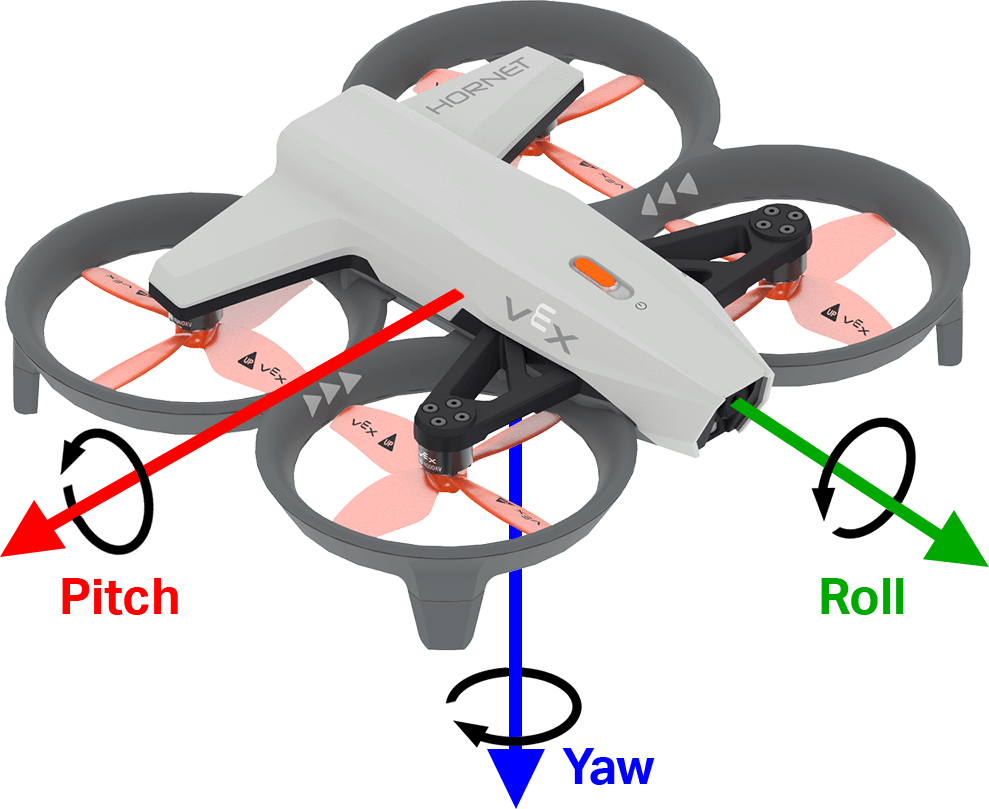
get_turn_rate returns the rate at which the drone is rotating along the specified axis. This returns a value in degrees per second (dps) as a float from –1000.00 to 1000.00 dps.
The image below uses arrows to show the direction of positive rotation for roll, pitch, and yaw.
Usage:
drone.inertial.get_turn_rate(axis)
Parameters |
Description |
|---|---|
|
Which orientation to report:
|
# Display the drone turn rate as it is rotated by hand.
while True:
    controller.screen.clear_screen()
    controller.screen.set_cursor(7, 1)
    controller.screen.print(drone.inertial.get_turn_rate(ROLL))
Range#
get_distance#
get_distance returns the distance between the selected Range Sensor and the nearest detected object.
Usage:
drone.range.get_distance(range, units)
Parameters |
Description |
|---|---|
|
The Range Sensor to use: |
|
Optional. The distance unit:
|
# Fly forward until close to an object
drone.take_off(climb_to=500)
drone.move_at(direction=0, velocity=50)
while not drone.range.get_distance(FORWARD_RANGE, MM) < 750:
    wait(0.1, SECONDS)
drone.land()
Battery#
get_battery_level#
get_battery_level returns the drone’s battery charge level as a percentage. This returns a number from 0 to 100.
Usage:
drone.get_battery_level()
Parameters |
Description |
|---|---|
This method has no parameters. |
# Display the drone's battery level
if drone.get_battery_level() < 25:
    controller.screen.print("Charge the drone Battery!")
else:
    controller.screen.print("Ready to fly!")