
Inercial#
Introducción#
El IQ (2.ª generación) Cerebro incluye un sensor inercial incorporado. Este sensor mide cómo se mueve y gira el cerebro.
El sensor inercial utiliza dos componentes para realizar esta función. El giroscopio mide los giros, como la dirección, la rotación, la velocidad angular y la orientación. El acelerómetro mide los cambios en el movimiento, como la aceleración o la desaceleración a lo largo de los ejes x, y y z.
This page uses brain_inertial as the example Inertial Sensor name. Replace it with your own configured name as needed.
A continuación se muestra una lista de todos los métodos disponibles:
Orientación: lee y controla el rumbo, la rotación y la calibración del sensor.
heading— Returns the direction the sensor is facing, from 0 to 359.99 degrees.rotation— Returns how far the sensor has turned.calibrate— Calibrates the Inertial Sensor.set_heading— Sets the Inertial Sensor’s current heading to a new heading value.set_rotation— Sets the Inertial Sensor’s current rotation to a new rotation value.is_calibrating— Returns whether the Inertial Sensor is currently calibrating.reset_heading— Resets the Inertial Sensor’s current heading to 0 degrees.reset_rotation— Resets the Inertial Sensor’s current rotation to 0 degrees.changed— Registers a function to run when the Inertial Sensor’s heading changes.
Movimiento: Mide la aceleración, la velocidad de rotación y la inclinación.
acceleration— Returns how quickly the sensor is speeding up or slowing down on the selected axis.gyro_rate— Returns how fast the sensor is rotating on the selected axis.orientation— Returns the Inertial Sensor’s roll, pitch, or yaw angle.
Constructores: Inicialice y configure manualmente un sensor inercial.
Inertial— Creates an Inertial Sensor.
Orientación#
heading#
A heading is the direction the sensor is facing, measured in degrees from 0 to 359.99. heading returns the sensor’s current heading.
El rumbo inicial es de 0 grados. Si el sensor gira más allá de los 359,99 grados, el rumbo vuelve a 0 grados.
Usage:
brain_inertial.heading(units)
Parámetros |
Descripción |
|---|---|
|
Optional. The heading unit: |
# Display the heading after turning
drivetrain.turn_for(RIGHT, 450, DEGREES)
brain.screen.print(brain_inertial.heading())
rotation#
Rotation is how much the sensor has turned, measured in degrees. Unlike heading, rotation can increase past 359.99 degrees or decrease below 0 degrees. At the beginning of a project, the rotation value is set to 0 degrees. rotation returns the Inertial Sensor’s current rotation.
Girar a la derecha aumenta la rotación, y girar a la izquierda la disminuye. Por ejemplo, dos giros completos a la derecha producen una rotación de 720 grados. Un giro completo a la izquierda desde 0 grados produce una rotación de -360 grados.
Usage:
brain_inertial.rotation(units)
Parámetros |
Descripción |
|---|---|
|
Optional. The rotation unit: |
# Display the rotation value after turning
drivetrain.turn_for(RIGHT, 450, DEGREES)
brain.screen.print(brain_inertial.rotation())
calibrate#
calibrate calibrates the Inertial Sensor. All subsequent lines will wait for calibration to complete before running. Calibration helps the sensor measure turns correctly by measuring and compensating for sensor noise and drift over a specified period. During this time, the Brain must remain completely still on a stable surface. Movement during calibration can produce inaccurate results.
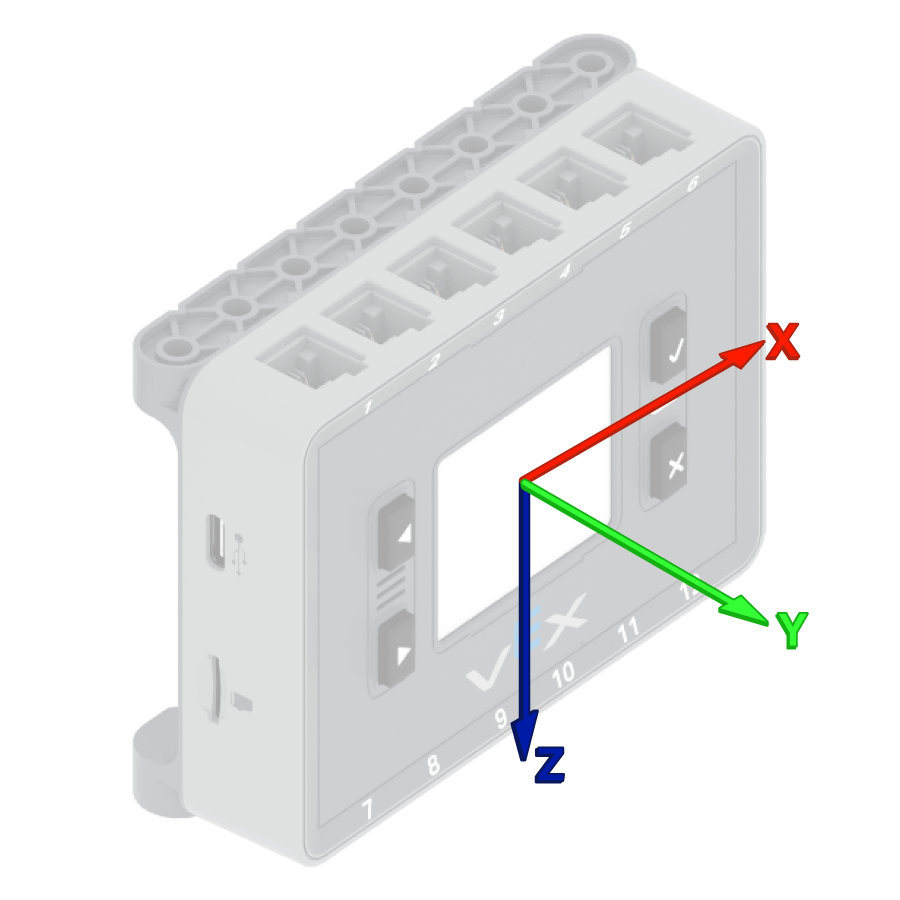
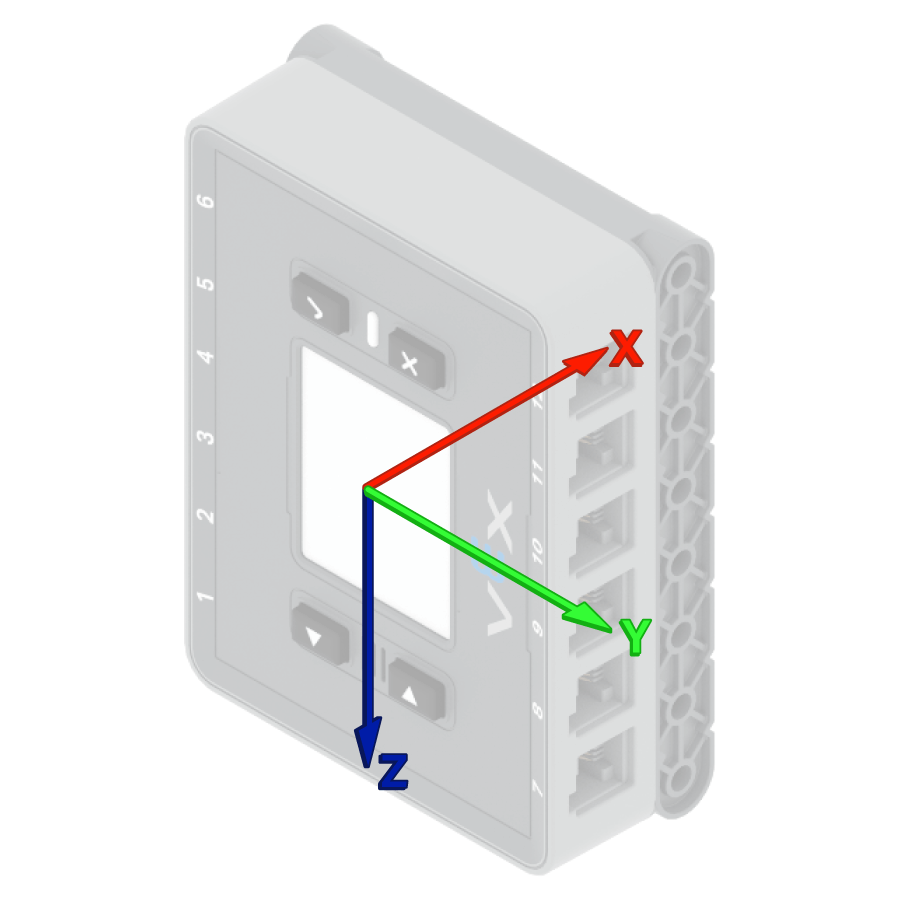
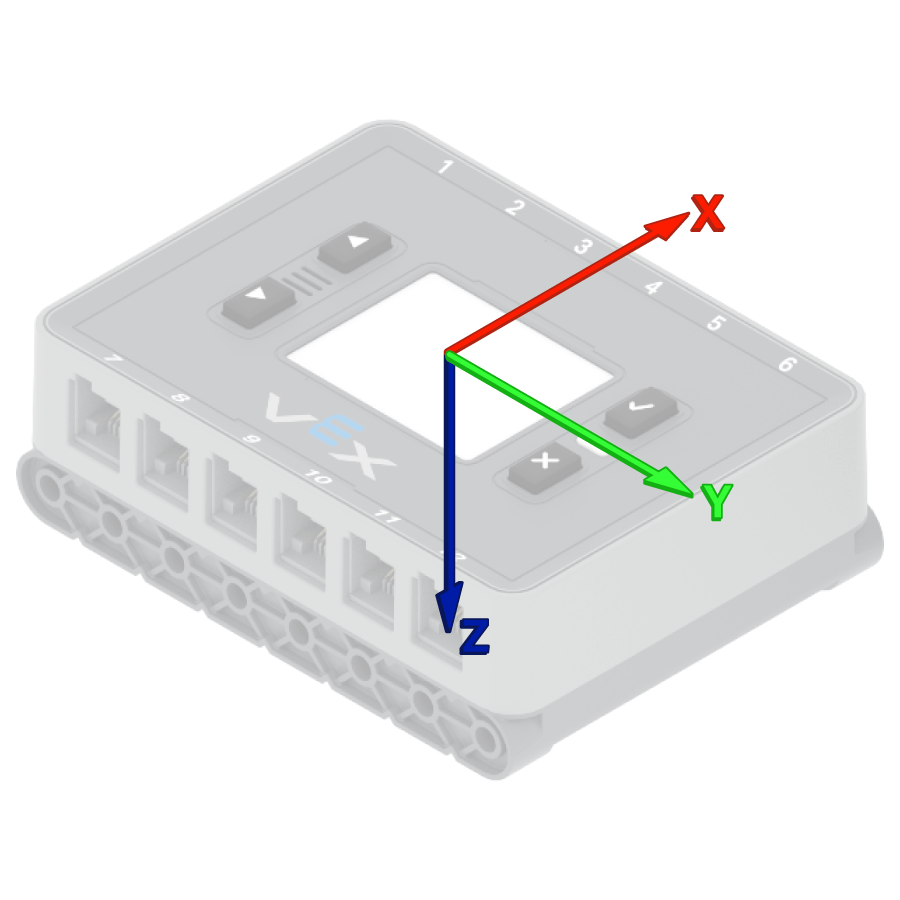
El VEX Brain intenta calibrar automáticamente el sensor inercial integrado al inicio de cada proyecto. Sin embargo, si el robot se transporta o se mueve durante el inicio del proyecto, es posible que el sensor no se calibre correctamente o que la calibración sea incorrecta.
Usage:
brain_inertial.calibrate()
Parámetro |
Descripción |
|---|---|
Este método no tiene parámetros. |
# Start calibration
brain_inertial.calibrate()
# Print after calibration
while brain_inertial.is_calibrating():
    brain.screen.clear_screen()
    brain.screen.set_cursor(1, 1)
    brain.screen.print("Inertial Sensor")
    brain.screen.next_row()
    brain.screen.print("Calibrating")
    wait(50, MSEC)
brain.screen.clear_screen()
brain.screen.set_cursor(1, 1)
brain.screen.print("Done!")
set_heading#
A heading is the direction the sensor is facing, measured in degrees from 0 to 359.99. set_heading() changes the Inertial Sensor’s current heading to a new heading value.
Por ejemplo, si el sensor se ha girado hacia la derecha, al ajustar la orientación a 0 grados, esa posición hacia la derecha se convierte en la nueva dirección de 0 grados. De esta forma, el sensor puede seguir otras orientaciones basándose en esa nueva dirección.
Usage:
brain_inertial.set_heading(value, units)
Parámetros |
Descripción |
|---|---|
|
El valor de rumbo, en grados, que se configurará para el sensor. Este valor puede estar entre 0 y 359,99. |
|
Optional. The heading unit: |
# Turn the robot around
brain_inertial.set_heading(180)
drivetrain.turn_to_heading(0)
set_rotation#
Rotation is how much the sensor has turned, measured in degrees. Unlike heading, rotation can increase past 359.99 degrees or decrease below 0 degrees. At the beginning of a project, the rotation value is set to 0 degrees. set_rotation() changes the Inertial Sensor’s current rotation to a new value.
Por ejemplo, si el sensor ha dado dos vueltas completas a la derecha, su valor de rotación será de 720 grados. Al establecer la rotación en 0 grados, esta volverá a su valor original. De esta forma, el sensor podrá registrar las rotaciones basándose en ese nuevo valor.
Usage:
brain_inertial.set_rotation(value, units)
Parámetros |
Descripción |
|---|---|
|
El valor de rotación, en grados, que se configurará para el sensor. Puede ser un número entero o decimal (flotante). |
|
Optional. The rotation unit: |
# Turn the robot around
brain_inertial.set_rotation(-180)
drivetrain.turn_to_rotation(0)
is_calibrating#
is_calibrating returns whether the Inertial Sensor is currently calibrating.
True— The Inertial Sensor is calibrating.False— The Inertial Sensor is not calibrating.
Usage:
brain_inertial.is_calibrating()
Parámetro |
Descripción |
|---|---|
Este método no tiene parámetros. |
# Start calibration
brain_inertial.calibrate()
# Print while waiting for calibration
while brain_inertial.is_calibrating():
    brain.screen.clear_screen()
    brain.screen.set_cursor(1, 1)
    brain.screen.print("Inertial Sensor")
    brain.screen.next_row()
    brain.screen.print("Calibrating")
    wait(50, MSEC)
brain.screen.clear_screen()
brain.screen.set_cursor(1, 1)
brain.screen.print("Done!")
reset_heading#
reset_heading resets the Inertial Sensor’s current heading to 0 degrees.
Una vez utilizado este método, la dirección actual del sensor se convierte en la nueva dirección de 0 grados.
Usage:
brain_inertial.reset_heading()
Parámetros |
Descripción |
|---|---|
Este método no tiene parámetros. |
# Turn the robot before and after resetting the heading
drivetrain.turn_to_heading(90, DEGREES)
wait(0.5, SECONDS)
brain_inertial.reset_heading()
drivetrain.turn_to_heading(90, DEGREES)
reset_rotation#
reset_rotation resets the Inertial Sensor’s current rotation to 0 degrees.
Una vez utilizado este método, el sensor registra los giros futuros a partir del nuevo valor de rotación de 0 grados.
Usage:
brain_inertial.reset_rotation()
Parámetros |
Descripción |
|---|---|
Este método no tiene parámetros. |
# Turn the robot before and after resetting the rotation
drivetrain.turn_to_rotation(-90, DEGREES)
wait(0.5, SECONDS)
brain_inertial.reset_rotation()
drivetrain.turn_to_rotation(-90, DEGREES)
changed#
changed registers a function to be called when the Inertial Sensor’s heading changes.
Usage:
brain_inertial.changed(callback, arg)
Parámetros |
Descripción |
|---|---|
|
Una función que se ejecuta cuando cambia la dirección del sensor inercial. |
|
Opcional. Una tupla de argumentos para pasar a la función de devolución de llamada. |
def heading_changed():
    brain.screen.set_cursor(1, 1)
    brain.screen.clear_screen()
    brain.screen.print("my heading ")
    brain.screen.next_row()
    brain.screen.print("has changed!")
    wait(0.1, SECONDS)
# Call the function when the inertial heading is changed
wait(1, SECONDS)
drivetrain.turn_for(RIGHT, 90, DEGREES, wait=False)
brain_inertial.changed(heading_changed)
wait(15, MSEC)
Movimiento#
acceleration#
Acceleration is how quickly the sensor is speeding up or slowing down. acceleration returns the acceleration of the Inertial Sensor on the selected axis, from -4.0 G to 4.0 G, as a float.
A G is a unit used to measure acceleration. 1 G is about the acceleration you feel from gravity while sitting still.
The value can be positive or negative depending on the direction of acceleration on the selected axis. The axis options are XAXIS, YAXIS, and ZAXIS.
Usage:
brain_inertial.acceleration(axis)
Parámetros |
Descripción |
|---|---|
eje |
The axis to measure acceleration on:
|
# Display acceleration after moving
vexcode_brain_precision = 2
drivetrain.set_drive_velocity(100, PERCENT)
brain.screen.print("Resting: ")
brain.screen.next_row()
brain.screen.print(brain_inertial.acceleration(XAXIS))
brain.screen.next_row()
wait(1, SECONDS)
drivetrain.drive_for(FORWARD, 500, MM, wait=False)
wait(0.01, SECONDS)
brain.screen.print("Startup: ")
brain.screen.next_row()
brain.screen.print(brain_inertial.acceleration(XAXIS))
gyro_rate#
Gyro rate is how fast the Inertial Sensor is rotating. gyro_rate returns the current rotation speed of the Inertial Sensor on the selected axis.
El valor puede ser positivo o negativo dependiendo de la dirección en la que gire el sensor sobre ese eje.
Usage:
brain_inertial.gyro_rate(axis, units)
Parámetros |
Descripción |
|---|---|
|
The axis to return the gyro rate from:
|
|
Optional. The gyro rate unit:
|
# Display the z-axis gyro rate
drivetrain.turn(RIGHT)
wait(1, SECONDS)
brain.screen.print(brain_inertial.gyro_rate(ZAXIS, RPM))
drivetrain.stop()
orientation#
Orientation is the Inertial Sensor’s current angle on a selected turning axis. orientation returns the roll, pitch, or yaw of the Inertial Sensor.
El balanceo, la inclinación y la guiñada describen las diferentes maneras en que el sensor puede inclinarse o girar.
Usage:
brain_inertial.orientation(axis, units)
Parámetros |
Descripción |
|---|---|
|
The orientation angle to return:
|
|
Optional. The orientation unit: |
# Display the roll, pitch, and yaw of the Brain as it
# is rotated by hand
while True:
    brain.screen.clear_screen()
    brain.screen.print(brain_inertial.orientation(OrientationType.ROLL))
    brain.screen.next_row()
    brain.screen.print(brain_inertial.orientation(OrientationType.PITCH))
    brain.screen.next_row()
    brain.screen.print(brain_inertial.orientation(OrientationType.YAW))
    brain.screen.next_row()
    brain.screen.set_cursor(1, 1)
    wait(0.1, SECONDS)
Constructores#
Constructors are used to manually create Inertial objects, such as when configuring an Inertial Sensor outside of VEXcode.
Inertial#
Inertial creates an Inertial Sensor.
Usage:
Inertial(smartport)
Parámetro |
Descripción |
|---|---|
|
Optional. If using the IQ (2nd gen) Brain’s built-in Inertial Sensor, a Smart Port is not needed. If connecting an external Inertial Sensor, specify the Smart Port that the Inertial Sensor is connected to, written as |
# Create a new object "brain_inertial" with the
# Inertial class
brain_inertial = Inertial()
left_drive_smart = Motor(Ports.PORT1, 1.0, False)
right_drive_smart = Motor(Ports.PORT6, 1.0, True)

drivetrain = SmartDrive(left_drive_smart, right_drive_smart, brain_inertial, 200)

brain_inertial.set_heading(180)
drivetrain.turn_to_heading(0)