
Axis#
Introduction#
The axis class is a derived class of the controller class. It provides access to controller joystick axis values and joystick axis change callbacks.
An axis object is accessed through a controller object. It is not constructed directly.
Access#
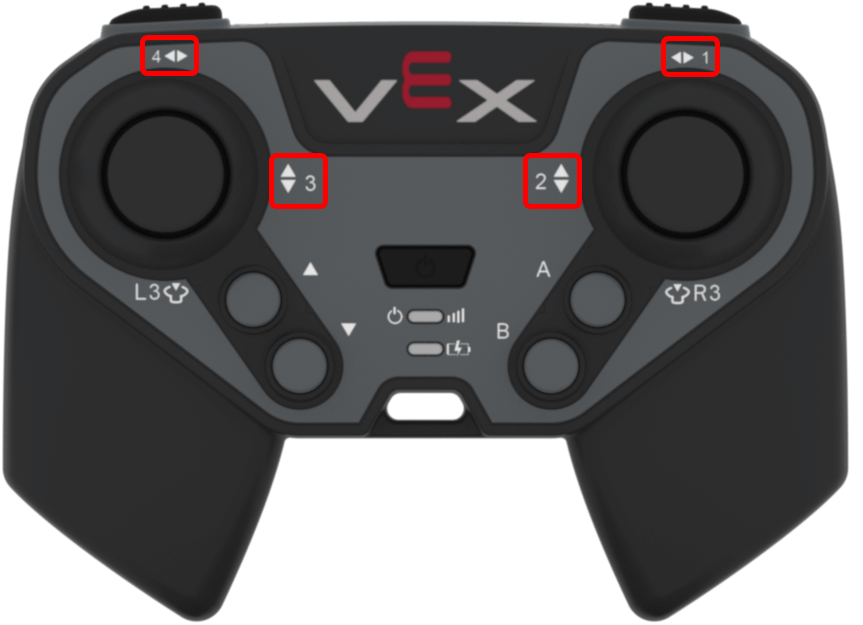
The controller class provides the following axis objects. Each object is an instance of the axis class.
Axis Object |
Example Usage |
Description |
|---|---|---|
|
|
Right joystick horizontal axis. |
|
|
Right joystick vertical axis. |
|
|
Left joystick vertical axis. |
|
|
Left joystick horizontal axis. |
Notes#
Before using an
axismember function, create acontrollerobject.positionreturns a value from-100to100.
// Create a controller object
controller Controller = controller();
Member Functions#
The axis class includes the following member functions:
Getter — Read joystick axis position.
position— Returns the position of the joystick axis.
Callback — Run a function when the joystick’s position changes along an axis.
changed— Runs a function when the joystick’s position changes along that axis.
Getter#
position#
position returns the position of the joystick axis as a value from -100 to 100.
Available Function
int32_t position(percentUnits units = percentUnits::pct) const;
Parameter |
Type |
Description |
|---|---|---|
|
|
Optional. The unit used for the returned axis value. The default is |
Return Value
Returns an int32_t value from -100 to 100.
100— The joystick axis is fully moved in the positive direction.0— The joystick axis is centered.-100— The joystick axis is fully moved in the negative direction.
Example
// Turn with the left joystick
while (true) {
  if (Controller.Axis4.position() > 10) {
    Drivetrain.turn(right);
  }
  else if (Controller.Axis4.position() < -10) {
    Drivetrain.turn(left);
  }
  else {
    Drivetrain.stop();
  }

  wait(20, msec);
}
Callback#
changed#
changed runs a function when the joystick’s position changes along that axis.
Available Function
void changed(void (* callback)(void)) const;
Parameter |
Type |
Description |
|---|---|---|
|
|
A function to run each time the joystick’s position changes along that axis. |
Return Value
This function does not return a value.
Example
Define the callback function outside of main.
// Rumble when the left joystick moves
void controllerRumble() {
  Controller.rumble(".");
}
Register the callback inside main.
int main() {
  vexcodeInit();

  // Run controllerRumble when the joystick's position changes along Axis4
  Controller.Axis4.changed(controllerRumble);
}