
颜色传感器#
介绍#
The colorsensor class is used to access data from the Color Sensor. It uses reflected light to detect objects, identify colors, and measure brightness and hue.
类构造函数#
colorsensor Color1 = colorsensor(index);
类析构函数#
Destroys the colorsensor object and releases associated resources.
virtual ~colorsensor();
参数#
范围 |
类型 |
描述 |
|---|---|---|
|
|
The Smart Port that the Color Sensor is connected to, written as |
示例#
// Create an colorsensor instance in Port 1
colorsensor Color1 = colorsensor(PORT1);
成员功能#
The colorsensor class includes the following member functions:
setLight– Turns the Color Sensor’s LED on, off, or to a set brightness level.isNearObject– Returns whether or not an object is close to the Color Sensor.detects– Returns whether or not a specified color is detected by the Color Sensor.colorname– Returns the name of the color detected by the Color Sensor.brightness– Returns the detected brightness of an object.hue– Returns the detected hue value.
Before calling any colorsensor member functions, an colorsensor instance must be created, as shown below:
/* This constructor is required when using VS Code.
Color Sensor configuration is generated automatically
in VEXcode using the Device Menu. Replace the values
as needed. */

// Create an colorsensor instance in Port 1
colorsensor Color1 = colorsensor(PORT1);
setLight#
设置颜色传感器 LED 的亮度。灯光可以帮助颜色传感器更清晰地检测物体和颜色。
如果颜色传感器的灯熄灭,将灯光功率设置为 0% 以上即可打开灯。
如果颜色传感器的指示灯亮着,将灯光功率设置为 0% 将关闭指示灯。
百分比越高,灯光越亮;百分比越低,灯光越暗。
Available Functions1 — Turns the led on or off using
ledState.void setLight( ledState state );
Parameters2 — 将 LED 灯调至特定亮度。
void setLight(
  int32_t      intensity,
  percentUnits units = percent );
范围 |
类型 |
描述 |
|---|---|---|
|
|
Sets the LED on or off. |
|
|
灯光亮度级别,范围从 0 到 100。 |
|
|
The unit that represents the light intensity: |
此函数不返回值。
Examples// Set the light power to 50 percent.
Color1.setLight(50, percent);
isNearObject#
如果颜色传感器检测到附近物体,则返回该值。
Available Functionsbool isNearObject();
此函数不接受任何参数。
Return Values此函数返回一个布尔值,指示是否检测到附近物体:
true– The Color Sensor detects an object.false– The Color Sensor does not detect an object.
// If an object is detected by the Color Sensor, print
// "near object".
if (Color1.isNearObject()){
  Brain.Screen.print("near object");
}
detects#
返回颜色传感器是否检测到指定颜色。
Available Functions1 — Detects a
colorType.bool detects( colorType color );
Parameters2 — Detects a
vex::color.bool detects( vex::color color );
参数 |
类型 |
描述 |
|---|---|---|
|
|
A valid color:
|
|
|
有效的自定义颜色,或上面列出的预定义颜色之一。 |
true– The Color Sensor detects the color.false– The Color Sensor does not detect the color.
int main() {
  // Initializing Robot Configuration. DO NOT REMOVE!
  vexcodeInit();

  // Drive until a red object is seen
  Drivetrain.drive(forward);
  while (true) {
    if (Color1.detects(red)) {
      Drivetrain.stop();
      break;
    }
    wait(0.5, seconds);
  }
}
colorname#
返回检测到的最接近的匹配颜色。
Available FunctionscolorType colorname();
此函数不接受任何参数。
Return Values直接打印时,会显示与该颜色关联的数值:
颜色 |
数值 |
|---|---|
|
0 |
|
1 |
|
2 |
|
3 |
|
4 |
|
5 |
|
6 |
|
7 |
|
8 |
|
9 |
|
10 |
|
11 |
|
12 |
|
13 |
|
14 |
|
15 |
|
16 |
|
17 |
The function
convertColorToStringis automatically created by VEXcode when a Color Sensor is configured in the Devices window. It is only available inside VEXcode IQ projects and will not work in other environments.When using
colornameoutside of VEXcode, comparisons should be made directly with acolorTypevalue — any color that begins withcolorType::(for example,colorType::greenorcolorType::red).
int main() {
  // Initializing Robot Configuration. DO NOT REMOVE!
  vexcodeInit();

  // Continuously check the detected color
  while (true) {

    // Compare the color name with "red"
    if (convertColorToString(Color1.colorname()) == "red") {
      Brain.Screen.print("Red object!");
    } else {
      Brain.Screen.print("Not red");
    }

    wait(0.5, seconds);
    Brain.Screen.clearScreen();
    Brain.Screen.setCursor(1, 1);
  }
}
int main() {
  // Initializing Robot Configuration. DO NOT REMOVE!
  vexcodeInit();

  // Continuously check the detected color
  while (true) {

    // Compare the color name with the colorType
    if (Color1.colorname() == colorType::red) {
      Brain.Screen.print("Red object!");
    } else {
      Brain.Screen.print("Not red");
    }

    wait(0.5, seconds);
    Brain.Screen.clearScreen();
    Brain.Screen.setCursor(1, 1);
  }
}
brightness#
返回物体反射的光量。
百分比越高,意味着反射回颜色传感器的光线越多;百分比越低,意味着反射回的光线越少。
Available Functionsdouble brightness(bool bRaw = false);
范围 |
类型 |
描述 |
|---|---|---|
|
|
A Boolean value to read raw brightness data instead of percentage. The default is |
表示颜色传感器检测到的亮度值的双精度浮点数,范围为 0 - 100%;或者表示传感器检测到的原始数据的双精度浮点数。
Examples// Set a variable, brightness, to the value of the brightness
// detected by the Color Sensor
double brightness = Color1.brightness();
// Print the brightness detected by the Color Sensor to the
// Brain's screen
Brain.Screen.print(brightness);
hue#
返回颜色传感器检测到的色调。
色相是用色轮上的数字来描述颜色的一种方法。
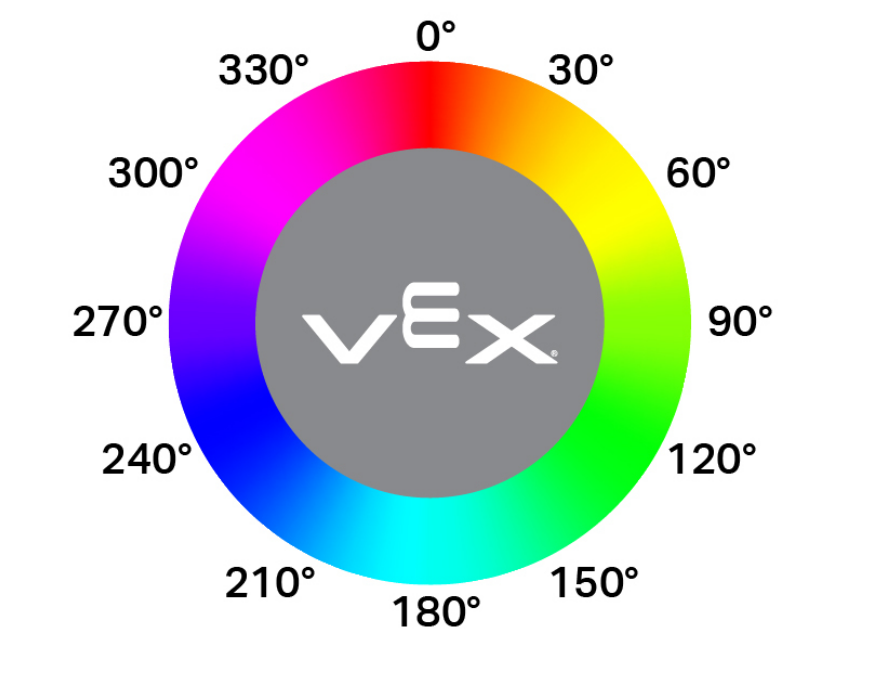
double hue();
此函数不接受任何参数。
Return Values表示颜色传感器检测到的色调值的双精度浮点数,范围为 0 — 359.00。
Examples// Set a variable, hue, to the value of the hue detected
// by the Color Sensor.
double hue = Color1.hue();