
Sensor de color#
Introducción#
The colorsensor class is used to access data from the Color Sensor. It uses reflected light to detect objects, identify colors, and measure brightness and hue.
Constructor de clases#
colorsensor Color1 = colorsensor(index);
Instructor de clase#
Destroys the colorsensor object and releases associated resources.
virtual ~colorsensor();
Parámetros#
Parámetro |
Tipo |
Descripción |
|---|---|---|
|
|
The Smart Port that the Color Sensor is connected to, written as |
Ejemplos#
// Create an colorsensor instance in Port 1
colorsensor Color1 = colorsensor(PORT1);
Funciones de los miembros#
The colorsensor class includes the following member functions:
setLight– Turns the Color Sensor’s LED on, off, or to a set brightness level.isNearObject– Returns whether or not an object is close to the Color Sensor.detects– Returns whether or not a specified color is detected by the Color Sensor.colorname– Returns the name of the color detected by the Color Sensor.brightness– Returns the detected brightness of an object.hue– Returns the detected hue value.
Before calling any colorsensor member functions, an colorsensor instance must be created, as shown below:
/* This constructor is required when using VS Code.
Color Sensor configuration is generated automatically
in VEXcode using the Device Menu. Replace the values
as needed. */

// Create an colorsensor instance in Port 1
colorsensor Color1 = colorsensor(PORT1);
setLight#
Ajusta la intensidad de la luz del LED del sensor de color. La luz ayuda al sensor a detectar objetos y colores con mayor claridad.
Si la luz del sensor de color está apagada, al configurar la potencia de la luz por encima del 0% se encenderá la luz.
Si la luz del sensor de color está encendida, al ajustar la potencia de la luz al 0%, esta se apagará.
Un porcentaje mayor hace que la luz sea más brillante. Un porcentaje menor hace que la luz sea más tenue.
Available Functions1 — Turns the led on or off using
ledState.void setLight( ledState state );
Parameters2 — Enciende el LED con una intensidad específica.
void setLight(
  int32_t      intensity,
  percentUnits units = percent );
Parámetro |
Tipo |
Descripción |
|---|---|---|
|
|
Sets the LED on or off. |
|
|
Nivel de potencia para ajustar la luz de 0 a 100. |
|
|
The unit that represents the light intensity: |
Esta función no devuelve ningún valor.
Examples// Set the light power to 50 percent.
Color1.setLight(50, percent);
isNearObject#
Devuelve un valor si el sensor de color detecta un objeto cercano.
Available Functionsbool isNearObject();
Esta función no acepta ningún parámetro.
Return ValuesEsta función devuelve un valor booleano que indica si se ha detectado un objeto cercano:
true– The Color Sensor detects an object.false– The Color Sensor does not detect an object.
// If an object is detected by the Color Sensor, print
// "near object".
if (Color1.isNearObject()){
  Brain.Screen.print("near object");
}
detects#
Devuelve un valor si el sensor de color detecta un color específico.
Available Functions1 — Detects a
colorType.bool detects( colorType color );
Parameters2 — Detects a
vex::color.bool detects( vex::color color );
Parámetros |
Tipo |
Descripción |
|---|---|---|
|
|
A valid color:
|
|
|
Un color personalizado válido o uno de los colores predefinidos enumerados anteriormente. |
true– The Color Sensor detects the color.false– The Color Sensor does not detect the color.
int main() {
  // Initializing Robot Configuration. DO NOT REMOVE!
  vexcodeInit();

  // Drive until a red object is seen
  Drivetrain.drive(forward);
  while (true) {
    if (Color1.detects(red)) {
      Drivetrain.stop();
      break;
    }
    wait(0.5, seconds);
  }
}
colorname#
Devuelve el color que más se asemeja al detectado.
Available FunctionscolorType colorname();
Esta función no acepta ningún parámetro.
Return ValuesCuando se imprime directamente, muestra el valor numérico asociado a ese color:
Color |
Valor numérico |
|---|---|
|
0 |
|
1 |
|
2 |
|
3 |
|
4 |
|
5 |
|
6 |
|
7 |
|
8 |
|
9 |
|
10 |
|
11 |
|
12 |
|
13 |
|
14 |
|
15 |
|
16 |
|
17 |
The function
convertColorToStringis automatically created by VEXcode when a Color Sensor is configured in the Devices window. It is only available inside VEXcode IQ projects and will not work in other environments.When using
colornameoutside of VEXcode, comparisons should be made directly with acolorTypevalue — any color that begins withcolorType::(for example,colorType::greenorcolorType::red).
int main() {
  // Initializing Robot Configuration. DO NOT REMOVE!
  vexcodeInit();

  // Continuously check the detected color
  while (true) {

    // Compare the color name with "red"
    if (convertColorToString(Color1.colorname()) == "red") {
      Brain.Screen.print("Red object!");
    } else {
      Brain.Screen.print("Not red");
    }

    wait(0.5, seconds);
    Brain.Screen.clearScreen();
    Brain.Screen.setCursor(1, 1);
  }
}
int main() {
  // Initializing Robot Configuration. DO NOT REMOVE!
  vexcodeInit();

  // Continuously check the detected color
  while (true) {

    // Compare the color name with the colorType
    if (Color1.colorname() == colorType::red) {
      Brain.Screen.print("Red object!");
    } else {
      Brain.Screen.print("Not red");
    }

    wait(0.5, seconds);
    Brain.Screen.clearScreen();
    Brain.Screen.setCursor(1, 1);
  }
}
brightness#
Devuelve la cantidad de luz reflejada por el objeto.
Un porcentaje más alto significa que se refleja más luz hacia el sensor de color. Un porcentaje más bajo significa que se refleja menos luz.
Available Functionsdouble brightness(bool bRaw = false);
Parámetro |
Tipo |
Descripción |
|---|---|---|
|
|
A Boolean value to read raw brightness data instead of percentage. The default is |
Un valor doble que representa el brillo detectado por el sensor de color en el rango de 0 a 100 %, o un valor doble que representa los datos brutos detectados por el sensor.
Examples// Set a variable, brightness, to the value of the brightness
// detected by the Color Sensor
double brightness = Color1.brightness();
// Print the brightness detected by the Color Sensor to the
// Brain's screen
Brain.Screen.print(brightness);
hue#
Devuelve el tono detectado por el sensor de color.
El matiz es una forma de describir el color utilizando números alrededor de una rueda de colores.
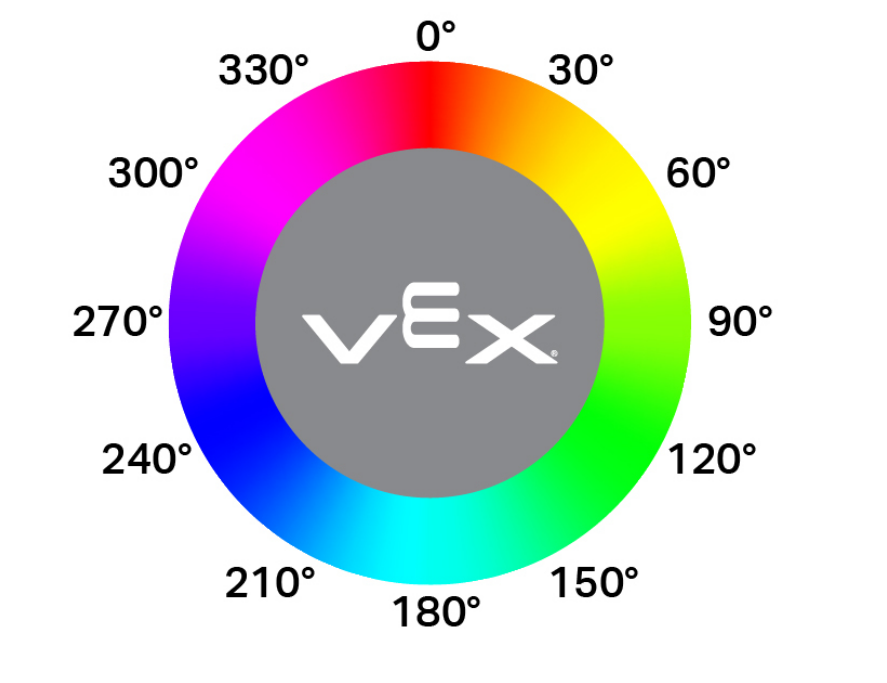
double hue();
Esta función no acepta ningún parámetro.
Return ValuesUn valor double que representa el valor del tono detectado por el sensor de color en el rango de 0 a 359,00.
Examples// Set a variable, hue, to the value of the hue detected
// by the Color Sensor.
double hue = Color1.hue();