
Κονσόλα#
Εισαγωγή#
Η Κονσόλα VEXcode V5 εμφανίζεται στο παράθυρο Monitor (Οθόνη) μέσα στο VEXcode. Οι μέθοδοι κονσόλας μπορούν να εμφανίσουν κείμενο, αριθμούς και τιμές μεταβλητών ενώ εκτελείται ένα έργο. Μπορούν επίσης να διαγράψουν την Κονσόλα, να διαβάσουν την είσοδο χρήστη και να ορίσουν το χρώμα του κειμένου που εκτυπώνεται μετά την αλλαγή του χρώματος.
Όταν χρησιμοποιείτε τον κώδικα VS, η έξοδος της κονσόλας που βασίζεται σε κείμενο εμφανίζεται στο τερματικό αντί για την κονσόλα VEXcode.
Σημείωση: Όταν χρησιμοποιείτε την Κονσόλα VEXcode, πρέπει να συνδεθείτε στη Σειριακή Θύρα της Κονσόλας προτού εκτυπωθεί οποιαδήποτε έξοδος στην Κονσόλα.
Παρακάτω είναι μια λίστα με όλες τις μεθόδους:
Ενέργειες — Εξαγωγή κειμένου ή εκκαθάριση της Κονσόλας.
print— Εμφανίζει κείμενο, αριθμούς ή τιμές μεταβλητών στην Κονσόλα ή στο τερματικό.clear_console— Διαγράφει όλες τις γραμμές στην Κονσόλα.
Getter — Ανάγνωση εισόδου χρήστη.
input— Εμφανίζει μια προαιρετική συμβολοσειρά προτροπής, περιμένει την εισαγωγή δεδομένων από τον χρήστη και επιστρέφει την απάντηση ως κείμενο.
Mutator — Μορφοποίηση εκτυπωμένου κειμένου.
set_console_text_color— Ορίζει το χρώμα που χρησιμοποιείται για το κείμενο που εκτυπώνεται στην Κονσόλα.
Ενέργειες#
print#
print εμφανίζει κείμενο, αριθμούς ή τιμές μεταβλητών στην Κονσόλα. Στον Κώδικα VS, print εμφανίζει την έξοδο στο τερματικό.
Χρησιμοποιήστε προσαρμοσμένη μορφοποίηση συμβολοσειράς όταν θέλετε ένα εκτυπωμένο μήνυμα να περιλαμβάνει τιμές από το έργο σας, όπως μια βαθμολογία, ένα χρονόμετρο ή μια ένδειξη αισθητήρα. Ανατρέξτε στη σελίδα Μορφοποίηση συμβολοσειράς για περισσότερες πληροφορίες.
Από προεπιλογή, κάθε εντολή print() τελειώνει με \n, το οποίο αντιπροσωπεύει μια νέα γραμμή. Αυτό μετακινεί τον κέρσορα στην επόμενη γραμμή μετά την εκτύπωση της τιμής. Η προαιρετική παράμετρος end αλλάζει τι προστίθεται μετά την εκτυπωμένη τιμή.
Usage:
print(value, end=“\n”)
Παράμετρος |
Περιγραφή |
|---|---|
|
Το κείμενο, ο αριθμός ή η τιμή μεταβλητής που θα εμφανίζεται στην Κονσόλα ή στο τερματικό. |
|
Optional. The text added after |
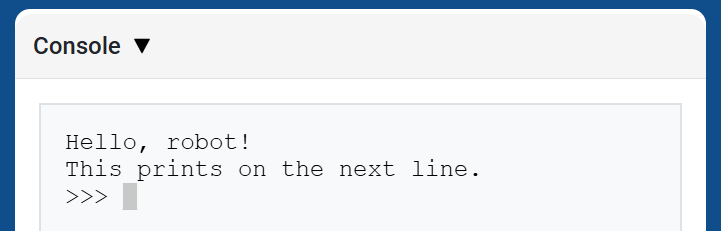
# Display two messages on separate lines
print("Hello, robot!")
print("This prints on the next line.")
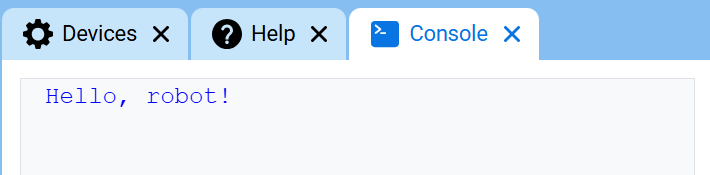
# Display two messages on the same line
print("Hello,", end=" ")
print("robot!")
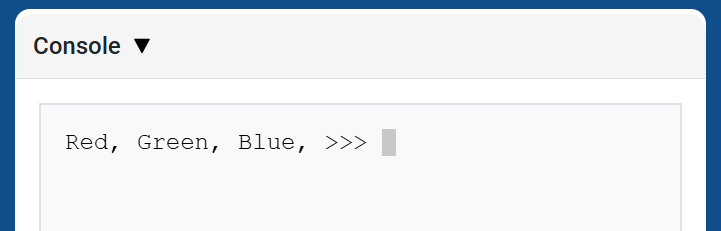
# Print three colors on one line, separated by commas
colors = ["Red", "Green", "Blue"]

for color in colors:
    print(color, end=", ")
Ακολουθίες διαφυγής#
Οι ακολουθίες διαφυγής είναι σύντομοι κωδικοί που μπορούν να εκτυπωθούν με print για να αλλάξουν τον τρόπο εμφάνισης του κειμένου στην Κονσόλα.
Τα περισσότερα έργα θα πρέπει να χρησιμοποιούν την set_console_text_color για να αλλάξουν το χρώμα του κειμένου και την clear_console για να καθαρίσουν την Κονσόλα. Οι ακολουθίες διαφυγής είναι χρήσιμες όταν θέλετε να κάνετε αυτά τα πράγματα απευθείας μέσα σε μια εντολή print.
Για να αλλάξετε το χρώμα του κειμένου, εκτυπώστε \033 ακολουθούμενο από έναν κωδικό χρώματος.
Χρώμα |
Ακολουθία διαφυγής |
|---|---|
Κόκκινος |
|
Πράσινος |
|
Μπλε |
|
Μαύρος |
|
Λευκό |
|
Κίτρινος |
|
Πορτοκάλι |
|
Μωβ |
|
Κυανό |
|
Διαφανής |
|
# Print VEXcode in red
print("\033[31mVEXcode")
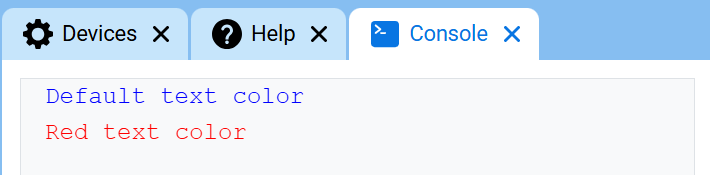
# Print text in different colors
print("Default text color")
print("\033[31m")
print("Red text color")
Για να καθαρίσετε ολόκληρη την Κονσόλα με μια ακολουθία διαφυγής, εκτυπώστε \033[2JΑυτό μετακινεί επίσης τον κέρσορα πίσω στη γραμμή 1.
# Clear the Console after two seconds
print("VEXcode")
wait(2, SECONDS)
print("\033[2J")
clear_console#
clear_console διαγράφει όλες τις γραμμές από την Κονσόλα.
Usage:
clear_console()
Παράμετροι |
Περιγραφή |
|---|---|
Αυτή η μέθοδος δεν έχει παραμέτρους. |
# Display text, then clear it after two seconds
print("This will disappear...")
wait(2, SECONDS)
clear_console()
Λήπτης#
input#
Η είσοδος input εμφανίζει μια προαιρετική συμβολοσειρά προτροπής, περιμένει τον χρήστη να εισαγάγει μια απάντηση και, στη συνέχεια, επιστρέφει αυτήν την απάντηση ως κείμενο.
Το έργο σταματάει στο input() μέχρι να εισαχθεί μια απάντηση στην Κονσόλα. Στον Κώδικα VS, η απάντηση εισάγεται στο τερματικό.
Η τιμή που επιστρέφεται από την συνάρτηση input() είναι πάντα κείμενο. Για να χρησιμοποιήσετε την απόκριση ως αριθμό, μετατρέψτε την πρώτα με int() ή float().
Usage:
input(prompt)
Παράμετρος |
Περιγραφή |
|---|---|
|
Προαιρετικό. Μια συμβολοσειρά που θα εμφανίζεται στην Κονσόλα ή στο τερματικό πριν από την αναμονή για απάντηση. Εάν δεν περιλαμβάνεται καμία προτροπή, δεν εμφανίζεται κανένα μήνυμα πριν από την αναμονή. |
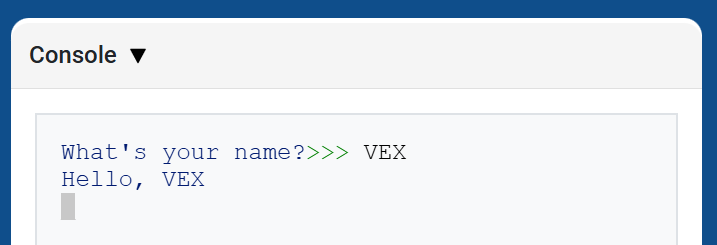
# Ask for a name, then print a greeting
answer = input("What's your name?")
print("Hello, " + answer)
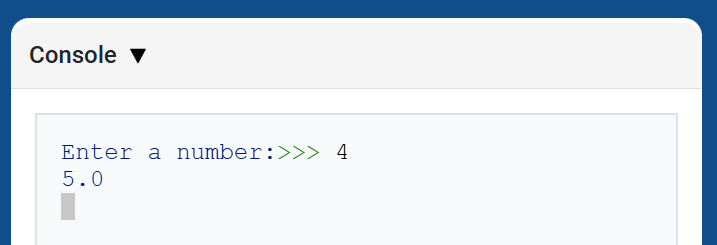
# Ask for a number, then use it in math
answer = input("Enter a number:")
number = float(answer)
print(number + 1)
Μεταλλακτής#
set_console_text_color#
set_console_text_color ορίζει το χρώμα που χρησιμοποιείται για το κείμενο που εκτυπώνεται στην Κονσόλα μετά τη χρήση αυτής της μεθόδου. Στην αρχή ενός έργου, το χρώμα κειμένου της Κονσόλας ορίζεται σε BLUE.
Αυτή η μέθοδος αλλάζει το χρώμα κειμένου στην κονσόλα VEXcode. Στο VS Code, η υποστήριξη χρωμάτων τερματικού μπορεί να διαφέρει ανά τερματικό.
Usage:
set_console_text_color(color)
Παράμετρος |
Περιγραφή |
|---|---|
|
Το χρώμα που θα χρησιμοποιηθεί για το κείμενο που εκτυπώνεται στην Κονσόλα:
|
# Print text in different colors
print("Default text color")
set_console_text_color(Color.RED)
print("Red text color")