
Ελεγκτής#
Εισαγωγή#
Το χειριστήριο V5 διαθέτει κουμπιά, δύο joystick, έναν κινητήρα rumble και μια οθόνη. Οι μέθοδοι του χειριστηρίου μπορούν να χρησιμοποιηθούν για τον έλεγχο των πατημάτων κουμπιών, την ανάγνωση της κίνησης του joystick, το rumble του χειριστηρίου, την ενεργοποίηση ή απενεργοποίηση των διαμορφωμένων ενεργειών του χειριστηρίου, την εκτέλεση λειτουργιών όταν συμβαίνουν συμβάντα του χειριστηρίου ή την εμφάνιση κειμένου στην οθόνη του χειριστηρίου.
Οι διαμορφωμένες ενέργειες ελεγκτή είναι συμπεριφορές ελεγκτή που ορίζονται στο μενού Συσκευές. Χρησιμοποιήστε την εντολή remote_control_code_enabled για να ενεργοποιήσετε ή να απενεργοποιήσετε προσωρινά αυτές τις διαμορφωμένες ενέργειες κατά τη διάρκεια ενός έργου.
Αυτή η σελίδα χρησιμοποιεί controller_1 ως παράδειγμα ονόματος ελεγκτή. Αντικαταστήστε το με το δικό σας διαμορφωμένο όνομα, όπως απαιτείται.
Παρακάτω είναι μια λίστα με όλες τις διαθέσιμες μεθόδους:
Ενέργειες — Εκτελέστε Rumble στο χειριστήριο ή ενεργοποιήστε/απενεργοποιήστε τις διαμορφωμένες ενέργειες του χειριστηρίου.
rumble— Αναπαράγει ένα μοτίβο βουητού στο χειριστήριο.remote_control_code_enabled— Ενεργοποιεί ή απενεργοποιεί τις ενέργειες του ελεγκτή που έχουν ρυθμιστεί στο μενού Συσκευές.
Οθόνη — Εμφάνιση κειμένου και αριθμών στην οθόνη του χειριστηρίου.
print— Εμφανίζει κείμενο, αριθμούς ή τιμές μεταβλητών στην οθόνη Ελεγκτή.set_cursor— Μετακινεί τον κέρσορα σε μια καθορισμένη γραμμή και στήλη στην οθόνη Ελεγκτή.column— Επιστρέφει την τρέχουσα στήλη δρομέα στην οθόνη Ελεγκτή.row— Επιστρέφει την τρέχουσα γραμμή δρομέα στην οθόνη Ελεγκτή.clear_screen— Καθαρίζει την οθόνη του Ελεγκτή.clear_row— Διαγράφει μία γραμμή στην οθόνη Ελεγκτή.next_row— Μετακινεί τον κέρσορα στην επόμενη γραμμή στην οθόνη Ελεγκτή.
Λήψη κουμπιών — Ανάγνωση καταστάσεων κουμπιών και θέσεων joystick.
.pressing— Επιστρέφει εάν πατιέται ένα συγκεκριμένο κουμπί..position— Επιστρέφει τη θέση ενός καθορισμένου άξονα joystick.
Επανακλήσεις — Εκτέλεση συναρτήσεων όταν αλλάζει η είσοδος του ελεγκτή.
.pressed— Εκτελεί μια λειτουργία όταν πατηθεί ένα συγκεκριμένο κουμπί..released— Εκτελεί μια συνάρτηση όταν απελευθερωθεί ένα καθορισμένο κουμπί..changed— Εκτελεί μια συνάρτηση όταν η θέση του joystick αλλάζει κατά μήκος ενός καθορισμένου άξονα.
Κατασκευαστής — Δημιουργήστε χειροκίνητα ένα αντικείμενο Ελεγκτή.
Controller— Δημιουργεί ένα αντικείμενο Ελεγκτή.
Ενέργειες#
rumble#
rumble αναπαράγει ένα μοτίβο rumble στο Controller. Στη συμβολοσειρά μοτίβων, οι τελείες είναι σύντομα rumbles, οι παύλες είναι μεγάλα rumbles και τα κενά είναι παύσεις.
Usage:
controller_1.rumble(pattern)
Παράμετρος |
Περιγραφή |
|---|---|
|
Μια συμβολοσειρά φτιαγμένη από τελείες, παύλες και κενά που αναπαριστούν το μοτίβο βουητού. |
# Rumble the Controller with a short-short-long-long pattern
controller_1.rumble("..--")
remote_control_code_enabled#
remote_control_code_enabled είναι μια μεταβλητή που ενεργοποιεί ή απενεργοποιεί τις ενέργειες του ελεγκτή που έχουν ρυθμιστεί στο μενού Συσκευές. Οι ενέργειες που έχουν ρυθμιστεί από τον ελεγκτή είναι ενεργοποιημένες από προεπιλογή.
Usage:
remote_control_code_enabled = state
Αξία |
Περιγραφή |
|---|---|
|
Ενεργοποιεί ενέργειες που έχουν ρυθμιστεί από τον ελεγκτή. |
|
Απενεργοποιεί τις ενέργειες που έχουν ρυθμιστεί από τον ελεγκτή. |
# Drive forward or backward using the left joystick
remote_control_code_enabled = False

while True:
    if controller_1.axis3.position() > 0:
        drivetrain.drive(FORWARD)
    elif controller_1.axis3.position() < 0:
        drivetrain.drive(REVERSE)
    # Press A to use Controller configured actions again
    elif controller_1.buttonA.pressing():
        break
    else:
        drivetrain.stop()

    wait(20, MSEC)

remote_control_code_enabled = True
Οθόνη#
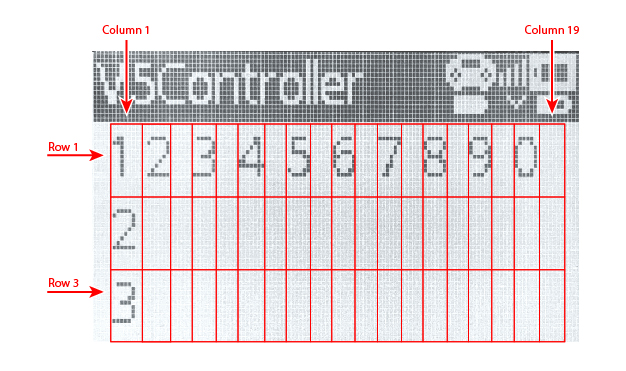
Η οθόνη του ελεγκτή V5 έχει 3 γραμμές και 19 στήλες για την εμφάνιση κειμένου και αριθμών.
print#
controller_1.screen.print εμφανίζει κείμενο, αριθμούς ή τιμές μεταβλητών στην οθόνη Controller χρησιμοποιώντας την τρέχουσα θέση του κέρσορα.
Usage:
controller_1.screen.print(value, sep, precision)
Παράμετρος |
Περιγραφή |
|---|---|
|
Το κείμενο, ο αριθμός ή η τιμή μεταβλητής που θα εμφανίζεται στην οθόνη Ελεγκτή. Περισσότερες από μία τιμές μπορούν να εκτυπωθούν διαχωρίζοντας τις τιμές με κόμματα. |
|
Προαιρετικό. Μια συμβολοσειρά που θα τοποθετηθεί μεταξύ τιμών. Αυτή πρέπει να γραφτεί ως όρισμα λέξης-κλειδιού, όπως |
|
Προαιρετικό. Ο αριθμός των δεκαδικών ψηφίων που θα εμφανίζονται κατά την εκτύπωση απλών αριθμών. Αυτό πρέπει να γραφτεί ως όρισμα λέξης-κλειδιού, όπως |
# Print a number on the Controller screen
controller_1.screen.print(1)
# Print multiple numbers separated by hyphens
controller_1.screen.print(1, 2, 3, 4, sep="-")
# Print a number using one decimal place
controller_1.screen.print(1 / 3, precision=1)
set_cursor#
set_cursor μετακινεί τον κέρσορα σε μια καθορισμένη γραμμή και στήλη στην οθόνη Controller. Η επόμενη εκτυπωμένη τιμή θα εμφανιστεί σε αυτήν τη θέση.
Usage:
controller_1.screen.set_cursor(row, col)
Παράμετρος |
Περιγραφή |
|---|---|
|
Η γραμμή του κέρσορα, από |
|
Η στήλη του δρομέα, από |
# Print text at row 2, column 1
controller_1.screen.set_cursor(2, 1)
controller_1.screen.print("Ready")
column#
Η στήλη column επιστρέφει την τρέχουσα στήλη όπου θα εκτυπωθεί κείμενο στην οθόνη Ελεγκτή.
Usage:
controller_1.screen.column()
Παράμετροι |
Περιγραφή |
|---|---|
Αυτή η μέθοδος δεν έχει παραμέτρους. |
# Print the current column number
controller_1.screen.set_cursor(2, 3)
controller_1.screen.print(controller_1.screen.column())
row#
Η γραμμή row επιστρέφει την τρέχουσα γραμμή όπου θα εκτυπωθεί κείμενο στην οθόνη Ελεγκτή.
Usage:
controller_1.screen.row()
Παράμετροι |
Περιγραφή |
|---|---|
Αυτή η μέθοδος δεν έχει παραμέτρους. |
# Print the current row number
controller_1.screen.set_cursor(2, 3)
controller_1.screen.print(controller_1.screen.row())
clear_screen#
clear_screen καθαρίζει την οθόνη Ελεγκτή και μετακινεί τον κέρσορα πίσω στην αρχική θέση.
Usage:
controller_1.screen.clear_screen()
Παράμετροι |
Περιγραφή |
|---|---|
Αυτή η μέθοδος δεν έχει παραμέτρους. |
# Print text, then clear the Controller screen
controller_1.screen.print("VEX V5")
wait(2, SECONDS)
controller_1.screen.clear_screen()
clear_row#
clear_row διαγράφει μία γραμμή στην οθόνη Ελεγκτή.
Usage:
controller_1.screen.clear_row(row)
Παράμετρος |
Περιγραφή |
|---|---|
|
Προαιρετικό. Η γραμμή που θα διαγραφεί, από |
# Clear row 2 on the Controller screen
controller_1.screen.clear_row(2)
next_row#
next_row μετακινεί τον κέρσορα στη στήλη 1 στην επόμενη γραμμή της οθόνης Ελεγκτή. Η επόμενη εκτυπωμένη τιμή θα εμφανιστεί σε αυτήν τη γραμμή.
Usage:
controller_1.screen.next_row()
Παράμετροι |
Περιγραφή |
|---|---|
Αυτή η μέθοδος δεν έχει παραμέτρους. |
# Print on two rows
controller_1.screen.print("VEX V5")
controller_1.screen.next_row()
controller_1.screen.print("Controller")
Αποκτητές#
.pressing#
.pressing επιστρέφει εάν πατιέται αυτήν τη στιγμή ένα συγκεκριμένο κουμπί στο Controller. Αυτή η μέθοδος πρέπει να κληθεί σε ένα συγκεκριμένο αντικείμενο κουμπιού, όπως controller_1.buttonA.
True— Πατιέται το καθορισμένο κουμπί.False— Το καθορισμένο κουμπί δεν πατιέται.
Χρήση:
Ένα από τα διαθέσιμα αντικείμενα κουμπιών μπορεί να χρησιμοποιηθεί με αυτήν τη μέθοδο:
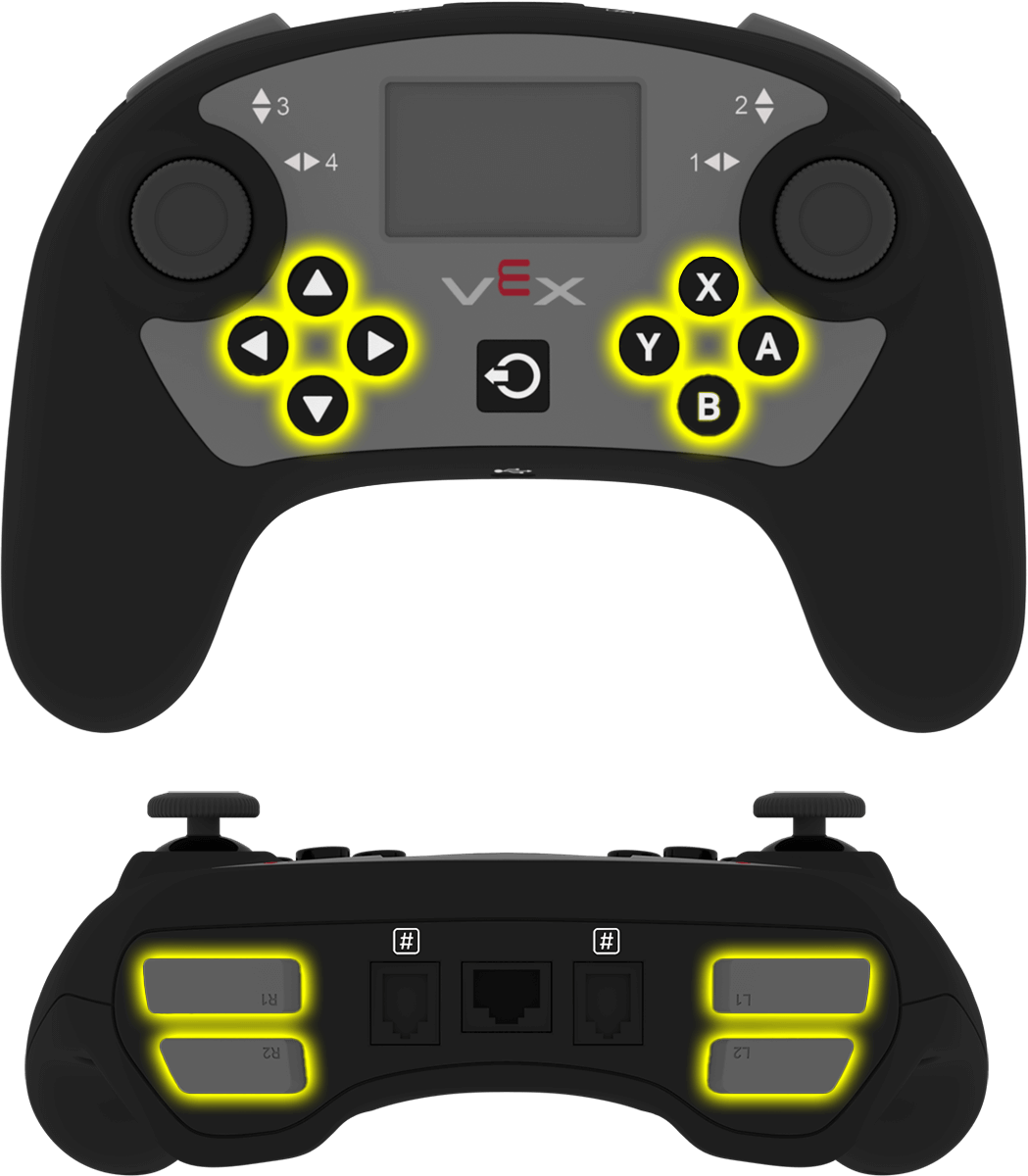
Κουμπί |
Εντολή |
|---|---|
|
|
|
|
|
|
|
|
|
|
|
|
|
|
|
|
|
|
|
|
|
|
|
|
Παράμετροι |
Περιγραφή |
|---|---|
Αυτή η μέθοδος δεν έχει παραμέτρους. |
# Turn right while L1 is pressed
while True:
    if controller_1.buttonL1.pressing():
        drivetrain.turn(RIGHT)
    else:
        drivetrain.stop()

    wait(20, MSEC)
.position#
.position επιστρέφει τη θέση ενός άξονα του joystick ως αριθμό από -100 έως 100.
Αυτή η μέθοδος πρέπει να κληθεί σε ένα συγκεκριμένο αντικείμενο άξονα, όπως controller_1.axis1.
Χρήση:
Ένα από τα διαθέσιμα αντικείμενα άξονα μπορεί να χρησιμοποιηθεί με αυτήν τη μέθοδο:
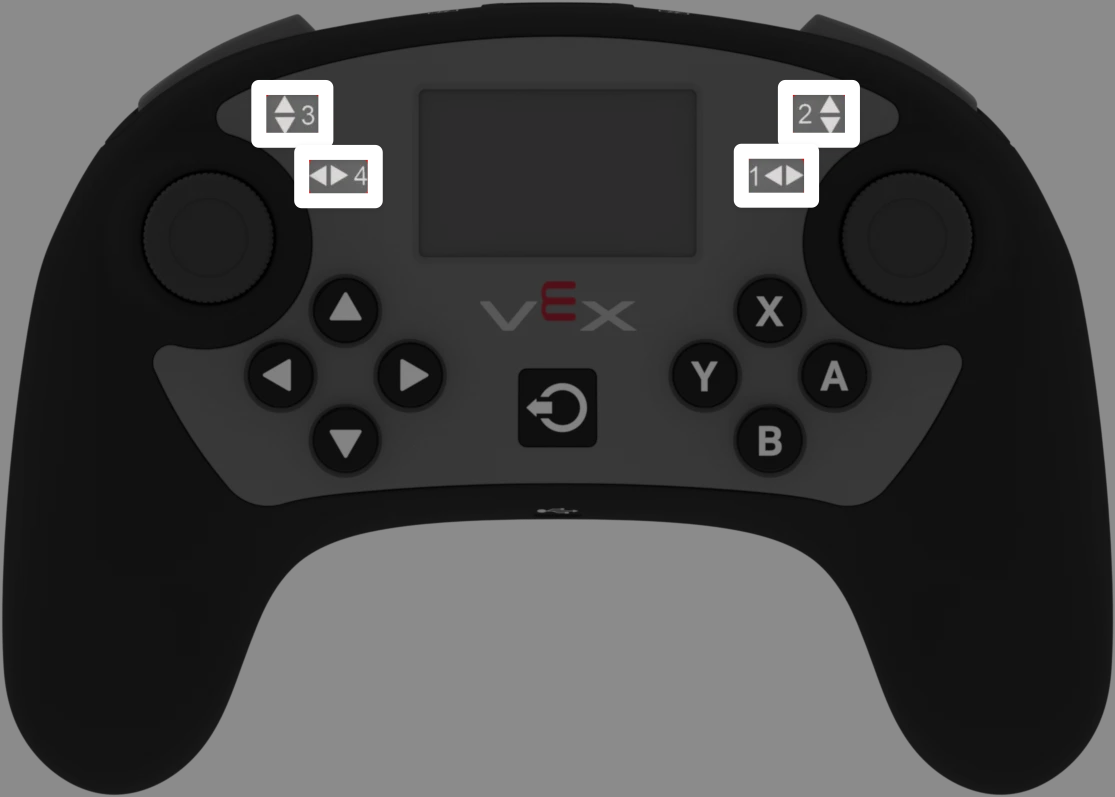
Αξονας |
Εντολή |
|---|---|
|
|
|
|
|
|
|
|
Παράμετροι |
Περιγραφή |
|---|---|
Αυτή η μέθοδος δεν έχει παραμέτρους. |
# Turn with the left joystick
remote_control_code_enabled = False

while True:
    if controller_1.axis4.position() > 10:
        drivetrain.turn(RIGHT)
    elif controller_1.axis4.position() < -10:
        drivetrain.turn(LEFT)
    else:
        drivetrain.stop()

    wait(20, MSEC)
Επανακλήσεις#
.pressed#
.pressed εκτελεί μια λειτουργία όταν πατηθεί το καθορισμένο κουμπί. Μόλις χρησιμοποιηθεί, η λειτουργία θα εκτελείται αυτόματα κάθε φορά που πατιέται το συγκεκριμένο κουμπί.
Χρήση:
Ένα από τα διαθέσιμα αντικείμενα κουμπιών μπορεί να χρησιμοποιηθεί με αυτήν τη μέθοδο:
Κουμπί |
Εντολή |
|---|---|
|
|
|
|
|
|
|
|
|
|
|
|
|
|
|
|
|
|
|
|
|
|
|
|
Παράμετρος |
Περιγραφή |
|---|---|
|
Μια προηγουμένως καθορισμένη συνάρτηση που θα εκτελείται κάθε φορά που πατιέται το καθορισμένο κουμπί. |
|
Προαιρετικό. Μια πλειάδα που περιέχει ορίσματα για να μεταβιβαστούν στη συνάρτηση επανάκλησης. Δείτε Χρήση συμβάντων με παραμέτρους για περισσότερες πληροφορίες. |
# Drive forward when A is pressed
def drive_forward():
    drivetrain.drive_for(FORWARD, 100, MM)

controller_1.buttonA.pressed(drive_forward)
.released#
.released εκτελεί μια συνάρτηση όταν απελευθερωθεί το καθορισμένο κουμπί. Μόλις χρησιμοποιηθεί, η συνάρτηση θα εκτελείται αυτόματα κάθε φορά που απελευθερώνεται το συγκεκριμένο κουμπί.
Χρήση:
Ένα από τα διαθέσιμα αντικείμενα κουμπιών μπορεί να χρησιμοποιηθεί με αυτήν τη μέθοδο:
Κουμπί |
Εντολή |
|---|---|
|
|
|
|
|
|
|
|
|
|
|
|
|
|
|
|
|
|
|
|
|
|
|
|
Παράμετρος |
Περιγραφή |
|---|---|
|
Μια προηγουμένως καθορισμένη συνάρτηση που θα εκτελείται κάθε φορά που απελευθερώνεται το καθορισμένο κουμπί. |
|
Προαιρετικό. Μια πλειάδα που περιέχει ορίσματα για να μεταβιβαστούν στη συνάρτηση επανάκλησης. Δείτε Χρήση συμβάντων με παραμέτρους για περισσότερες πληροφορίες. |
# Drive backward when A is released
def back_up():
    drivetrain.drive_for(REVERSE, 100, MM)

controller_1.buttonA.released(back_up)
.changed#
.changed εκτελεί μια συνάρτηση όταν η θέση του joystick αλλάζει κατά μήκος του καθορισμένου άξονα. Μόλις χρησιμοποιηθεί, η συνάρτηση θα εκτελείται αυτόματα κάθε φορά που αλλάζει η θέση του joystick κατά μήκος αυτού του άξονα.
Χρήση:
Ένα από τα διαθέσιμα αντικείμενα άξονα μπορεί να χρησιμοποιηθεί με αυτήν τη μέθοδο:
Αξονας |
Εντολή |
|---|---|
|
|
|
|
|
|
|
|
Παράμετρος |
Περιγραφή |
|---|---|
|
Μια προηγουμένως καθορισμένη συνάρτηση που θα εκτελείται κάθε φορά που αλλάζει η θέση του joystick κατά μήκος του καθορισμένου άξονα. |
|
Προαιρετικό. Μια πλειάδα που περιέχει ορίσματα για να μεταβιβαστούν στη συνάρτηση επανάκλησης. Δείτε Χρήση συμβάντων με παραμέτρους για περισσότερες πληροφορίες. |
# Play a sound when the left joystick moves
def tada_sound():
    brain.play_sound(SoundType.TADA)

controller_1.axis4.changed(tada_sound)
Κατασκευαστές#
Controller#
Controller δημιουργεί ένα αντικείμενο Ελεγκτή. Η χειροκίνητη δημιουργία ενός αντικειμένου Ελεγκτή απαιτείται μόνο κατά τη διαμόρφωση ενός ελεγκτή εκτός του VEXcode.
Usage:
Controller(controller_type)
Παράμετρος |
Περιγραφή |
|---|---|
|
Προαιρετικό. Ο τύπος ελεγκτή που θα δημιουργηθεί: |
# Create the primary Controller
controller_1 = Controller(PRIMARY)
# Create a partner Controller
controller_2 = Controller(PARTNER)