
구동계#
소개#
구동계는 로봇의 주행 및 회전을 제어하는 바퀴와 모터로 구성됩니다. 구동계는 코드 베이스 2.0, 슈퍼카 또는 맞춤형 로봇과 같은 모델에서 찾아볼 수 있습니다.
구동계는 브레인의 관성 센서를 사용하여 충돌을 감지하고 로봇이 정확하게 움직이고 회전할 수 있도록 합니다. 각 프로젝트 시작 시 구동계는 관성 센서를 자동으로 보정합니다. 보정하는 동안 로봇이 올바르게 움직이고 회전할 수 있도록 로봇을 약 2초 동안 정지 상태로 유지하십시오.
구동계를 코딩하는 방법은 여러 가지가 있습니다. 아래는 모든 구동계 코딩 방법의 목록입니다.
동작 — 로봇을 이동시키고 회전시키세요.
drive— 로봇을 무한히 전진 또는 후진으로 이동시킵니다.drive_for— 로봇을 특정 거리만큼 앞뒤로 이동시킵니다.drive_until— Eye Sensor가 물체를 감지하거나 로봇이 충돌을 감지할 때까지 로봇을 앞으로 이동시킵니다.turn— 로봇을 왼쪽 또는 오른쪽으로 계속 회전시킵니다.turn_for— 로봇을 특정 각도만큼 왼쪽 또는 오른쪽으로 회전시킵니다.turn_to_heading— 로봇을 -359도에서 359도 사이의 특정 방향으로 회전시킵니다. 로봇은 목표 방향에 도달하기 위해 가장 짧은 방향으로 회전합니다.turn_to_rotation— 로봇을 특정 회전으로 회전시킵니다.stop— 로봇의 움직임을 멈춥니다.
뮤테이터 — 구동계 설정을 조정합니다.
set_drive_velocity— 로봇에게 얼마나 빨리 운전해야 하는지 알려줍니다.set_turn_velocity— 로봇에게 회전 속도를 알려줍니다.set_stopping— 로봇이 어떻게 움직임을 멈출지 알려줍니다. 브레이크, 관성 주행 또는 정지.set_timeout— 로봇이 동작을 완료하려고 시도하는 시간을 설정합니다.set_heading— 로봇의 현재 방향을 새로운 방향으로 변경합니다.set_rotation— 로봇의 현재 회전을 새로운 회전으로 변경합니다.
게터 — 이동 상태를 확인합니다.
get_heading— 로봇의 현재 방향을 0~359도에서 반환합니다.get_rotation— 로봇의 현재 회전을 반환합니다.get_velocity— 로봇이 주행하는 속도를 -100%에서 100%까지의 백분율로 반환합니다.get_yaw— 로봇의 현재 요(yaw)를 반환합니다.get_roll— 로봇의 현재 롤을 반환합니다.get_pitch— 로봇의 현재 피치를 반환합니다.get_crashed— 로봇이 충돌을 감지했는지 여부를 부울 값으로 반환합니다.is_stopped— 로봇이 이동을 완료했는지 여부를 부울 값으로 반환합니다.
행위#
drive#
drive 로봇을 전진 또는 후진으로 무한히 이동시킵니다. 로봇은 방향 전환이나 정지와 같은 다른 동작이 주어질 때까지 계속 움직입니다.
Usage:
drivetrain.drive(direction)
매개변수 |
설명 |
|---|---|
|
로봇의 이동 방향: |
# Build Used: Code Base 2.0
def main():
    # Drive forward then stop
    drivetrain.drive(FORWARD)
    wait(2, SECONDS)
    drivetrain.stop()

# Start threads — Do not delete
start_thread(main)
drive_for#
drive_for 은 로봇을 특정 거리만큼 앞뒤로 이동시킵니다.
Usage:
drivetrain.drive_for(direction, distance, units, wait)
매개변수 |
설명 |
|---|---|
|
로봇의 이동 방향: |
|
로봇이 주행한 거리입니다. 정수 또는 소수일 수 있습니다. |
|
선택 사항입니다. 거리 단위: |
|
선택 사항입니다. |
# Build Used: Code Base 2.0
def main():
    # Drive back and forth
    drivetrain.drive_for(FORWARD, 100, MM)
    drivetrain.drive_for(REVERSE, 4, INCHES)


# Start threads — Do not delete
start_thread(main)
drive_until#
drive_until 은 로봇이 눈 센서가 물체를 감지하거나 로봇이 충돌을 감지할 때까지 앞으로 이동하도록 합니다.
Usage:
drivetrain.drive_until(condition, wait)
매개변수 |
설명 |
|---|---|
|
로봇을 멈추게 하는 조건: |
|
선택 사항입니다. |
# Build Used: Code Base 2.0
def main():
    # Turn right after a crash
    drivetrain.drive_until(CRASH)
    drivetrain.turn_for(RIGHT, 90)

# Start threads — Do not delete
start_thread(main)
turn#
turn 턴은 로봇을 왼쪽 또는 오른쪽으로 계속 회전시킵니다. 로봇은 주행에서 정지로 전환하는 등의 다른 동작이 주어질 때까지 계속 회전합니다.
Usage:
drivetrain.turn(direction)
매개변수 |
설명 |
|---|---|
|
로봇이 회전하는 방향: |
# Build Used: Code Base 2.0
def main():
    # Turn right and left, then stop
    drivetrain.turn(RIGHT)
    wait(2, SECONDS)
    drivetrain.turn(LEFT)
    wait(2, SECONDS)
    drivetrain.stop()

# Start threads — Do not delete
start_thread(main)
turn_for#
turn_for 은 로봇을 지정된 각도만큼 왼쪽 또는 오른쪽으로 회전시킵니다. 회전은 로봇의 현재 위치를 기준으로 합니다.
Usage:
drivetrain.turn_for(direction, angle, wait)
매개변수 |
설명 |
|---|---|
|
로봇이 회전하는 방향: |
|
로봇이 회전하는 각도(도)입니다. 정수 또는 소수일 수 있습니다. |
|
선택 사항입니다. |
# Build Used: Code Base 2.0
def main():
    # Turn right then left
    drivetrain.turn_for(RIGHT, 90)
    drivetrain.turn_for(LEFT, 90)

# Start threads — Do not delete
start_thread(main)
turn_to_heading#
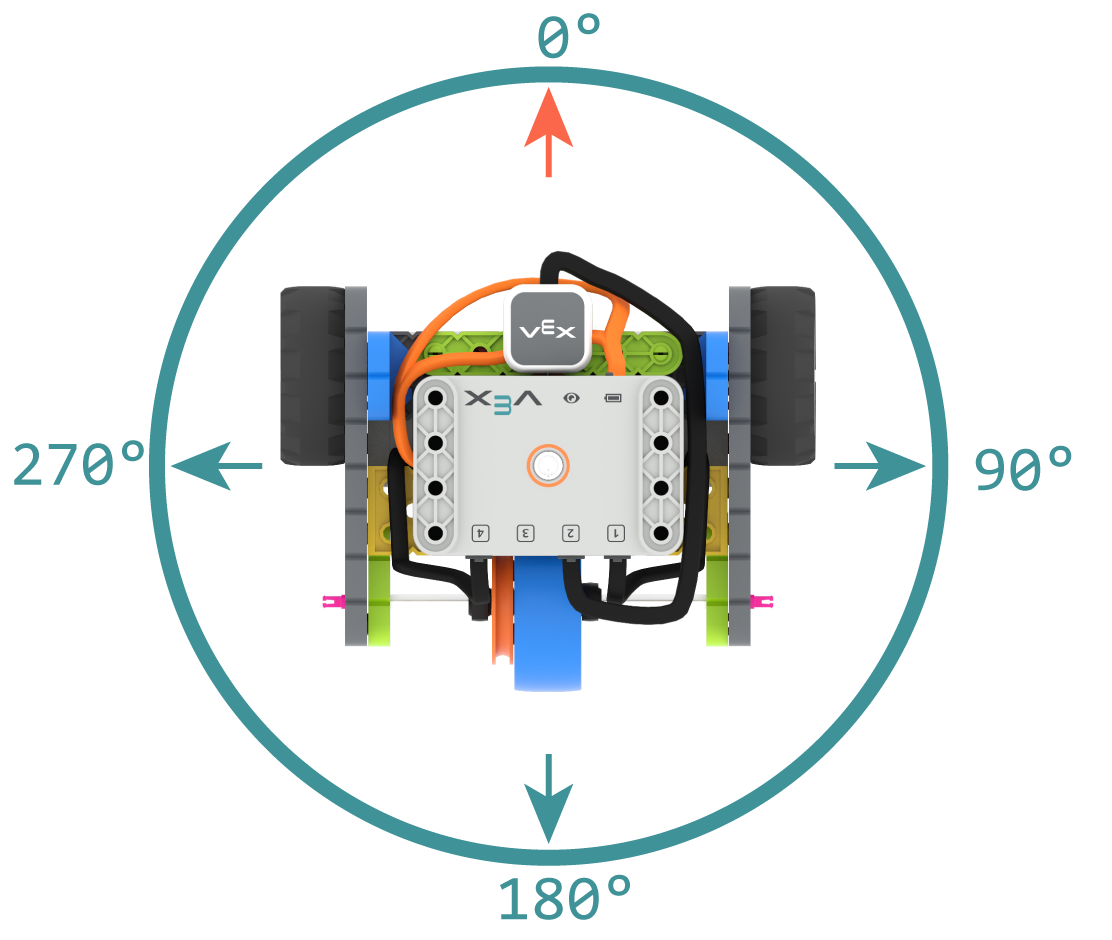
헤딩은 로봇의 두뇌가 향하는 방향을 도 단위로 나타낸 것입니다. turn_to_heading 은 로봇을 -359도에서 359도 사이의 특정 방향으로 회전시킵니다. 로봇은 목표 방향에 도달하기 위해 가장 짧은 경로로 회전합니다.
초기 방향은 0도입니다.
Usage:
drivetrain.turn_to_heading(angle, wait)
매개변수 |
설명 |
|---|---|
|
로봇이 향해야 할 방향을 -359도에서 359도 사이의 정수로 입력합니다. |
|
선택 사항입니다. |
# Build Used: Code Base 2.0
def main():
    # Turn to face the cardinal directions
    drivetrain.turn_to_heading(90)
    wait(1, SECONDS)
    drivetrain.turn_to_heading(180)
    wait(1, SECONDS)
    drivetrain.turn_to_heading(270)
    wait(1, SECONDS)
    drivetrain.turn_to_heading(0)

# Start threads — Do not delete
start_thread(main)
turn_to_rotation#
turn_to_rotation 로봇을 특정 회전 방향으로 회전시킵니다.
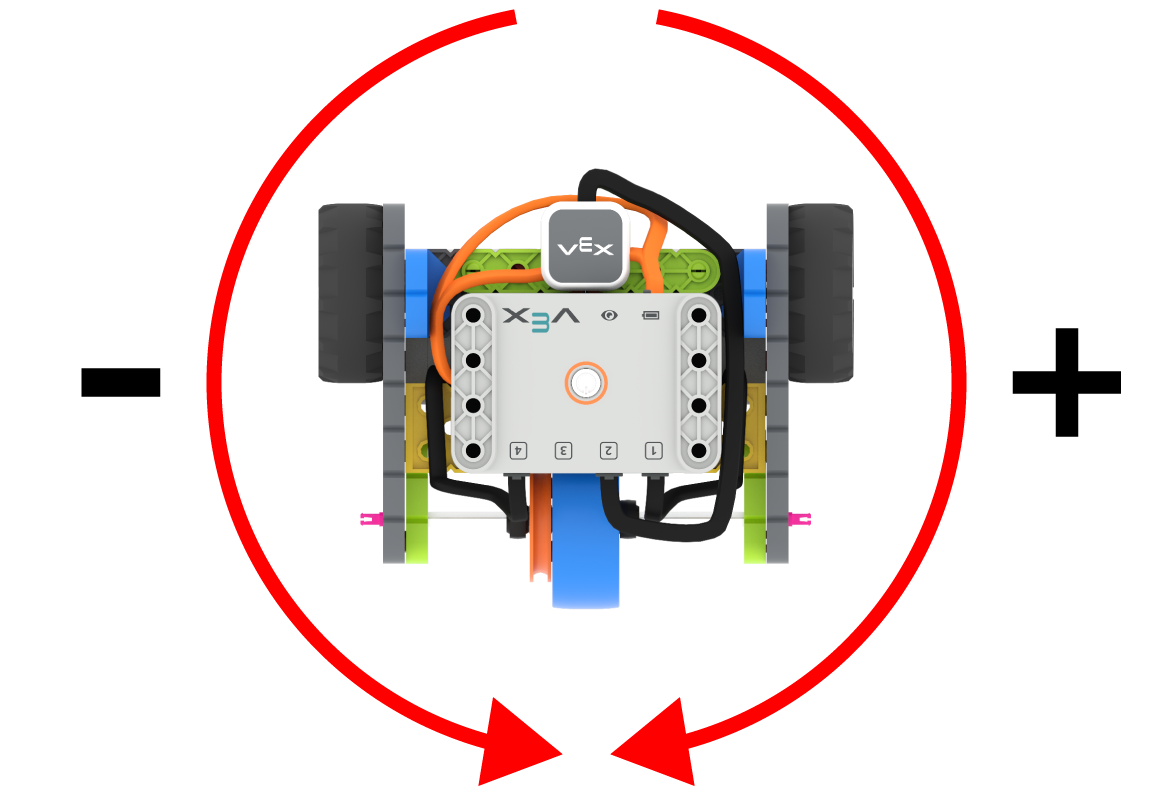
회전은 로봇이 회전한 정도를 도 단위로 측정한 값입니다. 프로젝트 시작 시 회전 값은 0도로 설정됩니다. 회전은 set_rotation를 사용하여 설정할 수도 있습니다.
회전 값은 절대값입니다. 즉, 회전 방향은 로봇의 현재 회전 각도에 따라 결정됩니다. 오른쪽으로 회전하면 회전 각도가 증가하고, 왼쪽으로 회전하면 회전 각도가 감소합니다.
예를 들어, 로봇이 0도에서 시작하여 720도 회전하면 오른쪽으로 두 번 회전합니다. 그런 다음 360도 회전하면 720도보다 360도가 작기 때문에 왼쪽으로 한 번 회전합니다.
Usage:
drivetrain.turn_to_rotation(angle, wait)
매개변수 |
설명 |
|---|---|
|
로봇이 회전할 각도(도)입니다. 정수로 입력할 수 있습니다. |
|
선택 사항입니다. |
# Build Used: Code Base 2.0
def main():
    # Make one full turn to the right
    drivetrain.turn_to_rotation(360)
    # Make another full turn to the right
    drivetrain.turn_to_rotation(720)
    # Make one full turn to the left, returning to 360 degrees
    drivetrain.turn_to_rotation(360)
# Start threads — Do not delete
start_thread(main)
stop#
stop 로봇의 움직임을 멈춥니다.
Usage:
drivetrain.stop()
매개변수 |
설명 |
|---|---|
이 메서드에는 매개변수가 없습니다. |
# Build Used: Code Base 2.0
def main():
    # Drive forward then stop
    drivetrain.drive(FORWARD)
    wait(2, SECONDS)
    drivetrain.stop()

# Start threads — Do not delete
start_thread(main)
돌연변이체#
set_drive_velocity#
set_drive_velocity 로봇이 얼마나 빠르게 주행해야 하는지를 알려줍니다. 백분율이 높을수록 로봇은 더 빠르게 주행하고, 백분율이 낮을수록 더 느리게 주행합니다.
모든 프로젝트는 로봇이 기본적으로 50% 속도로 주행하는 것으로 시작합니다.
참고: 속도가 높을수록 로봇의 주행 속도는 빨라지지만 정밀도는 떨어질 수 있습니다. 속도가 낮을수록 로봇의 주행 속도는 느려지지만 정밀도는 높아집니다.
Usage:
drivetrain.set_drive_velocity(velocity)
매개변수 |
설명 |
|---|---|
|
주행 속도를 0%에서 100%까지 조절할 수 있습니다. |
# Build Used: Code Base 2.0
def main():
    # Drive at different velocities
    drivetrain.drive_for(FORWARD, 100, MM)
    wait(1, SECONDS)
    # Drive slow
    drivetrain.set_drive_velocity(20)
    drivetrain.drive_for(FORWARD, 100, MM)
    wait(1, SECONDS)
    # Drive fast
    drivetrain.set_drive_velocity(100)
    drivetrain.drive_for(FORWARD, 100, MM)

# Start threads — Do not delete
start_thread(main)
set_turn_velocity#
set_turn_velocity 로봇이 회전하는 속도를 지정합니다. 백분율이 높을수록 로봇은 더 빠르게 회전하고, 백분율이 낮을수록 로봇은 더 느리게 회전합니다.
모든 프로젝트는 로봇이 기본적으로 50% 속도로 회전하는 것으로 시작합니다.
참고: 속도가 높을수록 로봇의 회전 속도는 빨라지지만 정밀도는 떨어질 수 있습니다. 속도가 낮을수록 로봇의 회전 속도는 느려지지만 정밀도는 높아집니다.
Usage:
drivetrain.set_turn_velocity(velocity)
매개변수 |
설명 |
|---|---|
|
회전 속도는 0%에서 100%까지입니다. |
# Build Used: Code Base 2.0
def main():
    # Turn at different velocities
    drivetrain.turn_for(RIGHT, 180)
    wait(1, SECONDS)
    # Turn fast
    drivetrain.set_turn_velocity(100)
    drivetrain.turn_for(RIGHT, 180)

# Start threads — Do not delete
start_thread(main)
set_stopping#
set_stopping 로봇이 정지하는 방식을 설정합니다. 브레이크, 관성 주행 또는 정지 중에서 선택할 수 있습니다.
Usage:
drivetrain.set_stopping(brake)
매개변수 |
설명 |
|---|---|
|
로봇 정지 방법:
|
이 방법을 사용하지 않으면 로봇은 정지할 때 BRAKE 사용합니다.
# Build Used: Code Base 2.0
def main():
    # Drive, then coast to a stop
    drivetrain.set_drive_velocity(100)
    drivetrain.set_stopping(COAST)
    drivetrain.drive(FORWARD)
    wait(2, SECONDS)
    drivetrain.stop()

# Start threads — Do not delete
start_thread(main)
set_timeout#
set_timeout 은 로봇이 동작을 완료하려고 시도하는 시간을 설정합니다. 로봇이 해당 시간 내에 동작을 완료하지 못하면 시도를 중단하고 다음 코드 줄로 넘어갑니다. 이렇게 하면 로봇이 동작 중에 멈추는 것을 방지할 수 있습니다.
Usage:
drivetrain.set_timeout(value, units)
매개변수 |
설명 |
|---|---|
|
로봇이 동작을 완료하려고 시도할 수 있는 시간입니다. 정수 또는 소수일 수 있습니다. |
|
선택 사항입니다. 시간 단위는 |
# Build Used: Code Base 2.0
def main():
    # Drive as far as possible for 1 second before turning right
    drivetrain.set_timeout(1, SECONDS)
    drivetrain.drive_for(FORWARD, 25, INCHES)
    drivetrain.turn_for(RIGHT, 90)

# Start threads — Do not delete
start_thread(main)
set_heading#
헤딩은 로봇의 두뇌가 향하는 방향을 도 단위로 나타낸 것입니다. set_heading 은 로봇의 현재 헤딩 값을 새로운 헤딩 값으로 변경합니다.
예를 들어, 로봇이 오른쪽을 향하도록 회전한 상태에서 방향을 0도로 설정하면 오른쪽을 향한 위치가 새로운 0도가 됩니다. 그러면 로봇은 이 새로운 방향을 기준으로 다른 위치로 회전할 수 있습니다.
Usage:
drivetrain.set_heading(value)
매개변수 |
설명 |
|---|---|
|
로봇의 진행 방향 값을 도 단위로 설정합니다. 이 값은 0에서 359 사이의 정수입니다. |
# Build Used: Code Base 2.0
def main():
    # Face the new 0 degree heading
    drivetrain.set_heading(90)
    drivetrain.turn_to_heading(0)

# Start threads — Do not delete
start_thread(main)
set_rotation#
회전은 로봇이 회전한 정도를 각도로 나타낸 것입니다. 프로젝트 시작 시 회전 값은 0도로 설정됩니다. set_rotation 명령어를 사용하면 로봇의 현재 회전 값을 새로운 값으로 변경할 수 있습니다.
예를 들어, 로봇이 오른쪽으로 두 바퀴를 완전히 돌았다면 회전 값은 720도가 됩니다. 회전 값을 0도로 설정하면 회전 값이 720도에서 0도로 초기화됩니다. 그러면 로봇은 이 새로운 값을 기준으로 회전할 수 있습니다.
Usage:
drivetrain.set_rotation(value)
매개변수 |
설명 |
|---|---|
|
로봇의 회전 각도를 도 단위로 설정합니다. 정수 값을 입력할 수 있습니다. |
# Build Used: Code Base 2.0
def main():
    # Spin counterclockwise two times
    drivetrain.set_rotation(720)
    drivetrain.turn_to_rotation(0)

# Start threads — Do not delete
start_thread(main)
게터스#
get_heading#
헤딩은 로봇의 두뇌가 향하는 방향을 도 단위로 나타낸 것입니다. get_heading 0도에서 359도 사이의 헤딩 값을 반환합니다.
로봇의 초기 진행 방향은 0도입니다.
Usage:
drivetrain.get_heading()
매개변수 |
설명 |
|---|---|
이 메서드에는 매개변수가 없습니다. |
# Build Used: Code Base 2.0
def main():
    # Display the heading while turning
    monitor_sensor("drivetrain.get_heading")
    drivetrain.turn_for(RIGHT, 450)


# Start threads — Do not delete
start_thread(main)
get_rotation#
회전은 로봇이 회전한 정도를 각도로 나타낸 것입니다. 프로젝트 시작 시 회전 값은 0도로 설정됩니다. get_rotation 은 로봇의 현재 회전 값을 반환합니다.
오른쪽으로 돌면 회전 각도가 증가하고, 왼쪽으로 돌면 회전 각도가 감소합니다. 예를 들어, 오른쪽으로 두 바퀴를 완전히 돌면 720도 회전하게 됩니다.
Usage:
drivetrain.get_rotation()
매개변수 |
설명 |
|---|---|
이 메서드에는 매개변수가 없습니다. |
# Build Used: Code Base 2.0
def main():
    # Display the rotation while turning
    monitor_sensor("drivetrain.get_rotation")
    drivetrain.turn_for(RIGHT, 450)


# Start threads — Do not delete
start_thread(main)
get_velocity#
get_velocity 로봇의 주행 속도를 -100%에서 100% 사이의 백분율로 반환합니다.
양수 값은 로봇이 전진하고 있음을 의미하고, 음수 값은 로봇이 후진하고 있음을 의미합니다.
Usage:
drivetrain.get_velocity()
매개변수 |
설명 |
|---|---|
이 메서드에는 매개변수가 없습니다. |
# Build Used: Code Base 2.0
def main():
    # Display the velocity of the robot before and while moving
    console.print("Start: ")
    console.print(drivetrain.get_velocity())
    console.new_line()
    drivetrain.drive(FORWARD)
    wait(0.5, SECONDS)
    console.print("Moving: ")
    console.print(drivetrain.get_velocity())
    drivetrain.stop()


# Start threads — Do not delete
start_thread(main)
get_yaw#
요(yaw)는 로봇이 시작 위치에서 왼쪽 또는 오른쪽으로 얼마나 회전했는지를 나타내는 각도입니다. get_yaw를 설정하면 로봇의 현재 요 값을 반환합니다.
오른쪽으로 회전하면 요(yaw) 값이 증가하고, 왼쪽으로 회전하면 요 값이 감소합니다.
Usage:
drivetrain.get_yaw()
매개변수 |
설명 |
|---|---|
이 메서드에는 매개변수가 없습니다. |
# Build Used: Super Code Base 2.0
def main():
    # Change the LED color based on the yaw while
    # moving the robot by hand
    monitor_sensor("drivetrain.get_yaw")
    while True:
        if drivetrain.get_yaw() > 0:
            bumper.set_color(GREEN)
        elif drivetrain.get_yaw() < 0:
            bumper.set_color(RED)
        else:
            bumper.set_color(NONE)

# Start threads — Do not delete
start_thread(main)
get_roll#
Roll은 로봇이 왼쪽 또는 오른쪽으로 기울어진 정도를 각도로 나타낸 것입니다. get_roll get_roll 로봇의 현재 Roll 값을 반환합니다.
뇌가 정면을 향하고 있을 때, 왼쪽으로 기울이면 주사위 굴림 값이 증가하고, 오른쪽으로 기울이면 주사위 굴림 값이 감소합니다.
Usage:
drivetrain.get_roll()
매개변수 |
설명 |
|---|---|
이 메서드에는 매개변수가 없습니다. |
# Build Used: Super Code Base 2.0
def main():
    # Change the LED color based on the roll while
    # moving the robot by hand
    monitor_sensor("drivetrain.get_roll")
    while True:
        if drivetrain.get_roll() > 0:
            bumper.set_color(GREEN)
        elif drivetrain.get_roll() < 0:
            bumper.set_color(RED)
        else:
            bumper.set_color(NONE)

# Start threads — Do not delete
start_thread(main)
get_pitch#
피치는 로봇이 앞뒤로 기울어지는 정도를 각도로 나타낸 것입니다. get_pitch 함수는 get_pitch 반환합니다.
뇌 모형이 정면을 향하도록 놓았을 때, 앞으로 기울이면 음높이 값이 높아지고, 뒤로 기울이면 음높이 값이 낮아집니다.
Usage:
drivetrain.get_pitch()
매개변수 |
설명 |
|---|---|
이 메서드에는 매개변수가 없습니다. |
# Build Used: Super Code Base 2.0
def main():
    # Change the LED color based on the pitch while
    # moving the robot by hand
    monitor_sensor("drivetrain.get_pitch")
    while True:
        if drivetrain.get_pitch() > 0:
            bumper.set_color(GREEN)
        elif drivetrain.get_pitch() < 0:
            bumper.set_color(RED)
        else:
            bumper.set_color(NONE)

# Start threads — Do not delete
start_thread(main)
get_crashed#
get_crashed 로봇이 충돌을 감지했는지 여부를 부울 값으로 반환합니다.
True— 충돌이 감지되었습니다.False— 충돌이 감지되지 않았습니다.
Usage:
drivetrain.get_crashed()
매개변수 |
설명 |
|---|---|
이 메서드에는 매개변수가 없습니다. |
# Build Used: Super Code Base 2.0
def main():
    # Drive until a crash
    drivetrain.drive(FORWARD)
    while not drivetrain.get_crashed():
        wait(50, MSEC)
    drivetrain.stop()
    drivetrain.turn_for(RIGHT, 90)

# Start threads — Do not delete
start_thread(main)
is_stopped#
is_stopped 로봇이 이동을 완료했는지 여부를 부울 값으로 반환합니다. 이 값은 로봇의 움직임에 따라 다른 동작의 타이밍을 제어하는 데 사용할 수 있습니다.
True— 로봇의 이동이 완료되었습니다.False— 로봇은 여전히 움직이고 있습니다.
이 방법은 wait 매개변수를 갖는 다음 드라이브트레인 방법과 함께 작동합니다: drive_for, drive_until, turn_for, turn_to_heading, 및 turn_to_rotation.
Usage:
drivetrain.is_stopped()
매개변수 |
설명 |
|---|---|
이 메서드에는 매개변수가 없습니다. |
# Build Used: Code Base 2.0
def main():
    # Turn when the drivetrain is done moving forward
    drivetrain.drive_for(FORWARD, 100, MM, wait=False)
    wait(0.25, SECONDS)
    while True:
        if drivetrain.is_stopped():
            drivetrain.turn_for(RIGHT, 180)
            break
        else:
            console.print("Still moving...")
            wait(0.1, SECONDS)
            console.clear()

# Start threads — Do not delete
start_thread(main)