
パワートレイン#
導入#
駆動系には、ロボットの走行や旋回を制御する車輪とモーターが含まれています。駆動系は、Code Base 2.0、Super Car、またはカスタムロボットなどの構成で使用できます。
Drivetrains use the Inertial Sensor in the Brain to detect crashes and help the robot move and turn precisely. At the start of each project, the drivetrain calibrates the Inertial Sensor automatically. Keep the robot still for about 2 seconds during calibration, so the robot can move and turn correctly.
ドライブトレインをコーディングする方法は数多くあります。以下に、ドライブトレインのすべてのメソッドの一覧を示します。
動作 — ロボットを移動および旋回させる。
drive— ロボットを永久に前進または後退させます。drive_for— ロボットを特定の距離だけ前進または後退させます。drive_until— アイセンサーが物体を検出するか、ロボットが衝突を検出するまでロボットを前進させます。turn— ロボットを永久に左または右に回転させます。turn_for— ロボットを特定の角度だけ左または右に回転させます。turn_to_heading— ロボットを-359度から359度までの特定の方向に向けて旋回させます。ロボットは目標の方向に到達するために最短の方向に旋回します。turn_to_rotation— ロボットを特定の回転方向に回転させます。stop— ロボットの動きを停止します。
ミューテーター — ドライブトレインの設定を調整します。
set_drive_velocity— ロボットに走行速度を指示します。set_turn_velocity— ロボットに旋回速度を指示します。set_stopping— ロボットがどのように停止するかを指定します。ブレーキ、惰性走行、または保持のいずれかです。set_timeout— ロボットが動作を完了しようとする時間を設定します。set_heading— ロボットの現在の進行方向を新しい進行方向に変更します。set_rotation— ロボットの現在の回転を新しい回転に変更します。
ゲッターズ ― 移動状況を確認してください。
get_heading— ロボットの現在の方位を0度から359度の範囲で返します。get_rotation— ロボットの現在の回転を返します。get_velocity— ロボットの走行速度を-100%から100%までのパーセンテージで返します。get_yaw— ロボットの現在のヨー角を返します。get_roll— ロボットの現在のロールを返します。get_pitch— ロボットの現在のピッチを返します。get_crashed— ロボットが衝突を検出したかどうかをブール値として返します。is_stopped— ロボットが移動を終えたかどうかをブール値として返します。
行動#
drive#
ドライブdrive 組み合わせでは、ロボットは永久に前進または後退します。ロボットは、旋回や停止などの別の動作が与えられるまで動き続けます。
Usage:
drivetrain.drive(direction)
パラメータ |
説明 |
|---|---|
|
ロボットの移動方向: |
# Build Used: Code Base 2.0
def main():
    # Drive forward then stop
    drivetrain.drive(FORWARD)
    wait(2, SECONDS)
    drivetrain.stop()

# Start threads — Do not delete
start_thread(main)
drive_for#
drive_for は、ロボットを特定の距離だけ前進または後退させます。
Usage:
drivetrain.drive_for(direction, distance, units, wait)
パラメータ |
説明 |
|---|---|
|
ロボットの移動方向: |
|
ロボットが走行する距離。整数または小数で指定できます。 |
|
オプション。距離の単位: |
|
オプション |
# Build Used: Code Base 2.0
def main():
    # Drive back and forth
    drivetrain.drive_for(FORWARD, 100, MM)
    drivetrain.drive_for(REVERSE, 4, INCHES)


# Start threads — Do not delete
start_thread(main)
drive_until#
drive_until は、アイセンサーが物体を検出するか、ロボットが衝突を検出するまでロボットを前進させます。
Usage:
drivetrain.drive_until(condition, wait)
パラメータ |
説明 |
|---|---|
|
ロボットを停止させる条件: |
|
オプション |
# Build Used: Code Base 2.0
def main():
    # Turn right after a crash
    drivetrain.drive_until(CRASH)
    drivetrain.turn_for(RIGHT, 90)

# Start threads — Do not delete
start_thread(main)
turn#
turn ロボットを左右に永久に回転させます。ロボットは、停止などの別の動作が与えられるまで回転し続けます。
Usage:
drivetrain.turn(direction)
パラメータ |
説明 |
|---|---|
|
ロボットが回転する方向: |
# Build Used: Code Base 2.0
def main():
    # Turn right and left, then stop
    drivetrain.turn(RIGHT)
    wait(2, SECONDS)
    drivetrain.turn(LEFT)
    wait(2, SECONDS)
    drivetrain.stop()

# Start threads — Do not delete
start_thread(main)
turn_for#
turn_for は、ロボットを特定の角度だけ左右に回転させます。回転角度はロボットの現在位置を基準としています。
Usage:
drivetrain.turn_for(direction, angle, wait)
パラメータ |
説明 |
|---|---|
|
ロボットが回転する方向: |
|
ロボットが回転する角度(度)。整数または小数で指定できます。 |
|
オプション |
# Build Used: Code Base 2.0
def main():
    # Turn right then left
    drivetrain.turn_for(RIGHT, 90)
    drivetrain.turn_for(LEFT, 90)

# Start threads — Do not delete
start_thread(main)
turn_to_heading#
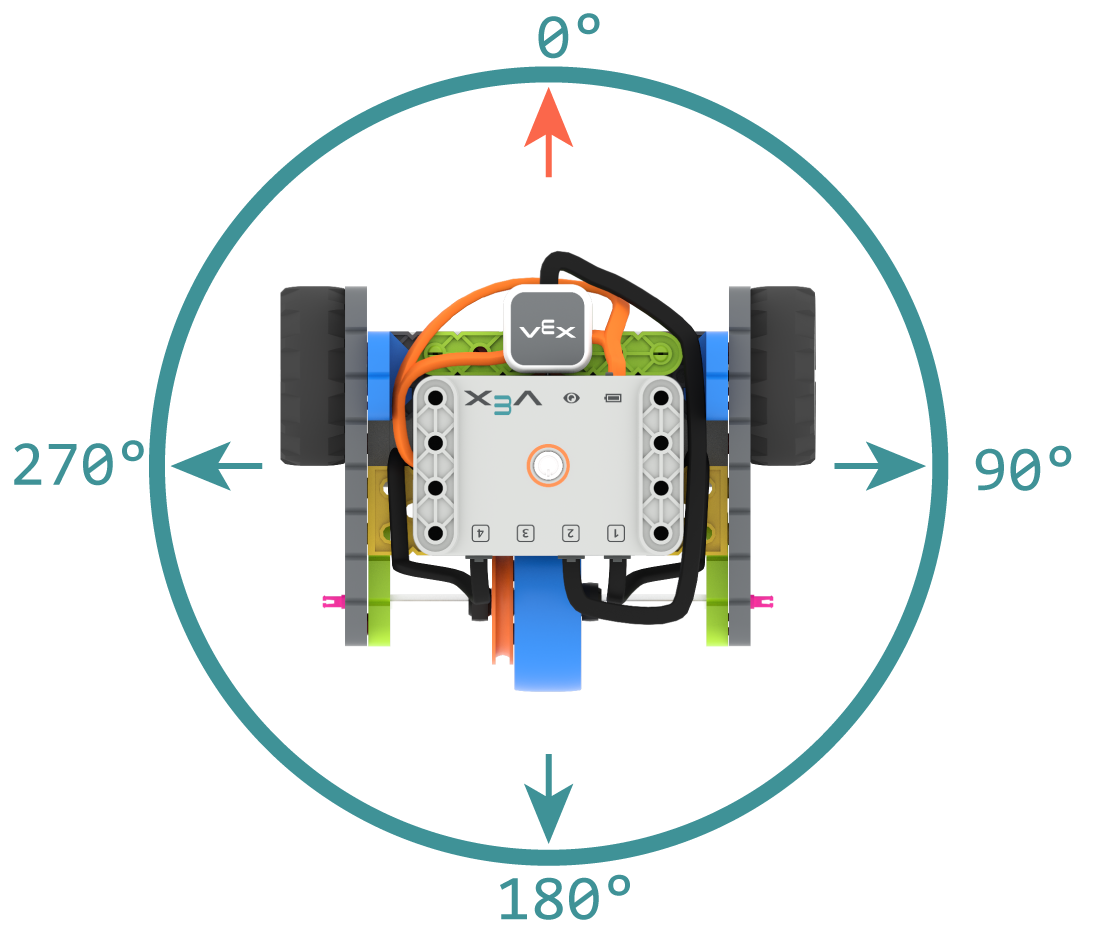
方位とは、ロボットの頭脳が向いている方向のことで、度数で表されます。0 turn_to_heading 、ロボットを-359度から359度までの特定の方位に向けます。ロボットは、目標の方位に到達するために最短の方向に旋回します。
開始時の方位は0度です。
Usage:
drivetrain.turn_to_heading(angle, wait)
パラメータ |
説明 |
|---|---|
|
ロボットが向くべき方向を整数で指定します。範囲は-359度から359度です。 |
|
オプション |
# Build Used: Code Base 2.0
def main():
    # Turn to face the cardinal directions
    drivetrain.turn_to_heading(90)
    wait(1, SECONDS)
    drivetrain.turn_to_heading(180)
    wait(1, SECONDS)
    drivetrain.turn_to_heading(270)
    wait(1, SECONDS)
    drivetrain.turn_to_heading(0)

# Start threads — Do not delete
start_thread(main)
turn_to_rotation#
turn_to_rotation はロボットを特定の回転方向に回転させます。
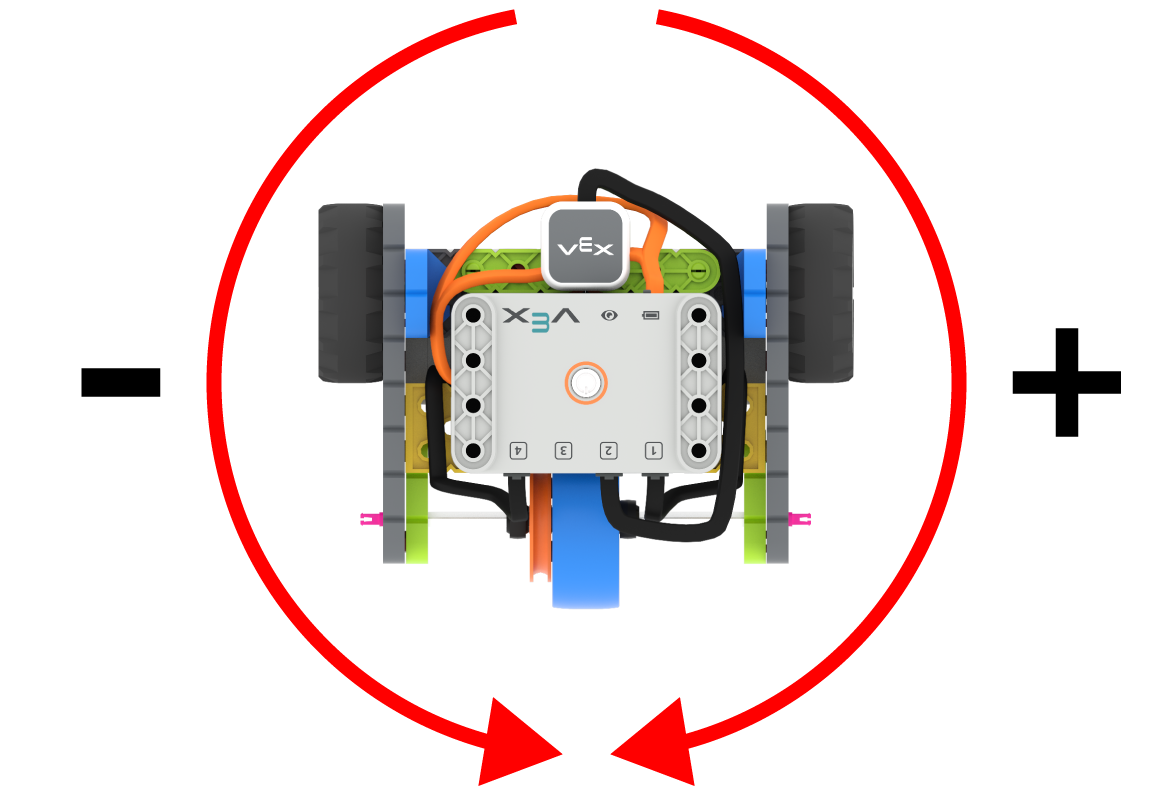
回転とは、ロボットがどれだけ回転したかを示すもので、度数で表されます。プロジェクトの開始時には、回転値は0度に設定されます。回転は、set_rotation を使用して設定することもできます。
回転値は絶対値です。つまり、旋回方向はロボットの現在の回転角度によって決まります。右に旋回すると回転角度が大きくなり、左に旋回すると回転角度が小さくなります。
例えば、ロボットが0度の位置から始まり、720度回転させると、右に2回転します。次に360度回転させると、360度は720度より小さいため、左に1回転します。
Usage:
drivetrain.turn_to_rotation(angle, wait)
パラメータ |
説明 |
|---|---|
|
ロボットが回転する角度(度数)。整数値を指定してください。 |
|
オプション |
# Build Used: Code Base 2.0
def main():
    # Make one full turn to the right
    drivetrain.turn_to_rotation(360)
    # Make another full turn to the right
    drivetrain.turn_to_rotation(720)
    # Make one full turn to the left, returning to 360 degrees
    drivetrain.turn_to_rotation(360)
# Start threads — Do not delete
start_thread(main)
stop#
stop ロボットの動きを停止します。
Usage:
drivetrain.stop()
パラメータ |
説明 |
|---|---|
このメソッドにはパラメータがありません。 |
# Build Used: Code Base 2.0
def main():
    # Drive forward then stop
    drivetrain.drive(FORWARD)
    wait(2, SECONDS)
    drivetrain.stop()

# Start threads — Do not delete
start_thread(main)
変異誘発者#
set_drive_velocity#
set_drive_velocity は、ロボットの走行速度を指定します。パーセンテージが高いほどロボットは速く走行し、低いほど遅く走行します。
すべてのプロジェクトは、ロボットがデフォルトで50%の速度で走行するところから始まります。
注: 速度を速くするとロボットの走行速度は速くなりますが、精度が低下する可能性があります。速度を遅くするとロボットの走行速度は遅くなりますが、精度は向上します。
Usage:
drivetrain.set_drive_velocity(velocity)
パラメータ |
説明 |
|---|---|
|
0%から100%までの走行速度。 |
# Build Used: Code Base 2.0
def main():
    # Drive at different velocities
    drivetrain.drive_for(FORWARD, 100, MM)
    wait(1, SECONDS)
    # Drive slow
    drivetrain.set_drive_velocity(20)
    drivetrain.drive_for(FORWARD, 100, MM)
    wait(1, SECONDS)
    # Drive fast
    drivetrain.set_drive_velocity(100)
    drivetrain.drive_for(FORWARD, 100, MM)

# Start threads — Do not delete
start_thread(main)
set_turn_velocity#
set_turn_velocity は、ロボットの旋回速度を指定します。パーセンテージが高いほどロボットの旋回速度は速くなり、低いほど旋回速度は遅くなります。
すべてのプロジェクトは、ロボットがデフォルトで50%の速度で旋回するところから始まります。
注: 速度が速いほどロボットの旋回速度は速くなりますが、精度が低下する可能性があります。速度が遅いほどロボットの旋回速度は遅くなりますが、精度は向上します。
Usage:
drivetrain.set_turn_velocity(velocity)
パラメータ |
説明 |
|---|---|
|
旋回速度を0%から100%まで設定します。 |
# Build Used: Code Base 2.0
def main():
    # Turn at different velocities
    drivetrain.turn_for(RIGHT, 180)
    wait(1, SECONDS)
    # Turn fast
    drivetrain.set_turn_velocity(100)
    drivetrain.turn_for(RIGHT, 180)

# Start threads — Do not delete
start_thread(main)
set_stopping#
set_stopping は、ロボットがどのように停止するかを設定します。ブレーキ、惰性走行、または停止のいずれかです。
Usage:
drivetrain.set_stopping(brake)
パラメータ |
説明 |
|---|---|
|
ロボットの停止方法:
|
この方法を使用しない場合、ロボットは停止時に BRAKE を使用します。
# Build Used: Code Base 2.0
def main():
    # Drive, then coast to a stop
    drivetrain.set_drive_velocity(100)
    drivetrain.set_stopping(COAST)
    drivetrain.drive(FORWARD)
    wait(2, SECONDS)
    drivetrain.stop()

# Start threads — Do not delete
start_thread(main)
set_timeout#
set_timeout は、ロボットが動作を完了しようとする時間を設定します。ロボットがその時間内に動作を完了できない場合、試行を停止して次のコード行に進みます。これにより、ロボットが動作中に停止してしまうのを防ぎます。
Usage:
drivetrain.set_timeout(value, units)
パラメータ |
説明 |
|---|---|
|
ロボットが動作を完了しようと試みる時間。整数または小数を指定できます。 |
|
オプション。時間の単位: |
# Build Used: Code Base 2.0
def main():
    # Drive as far as possible for 1 second before turning right
    drivetrain.set_timeout(1, SECONDS)
    drivetrain.drive_for(FORWARD, 25, INCHES)
    drivetrain.turn_for(RIGHT, 90)

# Start threads — Do not delete
start_thread(main)
set_heading#
方位とは、ロボットの頭脳が向いている方向を度数で表したものです。0 set_heading は ロボットの現在の方位を新しい方位値に変更します。
例えば、ロボットが右を向いた場合、方位を0度に設定すると、その右向きの位置が新たな0度になります。その後、ロボットはその新たな方位に基づいて他の位置に旋回することができます。
Usage:
drivetrain.set_heading(value)
パラメータ |
説明 |
|---|---|
|
ロボットに設定する方位角の値(度数)。0~359の整数値を指定できます。 |
# Build Used: Code Base 2.0
def main():
    # Face the new 0 degree heading
    drivetrain.set_heading(90)
    drivetrain.turn_to_heading(0)

# Start threads — Do not delete
start_thread(main)
set_rotation#
回転とは、ロボットがどれだけ回転したかを示すもので、度数で表されます。プロジェクトの開始時には、回転値は0度に設定されます。0 set_rotation 実行すると、ロボットの現在の回転が新しい値に変更されます。
例えば、ロボットが右に2回転した場合、回転角度は720度になります。回転角度を0度に設定すると、720度から0度にリセットされます。その後、ロボットはその新しい値に基づいて回転することができます。
Usage:
drivetrain.set_rotation(value)
パラメータ |
説明 |
|---|---|
|
ロボットに設定する回転角度(度数)。整数値を指定してください。 |
# Build Used: Code Base 2.0
def main():
    # Spin counterclockwise two times
    drivetrain.set_rotation(720)
    drivetrain.turn_to_rotation(0)

# Start threads — Do not delete
start_thread(main)
ゲッター#
get_heading#
方位とは、ロボットの脳が向いている方向を度数で表したものです。get_heading 、0度から359度までの方位を返します。
ロボットの初期進行方向は0度です。
Usage:
drivetrain.get_heading()
パラメータ |
説明 |
|---|---|
このメソッドにはパラメータがありません。 |
# Build Used: Code Base 2.0
def main():
    # Display the heading while turning
    monitor_sensor("drivetrain.get_heading")
    drivetrain.turn_for(RIGHT, 450)


# Start threads — Do not delete
start_thread(main)
get_rotation#
回転とは、ロボットがどれだけ回転したかを示すもので、度数で表されます。プロジェクトの開始時には、回転値は0度に設定されます。get_rotation ロボットの現在の回転角度を返します。
右に回すと回転角度が大きくなり、左に回すと回転角度が小さくなります。例えば、右に2回転すると720度回転します。
Usage:
drivetrain.get_rotation()
パラメータ |
説明 |
|---|---|
このメソッドにはパラメータがありません。 |
# Build Used: Code Base 2.0
def main():
    # Display the rotation while turning
    monitor_sensor("drivetrain.get_rotation")
    drivetrain.turn_for(RIGHT, 450)


# Start threads — Do not delete
start_thread(main)
get_velocity#
get_velocity は、ロボットの走行速度を -100% から 100% までのパーセンテージで返します。
正の値はロボットが前進していることを意味します。負の値はロボットが後退していることを意味します。
Usage:
drivetrain.get_velocity()
パラメータ |
説明 |
|---|---|
このメソッドにはパラメータがありません。 |
# Build Used: Code Base 2.0
def main():
    # Display the velocity of the robot before and while moving
    console.print("Start: ")
    console.print(drivetrain.get_velocity())
    console.new_line()
    drivetrain.drive(FORWARD)
    wait(0.5, SECONDS)
    console.print("Moving: ")
    console.print(drivetrain.get_velocity())
    drivetrain.stop()


# Start threads — Do not delete
start_thread(main)
get_yaw#
ヨーとは、ロボットが開始位置から左右にどれだけ回転したかを示す角度です。get_yaw get_yaw 、ロボットの現在のヨー値を返します。
右に旋回するとヨー角が増加し、左に旋回するとヨー角が減少します。
Usage:
drivetrain.get_yaw()
パラメータ |
説明 |
|---|---|
このメソッドにはパラメータがありません。 |
# Build Used: Super Code Base 2.0
def main():
    # Change the LED color based on the yaw while
    # moving the robot by hand
    monitor_sensor("drivetrain.get_yaw")
    while True:
        if drivetrain.get_yaw() > 0:
            bumper.set_color(GREEN)
        elif drivetrain.get_yaw() < 0:
            bumper.set_color(RED)
        else:
            bumper.set_color(NONE)

# Start threads — Do not delete
start_thread(main)
get_roll#
ロールとは、ロボットが左右に傾く角度のことで、度数で表されます。0 get_roll は ロボットの現在のロール値を返します。
脳が正面を向いている状態で、左に傾けるとロール値が増加し、右に傾けるとロール値が減少します。
Usage:
drivetrain.get_roll()
パラメータ |
説明 |
|---|---|
このメソッドにはパラメータがありません。 |
# Build Used: Super Code Base 2.0
def main():
    # Change the LED color based on the roll while
    # moving the robot by hand
    monitor_sensor("drivetrain.get_roll")
    while True:
        if drivetrain.get_roll() > 0:
            bumper.set_color(GREEN)
        elif drivetrain.get_roll() < 0:
            bumper.set_color(RED)
        else:
            bumper.set_color(NONE)

# Start threads — Do not delete
start_thread(main)
get_pitch#
ピッチとは、ロボットが前後に傾く角度のことで、度数で表されます。get_pitch get_pitch 、ロボットの現在のピッチ値を返します。
脳が正面を向いている状態で、前方に傾けると音の高さが上がり、後方に傾けると音の高さが下がります。
Usage:
drivetrain.get_pitch()
パラメータ |
説明 |
|---|---|
このメソッドにはパラメータがありません。 |
# Build Used: Super Code Base 2.0
def main():
    # Change the LED color based on the pitch while
    # moving the robot by hand
    monitor_sensor("drivetrain.get_pitch")
    while True:
        if drivetrain.get_pitch() > 0:
            bumper.set_color(GREEN)
        elif drivetrain.get_pitch() < 0:
            bumper.set_color(RED)
        else:
            bumper.set_color(NONE)

# Start threads — Do not delete
start_thread(main)
get_crashed#
get_crashed は、ロボットが衝突を検出したかどうかをブール値として返します。
True— クラッシュが検出されました。False— クラッシュは検出されませんでした。
Usage:
drivetrain.get_crashed()
パラメータ |
説明 |
|---|---|
このメソッドにはパラメータがありません。 |
# Build Used: Super Code Base 2.0
def main():
    # Drive until a crash
    drivetrain.drive(FORWARD)
    while not drivetrain.get_crashed():
        wait(50, MSEC)
    drivetrain.stop()
    drivetrain.turn_for(RIGHT, 90)

# Start threads — Do not delete
start_thread(main)
is_stopped#
is_stopped は、ロボットの移動が完了したかどうかをブール値で返します。これは、ロボットの動きに基づいて他の動作のタイミングを制御するために使用できます。
True— ロボットの移動が完了しました。False— ロボットはまだ動いています。
このメソッドは、 wait パラメータを持つ以下のドライブトレインメソッドと連携して動作します: drive_for、drive_until、turn_for、turn_to_heading、および turn_to_rotation。
Usage:
drivetrain.is_stopped()
パラメータ |
説明 |
|---|---|
このメソッドにはパラメータがありません。 |
# Build Used: Code Base 2.0
def main():
    # Turn when the drivetrain is done moving forward
    drivetrain.drive_for(FORWARD, 100, MM, wait=False)
    wait(0.25, SECONDS)
    while True:
        if drivetrain.is_stopped():
            drivetrain.turn_for(RIGHT, 180)
            break
        else:
            console.print("Still moving...")
            wait(0.1, SECONDS)
            console.clear()

# Start threads — Do not delete
start_thread(main)