
Χρώμα#
Εισαγωγή#
Ο Αισθητήρας Χρώματος είναι ένας οπτικός αισθητήρας που επιτρέπει στο ρομπότ σας να ανιχνεύει πότε υπάρχει ένα αντικείμενο, να αναγνωρίζει συγκεκριμένα χρώματα και να επιστρέφει οπτικά δεδομένα όπως φωτεινότητα και απόχρωση.
Μπορείτε επίσης να διαμορφώσετε τη φωτεινότητα του εσωτερικού φωτός του αισθητήρα. Αυτά τα εργαλεία είναι ιδανικά για προγράμματα που πρέπει να αντιδρούν σε χρωματιστά αντικείμενα, συνθήκες φωτισμού ή ανατροφοδότηση αισθητήρα σε πραγματικό χρόνο.
Αυτή η σελίδα χρησιμοποιεί color_1 ως παράδειγμα ονόματος αισθητήρα χρώματος. Αντικαταστήστε το με το δικό σας διαμορφωμένο όνομα, όπως απαιτείται.
Παρακάτω είναι μια λίστα με όλες τις μεθόδους:
Ενέργειες — Εντοπισμός αντικειμένων με τον Αισθητήρα Χρώματος.
object_detected— Καταγράφει μια συνάρτηση που θα κληθεί όταν εντοπιστεί ένα αντικείμενο.
Μεταλλαγμένοι — Τροποποιήστε τα φώτα στον Αισθητήρα Χρώματος.
set_light— Ορίζει τη λυχνία LED του αισθητήρα χρώματος σε ενεργοποιημένη, απενεργοποιημένη ή σε ένα καθορισμένο επίπεδο φωτεινότητας.set_light_power— Ορίζει τη φωτεινότητα της λυχνίας LED του αισθητήρα χρώματος.
Λήπτες — Επιστρέφουν δεδομένα αντικειμένου με τον Αισθητήρα Χρώματος.
is_near_object— Επιστρέφει εάν ένα αντικείμενο βρίσκεται εντός της εμβέλειας του αισθητήρα.color— Επιστρέφει τον δεκαεξαδικό κώδικα του ανιχνευμένου χρώματος.brightness— Επιστρέφει την ανιχνευμένη φωτεινότητα.hue— Επιστρέφει την ανιχνευμένη τιμή απόχρωσης.installed— Επιστρέφει εάν ο Αισθητήρας Χρώματος είναι συνδεδεμένος στον Εγκέφαλο.
Κατασκευαστές — Μη αυτόματη αρχικοποίηση και ρύθμιση παραμέτρων ενός Αισθητήρα Χρώματος.
ColorSensor— Δημιουργεί έναν Αισθητήρα Χρώματος.
Ενέργειες#
object_detected#
object_detected καταγράφει μια συνάρτηση που θα καλείται όταν ο Αισθητήρας Χρώματος ανιχνεύει ένα αντικείμενο.
Usage:
color_1.object_detected(callback, args)
Παράμετροι |
Περιγραφή |
|---|---|
|
Μια συνάρτηση που έχει οριστεί προηγουμένως για εκτέλεση όταν ο Αισθητήρας Χρώματος ανιχνεύει ένα αντικείμενο. |
|
Προαιρετικό. Μια πλειάδα που περιέχει ορίσματα για να μεταβιβαστούν στη συνάρτηση επανάκλησης. Δείτε Συναρτήσεις με Παραμέτρους για περισσότερες πληροφορίες. |
Μεταλλάκτες#
set_light#
set_light ορίζει τη λυχνία LED του αισθητήρα χρώματος σε ενεργοποίηση, απενεργοποίηση ή σε ένα καθορισμένο επίπεδο φωτεινότητας.
Usage:
color_1.set_light(value, units)
Παράμετροι |
Περιγραφή |
|---|---|
|
Καθορίζει εάν θα ενεργοποιηθεί ή θα απενεργοποιηθεί η λυχνία LED χρησιμοποιώντας ένα από τα ακόλουθα:
|
|
Προαιρετικό. Η μονάδα που αντιπροσωπεύει την τιμή φωτεινότητας: |
# Turn the LED on and off forever
while True:
    color_1.set_light(LedStateType.ON)
    wait(0.5, SECONDS)
    color_1.set_light(LedStateType.OFF)
    wait(0.5, SECONDS)
# Turn the LED on and off forever
while True:
    color_1.set_light(LedStateType.ON, 75)
    wait(0.5, SECONDS)
    color_1.set_light(0)
    wait(0.5, SECONDS)
set_light_power#
set_light_power ορίζει τη φωτεινότητα της λυχνίας LED του αισθητήρα χρώματος. Εάν η λυχνία LED δεν είναι ήδη αναμμένη, αυτή η μέθοδος θα την ανάψει επίσης.
Usage:
color_1.set_light_power(value)
Παράμετροι |
Περιγραφή |
|---|---|
|
Η φωτεινότητα της λυχνίας LED ως ποσοστό από 0 έως 100. Η τιμή 0 απενεργοποιεί τη λυχνία LED. |
# Turn the LED light on at different intensities
color_1.set_light_power(10)
wait(2, SECONDS)
color_1.set_light_power(100)
Αποκτητές#
is_near_object#
Η συνάρτηση is_near_object επιστρέφει μια λογική τιμή που υποδεικνύει εάν ο αισθητήρας χρώματος βρίσκεται σε απόσταση περίπου 57 χιλιοστών (2,25 ιντσών) από ένα αντικείμενο. Η ανίχνευση εξαρτάται από το ανακλώμενο φως, επομένως οι σκοτεινές ή μη ανακλαστικές επιφάνειες ενδέχεται να μην ανιχνεύονται αξιόπιστα.
True— Το ανιχνευμένο αντικείμενο βρίσκεται σε απόσταση περίπου 57 χιλιοστών.False— Το ανιχνευμένο αντικείμενο δεν βρίσκεται σε απόσταση περίπου 57 χιλιοστών.
Usage:
color_1.is_near_object()
Παράμετροι |
Περιγραφή |
|---|---|
Αυτή η μέθοδος δεν έχει παραμέτρους. |
color#
color επιστρέφει τον δεκαεξαδικό κώδικα του ανιχνευμένου χρώματος ως συμβολοσειρά στη μορφή “Color” ακολουθούμενη από δύο μηδενικά και την δεκαεξαδική τιμή του χρώματος.
Για παράδειγμα, η ανίχνευση του κόκκινου (#FF0000) θα επιστρέψει το “Χρώμα 00FF0000”.
Usage:
color_1.color()
Παράμετροι |
Περιγραφή |
|---|---|
Αυτή η μέθοδος δεν έχει παραμέτρους. |
# Display the currently detected hex value
while True:
    brain.screen.clear_screen()
    brain.screen.set_cursor(1, 1)
    brain.screen.print(color_1.color())
    wait(0.5,SECONDS)
brightness#
brightness επιστρέφει πόσο φωτεινό είναι το ανιχνευμένο χρώμα, ως ακέραιο αριθμό από 0% έως 100%.
Ένα υψηλότερο ποσοστό σημαίνει ότι ο Αισθητήρας Χρώματος ανιχνεύει περισσότερο φως. Ένα χαμηλότερο ποσοστό σημαίνει ότι ο Αισθητήρας Χρώματος ανιχνεύει λιγότερο φως.
Usage:
color_1.brightness()
Παράμετροι |
Περιγραφή |
|---|---|
Αυτή η μέθοδος δεν έχει παραμέτρους. |
# Display the currently detected brightness
while True:
    brain.screen.clear_screen()
    brain.screen.set_cursor(1, 1)
    brain.screen.print("Brightness:")
    brain.screen.next_row()
    brain.screen.print(color_1.brightness())
    wait(0.5,SECONDS)
hue#
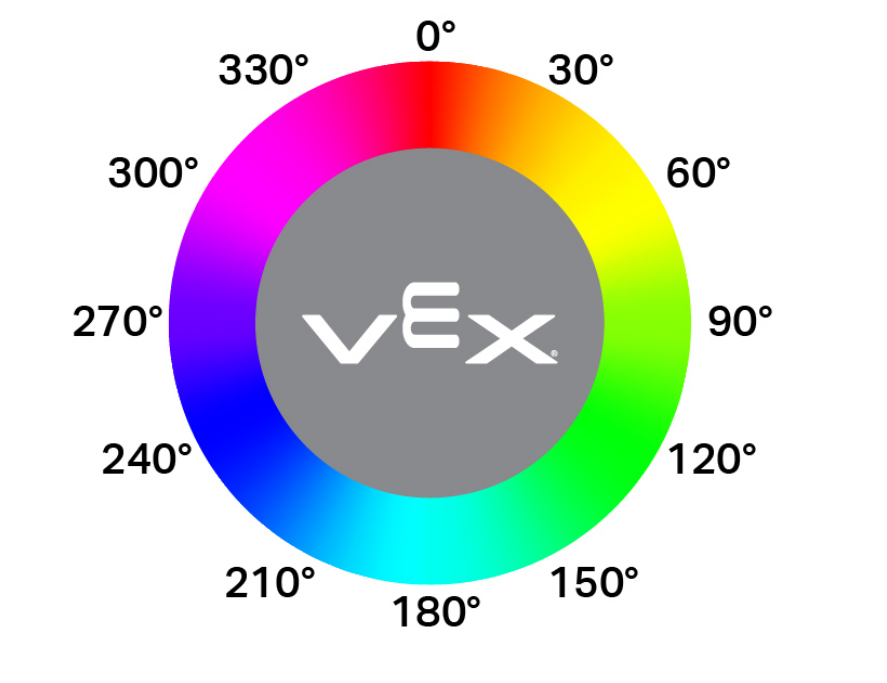
Η συνάρτηση hue επιστρέφει την ανιχνευμένη τιμή απόχρωσης ως κινητή μεταβλητή στην περιοχή από 0 έως 359,99 μοίρες.
Η απόχρωση είναι ένας τρόπος περιγραφής του χρώματος χρησιμοποιώντας αριθμούς γύρω από έναν χρωματικό κύκλο, όπως φαίνεται παρακάτω.
Usage:
color_1.hue()
Παράμετροι |
Περιγραφή |
|---|---|
Αυτή η μέθοδος δεν έχει παραμέτρους. |
# Display the currently detected hue
while True:
    brain.screen.clear_screen()
    brain.screen.set_cursor(1, 1)
    brain.screen.print("Hue: ")
    brain.screen.print(color_1.hue())
    wait(0.5,SECONDS)
installed#
installed επιστρέφει μια Boolean τιμή που υποδεικνύει εάν ο Αισθητήρας Χρώματος είναι συνδεδεμένος στον Εγκέφαλο.
True— Ο αισθητήρας χρώματος είναι συνδεδεμένος με τον εγκέφαλο.False— Ο αισθητήρας χρώματος δεν είναι συνδεδεμένος με τον εγκέφαλο.
Usage:
color_1.installed()
Παράμετροι |
Περιγραφή |
|---|---|
Αυτή η μέθοδος δεν έχει παραμέτρους. |
Κατασκευαστές#
Οι κατασκευαστές χρησιμοποιούνται για τη χειροκίνητη δημιουργία αντικειμένων ColorSensor , τα οποία είναι απαραίτητα για τη διαμόρφωση ενός Color Sensor εκτός του VEXcode.
ColorSensor#
ColorSensor δημιουργεί έναν αισθητήρα χρώματος.
Usage:
color_1 = ColorSensor(smartport)
Παράμετρος |
Περιγραφή |
|---|---|
|
Η Έξυπνη Θύρα στην οποία είναι συνδεδεμένος ο Αισθητήρας Χρώματος, γραμμένη ως PORTx όπου x είναι ο αριθμός της θύρας. |
# Create a Color Sensor object in Port 3
color_1 = ColorSensor(Ports.PORT3)