
Οθόνη#
Εισαγωγή#
Οι μέθοδοι οθόνης ελέγχουν τον τρόπο με τον οποίο ο εγκέφαλος IQ (2ης γενιάς) εμφανίζει κείμενο, αριθμούς και γραφικά στην ενσωματωμένη οθόνη του.
Για το σχέδιο, η ανάλυση του Brain είναι 160 x 108 pixel.
Αυτή η σελίδα χρησιμοποιεί brain ως παράδειγμα ονόματος Brain. Αντικαταστήστε το με το δικό σας διαμορφωμένο όνομα, όπως απαιτείται.
Παρακάτω είναι μια λίστα με όλες τις μεθόδους:
Εκτύπωση δρομέα — Τοποθέτηση και εκτύπωση κειμένου.
print— Εκτυπώνει κείμενο, αριθμούς ή τιμές μεταβλητών στην τρέχουσα θέση του κέρσορα.set_cursor— Μετακινεί τον κέρσορα σε μια συγκεκριμένη γραμμή και στήλη.next_row— Μετακινεί τον κέρσορα στη στήλη 1 της επόμενης γραμμής.clear_row— Διαγράφει μια γραμμή κειμένου.row— Επιστρέφει τη γραμμή όπου θα εκτυπωθεί το κείμενο.column— Επιστρέφει τη στήλη όπου θα εκτυπωθεί το κείμενο.print_at— Εκτυπώνει κείμενο, αριθμούς ή τιμές μεταβλητών σε μια συγκεκριμένη συντεταγμένη x και y.get_string_width— Επιστρέφει το πλάτος μιας συμβολοσειράς σε pixel χρησιμοποιώντας την τρέχουσα γραμματοσειρά.get_string_height— Επιστρέφει το ύψος μιας συμβολοσειράς σε pixel χρησιμοποιώντας την τρέχουσα γραμματοσειρά.
Μεταλλαγμένοι — Αλλάξτε τις ρυθμίσεις της οθόνης, τα χρώματα και τη συμπεριφορά σχεδίασης.
clear_screen— Καθαρίζει την οθόνη από όλα τα σχέδια και το κείμενο.set_font— Ορίζει τη γραμματοσειρά για το εκτυπωμένο κείμενο.set_pen_width— Ορίζει το πάχος των γραμμών που σχεδιάζονται και των περιγραμμάτων των σχημάτων.set_pen_color— Ορίζει το χρώμα του κειμένου, των pixel, των γραμμών και των περιγραμμάτων των σχημάτων.set_fill_color— Ορίζει το χρώμα γεμίσματος για τα σχεδιασμένα σχήματα και τα φόντα εκτυπωμένου κειμένου.set_origin— Ορίζει την αρχή που χρησιμοποιείται για εκτύπωση και σχεδίαση με βάση συντεταγμένες.
Σχεδίαση — Προσθήκη γραφικών στην οθόνη.
draw_pixel— Σχεδιάζει ένα pixel σε μια συντεταγμένη.draw_line— Σχεδιάζει μια γραμμή μεταξύ δύο σημείων.draw_rectangle— Σχεδιάζει ένα ορθογώνιο.draw_circle— Σχεδιάζει έναν κύκλο.set_clip_region— Περιορίζει το πού μπορούν να εμφανίζονται σχέδια και κείμενο.render— Ενημερώνει την οθόνη του Εγκεφάλου με κείμενο και σχέδια μόνο όταν καλείται.
Εκτύπωση δρομέα#
print#
print εκτυπώνει κείμενο, αριθμούς ή τιμές μεταβλητών στην οθόνη Brain στην τρέχουσα θέση κέρσορα και γραμματοσειρά.
Usage:
brain.screen.print(text, precision, opaque)
Παράμετροι |
Περιγραφή |
|---|---|
|
Το κείμενο, ο αριθμός ή η τιμή μεταβλητής που θα εκτυπωθεί στην οθόνη. |
|
Προαιρετικό. Ο αριθμός των δεκαδικών ψηφίων που θα εμφανίζονται κατά την εμφάνιση αριθμών. Αυτό πρέπει να γραφτεί ως όρισμα λέξης-κλειδιού, π.χ.: |
|
Προαιρετικό. |
# Display a message at the starting
# cursor position
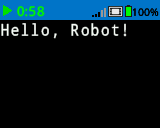
brain.screen.print("Hello, Robot!")
# Display a percentage with 4 decimal
# places and a blue background
brain.screen.set_fill_color(Color.BLUE)
brain.screen.print((42/100), precision = 4, opaque = True)
set_cursor#
set_cursor μετακινεί τον κέρσορα σε μια συγκεκριμένη γραμμή και στήλη στην οθόνη Brain. Η επόμενη κλήση print θα ξεκινήσει την εκτύπωση σε αυτήν τη θέση. Το πόσες γραμμές και στήλες μπορούν να χωρέσουν άνετα εξαρτάται από την επιλεγμένη γραμματοσειρά.
Οι γραμματοσειρές μονόχωρου χώρου έχουν χαρακτήρες που έχουν όλοι το ίδιο πλάτος, καθιστώντας την τοποθέτηση κειμένου συνεπή. Αντίθετα, οι αναλογικές γραμματοσειρές ποικίλλουν σε πλάτος χαρακτήρων, επομένως ορισμένα γράμματα καταλαμβάνουν περισσότερο χώρο από άλλα. Ωστόσο, ανεξάρτητα από τον τύπο που χρησιμοποιείται, η συνάρτηση set_cursor τοποθετεί τον κέρσορα με βάση το μέγεθος της γραμμής και της στήλης, όχι το στυλ γραμματοσειράς. Το μέγεθος της γραμματοσειράς μπορεί να ρυθμιστεί χρησιμοποιώντας την συνάρτηση set_font.
Usage:
brain.screen.set_cursor(row, column)
Παράμετροι |
Περιγραφή |
|---|---|
|
Η γραμμή στην οποία θα μετακινηθεί ο κέρσορας. |
|
Η στήλη στην οποία θα μετακινηθεί ο κέρσορας. |
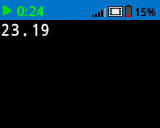
# Repeatedly print the Brain's timer at
# the top left of the screen
while True:
    brain.screen.print(brain.timer.time(SECONDS))
    brain.screen.next_row()
    wait(1, SECONDS)
    brain.screen.clear_screen()
    brain.screen.set_cursor(1, 1)
next_row#
next_row μετακινεί τον κέρσορα στη στήλη 1 της επόμενης γραμμής στην οθόνη Brain.
Usage:
brain.screen.next_row()
Παράμετροι |
Περιγραφή |
|---|---|
Αυτή η μέθοδος δεν έχει παραμέτρους. |
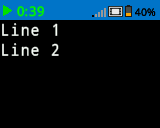
# Display two lines of text
brain.screen.print("Line 1")
brain.screen.next_row()
brain.screen.print("Line 2")
clear_row#
clear_row καθαρίζει μία μόνο γραμμή κειμένου στην οθόνη Brain.
Usage:
brain.screen.clear_row(row, color)
Παράμετροι |
Περιγραφή |
|---|---|
σειρά |
Προαιρετικό. Η γραμμή που θα διαγραφεί. Η προεπιλογή είναι η τρέχουσα γραμμή του δρομέα. |
χρώμα |
Προαιρετικό. Το χρώμα που θα εφαρμοστεί στη διαγραμμένη σειρά. Οι επιλογές περιλαμβάνουν:
|
# Display text on two rows
brain.screen.print("This text stays")
brain.screen.next_row()
brain.screen.print("This disappears")

# Wait 3 seconds before clearing
# only the second row
wait(3, SECONDS)
brain.screen.clear_row()
# Turn the 5th row green
brain.screen.clear_row(5, Color.GREEN)
row#
row επιστρέφει τη γραμμή όπου το κείμενο θα εκτυπωθεί ως ακέραιος αριθμός.
Usage:
brain.screen.row()
Παράμετροι |
Περιγραφή |
|---|---|
Αυτή η μέθοδος δεν έχει παραμέτρους. |
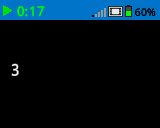
# Set cursor to (3,2) and print
# row number
brain.screen.set_cursor(3, 2)
brain.screen.print(brain.screen.row())
column#
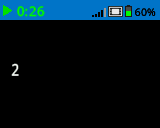
Η στήλη column επιστρέφει τη στήλη όπου το κείμενο θα εκτυπωθεί ως ακέραιος αριθμός.
Usage:
brain.screen.column()
Παράμετροι |
Περιγραφή |
|---|---|
Αυτή η μέθοδος δεν έχει παραμέτρους. |
# Set cursor to (3,2) and print
# column number
brain.screen.set_cursor(3, 2)
brain.screen.print(brain.screen.column())
print_at#
Η συνάρτηση print_at εκτυπώνει κείμενο, αριθμούς ή τιμές μεταβλητών στην οθόνη Brain σε μια καθορισμένη συντεταγμένη x και y σε pixel με την τρέχουσα καθορισμένη font και origin. Αυτή η μέθοδος αγνοεί την τρέχουσα θέση του κέρσορα.
Usage:
brain.screen.print_at(text, x, y, precision, opaque)
Παράμετροι |
Περιγραφή |
|---|---|
|
Το κείμενο, ο αριθμός ή η τιμή μεταβλητής που θα εκτυπωθεί. |
|
Η συντεταγμένη x που θα εκτυπωθεί ως όρισμα λέξης-κλειδιού, δηλαδή: |
|
Η συντεταγμένη y που θα εκτυπωθεί ως όρισμα λέξης-κλειδιού, δηλαδή: |
|
Προαιρετικό. Ο αριθμός των δεκαδικών ψηφίων που θα εμφανίζονται κατά την εμφάνιση αριθμών. Αυτό πρέπει να γραφτεί ως όρισμα λέξης-κλειδιού, π.χ.: |
|
Προαιρετικό. |
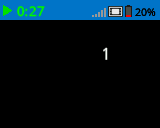
# Print the number 1 on the Brain's screen at position (100, 40)
brain.screen.print_at(1, x=100, y=40)
# Display 1/3 with 3 decimal places and a blue background
brain.screen.set_fill_color(Color.BLUE)
brain.screen.print_at((1/3), x=100, y=40, precision=3, opaque=True)
get_string_width#
get_string_width επιστρέφει το πλάτος μιας συμβολοσειράς σε pixel ως ακέραιο αριθμό, όπως θα εμφανιζόταν στην οθόνη του Brain. Το πλάτος ποικίλλει ανάλογα με το μήκος της συμβολοσειράς και την τρέχουσα γραμματοσειρά.
Usage:
brain.screen.get_string_width(string)
Παράμετροι |
Περιγραφή |
|---|---|
|
Η χορδή που θα μετρηθεί. |
get_string_height#
get_string_height επιστρέφει το ύψος μιας συμβολοσειράς σε pixel ως ακέραιο αριθμό, όπως θα εμφανιζόταν στην οθόνη Brain. Το ύψος ποικίλλει ανάλογα με το μήκος της συμβολοσειράς και την τρέχουσα γραμματοσειρά.
Usage:
brain.screen.get_string_height(string)
Παράμετροι |
Περιγραφή |
|---|---|
|
Η χορδή που θα μετρηθεί. |
Μεταλλάκτες#
clear_screen#
clear_screen διαγράφει όλα τα σχέδια και το κείμενο από την οθόνη του εγκεφάλου.
Usage:
brain.screen.clear_screen(color)
Παράμετροι |
Περιγραφή |
|---|---|
|
Προαιρετικό. Ορίζει το χρώμα της οθόνης. Οι επιλογές περιλαμβάνουν:
|
# Draw a circle and clear it after
# 2 seconds
brain.screen.draw_circle(80, 50, 20)
wait(2, SECONDS)
brain.screen.clear_screen()
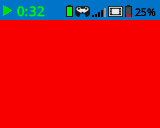
# Turn the screen red
brain.screen.clear_screen(Color.RED)
set_font#
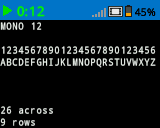
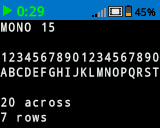
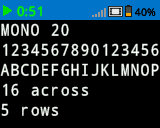
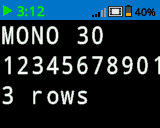
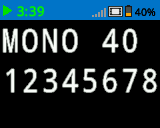
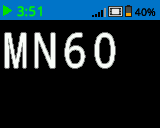
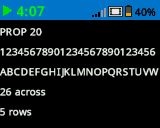
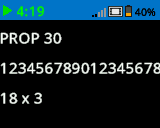
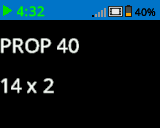
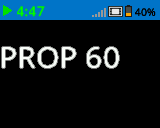
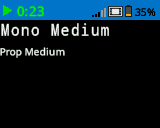
set_font ορίζει τη γραμματοσειρά που χρησιμοποιείται για την εμφάνιση κειμένου στην οθόνη Brain. Αυτή η γραμματοσειρά θα εφαρμοστεί σε όλο το κείμενο που εκτυπώνεται με print ή print_at. Η προεπιλεγμένη γραμματοσειρά στην αρχή ενός έργου είναι MONO20.
Usage:
brain.screen.set_font(fontname)
Παράμετρος |
Περιγραφή |
|---|---|
|
Ορίζει τη γραμματοσειρά σε μία από τις ακόλουθες τιμές:
|
|
|
|
|---|---|---|
|
|
|
|
|
|
|
# Display two different fonts on
# two separate lines
brain.screen.set_font(FontType.MONO20)
brain.screen.print("Mono Medium")
brain.screen.next_row()
brain.screen.set_font(FontType.PROP20)
brain.screen.print("Prop Medium")
set_pen_width#
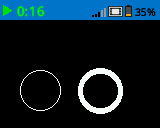
set_pen_width ορίζει το πάχος των γραμμών που σχεδιάζονται και των περιγραμμάτων των σχημάτων.
Usage:
brain.screen.set_pen_width(width)
Παράμετρος |
Περιγραφή |
|---|---|
|
Το πλάτος της πένας, σε pixel, κυμαίνεται από 0 έως 32. |
# Draw two circles with
# different pen widths
brain.screen.draw_circle(40, 70, 20)
brain.screen.set_pen_width(5)
brain.screen.draw_circle(100, 70, 20)
set_pen_color#
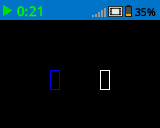
set_pen_color ορίζει το χρώμα του κειμένου, των pixel, των γραμμών και των περιγραμμάτων των σχημάτων.
Usage:
brain.screen.set_pen_color(color)
Παράμετρος |
Περιγραφή |
|---|---|
|
Προαιρετικό. Το χρώμα της πένας και της γραμματοσειράς που θα χρησιμοποιηθεί. Οι επιλογές περιλαμβάνουν:
|
# Draw two rectangles with
# different colors
brain.screen.draw_rectangle(100, 50, 10, 20)
brain.screen.set_pen_color(Color.BLUE)
brain.screen.draw_rectangle(50, 50, 10, 20)
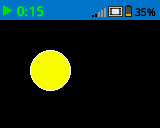
set_fill_color#
set_fill_color ορίζει το χρώμα γεμίσματος που χρησιμοποιείται όταν σχεδιάζονται σχήματα.
Usage:
brain.screen.set_fill_color(color)
Παράμετρος |
Περιγραφή |
|---|---|
|
Προαιρετικό. Το χρώμα γεμίσματος που θα χρησιμοποιηθεί. Οι επιλογές περιλαμβάνουν:
|
# Draw a yellow circle
brain.screen.set_fill_color(Color.YELLOW)
brain.screen.draw_circle(50, 50, 20)
set_origin#
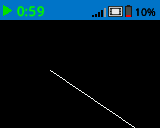
set_origin ορίζει την αρχή που χρησιμοποιείται για το σχέδιο και την εκτύπωση με βάση τις συντεταγμένες στην οθόνη Brain. Από προεπιλογή, η αρχή είναι η επάνω αριστερή γωνία της οθόνης.
Usage:
brain.screen.set_origin(x, y)
Παράμετρος |
Περιγραφή |
|---|---|
|
Η νέα συντεταγμένη x που θα οριστεί ως αρχή, δίνεται ως ακέραιος αριθμός από 0 έως 159. |
|
Η νέα συντεταγμένη y που θα οριστεί ως αρχή, δίνεται ως ακέραιος αριθμός από 0 έως 107. |
# Draw a line with the origin set to (50, 50)
brain.screen.set_origin(50, 50)
brain.screen.draw_line(1, 1, 159, 107)
Ισοπαλία#
draw_pixel#
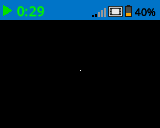
draw_pixel σχεδιάζει ένα pixel στην επιλεγμένη συντεταγμένη x και y χρησιμοποιώντας το τρέχον χρώμα πένας.
Usage:
brain.screen.draw_pixel(x, y)
Παράμετρος |
Περιγραφή |
|---|---|
|
Η συντεταγμένη x όπου θα σχεδιαστεί το εικονοστοιχείο, η οποία δίνεται ως ακέραιος αριθμός από 0 έως 159. |
|
Η συντεταγμένη y όπου θα σχεδιαστεί το εικονοστοιχείο, η οποία δίνεται ως ακέραιος αριθμός από 0 έως 107. |
# Draw one pixel at the center
# of the screen
brain.screen.draw_pixel(80, 50)
draw_line#
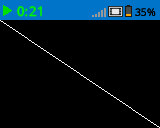
draw_line σχεδιάζει μια γραμμή από την πρώτη συντεταγμένη οθόνης (x1, y1) έως τη δεύτερη συντεταγμένη οθόνης (x2, y2) χρησιμοποιώντας τα τρέχοντα πλάτος πένας και χρώμα πένας.
Οι συντεταγμένες x και y χρησιμοποιούν την προεπιλεγμένη αρχή (0, 0), εκτός εάν έχει οριστεί διαφορετική αρχή χρησιμοποιώντας το set_origin.
Usage:
brain.screen.draw_line(x1, y1, x2, y2)
Παράμετρος |
Περιγραφή |
|---|---|
|
Η αρχική συντεταγμένη x της γραμμής, που δίνεται ως ακέραιος αριθμός από 0 έως 159. |
|
Η αρχική συντεταγμένη y της γραμμής, που δίνεται ως ακέραιος αριθμός από 0 έως 107. |
|
Η τελική συντεταγμένη x της γραμμής, που δίνεται ως ακέραιος αριθμός από 0 έως 159. |
|
Η τελική συντεταγμένη y της γραμμής, η οποία δίνεται ως ακέραιος αριθμός από 0 έως 107. |
# Draw a line from the top left to
# bottom right of the screen
brain.screen.draw_line(0, 0, 159, 107)
draw_rectangle#
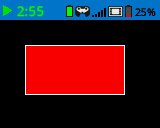
draw_rectangle σχεδιάζει ένα ορθογώνιο με την επάνω αριστερή γωνία του στην επιλεγμένη συντεταγμένη (x, y) και ένα μέγεθος που καθορίζεται από το δεδομένο πλάτος και ύψος, όλα μετρημένα σε pixel. Το περίγραμμα του ορθογωνίου σχεδιάζεται χρησιμοποιώντας το τρέχον πλάτος πένας και το χρώμα πένας. Το εσωτερικό γεμίζεται με το τρέχον χρώμα γεμίσματος, εκτός εάν χρησιμοποιείται η προαιρετική παράμετρος color.
Οι συντεταγμένες x και y χρησιμοποιούν την προεπιλεγμένη αρχή (0,0), εκτός εάν έχει οριστεί διαφορετική αρχή χρησιμοποιώντας το set_origin.
Usage:
brain.screen.draw_rectangle(x, y, width, height, color)
Παράμετρος |
Περιγραφή |
|---|---|
|
Η συντεταγμένη x της επάνω αριστερής γωνίας του ορθογωνίου, που δίνεται ως ακέραιος αριθμός από 0 έως 159. |
|
Η συντεταγμένη y της επάνω αριστερής γωνίας του ορθογωνίου, που δίνεται ως ακέραιος αριθμός από 0 έως 107. |
|
Το πλάτος του ορθογωνίου, σε pixel. |
|
Το ύψος του ορθογωνίου, σε pixel. |
|
Προαιρετικό. Το χρώμα γεμίσματος του ορθογωνίου. Οι επιλογές περιλαμβάνουν:
|
# Draw a red rectangle on the screen
brain.screen.draw_rectangle(25, 25, 100, 50, Color.RED)
draw_circle#
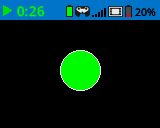
draw_circle σχεδιάζει έναν κύκλο με κέντρο την επιλεγμένη συντεταγμένη (x, y) και μέγεθος που καθορίζεται από τη δεδομένη ακτίνα, όλα μετρημένα σε pixel. Το περίγραμμα του κύκλου σχεδιάζεται χρησιμοποιώντας το τρέχον πλάτος πένας και το χρώμα πένας. Το εσωτερικό γεμίζεται με το τρέχον χρώμα γεμίσματος, εκτός εάν χρησιμοποιείται η προαιρετική παράμετρος color.
Οι συντεταγμένες x και y χρησιμοποιούν την προεπιλεγμένη αρχή (0,0), εκτός εάν έχει οριστεί διαφορετική αρχή χρησιμοποιώντας το set_origin.
Usage:
brain.screen.draw_circle(x, y, radius, color)
Παράμετρος |
Περιγραφή |
|---|---|
|
Η συντεταγμένη x του κέντρου του κύκλου, που δίνεται ως ακέραιος αριθμός από 0 έως 159. |
|
Η συντεταγμένη y του κέντρου του κύκλου, που δίνεται ως ακέραιος αριθμός από 0 έως 107. |
|
Η ακτίνα του κύκλου, σε pixel. |
|
Προαιρετικό. Το χρώμα γεμίσματος του κύκλου. Οι επιλογές περιλαμβάνουν:
|
# Draw a green circle on the screen
brain.screen.draw_circle(80, 50, 20, Color.GREEN)
set_clip_region#
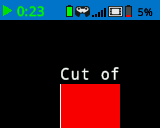
set_clip_region ορίζει μια ορθογώνια περιοχή στην οθόνη όπου θα περιορίζονται όλα τα σχέδια και το κείμενο. Οποιοδήποτε περιεχόμενο εκτός αυτής της περιοχής δεν θα εμφανίζεται.
Usage:
brain.screen.set_clip_region(x, y, width, height)
Παράμετρος |
Περιγραφή |
|---|---|
|
Η συντεταγμένη x της επάνω αριστερής γωνίας της περιοχής αποκοπής, που δίνεται ως ακέραιος αριθμός ή κινητή υποδιαστολή από 0 έως 159. |
|
Η συντεταγμένη y της επάνω αριστερής γωνίας της περιοχής αποκοπής, που δίνεται ως ακέραιος αριθμός ή κινητή υποδιαστολή από 0 έως 107. |
|
Το πλάτος της περιοχής κλιπ σε pixel. |
|
Το ύψος της περιοχής κλιπ σε pixel. |
# Restrict text and drawings to a specific region
brain.screen.set_clip_region(0, 0, 120, 120)
brain.screen.draw_rectangle(60, 60, 100, 100, Color.RED)
brain.screen.print_at("Cut off!", x=60, y=60)
render#
Η εντολή render ενεργοποιεί τη διπλή προσωρινή αποθήκευση για την οθόνη του Brain. Μόλις κληθούν, τυχόν εντολές σχεδίασης (όπως κείμενο, σχήματα ή εικόνες) δεν θα εμφανίζονται πλέον αμέσως για το υπόλοιπο έργο. Αντίθετα, οι ενημερώσεις θα εμφανίζονται μόνο όταν χρησιμοποιηθεί ξανά η εντολή render Αυτό επιτρέπει ομαλότερες και πιο ελεγχόμενες ενημερώσεις οθόνης, αλλά σημαίνει ότι τίποτα δεν θα είναι ορατό μέχρι να χρησιμοποιηθεί η εντολή render.
Usage:
brain.screen.render()
Παράμετροι |
Περιγραφή |
|---|---|
Αυτή η μέθοδος δεν έχει παραμέτρους. |
# Render text after moving
brain.screen.render()
brain.screen.print("Render later...")
drivetrain.drive_for(FORWARD, 100, MM)
drivetrain.turn_for(RIGHT, 90, DEGREES)
brain.screen.render()