
光学传感器#
介绍#
光学传感类别包含用于控制 VEX IQ 光学传感器并从中检索数据的模块。该传感器可以检测物体、识别颜色以及测量亮度和色调。
光学传感器带有一个可以开启或关闭的指示灯。该指示灯可以帮助光学传感器更清晰地检测物体和颜色。
以下是所有模块的列表:
设置光学光#
“设置光学照明”模块用于打开或关闭光学传感器上的照明灯。当光学传感器位于黑暗环境中时,照明灯可以帮助它更好地识别物体。
设定 [Optical1 v] 灯 [亮 v]
参数 |
描述 |
|---|---|
光学传感器 |
在“设备”窗口中配置要使用的光学传感器。 |
状态 |
光学传感器指示灯状态设置:
|
例子
当开始
[Repeatedly flash the Optical Sensor's lights.]
永久循环
设定 [Optical1 v] 灯 [亮 v]
等待 (1) 秒
设定 [Optical1 v] 灯 [灭 v]
等待 (1) 秒
设置光学功率#
“设置光学光功率”模块用于设置光学传感器的光强。光强可以帮助光学传感器更清晰地检测物体和颜色。
百分比越高,灯光越亮;百分比越低,灯光越暗。
如果光传感器的灯熄灭,将灯光功率设置为 0% 以上即可打开灯。
如果光传感器的指示灯亮着,将光功率设置为 0% 将关闭指示灯。
设定 [Optical1 v] 灯亮度为 (50) %
**注意:**如果光学传感器的指示灯熄灭,此模块会将指示灯打开。
参数 |
描述 |
|---|---|
光学传感器 |
在“设备”窗口中配置要使用的光学传感器。 |
亮度 |
光学传感器的亮度,从 0 到 100,以百分比表示。 |
例子
当开始
[Repeatedly change the brightness of the Optical Sensor's lights.]
永久循环
设定 [Optical1 v] 灯亮度为 (10) %
等待 (2) 秒
设定 [Optical1 v] 灯亮度为 (50) %
等待 (2) 秒
设定 [Optical1 v] 灯亮度为 (100) %
等待 (2) 秒
光学仪器发现物体了吗?#
**光学传感器检测到物体?**布尔模块报告光学传感器是否在范围内检测到物体。
正确 — 光学传感器已检测到物体。
错误 — 光学传感器未检测到物体。
<[Optical1 v] 发现对象?>
参数 |
描述 |
|---|---|
光学传感器 |
在“设备”窗口中配置要使用的光学传感器。 |
例子
当开始
[Turn until the Optical Sensor detects an object.]
设定转向速度为 (10) [% v]
设定 [Optical1 v] 灯亮度为 [75] %
[右 v] 转
等到 <[Optical1 v] 发现对象?>
在屏幕上打印 [Object detected]◀ 并设定光标至下一行
驱动停止
光学器件能检测颜色吗?#
**光学传感器检测到颜色?**布尔模块报告光学传感器是否检测到特定颜色。
正确 — 光学传感器已检测到指定颜色。
错误 — 光学传感器未检测到指定的颜色。
<[Optical1 v] 测得 [红色 v]?>
参数 |
描述 |
|---|---|
光学传感器 |
在“设备”窗口中配置要使用的光学传感器。 |
颜色 |
要检查的颜色:
|
例子
当开始
[Turn until the Optical Sensor detects a red object.]
设定转向速度为 (10) [% v]
设定 [Optical1 v] 灯亮度为 [75] %
[右 v] 转
等到 <[Optical1 v] 测得 [红色 v]?>
在屏幕上打印 [Red detected]◀ 并设定光标至下一行
驱动停止
光学颜色名称#
光学颜色名称报告模块报告光学传感器检测到的颜色名称。
可选颜色有:
红色的
绿色的
蓝色的
黄色的
橙子
紫色的
青色
**注意:**此模块可以插入到 设置触摸 LED 颜色 模块 中,使触摸 LED 与检测到的颜色相匹配。
([Optical1 v] 颜色)
参数 |
描述 |
|---|---|
光学传感器 |
在“设备”窗口中配置要使用的光学传感器。 |
例子
当开始
[Display a message when the Optical Sensor detects red.]
等到 <[Optical1 v] 测得 [红色 v]?>
在屏幕上打印 ([Optical1 v] 颜色)◀ 并设定光标至下一行
光学亮度#
光学亮度报告模块以百分比(0% 到 100%)报告检测到的光的亮度。
百分比越高,表示光学传感器检测到的光线越多;百分比越低,表示光学传感器检测到的光线越少。
([Optical1 v] 亮度百分比)
参数 |
描述 |
|---|---|
光学传感器 |
在“设备”窗口中配置要使用的光学传感器。 |
例子
当开始
[Display the brightness when the Optical Sensor detects red.]
等到 <[Optical1 v] 测得 [红色 v]?>
在屏幕上打印 ([Optical1 v] 亮度百分比)◀ 并设定光标至下一行
光学色调#
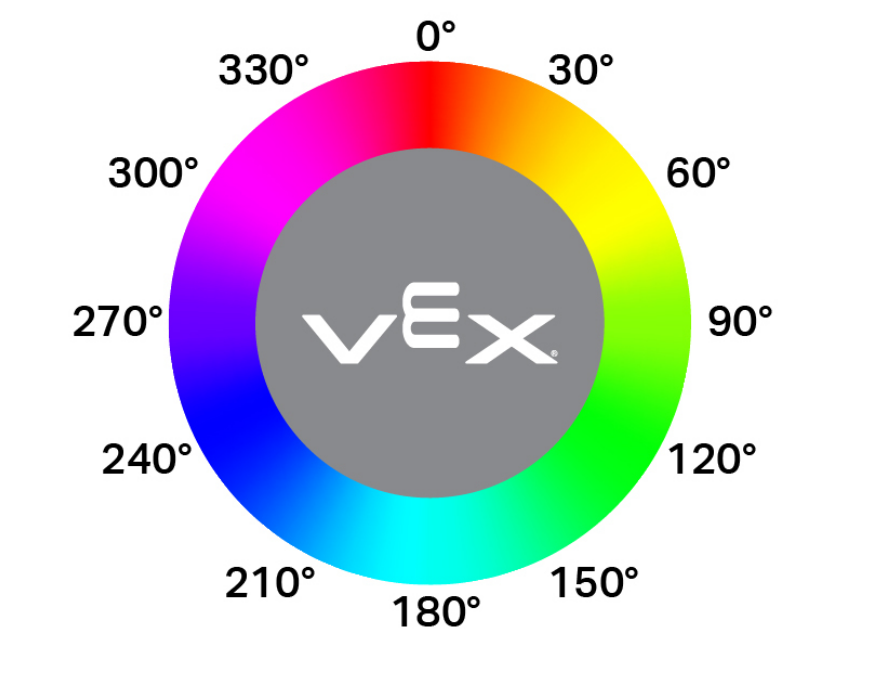
光学色调报告模块将光学传感器检测到的色调报告为 0 到 359 度之间的数字。
色相是一种用色轮上的数字来描述颜色的方法,如下图所示:
([Optical1 v] 色度值)
参数 |
描述 |
|---|---|
光学传感器 |
在“设备”窗口中配置要使用的光学传感器。 |
例子
当开始
[Print when the Optical Sensor detects pink.]
永久循环
清屏
在屏幕上设定光标至 (1) 行 (1) 列
如果 <<([Optical1 v] 色度值) [math_greater_than v] [290]> [和 v] <([Optical1 v] 色度值) [math_less_than v] [350]>> 那么
在屏幕上打印 [Pink!]▶
等待 (0.1) 秒
否则
在屏幕上打印 [Not pink.]▶
等待 (0.1) 秒
当光学#
当选定的光学传感器检测到或丢失物体时,When Optical 模块会运行所连接的模块堆栈。
当 [Optical1 v] [测得 v] 一个对象
参数 |
描述 |
|---|---|
光学传感器 |
在“设备”窗口中配置要使用的光学传感器。 |
状态 |
当连接的积木栈运行时:
|
例子
当 [Optical1 v] [测得 v] 一个对象
[Find an object when it is lost.]
[右 v] 转
等到 <[Optical1 v] 发现对象?>
驱动停止