
颜色传感器#
介绍#
颜色传感器类别包含一些模块,用于报告来自 VEX IQ 颜色传感器的颜色信息。这些模块可以让你的机器人检测物体是否存在、识别特定颜色,并返回亮度、色调等视觉数据。
您还可以使用模块来配置传感器内部指示灯的亮度。这些工具非常适合需要实时响应彩色物体、光照条件或传感器反馈的程序。
以下是所有模块的列表:
设置彩色灯光#
“设置颜色灯光”堆栈模块用于设置颜色传感器灯光的亮度。灯光可以帮助颜色传感器更清晰地检测物体和颜色。
百分比越高,灯光越亮;百分比越低,灯光越暗。
如果颜色传感器的灯熄灭,将灯光功率设置为 0% 以上即可打开灯。
如果颜色传感器的指示灯亮着,将灯光功率设置为 0% 将关闭指示灯。
设定 [Color1 v] 灯亮为 (50) %
参数 |
描述 |
|---|---|
颜色传感器 |
在“设备”窗口中配置要设置哪个颜色传感器的光亮度。 |
亮度 |
颜色传感器的亮度,取值范围为 0% 到 100%,以整数表示。 |
例子
当开始
[Light up the Color Sensor dimmer.]
设定 [Color1 v] 灯亮为 (25) %
等待 (2) 秒
[Light up the Color Sensor brighter.]
设定 [Color1 v] 灯亮为 (100) %
颜色找到了一个物体?#
“颜色检测到物体?”布尔模块报告颜色传感器是否检测到任何物体。
正确 — 颜色传感器已检测到物体。
错误 — 颜色传感器未检测到物体。
<[Color1 v] 发现对象?>
参数 |
描述 |
|---|---|
颜色传感器 |
在“设备”窗口中配置要使用的颜色传感器。 |
例子
当开始
[Print a different message when an object is in front of the Color Sensor.]
永久循环
在屏幕上设定光标至 (1) 行 (1) 列
如果 <[Color1 v] 发现对象?> 那么
在控制台上打印 [Object detected]▶
否则
在控制台上打印 [Nothing detected]▶
结束
清除屏幕第 (1) 行
颜色识别颜色?#
“颜色检测颜色?”布尔模块报告颜色传感器是否检测到特定颜色。
正确 — 颜色传感器已检测到指定颜色。
错误 — 颜色传感器未检测到指定的颜色。
<[Color1 v] 测得 [红色 v]?>
参数 |
描述 |
|---|---|
颜色传感器 |
在“设备”窗口中配置要使用的颜色传感器。 |
颜色 |
要检查的颜色:
|
例子
当开始
[Turn until the Color Sensor detects green.]
[右 v] 转
等到 <[Color1 v] 测得 [绿色 v]?>
驱动停止
颜色 颜色名称#
颜色名称报告块将颜色传感器检测到的颜色名称以字符串形式报告。
可选颜色有:
红色的
绿色的
蓝色的
白色的
黄色的
橙子
紫色的
红紫色
紫色
蓝紫色
蓝绿色
黄绿色
黄橙色
红橙色
**注意:**此模块可以插入到 设置触摸 LED 颜色 模块 中,使触摸 LED 与检测到的颜色相匹配。
([Color1 v] 颜色)
参数 |
描述 |
|---|---|
颜色传感器 |
在“设备”窗口中配置要使用的颜色传感器。 |
例子
当开始
[Stop and print when the Color Sensor detects green.]
[右 v] 转
等到 <[Color1 v] 测得 [绿色 v]?>
驱动停止
在控制台上打印 ([Color1 v] 颜色)◀ 并设定光标至下一行
色彩亮度#
颜色亮度报告模块会以百分比(0% 到 100%)报告检测到的颜色的亮度。
百分比越高,表示颜色传感器检测到的光线越多;百分比越低,表示颜色传感器检测到的光线越少。
([Color1 v] 亮度百分比)
参数 |
描述 |
|---|---|
颜色传感器 |
在“设备”窗口中配置要使用的颜色传感器。 |
例子
当开始
[Stop and print the brightness when the Color Sensor detects green.]
[右 v] 转
等到 <[Color1 v] 测得 [绿色 v]?>
驱动停止
在控制台上打印 ([Color1 v] 亮度百分比)◀ 并设定光标至下一行
色调#
色调报告模块将颜色传感器检测到的色调报告为 0 到 359 度之间的数字。
色相是一种用色轮上的数字来描述颜色的方法,如下图所示:
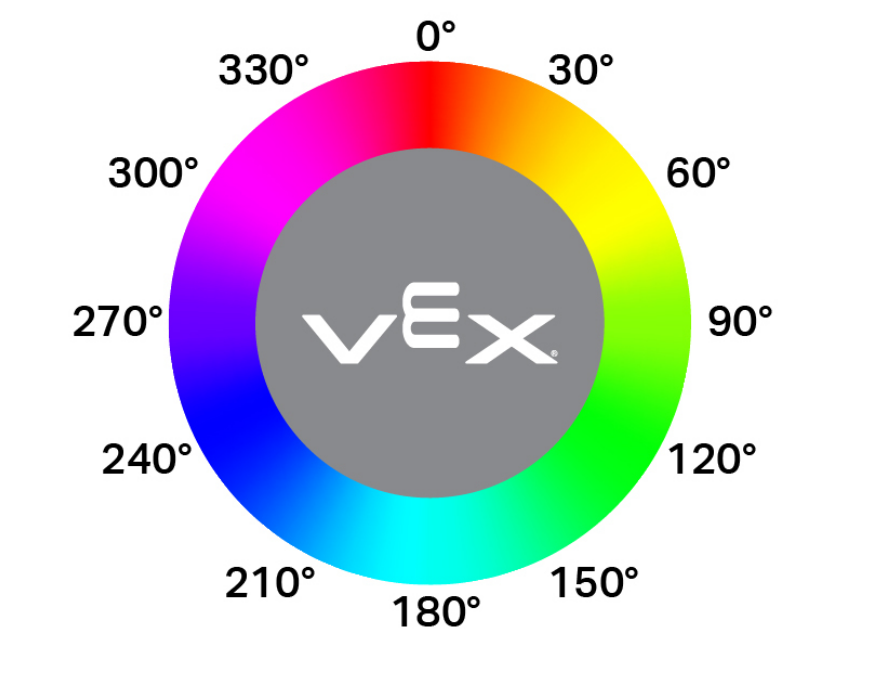
([Color1 v] 色度值)
参数 |
描述 |
|---|---|
颜色传感器 |
在“设备”窗口中配置要使用的颜色传感器。 |
例子
当开始
[Print when the Color Sensor detects pink.]
永久循环
清除控制台所有行
在屏幕上设定光标至 (1) 行 (1) 列
如果 <<([Color1 v] 色度值) [math_greater_than v] [290]> [和 v] <([Color1 v] 色度值) [math_less_than v] [350]>> 那么
在控制台上打印 [Pink!]▶
等待 (0.1) 秒
否则
在控制台上打印 [Not pink.]▶
等待 (0.1) 秒