
惯性陀螺仪传感器#
介绍#
VEX IQ(第二代)大脑内置惯性传感器。该传感器用于测量大脑的运动和转动情况。
内置惯性传感器由两部分组成。陀螺仪测量转向参数,例如航向、旋转、陀螺仪速率和方向。加速度计测量运动变化,例如加速或减速。
内置惯性传感器在每个项目开始时都会自动配置并可直接使用。也可以使用外部陀螺仪传感器,但必须在使用前进行配置。外部 VEX IQ 陀螺仪传感器仅测量旋转。
以下是所有模块的列表:
陀螺仪传感——处理航向和旋转值。
校准陀螺仪 — 校准已配置的外部陀螺仪传感器。
校准大脑惯性 — 校准大脑内置的惯性传感器。
设置惯性/陀螺仪航向 — 将传感器的当前航向设置为新的航向值。
设置惯性/陀螺仪旋转 — 将传感器的当前旋转设置为新的旋转值。
惯性/陀螺仪航向角 — 报告传感器朝向的方向,范围从 0 到 359.99 度。
惯性/陀螺仪旋转角度 — 报告传感器旋转了多远。
陀螺仪速率 — 报告外部陀螺仪传感器的当前旋转速度。
惯性传感——使用内置的Brain惯性传感器。
加速度 — 报告大脑在选定轴上加速或减速的速度。
陀螺仪速率 — 报告大脑绕选定轴旋转的速度。
orientation — 报告大脑的滚动、俯仰或偏航角度。
陀螺仪感应#
校准陀螺仪#
校准陀螺仪堆栈模块用于校准已配置的外部陀螺仪传感器。
校准有助于陀螺仪传感器正确测量转弯角度。校准过程中请保持传感器静止。如果在校准过程中传感器移动,航向和旋转值可能无法正确测量转弯角度。
项目将等待校准完成后,才会运行堆栈中的下一个模块。
**注意:**此模块仅在配置了陀螺仪传感器后才可用。
[Gyro1 v] 校准 [2 v] 秒
参数 |
描述 |
|---|---|
陀螺仪 |
外部陀螺仪传感器需要校准。 |
期间 |
传感器校准所需时间(秒):
|
例子
当开始
[Calibrate a Gyro Sensor and display its angle of heading.]
[Gyro1 v] 校准 [2 v] 秒
在屏幕上打印 ([Gyro1 v] 归位角度值)◀ 并设定光标至下一行
校准 BrainInertial#
校准 BrainInertial 堆栈模块用于校准 Brain 内置的惯性传感器。
校准有助于惯性传感器正确测量转向角度。校准期间请保持主机静止。如果主机在校准期间移动,则航向、旋转、陀螺仪速率和方向值可能无法正确测量。
项目将等待校准完成后,才会运行堆栈中的下一个模块。
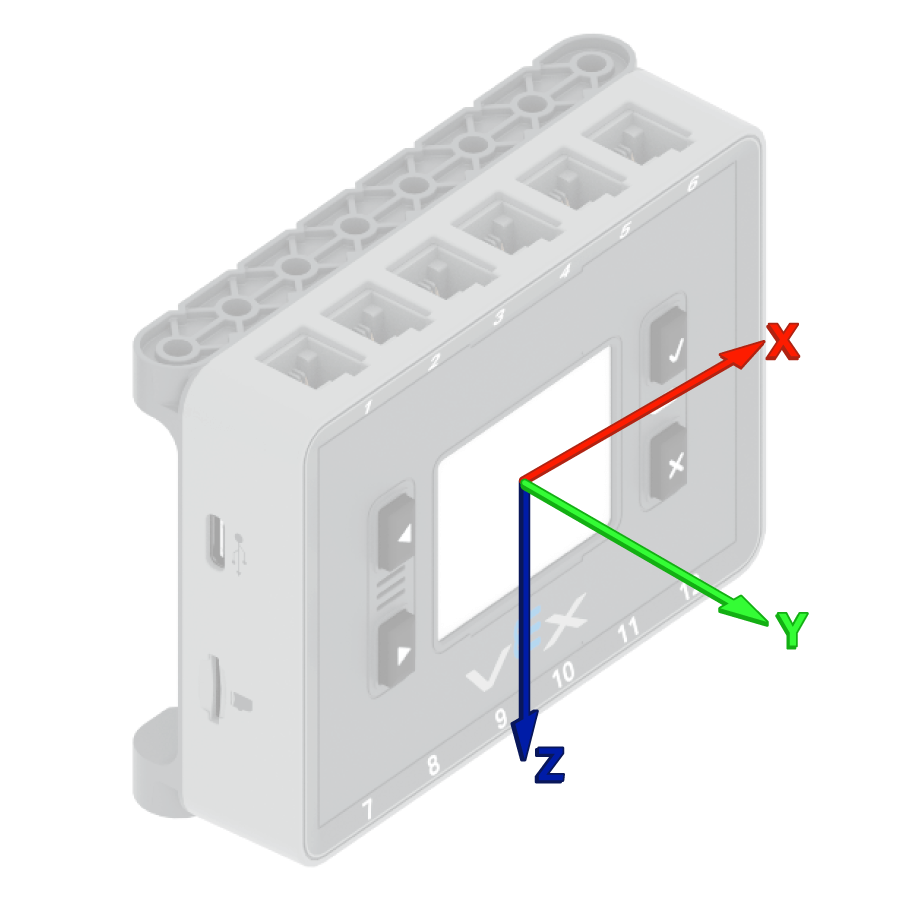
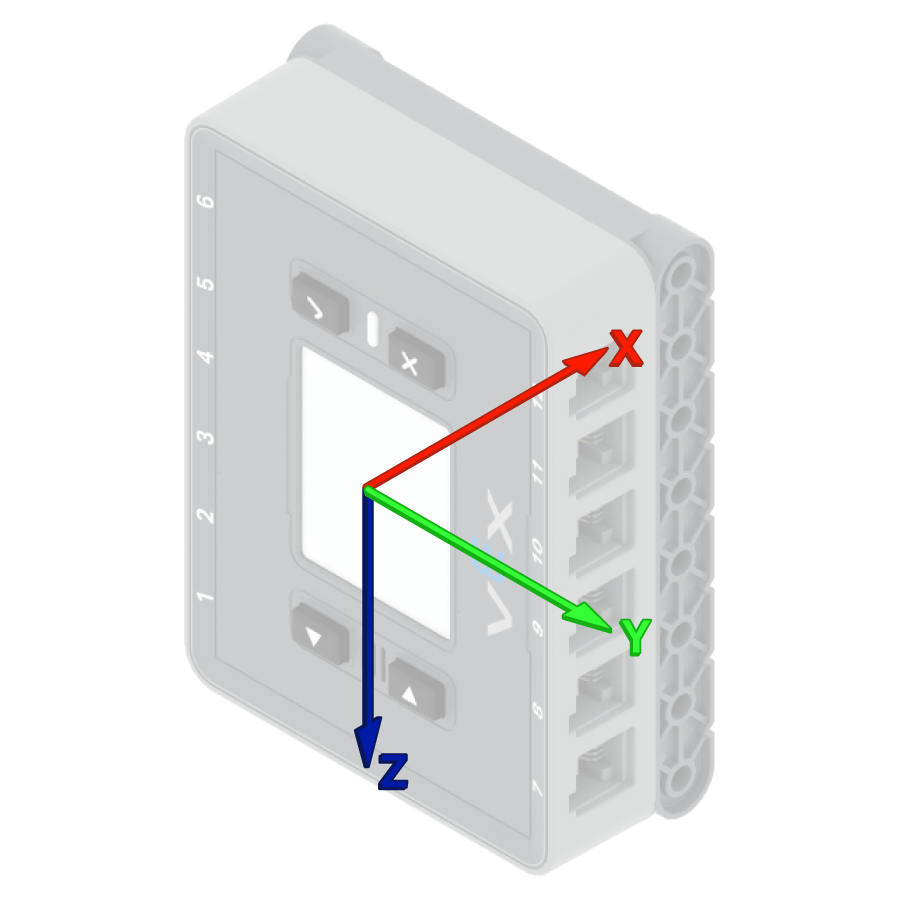
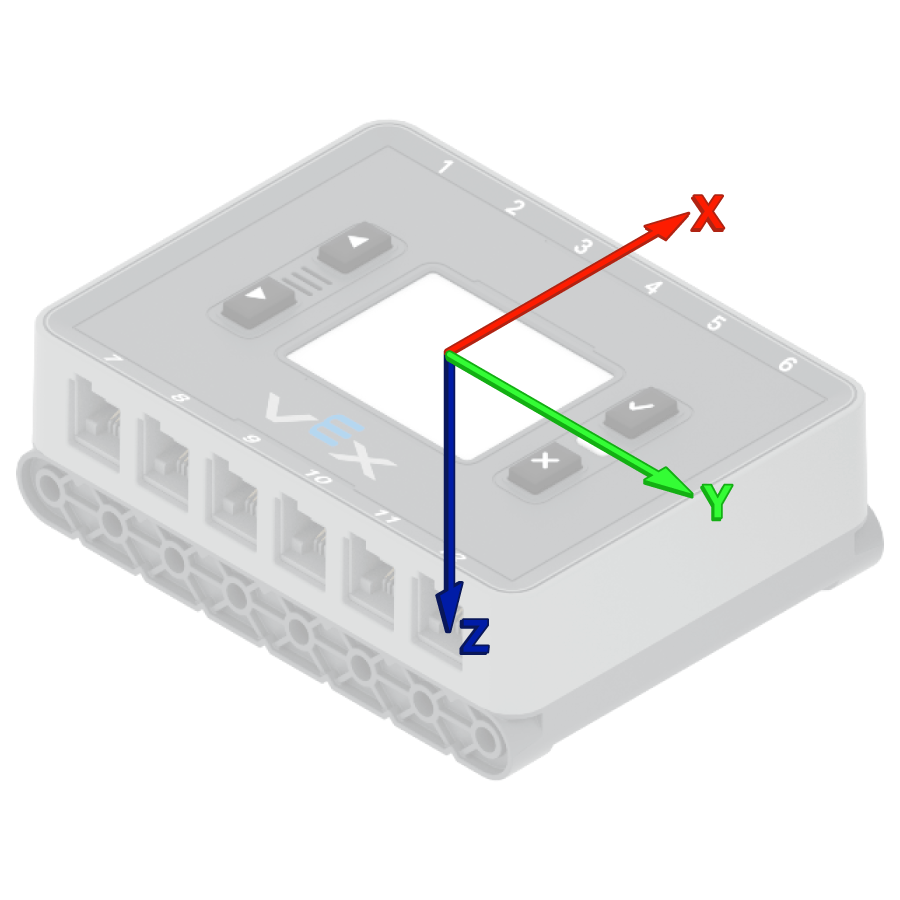
VEX Brains 会在每个项目开始时尝试自动校准。但是,如果在项目开始期间机器人被搬运或移动,传感器可能无法正确校准或校准结果不准确。
校准BrainInertial
参数 |
描述 |
|---|---|
该块没有参数。 |
例子
当开始
[Calibrate the Brain's sensor and display its angle of heading.]
校准BrainInertial
在屏幕上打印 ([BrainInertial v] 归位角度值)◀ 并设定光标至下一行
设置惯性/陀螺仪航向#
航向是指传感器朝向的方向,以度为单位,范围从 0 到 359.99。设置惯性/陀螺仪航向堆栈块将传感器的当前航向更改为新的航向值。
例如,如果传感器已转向右侧,将航向设置为 0 度,则该右侧位置将成为新的 0 度。然后,传感器可以根据该新方向跟踪其他航向。
设定[Gyro1 v] 归位为 (0) 度
参数 |
描述 |
|---|---|
陀螺仪 |
要使用的惯性传感器或陀螺仪传感器。 |
标题 |
要设置的传感器航向值,单位为度。该值可以介于 0 到 359.99 之间。 |
例子
当开始
[Turn to the new 0 degrees heading.]
设定[Gyro1 v] 归位为 (90) 度
归位至 (0) 度 ▶
设置惯性/陀螺仪旋转#
旋转角度是指传感器转动的程度,以度为单位。与航向不同,旋转角度可以超过 359.99 度,也可以低于 0 度。在项目开始时,旋转角度值设置为 0 度。设置惯性/陀螺仪旋转角度 代码块会将传感器的当前旋转角度更改为新值。
例如,如果传感器向右旋转了两圈,其旋转角度将为 720 度。将旋转角度设置为 0 度会将旋转角度从 720 度重置为 0 度。然后,传感器可以根据这个新值跟踪旋转。
设定 [Gyro1 v] 转向为 (0) 度
参数 |
描述 |
|---|---|
陀螺仪 |
要使用的惯性传感器或陀螺仪传感器。 |
旋转 |
要设置的传感器旋转值,以度为单位。可以是整数或小数。 |
例子
当开始
[Turn to the new 0 rotation.]
设定 [Gyro1 v] 转向为 (-100) 度
转向至 (0) 度 ▶
惯性/陀螺仪航向角#
航向角是指传感器朝向的方向,以度为单位,范围从 0 到 359.99。惯性/陀螺仪航向角报告模块报告传感器的当前航向角。
初始航向为0度。如果传感器旋转超过359.99度,航向将回落至0度。
([Gyro1 v] 归位角度值)
参数 |
描述 |
|---|---|
陀螺仪 |
惯性传感器或陀螺仪传感器用于报告航向。 |
例子
当开始
[Display the Gyro Sensor's heading before and after rotating.]
在屏幕上打印 ([Gyro1 v] 归位角度值)◀ 并设定光标至下一行
[右 v] 转 (390) 度 ▶
在屏幕上打印 ([Gyro1 v] 归位角度值)◀ 并设定光标至下一行
惯性/陀螺旋转角度#
旋转角度是指传感器转动的程度,以度为单位。与航向不同,旋转角度可以超过 359.99 度,也可以低于 0 度。项目开始时,旋转角度值设置为 0 度。“惯性/陀螺仪旋转角度”报告模块会报告传感器的当前旋转角度。
向右转动会增加旋转角度,向左转动会减少旋转角度。例如,向右转动两圈,旋转角度为 720 度。从 0 度向左转动一圈,旋转角度为 -360 度。
([Gyro1 v] 转向角度值)
参数 |
描述 |
|---|---|
陀螺仪 |
惯性传感器或陀螺仪传感器用于报告旋转情况。 |
例子
当开始
[Display the Gyro Sensor's angle of rotation before and after rotating.]
在屏幕上打印 ([Gyro1 v] 转向角度值)◀ 并设定光标至下一行
[右 v] 转 (390) 度 ▶
在屏幕上打印 ([Gyro1 v] 转向角度值)◀ 并设定光标至下一行
陀螺仪速率#
“陀螺仪转速”报告模块以度/秒 \(dps\) 为单位报告外部陀螺仪传感器的当前旋转速度。该值可以是正数也可以是负数,具体取决于陀螺仪传感器的旋转方向。
([Gyro1 v] 角速度\(dps\))
参数 |
描述 |
|---|---|
陀螺仪 |
外部陀螺仪传感器用于报告旋转速度。 |
例子
当开始
[Display the Gyro Sensor's current rotation speed.]
[右 v] 转
等待 (1) 秒
在屏幕上打印 ([Gyro1 v] 角速度\(dps\))◀ 并设定光标至下一行
惯性传感#
加速度#
加速度是指大脑加速或减速的速度。加速度报告模块会报告大脑沿选定轴的加速度,范围从 -4.00 G 到 4.00 G。
G是用来测量加速度的单位。1G大约相当于你静止坐着时感受到的重力加速度。
该值可以是正数也可以是负数,具体取决于所选轴上的加速度方向。可选轴包括 x、y 和 z。
(BrainInertial [X v] 轴加速度值\(g\))
参数 |
描述 |
|---|---|
轴 |
测量加速度的轴:
|
例子
当开始
[Display the acceleration along the x-axis while the drivetrain is moving.]
在屏幕上设定打印精度为 [0.01 v]
设定驱动速度为 (100) %
在屏幕上打印 [Resting: ]◀ 并设定光标至下一行
在屏幕上打印 (BrainInertial [X v] 轴加速度值\(g\))◀ 并设定光标至下一行
等待 (1) 秒
驱动 [向前 v] (500) [毫米 v] ◀ 并且不等待
等待 (0.1) 秒
在屏幕上打印 [Startup: ]◀ 并设定光标至下一行
在屏幕上打印 (BrainInertial [X v] 轴加速度值\(g\))◀ 并设定光标至下一行
陀螺仪速率#
陀螺仪速率是指大脑旋转的速度。陀螺仪速率报告模块以十进制数的形式报告大脑沿选定轴的当前旋转速度,单位为度/秒 \(dps\)。
该值可以是正值也可以是负值,具体取决于大脑绕该轴旋转的方向。
(BrainInertial [X v] 轴陀螺仪角速度\(dps\))
参数 |
描述 |
|---|---|
轴 |
陀螺仪速率报告轴:
|
例子
当开始
[Display the gyro rate around the z-axis while the drivetrain is turning.]
[右 v] 转
等待 (1) 秒
在屏幕上打印 (BrainInertial [z v] 轴陀螺仪角速度\(dps\))◀ 并设定光标至下一行
方向#
方向是指大脑在选定的旋转轴上的当前角度。方向报告模块报告大脑的横滚角、俯仰角或偏航角,范围从 -180.00 度到 180.00 度。
滚动、俯仰和偏航描述了大脑倾斜或转动的不同方式。
(BrainInertial [横滚 v] 偏转角度值)
参数 |
描述 |
|---|---|
轴 |
要报告的方位轴:
|
例子
当开始
[Display the roll, pitch, and yaw of the Brain as it is rotated by hand.]
永久循环
清屏
在屏幕上打印 (BrainInertial [横滚 v] 偏转角度值)◀ 并设定光标至下一行
在屏幕上打印 (BrainInertial [俯仰 v] 偏转角度值)◀ 并设定光标至下一行
在屏幕上打印 (BrainInertial [偏转 v] 偏转角度值)◀ 并设定光标至下一行
在屏幕上设定光标至 (1) 行 (1) 列
等待 (0.05) 秒
结束