
Sensor inercial y giroscópico#
Introducción#
El cerebro VEX IQ (2.ª generación) tiene un sensor inercial incorporado. Este sensor mide cómo se mueve y gira el cerebro.
El sensor inercial integrado utiliza dos componentes para ello. El giroscopio mide los giros, como la dirección, la rotación, la velocidad angular y la orientación. El acelerómetro mide los cambios de movimiento, como la aceleración o la desaceleración.
El sensor inercial integrado se configura automáticamente y está listo para usar al inicio de cada proyecto. También se puede usar un giroscopio externo, pero debe configurarse antes de su uso. El giroscopio externo VEX IQ solo mide el giro.
A continuación se muestra una lista de todos los bloques:
Detección giroscópica: funciona con valores de rumbo y rotación.
calibrar giroscopio — Calibra un sensor giroscópico externo configurado.
calibrar BrainInertial — Calibra el sensor inercial incorporado del cerebro.
establecer rumbo inercial/giroscopio — Establece el rumbo actual del sensor a un nuevo valor de rumbo.
establecer rotación inercial/giróscopo — Establece la rotación actual del sensor a un nuevo valor de rotación.
ángulo de rumbo inercial/giroscopio — Informa la dirección hacia la que apunta el sensor, de 0 a 359,99 grados.
ángulo de rotación inercial/giróscopo — Indica cuánto ha girado el sensor.
velocidad del giroscopio — Informa la velocidad de rotación actual del sensor giroscópico externo.
Detección inercial: utilice el sensor inercial cerebral integrado.
aceleración — Informa qué tan rápido el cerebro está acelerando o desacelerando en el eje seleccionado.
velocidad giroscópica — Indica la velocidad a la que el cerebro gira sobre el eje seleccionado.
orientación — Informa el ángulo de balanceo, cabeceo o guiñada del cerebro.
Detección giroscópica#
calibrar el giroscopio#
El bloque calibrate gyro calibra un sensor giroscópico externo configurado.
La calibración ayuda al sensor giroscópico a medir los giros correctamente. Mantenga el sensor inmóvil durante la calibración. Si el sensor se mueve durante la calibración, los valores de rumbo y rotación podrían no medir los giros correctamente.
El proyecto esperará a que finalice la calibración antes de ejecutar el siguiente bloque de la pila.
Nota: Este bloque solo está disponible si hay un sensor giroscópico configurado.
calibrar [Gyro1 v] por [2 v] segundos
Parámetros |
Descripción |
|---|---|
giroscopio |
El sensor giroscópico externo para calibrar. |
duración |
¿Cuánto tiempo se debe calibrar el sensor en segundos?:
|
Ejemplo
cuando inicie
[Calibrate a Gyro Sensor and display its angle of heading.]
calibrar [Gyro1 v] por [2 v] segundos
imprimir (rumbo de [Gyro1 v] en grados) en pantalla ◀ y mover cursor a la siguiente fila
calibrar BrainInertial#
El bloque calibrate BrainInertial calibra el sensor inercial integrado del cerebro.
La calibración ayuda al sensor inercial a medir los giros correctamente. Mantenga el dispositivo inmóvil durante la calibración. Si el dispositivo se mueve durante la calibración, es posible que los valores de rumbo, rotación, velocidad angular y orientación no se midan correctamente.
El proyecto esperará a que finalice la calibración antes de ejecutar el siguiente bloque de la pila.
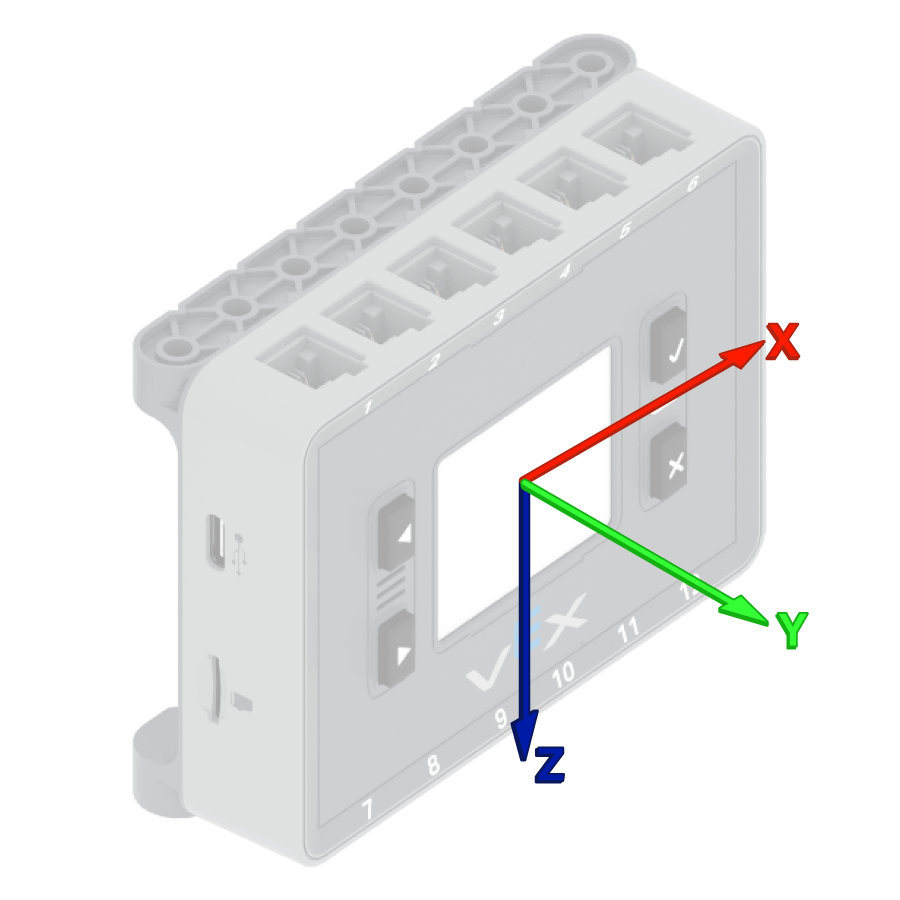
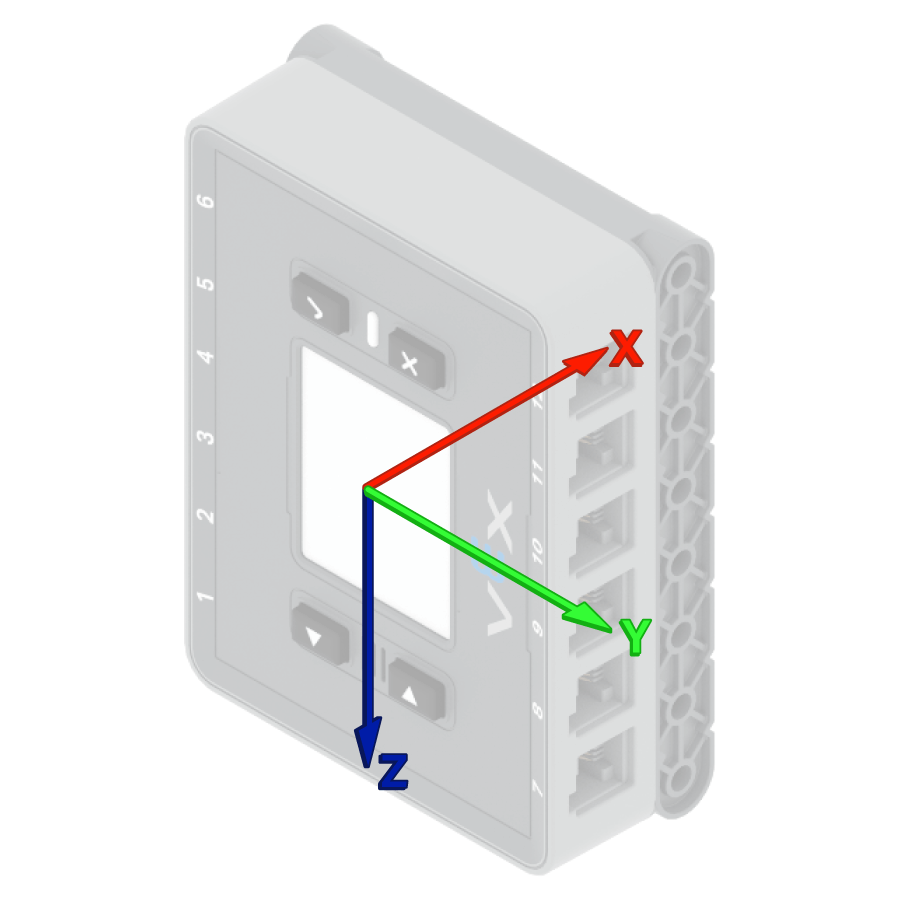
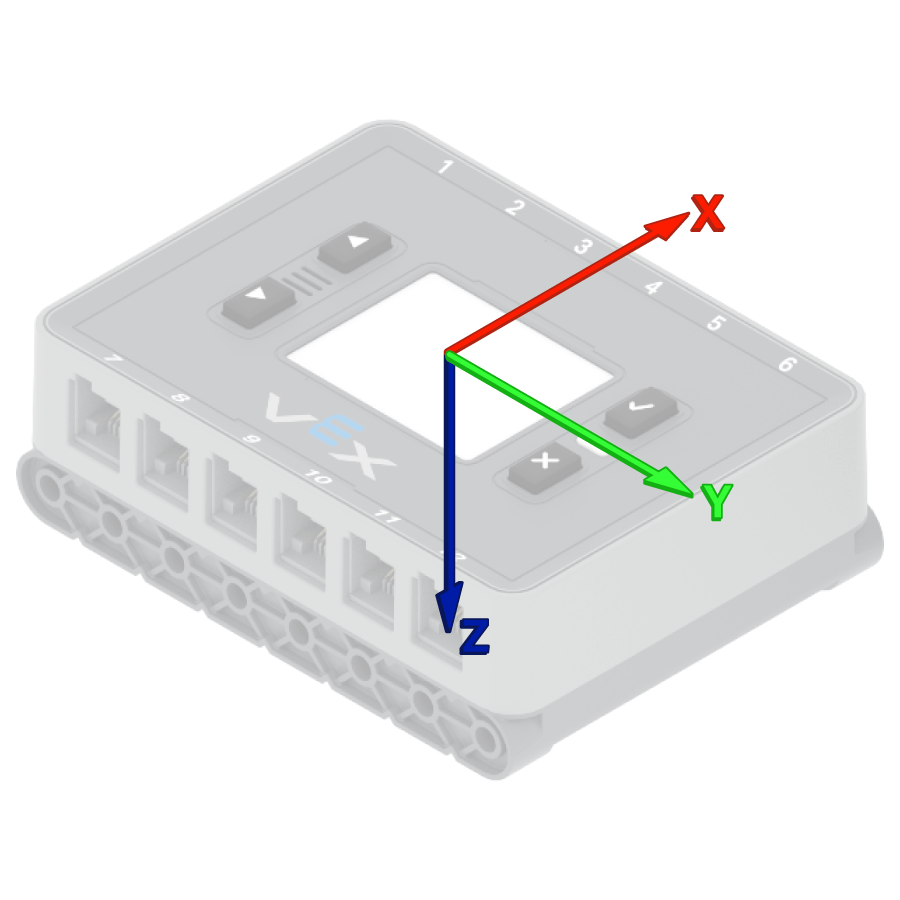
Los sistemas VEX Brains intentan calibrarse automáticamente al inicio de cada proyecto. Sin embargo, si el robot se transporta o se mueve durante el inicio del proyecto, es posible que el sensor no se calibre correctamente o que la calibración sea incorrecta.
calibrar BrainInertial
Parámetros |
Descripción |
|---|---|
Este bloque no tiene parámetros. |
Ejemplo
cuando inicie
[Calibrate the Brain's sensor and display its angle of heading.]
calibrar BrainInertial
imprimir (rumbo de [BrainInertial v] en grados) en pantalla ◀ y mover cursor a la siguiente fila
Establecer rumbo inercial/giroscopio#
La orientación es la dirección hacia la que apunta el sensor, medida en grados de 0 a 359,99. El bloque de pila establecer orientación inercial/giróscopo cambia la orientación actual del sensor a un nuevo valor.
Por ejemplo, si el sensor se ha girado hacia la derecha, al ajustar la orientación a 0 grados, esa posición hacia la derecha se convierte en la nueva dirección de 0 grados. De esta forma, el sensor puede seguir otras orientaciones basándose en esa nueva dirección.
establecer rumbo de [Gyro1 v] a (0) grados
Parámetros |
Descripción |
|---|---|
giroscopio |
El sensor inercial o giroscópico que se va a utilizar. |
título |
El valor de rumbo, en grados, que se configurará para el sensor. Este valor puede estar entre 0 y 359,99. |
Ejemplo
cuando inicie
[Turn to the new 0 degrees heading.]
establecer rumbo de [Gyro1 v] a (90) grados
girar al rumbo (0) grados ▶
Configurar la rotación inercial/girográfica#
La rotación indica cuánto ha girado el sensor, medida en grados. A diferencia de la orientación, la rotación puede superar los 359,99 grados o disminuir por debajo de 0 grados. Al inicio de un proyecto, el valor de rotación se establece en 0 grados. El bloque de pila establecer rotación inercial/giróscopo cambia la rotación actual del sensor a un nuevo valor.
Por ejemplo, si el sensor ha dado dos vueltas completas a la derecha, su valor de rotación será de 720 grados. Al establecer la rotación en 0 grados, esta volverá a su valor original. De esta forma, el sensor podrá registrar las rotaciones basándose en ese nuevo valor.
establecer rotación de [Gyro1 v] a (0) grados
Parámetros |
Descripción |
|---|---|
giroscopio |
El sensor inercial o giroscópico que se va a utilizar. |
rotación |
El valor de rotación, en grados, que se configurará para el sensor. Puede ser un número entero o decimal. |
Ejemplo
cuando inicie
[Turn to the new 0 rotation.]
establecer rotación de [Gyro1 v] a (-100) grados
girar a la rotación (0) grados ▶
ángulo de rumbo inercial/giroscopio#
La orientación es la dirección hacia la que apunta el sensor, medida en grados de 0 a 359,99. El bloque de informe ángulo de orientación inercial/giróscopo informa la orientación actual del sensor.
El rumbo inicial es de 0 grados. Si el sensor gira más allá de los 359,99 grados, el rumbo vuelve a 0 grados.
(rumbo de [Gyro1 v] en grados)
Parámetros |
Descripción |
|---|---|
giroscopio |
El sensor inercial o giroscópico para informar la dirección. |
Ejemplo
cuando inicie
[Display the Gyro Sensor's heading before and after rotating.]
imprimir (rumbo de [Gyro1 v] en grados) en pantalla ◀ y mover cursor a la siguiente fila
girar [derecha v] por (390) grados ▶
imprimir (rumbo de [Gyro1 v] en grados) en pantalla ◀ y mover cursor a la siguiente fila
ángulo de rotación inercial/giróscopo#
La rotación indica cuánto ha girado el sensor, medida en grados. A diferencia de la orientación, la rotación puede superar los 359,99 grados o disminuir por debajo de 0 grados. Al inicio de un proyecto, el valor de rotación se establece en 0 grados. El bloque de informe ángulo de rotación inercial/giróscopo informa sobre la rotación actual del sensor.
Girar a la derecha aumenta la rotación, y girar a la izquierda la disminuye. Por ejemplo, dos giros completos a la derecha darán como resultado una rotación de 720 grados. Un giro completo a la izquierda desde 0 grados dará como resultado una rotación de -360 grados.
(rotación de [Gyro1 v] en grados)
Parámetros |
Descripción |
|---|---|
giroscopio |
El sensor inercial o giroscópico para informar la rotación. |
Ejemplo
cuando inicie
[Display the Gyro Sensor's angle of rotation before and after rotating.]
imprimir (rotación de [Gyro1 v] en grados) en pantalla ◀ y mover cursor a la siguiente fila
girar [derecha v] por (390) grados ▶
imprimir (rotación de [Gyro1 v] en grados) en pantalla ◀ y mover cursor a la siguiente fila
velocidad del giroscopio#
El bloque de informe velocidad del giroscopio informa la velocidad de rotación actual del sensor giroscópico externo en grados por segundo \(dps\). El valor puede ser positivo o negativo según la dirección de rotación del sensor.
(tasa de [Gyro1 v] en dps)
Parámetros |
Descripción |
|---|---|
giroscopio |
El sensor giroscópico externo informa la velocidad de rotación. |
Ejemplo
cuando inicie
[Display the Gyro Sensor's current rotation speed.]
girar [derecha v]
esperar (1) segundos
imprimir (tasa de [Gyro1 v] en dps) en pantalla ◀ y mover cursor a la siguiente fila
Detección inercial#
aceleración#
La aceleración indica la rapidez con la que el cerebro acelera o desacelera. El bloque de informe de aceleración informa sobre la aceleración del cerebro a lo largo del eje seleccionado, desde -4,00 G hasta 4,00 G.
Una G es una unidad que se utiliza para medir la aceleración. 1 G equivale aproximadamente a la aceleración que sientes debido a la gravedad cuando estás sentado en reposo.
El valor puede ser positivo o negativo dependiendo de la dirección de la aceleración en el eje seleccionado. Las opciones de eje son x, y y z.
(Aceleración de BrainInertial del eje [x v] en g)
Parámetros |
Descripción |
|---|---|
eje |
El eje para medir la aceleración es:
|
Ejemplo
cuando inicie
[Display the acceleration along the x-axis while the drivetrain is moving.]
establecer precisión de impresión a [0.01 v] en pantalla
establecer velocidad de conducción a (100) %
imprimir [Resting: ] en pantalla ◀ y mover cursor a la siguiente fila
imprimir (Aceleración de BrainInertial del eje [x v] en g) en pantalla ◀ y mover cursor a la siguiente fila
esperar (1) segundos
conducir [adelante v] por (500) [mm v] ◀ y no esperar
esperar (0.1) segundos
imprimir [Startup: ] en pantalla ◀ y mover cursor a la siguiente fila
imprimir (Aceleración de BrainInertial del eje [x v] en g) en pantalla ◀ y mover cursor a la siguiente fila
tasa de giro#
La velocidad giroscópica indica la rapidez con la que gira el cerebro. El bloque de informe velocidad giroscópica informa la velocidad de rotación actual del cerebro a lo largo del eje seleccionado en grados por segundo \(dps\) como un número decimal.
El valor puede ser positivo o negativo dependiendo de la dirección en la que el cerebro esté girando sobre ese eje.
(Tasa giroscópica de BrainInertial del eje [x v] en dps)
Parámetros |
Descripción |
|---|---|
eje |
Eje para informar la velocidad del giroscopio:
|
Ejemplo
cuando inicie
[Display the gyro rate around the z-axis while the drivetrain is turning.]
girar [derecha v]
esperar (1) segundos
imprimir (Tasa giroscópica de BrainInertial del eje [z v] en dps) en pantalla ◀ y mover cursor a la siguiente fila
orientación#
La orientación es el ángulo actual del cerebro en un eje de giro seleccionado. El bloque de informe de orientación informa el balanceo, cabeceo o guiñada del cerebro, desde -180,00 hasta 180,00 grados.
El balanceo, la inclinación y la guiñada describen diferentes maneras en que el cerebro puede inclinarse o girar.
(Orientación de BrainInertial en [alabeo v] en grados)
Parámetros |
Descripción |
|---|---|
eje |
Eje de orientación a informar:
|
Ejemplo
cuando inicie
[Display the roll, pitch, and yaw of the Brain as it is rotated by hand.]
por siempre
limpiar pantalla
imprimir (Orientación de BrainInertial en [alabeo v] en grados) en pantalla ◀ y mover cursor a la siguiente fila
imprimir (Orientación de BrainInertial en [cabeceo v] en grados) en pantalla ◀ y mover cursor a la siguiente fila
imprimir (Orientación de BrainInertial en [guiñada v] en grados) en pantalla ◀ y mover cursor a la siguiente fila
mover cursor a fila (1) columna (1) en pantalla
esperar (0.05) segundos
fin