
光學的#
介紹#
光學感測器是一種基於光的感測器,它利用反射光來檢測物體、識別顏色以及測量亮度和色調。
您也可以配置感測器內部指示燈的亮度。這些工具非常適合需要即時響應彩色物體、光照條件或感測器回饋的程式。
本頁面使用 optical_1 作為範例光學感測器名稱。請根據需要將其替換為您自己配置的名稱。
以下是所有方法的清單:
操作-開啟或關閉光學感測器的 LED 指示燈。
set_light— 設定 LED 的開啟或關閉狀態。
自訂設定 — 調整 LED 亮度和物體偵測設定。
set_light_power— 設定 LED 的亮度。object_detect_threshold— 設定偵測物件的閾值。
獲取器 — 讀取物體是否存在、顏色、亮度、色調、RGB 值和感測器狀態。
is_near_object— 返回偵測到的物件是否靠近光學感測器。color— 傳回偵測到的最接近的顏色匹配。brightness— 傳回偵測到的物件的亮度。hue— 傳回偵測到的物件的色調。rgb— 返迴光學感測器偵測到的 RGB 值。installed— 返迴光學感測器是否已連接到大腦。
回調函數-當偵測到物體或物體遺失時執行的程式碼。
object_detected— 註冊一個在偵測到物件時要呼叫的函數。object_lost— 註冊一個在物件遺失時要呼叫的函數。
建構函數-手動初始化和配置光學感測器。
Optical— 建立光學感測器。
行動#
set_light#
set_light 將光學感測器的 LED 設定為開、關或設定的亮度等級。
Usage:
optical_1.set_light(state)
參數 |
描述 |
|---|---|
|
設定燈光狀態或功率百分比,範圍為 0 到 100。狀態可以是以下幾種:
|
# Turn the LED on and off forever
while True:
    optical_1.set_light(LedStateType.ON)
    wait(0.5, SECONDS)
    optical_1.set_light(LedStateType.OFF)
    wait(0.5, SECONDS)
# Turn the LED on and off forever
while True:
    optical_1.set_light(100)
    wait(0.5, SECONDS)
    optical_1.set_light(0)
    wait(0.5, SECONDS)
變異體#
set_light_power#
set_light_power 設定光學感應器的燈光亮度。如果 LED 燈尚未亮起,此方法也會將其開啟。
Usage:
optical_1.set_light_power(value)
參數 |
描述 |
|---|---|
|
用於設定燈光亮度(0 到 100 之間,以百分比表示)的功率等級。 |
# Turn the LED light on at different
# intensities
optical_1.set_light(LedStateType.ON)
wait(2, SECONDS)
optical_1.set_light_power(10)
wait(2, SECONDS)
optical_1.set_light_power(100)
object_detect_threshold#
object_detect_threshold 設定感測器可以偵測物體的範圍。此方法也會傳回新設定的閾值。
數字越接近 255,表示範圍越小;數字越接近 0,表示範圍越大。
Usage:
optical_1.object_detect_threshold(value)
參數 |
描述 |
|---|---|
|
取值範圍為 0 到 255 的數字。值為 0 時,將直接傳回目前值。 |
def detected():
    # The Brain will print that an object was detected on
    # the Brain's screen.
    brain.screen.print("object detected")
    brain.screen.next_row()
    optical_1.object_detect_threshold(254)
    optical_1.object_detected(detected_closer)

def detected_closer():
    # Detect an object closer to the sensor.
    brain.screen.print("Detected closer")

# Run detected when the Optical Sensor detects an object.
optical_1.object_detect_threshold(100)
optical_1.object_detected(detected)
# Detect an object first with the detect threshold at 100,
# then again at 254
stage = 0

def detected():
    global stage
    if stage == 0:
        brain.screen.print("Get closer...")
        brain.screen.next_row()
        stage = 1
        optical_1.object_detect_threshold(254)
        optical_1.object_detected(detected_closer)

def detected_closer():
    global stage
    if stage == 1:
        brain.screen.print("Too close!")
        brain.screen.next_row()
        stage = 2

optical_1.object_detect_threshold(100)
optical_1.object_detected(detected)
wait(15, MSEC)
獲取器#
is_near_object#
is_near_object 返迴光學感測器是否靠近某個物體。
True— 感測器靠近物體。False— 感測器附近沒有物體。
Usage:
optical_1.is_near_object()
參數 |
描述 |
|---|---|
此方法沒有參數。 |
# Stop driving when Optical Sensor is
# near an object
while True:
    if optical_1.is_near_object():
        drivetrain.stop()
    else:
        drivetrain.drive(FORWARD)
color#
color 返迴光學感測器偵測到的預定義顏色,顏色選項如下:
BLACKBLUECYANGREENORANGEPURPLEREDTRANSPARENTWHITEYELLOW
Usage:
optical_1.color()
參數 |
描述 |
|---|---|
此方法沒有參數。 |
# Stop the robot if the Optical Sensor
# detects red
while True:
    if optical_1.color() == Color.RED:
        drivetrain.stop()
    else:
        drivetrain.turn(RIGHT)
brightness#
brightness 返迴光學感測器偵測到的亮度。
百分比越高,表示光學感測器偵測到的光線越多;百分比越低,表示光學感測器偵測到的光線越少。
Usage:
optical_1.brightness(readraw)
參數 |
描述 |
|---|---|
|
Optional. A Boolean value to read raw brightness data instead of percentage:
|
hue#
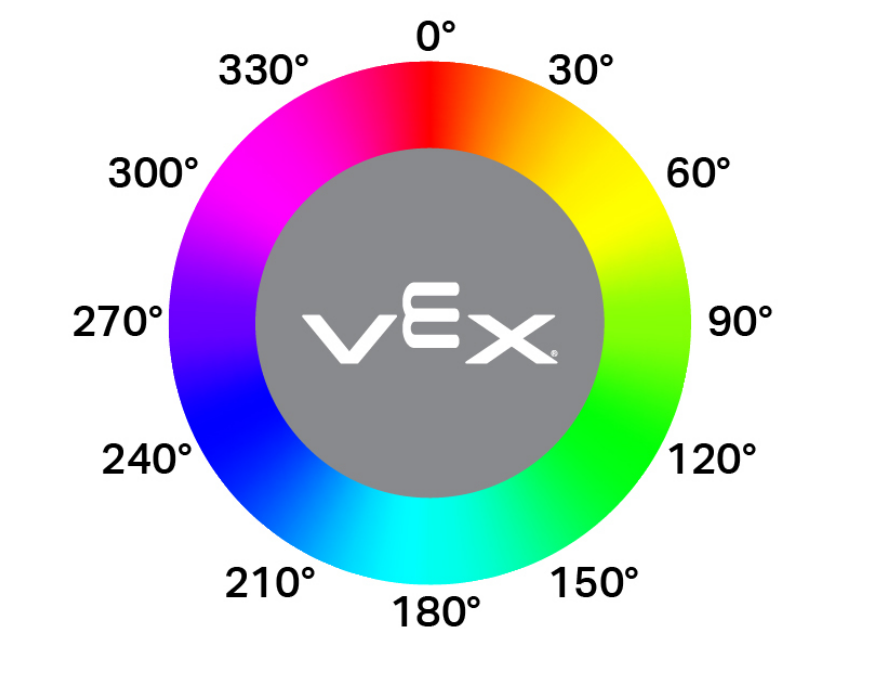
hue 返迴光學感測器偵測到的色調值,該值是介於 0 到 359.99 度之間的浮點數。
色相是一種用色輪上的數字來描述顏色的方法,如下圖所示。
Usage:
optical_1.hue()
參數 |
描述 |
|---|---|
此方法沒有參數。 |
# Check the hue of a detected object
# to determine if it is pink
while True:
    brain.screen.clear_screen()
    brain.screen.set_cursor(1, 1)
    if 290 < optical_1.hue() < 350:
        brain.screen.print("Pink!")
        wait(0.1,SECONDS)
    else:
        brain.screen.print("Not pink.")
        wait(0.1,SECONDS)
rgb#
rgb 返迴光學感測器偵測到的紅色、綠色、藍色和亮度值,以元組形式返回。
Usage:
optical_1.rgb(raw)
參數 |
描述 |
|---|---|
|
可選。一個布林值 用於確定傳回原始值還是處理後的值:
|
# Display the rgb values and brightness detected
# by the Optical Sensor.
brain.screen.set_font(FontType.MONO12)
while True:
    brain.screen.clear_screen()
    brain.screen.set_cursor(1, 1)
    brain.screen.print(optical_1.rgb())
    wait(0.1, SECONDS)
installed#
installed 返回一個布林值,指示光學感測器是否連接到大腦。
True— 光學感測器與大腦相連。False— 光學感測器未連接到大腦。
Usage:
optical_1.installed()
參數 |
描述 |
|---|---|
此方法沒有參數。 |
# Display a message if the Optical Sensor
# is installed.
if optical_1.installed():
    brain.screen.print("Installed!")
打回來#
object_detected#
object_detected 註冊一個在偵測到物件時執行的回呼函數。
Usage:
optical_1.object_detected(callback, arg)
參數 |
描述 |
|---|---|
|
先前定義的當偵測到物件時要執行的函數。 |
|
可選。包含要傳遞給回呼函數的參數的元組。有關更多信息,請參閱帶參數的函數。 |
def detected():
    drivetrain.stop()
    brain.screen.set_cursor(1, 1)
    brain.screen.print("object detected")
    wait(0.5,SECONDS)
    brain.screen.clear_screen()

# Display a message when the
# Optical Sensor detects an object
drivetrain.drive(FORWARD)
optical_1.object_detected(detected)
object_lost#
object_lost 註冊一個回呼函數,用於在光學感測器遺失偵測到的物件時進行回調。
Usage:
optical_1.object_lost(callback, arg)
參數 |
描述 |
|---|---|
|
先前定義的當物件遺失時執行的函數。 |
|
可選。包含要傳遞給回呼函數的參數的元組。有關更多信息,請參閱帶參數的函數。 |
def lost():
    drivetrain.stop()
    brain.screen.set_cursor(1, 1)
    brain.screen.print("object lost")
    wait(0.5,SECONDS)
    brain.screen.clear_screen()

# Display a message when the Optical
# Sensor loses sight of on object
drivetrain.drive(REVERSE)
optical_1.object_lost(lost)
建構函數#
建構函式用於手動建立 Optical 對象,這是在 VEXcode 之外配置光學感測器所必需的。
Optical#
Optical 創建一個光學感測器。
Usage:
Optical(smartport)
範圍 |
描述 |
|---|---|
|
光感測器所連接的智慧型端口,記為 PORTx,其中 x 為端口號。 |
# Construct an Optical Sensor "optical_1" with the
# Optical class
optical_1 = Optical(Ports.PORT1)

# Display the brightness of a red object detected
# by the Optical Sensor
drivetrain.turn(RIGHT)
while not optical_1.color() == Color.RED:
    wait(50, MSEC)
drivetrain.stop()
brain.screen.print(optical_1.brightness())