
Óptico#
Introducción#
El sensor óptico es un sensor basado en luz que utiliza luz reflejada para detectar objetos, identificar colores y medir el brillo y el tono.
También puedes configurar el brillo de la luz interna del sensor. Estas herramientas son ideales para programas que necesitan reaccionar en tiempo real a objetos de color, condiciones de iluminación o información del sensor.
This page uses optical_1 as the example Optical Sensor name. Replace it with your own configured name as needed.
A continuación se muestra una lista de todos los métodos:
Acciones: Enciende o apaga el LED del sensor óptico.
set_light— Sets the on or off state of the LED.
Motadores: ajusta el brillo del LED y la configuración de detección de objetos.
set_light_power— Sets the brightness of the LED.object_detect_threshold— Sets the threshold for detecting objects.
Obtenedores: leen la presencia del objeto, el color, el brillo, el tono, el valor RGB y el estado del sensor.
is_near_object— Returns whether a detected object is near the Optical Sensor.color— Returns the closest detected color match.brightness— Returns the brightness of a detected object.hue— Returns the hue of a detected object.rgb— Returns the RGB values detected by the Optical Sensor.installed— Returns whether an Optical Sensor is connected to the Brain.
Función de devolución de llamada: ejecuta el código cuando se detecta o se pierde un objeto.
object_detected— Registers a function to be called when an object is detected.object_lost— Registers a function to be called when an object is lost.
Constructores: Inicialice y configure manualmente un sensor óptico.
Optical— Creates an Optical Sensor.
Comportamiento#
set_light#
set_light sets Optical Sensor’s LED to on, off, or a set brightness level.
Usage:
optical_1.set_light(state)
Parámetros |
Descripción |
|---|---|
|
The state to set the light or the percentage of power in the range 0 to 100. The state can be either of the following:
|
# Turn the LED on and off forever
while True:
    optical_1.set_light(LedStateType.ON)
    wait(0.5, SECONDS)
    optical_1.set_light(LedStateType.OFF)
    wait(0.5, SECONDS)
# Turn the LED on and off forever
while True:
    optical_1.set_light(100)
    wait(0.5, SECONDS)
    optical_1.set_light(0)
    wait(0.5, SECONDS)
Mutadores#
set_light_power#
set_light_power sets the brightness of the Optical Sensor’s light. If the LED is not already on, this method will also turn the LED on.
Usage:
optical_1.set_light_power(value)
Parámetros |
Descripción |
|---|---|
|
El nivel de potencia para configurar la luz de 0 a 100 como porcentaje. |
# Turn the LED light on at different
# intensities
optical_1.set_light(LedStateType.ON)
wait(2, SECONDS)
optical_1.set_light_power(10)
wait(2, SECONDS)
optical_1.set_light_power(100)
object_detect_threshold#
object_detect_threshold sets the range that the sensor can detect objects from. This method also returns the newly set threshold.
Los números más cercanos a 255 indican un rango menor, mientras que los números más cercanos a 0 indican un rango mayor.
Usage:
optical_1.object_detect_threshold(value)
Parámetros |
Descripción |
|---|---|
|
Un número en el rango 0 - 255. Un valor de 0 solo devolverá el valor actual. |
def detected():
    # The Brain will print that an object was detected on
    # the Brain's screen.
    brain.screen.print("object detected")
    brain.screen.next_row()
    optical_1.object_detect_threshold(254)
    optical_1.object_detected(detected_closer)

def detected_closer():
    # Detect an object closer to the sensor.
    brain.screen.print("Detected closer")

# Run detected when the Optical Sensor detects an object.
optical_1.object_detect_threshold(100)
optical_1.object_detected(detected)
# Detect an object first with the detect threshold at 100,
# then again at 254
stage = 0

def detected():
    global stage
    if stage == 0:
        brain.screen.print("Get closer...")
        brain.screen.next_row()
        stage = 1
        optical_1.object_detect_threshold(254)
        optical_1.object_detected(detected_closer)

def detected_closer():
    global stage
    if stage == 1:
        brain.screen.print("Too close!")
        brain.screen.next_row()
        stage = 2

optical_1.object_detect_threshold(100)
optical_1.object_detected(detected)
wait(15, MSEC)
Captadores#
is_near_object#
is_near_object returns whether the Optical Sensor is nearby an object.
True— The sensor is near an object.False— The sensor is not near an object.
Usage:
optical_1.is_near_object()
Parámetros |
Descripción |
|---|---|
Este método no tiene parámetros. |
# Stop driving when Optical Sensor is
# near an object
while True:
    if optical_1.is_near_object():
        drivetrain.stop()
    else:
        drivetrain.drive(FORWARD)
color#
color returns the predefined color detected by the Optical Sensor from the colors below:
BLACKBLUECYANGREENORANGEPURPLEREDTRANSPARENTWHITEYELLOW
Usage:
optical_1.color()
Parámetros |
Descripción |
|---|---|
Este método no tiene parámetros. |
# Stop the robot if the Optical Sensor
# detects red
while True:
    if optical_1.color() == Color.RED:
        drivetrain.stop()
    else:
        drivetrain.turn(RIGHT)
brightness#
brightness returns the brightness detected by the Optical Sensor.
Un porcentaje más alto significa que el sensor óptico detecta más luz. Un porcentaje más bajo significa que el sensor óptico detecta menos luz.
Usage:
optical_1.brightness(readraw)
Parámetros |
Descripción |
|---|---|
|
Optional. A Boolean value to read raw brightness data instead of percentage:
|
hue#
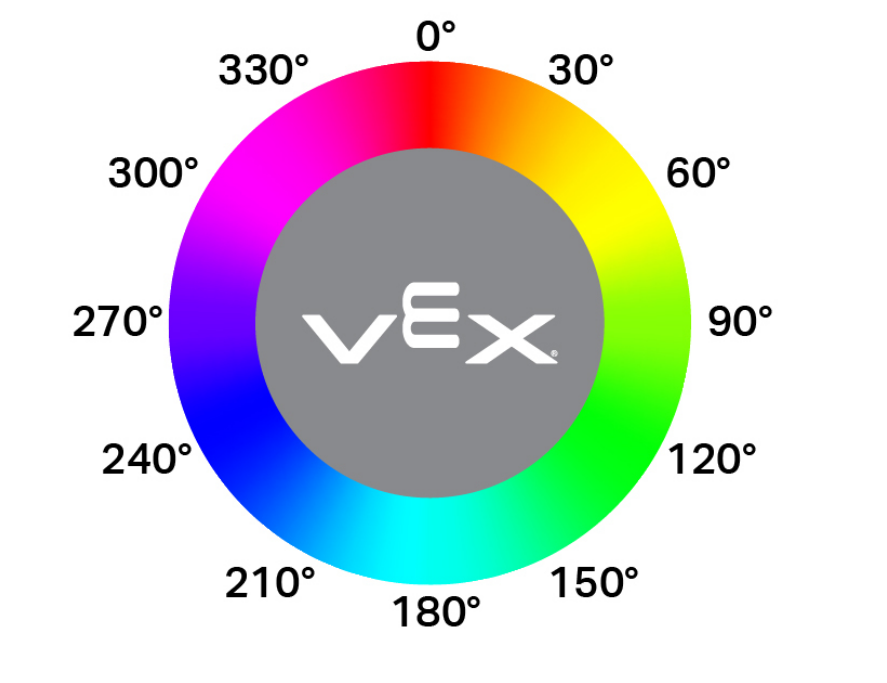
hue returns the value of the hue detected by the Optical Sensor as a float in the range of 0 to 359.99 degrees.
El matiz es una forma de describir el color utilizando números alrededor de una rueda de colores, como se muestra a continuación.
Usage:
optical_1.hue()
Parámetros |
Descripción |
|---|---|
Este método no tiene parámetros. |
# Check the hue of a detected object
# to determine if it is pink
while True:
    brain.screen.clear_screen()
    brain.screen.set_cursor(1, 1)
    if 290 < optical_1.hue() < 350:
        brain.screen.print("Pink!")
        wait(0.1,SECONDS)
    else:
        brain.screen.print("Not pink.")
        wait(0.1,SECONDS)
rgb#
rgb returns the red, green, blue, and brightness values detected by the Optical Sensor as a Tuple.
Usage:
optical_1.rgb(raw)
Parámetros |
Descripción |
|---|---|
|
Optional. A Boolean value to determine if you return raw or processed values:
|
# Display the rgb values and brightness detected
# by the Optical Sensor.
brain.screen.set_font(FontType.MONO12)
while True:
    brain.screen.clear_screen()
    brain.screen.set_cursor(1, 1)
    brain.screen.print(optical_1.rgb())
    wait(0.1, SECONDS)
installed#
installed returns a Boolean indicating whether the Optical Sensor is connected to the Brain.
True— The Optical Sensor is connected to the Brain.False— The Optical Sensor is not connected to the Brain.
Usage:
optical_1.installed()
Parámetros |
Descripción |
|---|---|
Este método no tiene parámetros. |
# Display a message if the Optical Sensor
# is installed.
if optical_1.installed():
    brain.screen.print("Installed!")
Llamar de vuelta#
object_detected#
object_detected registers a callback function for when an object is detected.
Usage:
optical_1.object_detected(callback, arg)
Parámetros |
Descripción |
|---|---|
|
Una función que se define previamente para ejecutarse cuando se detecta un objeto. |
|
Opcional. Una tupla que contiene los argumentos que se pasarán a la función de devolución de llamada. Consulte Funciones con parámetros para obtener más información. |
def detected():
    drivetrain.stop()
    brain.screen.set_cursor(1, 1)
    brain.screen.print("object detected")
    wait(0.5,SECONDS)
    brain.screen.clear_screen()

# Display a message when the
# Optical Sensor detects an object
drivetrain.drive(FORWARD)
optical_1.object_detected(detected)
object_lost#
object_lost registers a callback function for when the Optical Sensor loses a detected object.
Usage:
optical_1.object_lost(callback, arg)
Parámetros |
Descripción |
|---|---|
|
Una función que se define previamente para ejecutarse cuando se pierde un objeto. |
|
Opcional. Una tupla que contiene los argumentos que se pasarán a la función de devolución de llamada. Consulte Funciones con parámetros para obtener más información. |
def lost():
    drivetrain.stop()
    brain.screen.set_cursor(1, 1)
    brain.screen.print("object lost")
    wait(0.5,SECONDS)
    brain.screen.clear_screen()

# Display a message when the Optical
# Sensor loses sight of on object
drivetrain.drive(REVERSE)
optical_1.object_lost(lost)
Constructores#
Constructors are used to manually create Optical objects, which are necessary for configuring an Optical Sensor outside of VEXcode.
Optical#
Optical creates an Optical Sensor.
Usage:
Optical(smartport)
Parámetro |
Descripción |
|---|---|
|
El puerto inteligente al que está conectado el sensor óptico, escrito como PORTx donde x es el número del puerto. |
# Construct an Optical Sensor "optical_1" with the
# Optical class
optical_1 = Optical(Ports.PORT1)

# Display the brightness of a red object detected
# by the Optical Sensor
drivetrain.turn(RIGHT)
while not optical_1.color() == Color.RED:
    wait(50, MSEC)
drivetrain.stop()
brain.screen.print(optical_1.brightness())