
광학#
소개#
광학 센서는 반사된 빛을 이용하여 물체를 감지하고, 색상을 식별하며, 밝기와 색조를 측정하는 광 기반 센서입니다.
센서 내부 조명의 밝기도 조절할 수 있습니다. 이러한 기능은 색상이 있는 물체, 조명 조건 또는 센서 피드백에 실시간으로 반응해야 하는 프로그램에 이상적입니다.
이 페이지에서는 광학 센서 이름의 예시로 optical_1 사용합니다. 필요에 따라 구성된 이름으로 교체하십시오.
다음은 모든 방법 목록입니다.
동작 — 광학 센서의 LED를 켜거나 끕니다.
set_light— LED의 켜짐 또는 꺼짐 상태를 설정합니다.
뮤테이터 — LED 밝기 및 물체 감지 설정을 조정합니다.
set_light_power— LED의 밝기를 설정합니다.object_detect_threshold— 객체 감지를 위한 임계값을 설정합니다.
게터 — 객체 존재 여부, 색상, 밝기, 색조, RGB 값 및 센서 상태를 읽습니다.
is_near_object— 감지된 객체가 광학 센서 근처에 있는지 여부를 반환합니다.color— 감지된 색상 일치 항목 중 가장 가까운 색상을 반환합니다.brightness— 감지된 객체의 밝기를 반환합니다.hue— 감지된 객체의 색조를 반환합니다.rgb— 광학 센서에서 감지된 RGB 값을 반환합니다.installed— 광학 센서가 브레인에 연결되어 있는지 여부를 반환합니다.
콜백 함수 — 객체가 감지되거나 사라졌을 때 코드를 실행합니다.
object_detected— 객체가 감지될 때 호출될 함수를 등록합니다.object_lost— 객체가 손실될 때 호출될 함수를 등록합니다.
생성자 — 광학 센서를 수동으로 초기화하고 구성합니다.
Optical— 광학 센서를 생성합니다.
행위#
set_light#
set_light 광학 센서의 LED를 켜거나 끄거나 설정된 밝기 수준으로 설정합니다.
Usage:
optical_1.set_light(state)
매개변수 |
설명 |
|---|---|
|
조명의 상태 또는 전력 비율을 0에서 100 사이의 값으로 설정합니다. 상태는 다음 중 하나일 수 있습니다.
|
# Turn the LED on and off forever
while True:
    optical_1.set_light(LedStateType.ON)
    wait(0.5, SECONDS)
    optical_1.set_light(LedStateType.OFF)
    wait(0.5, SECONDS)
# Turn the LED on and off forever
while True:
    optical_1.set_light(100)
    wait(0.5, SECONDS)
    optical_1.set_light(0)
    wait(0.5, SECONDS)
돌연변이체#
set_light_power#
set_light_power 광학 센서의 빛의 밝기를 설정합니다. LED가 켜져 있지 않은 경우, 이 메서드는 LED를 켜기도 합니다.
Usage:
optical_1.set_light_power(value)
매개변수 |
설명 |
|---|---|
|
조명의 밝기를 0%에서 100%까지 백분율로 설정하는 전력 레벨입니다. |
# Turn the LED light on at different
# intensities
optical_1.set_light(LedStateType.ON)
wait(2, SECONDS)
optical_1.set_light_power(10)
wait(2, SECONDS)
optical_1.set_light_power(100)
object_detect_threshold#
object_detect_threshold 센서가 물체를 감지할 수 있는 범위를 설정합니다. 이 메서드는 새로 설정된 임계값도 반환합니다.
255에 가까운 숫자는 범위가 좁다는 것을 나타내고, 0에 가까운 숫자는 범위가 넓다는 것을 나타냅니다.
Usage:
optical_1.object_detect_threshold(value)
매개변수 |
설명 |
|---|---|
|
0에서 255 사이의 숫자입니다. 값이 0이면 현재 값을 반환합니다. |
def detected():
    # The Brain will print that an object was detected on
    # the Brain's screen.
    brain.screen.print("object detected")
    brain.screen.next_row()
    optical_1.object_detect_threshold(254)
    optical_1.object_detected(detected_closer)

def detected_closer():
    # Detect an object closer to the sensor.
    brain.screen.print("Detected closer")

# Run detected when the Optical Sensor detects an object.
optical_1.object_detect_threshold(100)
optical_1.object_detected(detected)
# Detect an object first with the detect threshold at 100,
# then again at 254
stage = 0

def detected():
    global stage
    if stage == 0:
        brain.screen.print("Get closer...")
        brain.screen.next_row()
        stage = 1
        optical_1.object_detect_threshold(254)
        optical_1.object_detected(detected_closer)

def detected_closer():
    global stage
    if stage == 1:
        brain.screen.print("Too close!")
        brain.screen.next_row()
        stage = 2

optical_1.object_detect_threshold(100)
optical_1.object_detected(detected)
wait(15, MSEC)
게터스#
is_near_object#
is_near_object 광학 센서가 물체 근처에 있는지 여부를 반환합니다.
True— 센서가 물체 근처에 있습니다.False— 센서가 물체 근처에 없습니다.
Usage:
optical_1.is_near_object()
매개변수 |
설명 |
|---|---|
이 메서드에는 매개변수가 없습니다. |
# Stop driving when Optical Sensor is
# near an object
while True:
    if optical_1.is_near_object():
        drivetrain.stop()
    else:
        drivetrain.drive(FORWARD)
color#
color 아래 색상 목록에서 광학 센서가 감지한 미리 정의된 색상을 반환합니다.
BLACKBLUECYANGREENORANGEPURPLEREDTRANSPARENTWHITEYELLOW
Usage:
optical_1.color()
매개변수 |
설명 |
|---|---|
이 메서드에는 매개변수가 없습니다. |
# Stop the robot if the Optical Sensor
# detects red
while True:
    if optical_1.color() == Color.RED:
        drivetrain.stop()
    else:
        drivetrain.turn(RIGHT)
brightness#
brightness 광학 센서가 감지한 밝기를 반환합니다.
백분율이 높을수록 광학 센서가 더 많은 빛을 감지한다는 의미이고, 백분율이 낮을수록 광학 센서가 더 적은 빛을 감지한다는 의미입니다.
Usage:
optical_1.brightness(readraw)
매개변수 |
설명 |
|---|---|
|
선택 사항입니다. 백분율 대신 원시 밝기 데이터를 읽을지 여부를 나타내는 부울 값입니다.
|
hue#
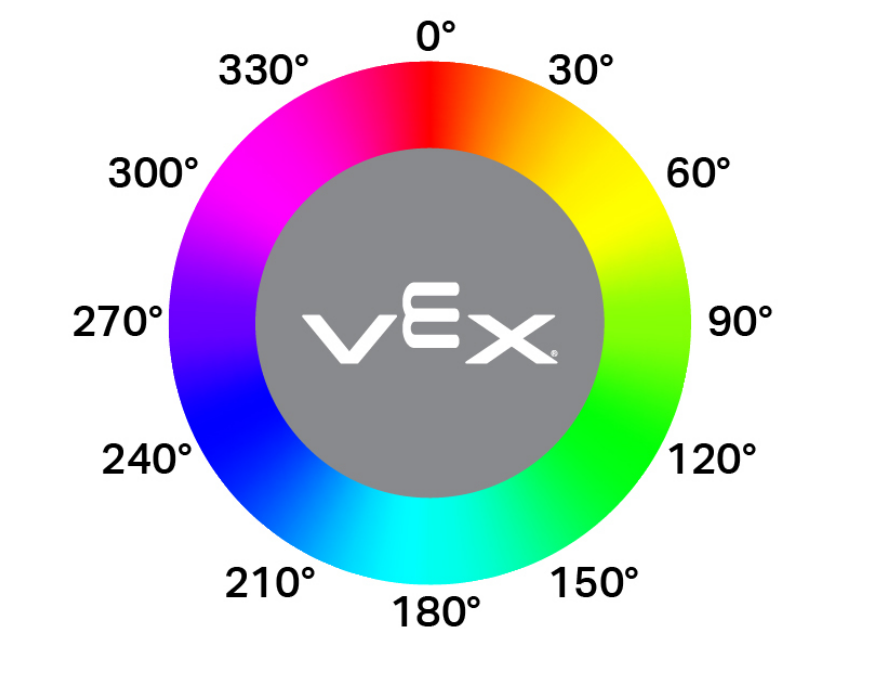
hue 광학 센서가 감지한 색조 값을 0~359.99도 범위의 부동 소수점 값으로 반환합니다.
색조는 아래 그림과 같이 색상환을 따라 숫자를 사용하여 색을 설명하는 방법입니다.
Usage:
optical_1.hue()
매개변수 |
설명 |
|---|---|
이 메서드에는 매개변수가 없습니다. |
# Check the hue of a detected object
# to determine if it is pink
while True:
    brain.screen.clear_screen()
    brain.screen.set_cursor(1, 1)
    if 290 < optical_1.hue() < 350:
        brain.screen.print("Pink!")
        wait(0.1,SECONDS)
    else:
        brain.screen.print("Not pink.")
        wait(0.1,SECONDS)
rgb#
rgb 광학 센서가 감지한 빨강, 녹색, 파랑 및 밝기 값을 튜플로 반환합니다.
Usage:
optical_1.rgb(raw)
매개변수 |
설명 |
|---|---|
|
선택 사항입니다. 원시 값 또는 처리된 값을 반환할지 여부를 결정하는 부울 값입니다.
|
# Display the rgb values and brightness detected
# by the Optical Sensor.
brain.screen.set_font(FontType.MONO12)
while True:
    brain.screen.clear_screen()
    brain.screen.set_cursor(1, 1)
    brain.screen.print(optical_1.rgb())
    wait(0.1, SECONDS)
installed#
installed 광학 센서가 브레인에 연결되었는지 여부를 나타내는 부울 값을 반환합니다.
True— 광학 센서가 뇌에 연결되어 있습니다.False— 광학 센서는 뇌에 연결되어 있지 않습니다.
Usage:
optical_1.installed()
매개변수 |
설명 |
|---|---|
이 메서드에는 매개변수가 없습니다. |
# Display a message if the Optical Sensor
# is installed.
if optical_1.installed():
    brain.screen.print("Installed!")
콜백#
object_detected#
object_detected 객체가 감지되었을 때 호출될 콜백 함수를 등록합니다.
Usage:
optical_1.object_detected(callback, arg)
매개변수 |
설명 |
|---|---|
|
객체가 감지되면 실행되도록 미리 정의된 함수입니다. |
|
선택 사항입니다. 콜백 함수에 전달할 인수를 포함하는 튜플입니다. 자세한 내용은 매개변수가 있는 함수를 참조하세요. |
def detected():
    drivetrain.stop()
    brain.screen.set_cursor(1, 1)
    brain.screen.print("object detected")
    wait(0.5,SECONDS)
    brain.screen.clear_screen()

# Display a message when the
# Optical Sensor detects an object
drivetrain.drive(FORWARD)
optical_1.object_detected(detected)
object_lost#
object_lost 은 광학 센서가 감지된 객체를 놓쳤을 때 호출될 콜백 함수를 등록합니다.
Usage:
optical_1.object_lost(callback, arg)
매개변수 |
설명 |
|---|---|
|
객체가 손실될 때 실행되도록 미리 정의된 함수. |
|
선택 사항입니다. 콜백 함수에 전달할 인수를 포함하는 튜플입니다. 자세한 내용은 매개변수가 있는 함수를 참조하세요. |
def lost():
    drivetrain.stop()
    brain.screen.set_cursor(1, 1)
    brain.screen.print("object lost")
    wait(0.5,SECONDS)
    brain.screen.clear_screen()

# Display a message when the Optical
# Sensor loses sight of on object
drivetrain.drive(REVERSE)
optical_1.object_lost(lost)
건설업자#
생성자는 VEXcode 외부에서 광학 센서를 구성하는 데 필요한 Optical 객체를 수동으로 생성하는 데 사용됩니다.
Optical#
Optical 광학 센서를 생성합니다.
Usage:
Optical(smartport)
매개변수 |
설명 |
|---|---|
|
광학 센서가 연결된 스마트 포트는 PORTx 형식으로 표기하며, 여기서 x는 포트 번호입니다. |
# Construct an Optical Sensor "optical_1" with the
# Optical class
optical_1 = Optical(Ports.PORT1)

# Display the brightness of a red object detected
# by the Optical Sensor
drivetrain.turn(RIGHT)
while not optical_1.color() == Color.RED:
    wait(50, MSEC)
drivetrain.stop()
brain.screen.print(optical_1.brightness())