
Using the Electromagnet#
This tutorial walks you through using the Electromagnet to pick up and drop a Disk in VEXcode GO. By the end, you’ll have a project that picks up a Disk, waits, then drops it.
Make sure your robot has an Electromagnet connected. See Configuring Devices if you haven’t added one yet.
Attach an energize magnet block, set to boost, below the when started block, to pick up a Disk.
cuando inicie :: hat events
energizar [Magnet2 v] a [impulso v]
Attach a wait block, to give your robot time to react before dropping the Disk.
cuando inicie :: hat events
energizar [Magnet2 v] a [impulso v]
esperar [1] segundos
Attach another energize magnet block below the wait block.
cuando inicie :: hat events
energizar [Magnet2 v] a [impulso v]
esperar [1] segundos
energizar [Magnet2 v] a [impulso v]
Change the parameter to drop, to release the Disk.
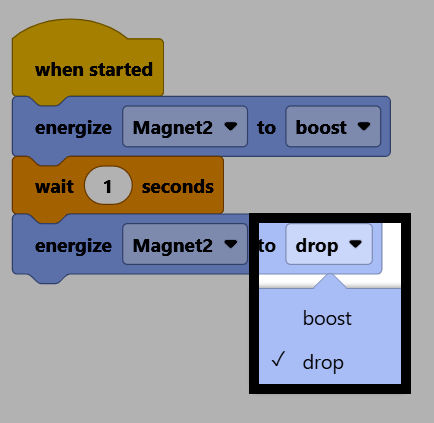
Attach a drive for block below the second energize magnet block.
cuando inicie :: hat events
energizar [Magnet2 v] a [impulso v]
esperar [1] segundos
energizar [Magnet2 v] a [soltar v]
conducir [adelante v] por (100) [mm v] ▶
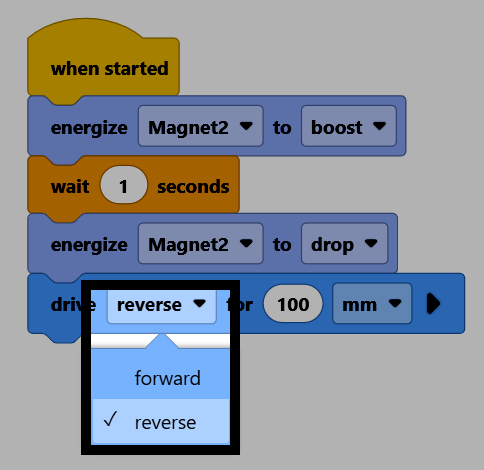
Change the direction parameter to reverse, to back away from the Disk once it’s dropped.
Make sure your robot is connected to VEXcode. See Connecting to Your Robot if it isn’t connected yet.
Select Start to run the project. The Electromagnet will pick up a Disk, wait a second, drop it, then back away.
