
Bloques específicos para robots#
Introducción#
El robot de competición GO incluye controles para el motor del brazo y bloques de sensores específicos para el robot.
Todos los bloques VR VEXcode estándar están disponibles para su uso en el área de juegos GO Competition - Mars Math Expedition.
A continuación se muestra una lista de todos los bloques específicos para robots disponibles:
Sistema de transmisión: Mover y girar el robot.
Comportamiento
drive — Mueve el robot hacia adelante o hacia atrás indefinidamente.
drive for — Mueve el robot hacia adelante o hacia atrás una distancia específica.
giro — Gira el robot hacia la izquierda o hacia la derecha indefinidamente.
girar para — Gira el robot hacia la izquierda o hacia la derecha un número específico de grados.
girar rumbo — Gira el robot para que mire hacia un rumbo específico.
girar a rotación — Gira el robot a una rotación específica.
detener conducción — Detiene el movimiento del robot.
Ajustes
establecer velocidad de conducción — Indica al robot a qué velocidad debe conducir.
establecer velocidad de giro — Indica al robot a qué velocidad debe girar.
establecer rumbo de conducción — Cambia el rumbo actual del robot a un nuevo rumbo.
establecer rotación de accionamiento — Cambia la rotación actual del robot a una nueva rotación.
set drive timeout — Establece cuántos segundos el robot intentará terminar un movimiento.
Valores
el movimiento ha terminado — Informa si el robot ha terminado de moverse.
el accionamiento se está moviendo — Informa si el robot se está moviendo.
dirección de conducción — Informa la dirección actual del robot de 0 a 359,99 grados.
rotación de accionamiento — Informa la rotación actual del robot.
velocidad de conducción — Indica la velocidad a la que se desplaza el robot.
Movimiento: Mueve y rastrea el motor del brazo del robot.
Comportamiento
motor de giro – Hace girar el motor del brazo hacia arriba o hacia abajo indefinidamente.
girar motor durante – Gira el motor del brazo una distancia específica en grados o vueltas.
girar el motor a la posición – Gira el motor del brazo a una posición específica.
detener motor – Detiene el giro del motor del brazo.
Ajustes
establecer velocidad del motor – Indica al motor del brazo a qué velocidad debe girar.
establecer tiempo de espera del motor – Establece cuánto tiempo intentará el motor del brazo completar un movimiento.
establecer posición del motor – Cambia la posición actual del motor del brazo a un nuevo valor.
Valores
el motor ha terminado – Informa si el motor del brazo ha terminado de moverse.
el motor está girando – Informa si el motor del brazo está girando.
posición del motor – Informa la posición actual del motor del brazo.
velocidad del motor – Indica la velocidad de giro del motor del brazo, como un porcentaje de -100% a 100%.
Detección: Utilice los sensores del robot.
Sensor ocular
El ojo encontró un objeto — Informa si el sensor ocular detecta o no un objeto dentro del alcance.
El ojo detecta el color — Informa si el sensor ocular detecta un color específico.
Brillo ocular — Informa el brillo detectado por el sensor ocular.
Tono de ojo — Informa el tono detectado por el sensor de ojo.
Detección giroscópica
choque detectado — Informa si el robot ha detectado un impacto repentino.
Los ejemplos de esta página utilizan la posición de inicio predeterminada del Playground.
Tren de transmisión#
El sistema de transmisión controla cómo se desplaza y gira el robot de realidad virtual. Este sistema puede avanzar o retroceder, girar a la izquierda o a la derecha, orientarse y seguir su propio movimiento de rotación.
Comportamiento#
conducir#
El bloque de accionamiento mueve el robot hacia adelante o hacia atrás indefinidamente. El robot seguirá moviéndose hasta que se le indique otra acción, como girar o detenerse.
conducir [adelante v]
Parámetros |
Descripción |
|---|---|
dirección |
La dirección en la que se mueve el robot: hacia adelante o hacia atrás. |
Ejemplo
cuando inicie :: hat events
[Drive forward, then stop.]
conducir [adelante v]
esperar (2) segundos
detener conducción
impulso para#
El bloque de la pila drive for mueve el robot hacia adelante o hacia atrás una distancia específica. El proyecto esperará a que el robot termine de moverse antes de ejecutar el siguiente bloque de la pila.
conducir [adelante v] por (200) [mm v] ▶
Parámetros |
Descripción |
|---|---|
dirección |
La dirección en la que se mueve el robot: hacia adelante o hacia atrás. |
distancia |
La distancia que recorre el robot. Puede ser un número entero o decimal. |
unidad |
Unidad de distancia: mm (milímetros) o pulgadas |
y no esperes |
Seleccione la flecha ( ▶ ) para expandir el bloque y decir y no espere, de modo que el siguiente bloque en la pila se ejecutará inmediatamente. |
Ejemplo
cuando inicie :: hat events
[Drive forward.]
conducir [adelante v] por (500) [mm v] ▶
doblar#
El bloque de pila girar hace girar al robot hacia la izquierda o hacia la derecha indefinidamente. El robot seguirá girando hasta que se le asigne otra acción, como conducir o detenerse.
girar [derecha v]
Parámetros |
Descripción |
|---|---|
dirección |
La dirección en la que gira el robot: izquierda o derecha. |
Ejemplo
cuando inicie :: hat events
[Turn right, then stop.]
girar [derecha v]
esperar (2) segundos
detener conducción
girar para#
El bloque turn for hace girar el robot hacia la izquierda o hacia la derecha un número específico de grados. El giro es relativo a la posición actual del robot. El programa esperará a que el robot termine de girar antes de ejecutar el siguiente bloque.
girar [derecha v] por (90) grados ▶
Parámetros |
Descripción |
|---|---|
dirección |
La dirección en la que gira el robot: izquierda o derecha. |
ángulo |
El número de grados que gira el robot. Puede ser un número entero o decimal. |
y no esperes |
Seleccione la flecha ( ▶ ) para expandir el bloque y decir y no espere, de modo que el siguiente bloque en la pila se ejecutará inmediatamente. |
Ejemplo
cuando inicie :: hat events
[Turn left, then turn around to the right.]
girar [izquierda v] por (90) grados ▶
girar [derecha v] por (180) grados ▶
girar hacia el encabezamiento#
El rumbo es la dirección hacia la que apunta el robot, medida en grados. El bloque girar a rumbo hace que el robot gire para apuntar a un rumbo específico, desde -359 hasta 359 grados. El robot girará en la dirección más corta para alcanzar el rumbo deseado.
El rumbo inicial es de 0 grados.
El proyecto esperará a que el robot termine de girar antes de ejecutar el siguiente bloque de la pila.
girar al rumbo (90) grados ▶
Parámetros |
Descripción |
|---|---|
título |
La dirección hacia la que debe apuntar el robot, desde -359 hasta 359 grados. |
y no esperes |
Seleccione la flecha ( ▶ ) para expandir el bloque y decir y no espere, de modo que el siguiente bloque en la pila se ejecutará inmediatamente. |
Ejemplo
cuando inicie :: hat events
[Turn to face the cardinal directions.]
girar al rumbo (90) grados ▶
esperar (2) segundos
girar al rumbo (180) grados ▶
esperar (2) segundos
girar al rumbo (270) grados ▶
esperar (2) segundos
girar al rumbo (0) grados ▶
esperar (2) segundos
girar para rotar#
El bloque apilable girar para rotar hace que el robot gire a una rotación específica.
La rotación indica cuánto ha girado el robot, medida en grados. Al inicio de un proyecto, el valor de rotación se establece en 0 grados. La rotación también se puede configurar mediante el bloque establecer rotación de accionamiento.
Los valores de rotación son absolutos. Esto significa que la dirección del giro depende de la rotación actual del robot. Girar a la derecha aumenta la rotación, y girar a la izquierda la disminuye.
Por ejemplo, si el robot comienza en 0 grados y se le da una rotación de 720 grados, girará dos veces a la derecha. Si luego se le da una rotación de 360 grados, girará una vez a la izquierda, ya que 360 es menor que 720.
El proyecto esperará a que el robot termine de girar antes de ejecutar el siguiente bloque de la pila.
girar a la rotación (90) grados ▶
Parámetros |
Descripción |
|---|---|
rotación |
El valor de rotación, en grados, que alcanzará el robot. Puede ser un número entero o decimal. |
y no esperes |
Seleccione la flecha ( ▶ ) para expandir el bloque y decir y no espere, de modo que el siguiente bloque en la pila se ejecutará inmediatamente. |
Ejemplo
cuando inicie :: hat events
[Turn left, then spin in a circle clockwise and face right.]
girar a la rotación (-90) grados ▶
esperar (2) segundos
girar a la rotación (450) grados ▶
dejar de conducir#
El bloque de apilamiento detener conducción detiene el movimiento del robot.
detener conducción
Parámetros |
Descripción |
|---|---|
Este bloque no tiene parámetros. |
Ejemplo
cuando inicie :: hat events
[Drive forward, then stop.]
conducir [adelante v]
esperar [4] segundos
detener conducción
Ajustes#
establecer la velocidad de accionamiento#
El bloque establecer velocidad de conducción indica al robot a qué velocidad debe conducir. Un porcentaje mayor hace que el robot conduzca más rápido y un porcentaje menor hace que conduzca más despacio.
Todos los proyectos comienzan con el robot conduciendo al 50% de su velocidad por defecto.
Nota: Una mayor velocidad hace que el robot se desplace más rápido, pero puede ser menos preciso. Una menor velocidad hace que el robot se desplace más despacio, pero puede ser más preciso.
establecer velocidad de conducción a (50) [% v]
Parámetros |
Descripción |
|---|---|
velocidad |
La velocidad de conducción varía del 0% al 100%. |
unidad |
Unidad de velocidad: % |
Ejemplo
cuando inicie :: hat events
[Drive forward at the default velocity.]
conducir [adelante v] por (100) [mm v] ▶
esperar (1) segundos
[Move slower.]
establecer velocidad de conducción a (20) [% v]
conducir [adelante v] por (100) [mm v] ▶
esperar (1) segundos
[Move faster.]
establecer velocidad de conducción a (100) [% v]
conducir [adelante v] por (100) [mm v] ▶
esperar (1) segundos
establecer la velocidad de giro#
El bloque de pila establecer velocidad de giro indica al robot la velocidad a la que debe girar. Un porcentaje mayor hace que el robot gire más rápido y un porcentaje menor hace que gire más lento.
Todos los proyectos comienzan con el robot girando al 50% de su velocidad por defecto.
Nota: Una mayor velocidad hace que el robot gire más rápido, pero puede ser menos preciso. Una menor velocidad hace que el robot gire más despacio, pero puede ser más preciso.
establecer velocidad de giro a (50) [% v]
Parámetros |
Descripción |
|---|---|
velocidad |
La velocidad de giro varía del 0% al 100%. |
unidad |
Unidad de velocidad: % |
Ejemplo
cuando inicie :: hat events
[Turn at default velocity.]
girar [derecha v] por (100) grados ▶
esperar (1) segundos
[Turn slower.]
establecer velocidad de giro a (20)%
girar [derecha v] por (100) grados ▶
esperar (1) segundos
[Turn faster.]
establecer velocidad de giro a (100)%
girar [derecha v] por (100) grados ▶
esperar (1) segundos
establecer dirección de conducción#
El rumbo es la dirección hacia la que apunta el robot, medida en grados. El bloque de pila establecer rumbo de conducción cambia el rumbo actual del robot a un nuevo valor.
Por ejemplo, si el robot ha girado para mirar hacia la derecha, al establecer la orientación a 0 grados, esa posición mirando hacia la derecha se convierte en la nueva posición de 0 grados. Entonces, el robot puede girar a otras posiciones en función de esa nueva orientación.
establecer rumbo de conducción a (0) grados
Parámetros |
Descripción |
|---|---|
título |
El valor de rumbo, en grados, que se debe establecer para el robot. |
Ejemplo
cuando inicie :: hat events
[Turn to the left.]
establecer rumbo de conducción a (90) grados
girar al rumbo (0) grados ▶
ajuste de la rotación del accionamiento#
La rotación indica cuánto ha girado el robot, medida en grados. Al inicio de un proyecto, el valor de rotación se establece en 0 grados. El bloque establecer rotación de accionamiento modifica la rotación actual del robot a un nuevo valor.
Por ejemplo, si el robot ha dado dos vueltas completas a la derecha, su valor de rotación será de 720 grados. Si se establece la rotación en 0 grados, esta volverá a su valor original. A partir de ahí, el robot podrá girar según ese nuevo valor.
establecer rotación de conducción a (0) grados
Parámetros |
Descripción |
|---|---|
rotación |
El valor de rotación, en grados, que se debe configurar para el robot. Puede ser un número entero o decimal. |
Ejemplo
cuando inicie :: hat events
[Spin counterclockwise two times.]
establecer rotación de conducción a (720) grados
girar a la rotación (0) grados ▶
establecer tiempo de espera de la unidad#
El bloque set drive timeout de la pila establece cuántos segundos intentará el robot completar un movimiento. Si el robot no puede terminar en ese tiempo, dejará de intentarlo y pasará al siguiente bloque de la pila. Esto evita que el robot se quede atascado en un movimiento.
establecer tiempo límite de conducción a (1) segundos
Parámetros |
Descripción |
|---|---|
tiempo |
El número de segundos que el robot puede intentar para completar un movimiento. Puede ser un número entero o decimal. |
Ejemplo
cuando inicie :: hat events
[Drive forward for 1 second, then turn.]
establecer tiempo límite de conducción a (1) segundos
conducir [adelante v] por (25) [pulgadas v] ▶
girar [derecha v] por (90) grados ▶
Valores#
El viaje ha terminado.#
El bloque booleano drive is done indica si el robot ha terminado de moverse. Esto permite controlar la sincronización de otras acciones en función del movimiento del robot.
Verdadero — El robot ha terminado de moverse.
Falso — El robot sigue en movimiento.
Este bloque funciona junto con los bloques de transmisión que tienen el parámetro y no esperar.
<¿conducción terminada?>
Parámetros |
Descripción |
|---|---|
Este bloque no tiene parámetros. |
Ejemplo
cuando inicie :: hat events
[Start spinning when the drive is complete.]
conducir [adelante v] por (200) [mm v] ◀ y no esperar
esperar hasta <¿conducción terminada?>
girar [derecha v] por (360) grados ▶
El impulso se está moviendo#
El bloque booleano drive is moving indica si el robot se está moviendo. Esto permite controlar la sincronización de otras acciones en función del movimiento del robot.
Verdadero — El robot se está moviendo.
Falso — El robot no se está moviendo.
Este bloque funciona junto con los bloques de transmisión que tienen el parámetro y no esperar.
<¿conducción en movimiento?>
Parámetros |
Descripción |
|---|---|
Este bloque no tiene parámetros. |
Ejemplo
cuando inicie :: hat events
[Print that the robot is moving while it is still driving.]
conducir [adelante v] por (200) [mm v] ◀ y no esperar
mientras <¿conducción en movimiento?>
imprimir [Still Moving...] ▶
esperar (0.1) segundos
limpiar pantalla
fin
imprimir [Done!] ▶
dirección de conducción#
El rumbo es la dirección hacia la que apunta el robot, medida en grados. El bloque de informe rumbo de conducción informa ese rumbo desde 0 hasta 359,99 grados.
La dirección inicial del robot es de 0 grados.
(rumbo de conducción en grados)
Parámetros |
Descripción |
|---|---|
Este bloque no tiene parámetros. |
Ejemplo
cuando inicie :: hat events
[Display the heading after turning.]
girar [derecha v] por (450) grados ▶
imprimir (rumbo de conducción en grados) en pantalla ◀ y mover cursor a la siguiente fila
rotación de accionamiento#
La rotación indica cuánto ha girado el robot, medida en grados. Al inicio de un proyecto, el valor de rotación se establece en 0 grados. El bloque de informe drive rotation informa sobre la rotación actual del robot.
Girar a la derecha aumenta la rotación, y girar a la izquierda la disminuye. Por ejemplo, al dar dos vueltas completas a la derecha se registrará una rotación de 720 grados.
(rotación de conducción en grados)
Parámetros |
Descripción |
|---|---|
Este bloque no tiene parámetros. |
Ejemplo
cuando inicie :: hat events
[Display the rotation after turning.]
girar [derecha v] por (450) grados ▶
imprimir (rotación de conducción en grados) en pantalla ◀ y mover cursor a la siguiente fila
velocidad de conducción#
El bloque de informe de velocidad de conducción indica la velocidad a la que se desplaza el robot.
(velocidad de conducción en [% v])
Parámetros |
Descripción |
|---|---|
unidad |
Unidad de velocidad: % |
Ejemplo
cuando inicie :: hat events
[Display the velocity after driving.]
conducir [adelante v] por (200) [mm v] ▶
imprimir (velocidad de conducción en [% v]) en pantalla ◀ y mover cursor a la siguiente fila
Movimiento#
El robot GO Competition Advanced 2.0 utiliza el motor del brazo para subir y bajar el brazo, lo que le permite recoger, levantar y transportar objetos.
Comportamiento#
motor de giro#
El bloque de apilamiento motor de giro hace girar el motor del brazo hacia arriba o hacia abajo indefinidamente. El motor seguirá girando hasta que se le dé otra acción, como girar en una dirección diferente o detenerse.
girar [ArmMotor v] [arriba v]
Parámetros |
Descripción |
|---|---|
motor |
El motor para girar: ArmMotor. |
dirección |
La dirección de giro del motor: hacia arriba o hacia abajo. |
Ejemplo
cuando inicie
[Raise the Arm Motor, then stop.]
girar [ArmMotor v] [arriba v]
esperar (1) segundos
detener [ArmMotor v]
motor de giro para#
El bloque spin motor for hace girar un motor una distancia específica. El giro es relativo a la posición actual del motor. El proyecto esperará a que el motor termine de girar antes de ejecutar el siguiente bloque de la pila.
girar [ArmMotor v] [arriba v] por [90] [grados v] ▶
Parámetros |
Descripción |
|---|---|
motor |
El motor para girar: ArmMotor. |
dirección |
La dirección de giro del motor: hacia arriba o hacia abajo. |
distancia |
La distancia que gira el motor. Los grados usan números enteros. Las vueltas pueden usar números enteros o decimales. |
unidad |
La unidad de distancia: grados o vueltas. |
y no esperes |
Seleccione la flecha ( ▶ ) para expandir el bloque y decir y no espere, de modo que el siguiente bloque en la pila se ejecutará inmediatamente. |
Ejemplo
cuando inicie
[Raise the Arm Motor by 200 degrees.]
girar [ArmMotor v] [arriba v] por [200] [grados v] ▶
motor de giro para posicionar#
El bloque de apilamiento girar motor para posicionar hace girar un motor hasta una posición específica.
La posición de un motor se refiere a cuánto ha girado, medido en grados o vueltas. Una vuelta equivale a 360 grados. Al inicio de un proyecto, la posición del motor se establece en 0 grados. También se puede establecer la posición del motor mediante el bloque establecer posición del motor.
Los valores de posición son absolutos. Esto significa que la dirección de giro depende de la posición actual del motor.
Por ejemplo, si el motor parte de 0 grados y gira hasta una posición de 720 grados, girará dos vueltas hacia adelante. Si luego gira hasta una posición de 360 grados, girará una vuelta hacia atrás, ya que 360 es menor que 720.
girar [ArmMotor v] a posición [90] [grados v] ▶
Parámetros |
Descripción |
|---|---|
motor |
El motor para girar: ArmMotor. |
posición |
El valor de posición al que girará el motor. Los grados se expresan con números enteros. Las vueltas pueden expresarse con números enteros o decimales. |
unidad |
La unidad de medida de la posición: grados o vueltas. |
y no esperes |
Seleccione la flecha ( ▶ ) para expandir el bloque y decir y no espere, de modo que el siguiente bloque en la pila se ejecutará inmediatamente. |
Ejemplo
cuando inicie
[Move the Arm Motor to 180 degrees.]
girar [ArmMotor v] a posición [180] [grados v] ▶
motor de parada#
El bloque parar motor detiene el motor seleccionado.
detener [ArmMotor v]
Parámetros |
Descripción |
|---|---|
motor |
El motor a detener: ArmMotor. |
Ejemplo
cuando inicie
[Raise the Arm Motor, then stop.]
girar [ArmMotor v] [arriba v]
esperar (1) segundos
detener [ArmMotor v]
Ajustes#
establecer la velocidad del motor#
El bloque establecer velocidad del motor indica a un motor a qué velocidad debe girar. Un porcentaje mayor hace que el motor gire más rápido y un porcentaje menor hace que gire más lento.
establecer velocidad de [ArmMotor v] a [50] [% v]
Parámetros |
Descripción |
|---|---|
motor |
El motor para ajustar la velocidad es: ArmMotor. |
velocidad |
La velocidad a la que girará el motor. Porcentaje utiliza números enteros del 0% al 100%. |
unidad |
La unidad de velocidad: %. |
Ejemplo
cuando inicie
[Set the Arm Motor velocity to 100%.]
establecer velocidad de [ArmMotor v] a [100] [% v]
girar [ArmMotor v] [arriba v] por [1] [vueltas v] ▶
establecer tiempo de espera del motor#
El bloque set motor timeout de la pila establece cuánto tiempo intentará un motor completar un movimiento. Si el motor no puede terminar en ese tiempo, dejará de intentarlo y pasará al siguiente bloque de la pila. Esto evita que el motor se quede atascado en un movimiento.
establecer tiempo límite de [ArmMotor v] a [1] segundos
Parámetros |
Descripción |
|---|---|
motor |
Motor para configurar el tiempo de espera: ArmMotor. |
tiempo |
El número de segundos que el motor puede intentar completar un movimiento. Puede ser un número entero o decimal. |
Ejemplo
cuando inicie
[Limit Arm Motor movement to 1 second.]
establecer tiempo límite de [ArmMotor v] a [1] segundos
girar [ArmMotor v] [arriba v] por [3] [vueltas v] ▶
Posición#
posición del motor#
La posición de un motor se refiere a cuánto ha girado, medido en grados o vueltas. Una vuelta equivale a 360 grados. El bloque de informe de posición del motor informa la posición actual del motor.
Al inicio del proyecto, la posición del motor se establece en 0 grados. Si el motor gira una vuelta completa hacia adelante, la posición será de 360 grados o 1 vuelta. Si el motor gira en sentido contrario, la posición será negativa.
(posición de [ArmMotor v] en [grados v] :: custom-motion)
Parámetros |
Descripción |
|---|---|
motor |
El motor que informa la posición de: ArmMotor. |
unidad |
La unidad informa la posición del motor en: grados o vueltas. |
Ejemplo
cuando inicie
[Print the Arm Motor position.]
imprimir (posición de [ArmMotor v] en [grados v] :: custom-motion) ▶
establecer la posición del motor#
La posición de un motor se refiere a cuánto ha girado, medido en grados o vueltas. Una vuelta equivale a 360 grados. El bloque de pila establecer posición del motor cambia la posición actual del motor a un nuevo valor.
Por ejemplo, si un motor ha girado 180 grados, al ajustar la posición a 0 grados, dicha posición volverá a su estado original. A partir de ahí, el motor podrá girar a posiciones que dependan de ese nuevo valor.
establecer posición de [ArmMotor v] a [0] [grados v]
Parámetros |
Descripción |
|---|---|
motor |
El motor para establecer la posición de: ArmMotor. |
posición |
Valor de posición para el motor. Grados: usar números enteros. Vueltas: usar números enteros o decimales. |
unidad |
La unidad de medida de la posición: grados o vueltas. |
Ejemplo
cuando inicie
[Set the Arm Motor to 90 degrees, then return to 0 degrees.]
establecer posición de [ArmMotor v] a [90] [grados v]
girar [ArmMotor v] a posición [0] [grados v] ▶
Valores#
El motor está terminado#
El bloque booleano motor is done indica si el motor ha terminado de moverse. Esto permite controlar la sincronización de otras acciones en función del movimiento del motor.
Verdadero — El motor ha terminado de moverse.
Falso — El motor sigue en movimiento.
Este bloque funciona junto con los siguientes bloques de movimiento que tienen el parámetro y no esperar: girar motor para y girar motor a posición.
<¿[ArmMotor v] terminó?>
Parámetros |
Descripción |
|---|---|
motor |
El motor para informar si ha terminado de moverse: ArmMotor. |
Ejemplo
cuando inicie
[Check when the Arm Motor has finished moving.]
girar [ArmMotor v] [arriba v] por [180] [grados v] ◀ y no esperar
esperar (0.1) segundos
si <¿[ArmMotor v] terminó?> entonces
imprimir [Arm Motor is done.] ▶
fin
El motor está girando#
El bloque booleano el motor está girando indica si el motor está girando. Esto permite controlar la sincronización de otras acciones en función del movimiento del motor.
Verdadero — El motor está girando.
Falso — El motor no está girando.
Este bloque funciona junto con los siguientes bloques de movimiento que tienen el parámetro y no esperar: girar motor para y girar motor a posición.
<¿[ArmMotor v] está girando?>
Parámetros |
Descripción |
|---|---|
motor |
El motor para informar si está girando: ArmMotor. |
Ejemplo
cuando inicie
[Check whether the Arm Motor is moving.]
girar [ArmMotor v] [arriba v] por [180] [grados v] ◀ y no esperar
esperar (0.1) segundos
si <¿[ArmMotor v] está girando?> entonces
imprimir [Arm Motor is spinning.] ▶
fin
velocidad del motor#
El bloque de informe de velocidad del motor indica la velocidad de giro del motor, expresada como un porcentaje entre -100% y 100%.
Un valor positivo significa que el motor gira hacia adelante. Un valor negativo significa que el motor gira hacia atrás.
(velocidad de [ArmMotor v] en [% v] :: custom-motion)
Parámetros |
Descripción |
|---|---|
motor |
El motor que debe informar la velocidad es: ArmMotor. |
unidad |
La unidad para informar la velocidad del motor en: %. |
Ejemplo
cuando inicie
[Print the Arm Motor velocity.]
imprimir (velocidad de [ArmMotor v] en [% v] :: custom-motion) ▶
Detección#
El robot héroe virtual también tiene acceso a los bloques de detección estándar del cerebro y del sistema de propulsión.
Ojo#
El ojo encontró un objeto#
El bloque booleano Eye found an object informa si el sensor ocular detecta o no un objeto dentro del alcance.
Verdadero — El sensor ocular detecta un objeto.
Falso — El sensor ocular no detecta ningún objeto.
<¿[FrontEye v] encontró un objeto?>
Parámetros |
Descripción |
|---|---|
Este bloque no tiene parámetros. |
Ejemplo
cuando inicie
[Check whether the Front Eye Sensor detects an object.]
si <¿[FrontEye v] encontró un objeto?> entonces
imprimir [Object detected!] ▶
si no
imprimir [No object detected.] ▶
fin
El ojo detecta el color.#
El bloque booleano Detección de color por el ojo indica si el sensor ocular detecta un color específico, basándose en el valor de tono detectado.
Verdadero — El sensor ocular detecta el color seleccionado.
Falso — El sensor ocular no detecta el color seleccionado.
Para comprobar el valor de tono exacto detectado por el sensor ocular, utilice el bloque de informe eye hue.
<¿[FrontEye v] detecta [rojo v]?>
Parámetros |
Descripción |
|---|---|
color |
Color que el sensor ocular debe detectar:
|
Ejemplo
cuando inicie
[Check whether the Front Eye Sensor detects blue.]
si <¿[FrontEye v] detecta [azul v]?> entonces
imprimir [Blue object detected.] ▶
fin
brillo de los ojos#
El bloque de informe Brillo ocular indica la cantidad de luz que se refleja hacia el sensor ocular, expresada como un porcentaje del 0 % al 100 %.
Un porcentaje más alto significa que se refleja más luz hacia el sensor ocular. Un porcentaje más bajo significa que se refleja menos luz.
(brillo de [FrontEye v] en %)
Parámetros |
Descripción |
|---|---|
Este bloque no tiene parámetros. |
Ejemplo
cuando inicie
[Print the brightness detected by the Front Eye Sensor.]
imprimir (brillo de [FrontEye v] en %) ▶
Tono de ojos#
El bloque de informe Tono del ojo informa el tono detectado por el sensor ocular como un número de 0 a 359 grados.
El matiz es una forma de describir el color utilizando números alrededor de una rueda de colores.
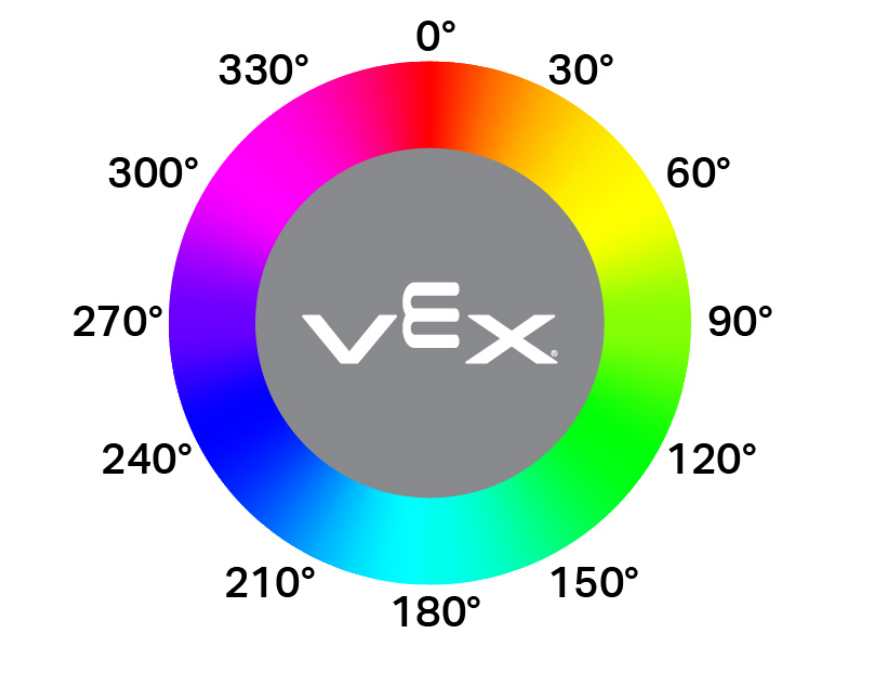
(tono de [FrontEye v] en grados)
Parámetros |
Descripción |
|---|---|
Este bloque no tiene parámetros. |
Ejemplo
cuando inicie
[Print the hue detected by the Front Eye Sensor.]
imprimir (tono de [FrontEye v] en grados) ▶
Giroscopio#
El robot GO Competition Advanced 2.0 utiliza sensores giroscópicos para detectar impactos repentinos, como chocar contra una pared o un objeto.
se detectó un choque#
El bloque booleano detected crash informa si el robot ha detectado un impacto repentino, como golpear una pared u objeto con la suficiente fuerza como para cambiar rápidamente su movimiento.
Verdadero — Se ha detectado un fallo.
Falso — No se ha detectado ningún fallo.
<¿choque detectado?>
Parámetros |
Descripción |
|---|---|
Este bloque no tiene parámetros. |
Ejemplo
cuando inicie
[Drive until the robot crashes, then stop.]
conducir [adelante v]
esperar hasta <¿choque detectado?>
detener conducción