
ボタン#
導入#
button クラスは controller クラスの派生クラスです。コントローラーのボタンの状態とボタンイベントのコールバックへのアクセスを提供します。
button オブジェクトは、 controller オブジェクトを介してアクセスされます。直接構築されるものではありません。
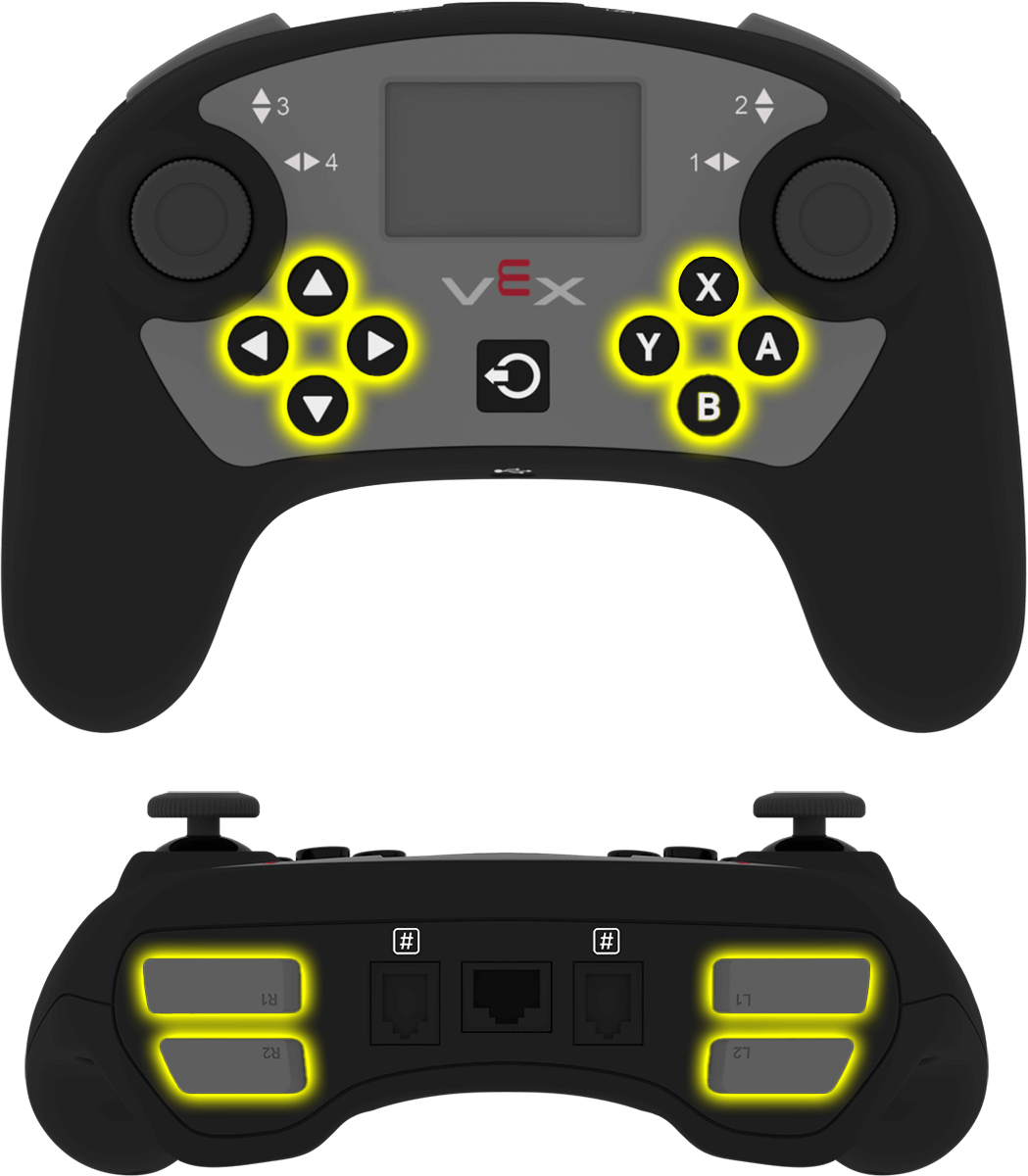
アクセス#
controller クラスは、以下のボタン オブジェクトを提供します。各オブジェクトは button クラスのインスタンスです。
物体 |
使用例 |
説明 |
|---|---|---|
|
|
Aボタン。 |
|
|
Bボタン。 |
|
|
Xボタン。 |
|
|
Yボタン。 |
|
|
下ボタン。 |
|
|
上ボタン。 |
|
|
左ボタン。 |
|
|
右ボタン。 |
|
|
L1ボタン。 |
|
|
L2ボタン。 |
|
|
R1ボタン。 |
|
|
R2ボタン。 |
注記#
buttonメンバー関数を使用する前に、controllerオブジェクトを作成します。
// Create a Controller object
controller Controller = controller();
メンバーの機能#
button クラスには、以下のメンバ関数が含まれています。
ゲッター — ボタンの状態を読み取る。
pressing— ボタンが押されているかどうかを返します。
コールバック — ボタンイベントが発生したときに実行される関数。
ゲッター#
押す#
pressing 返され、ボタンが現在押されているかどうかが返されます。
利用可能な機能
bool pressing() const;
パラメータ
この関数には引数がありません。
戻り値
ブール値を返します。
true— ボタンが押されています。false— ボタンが押されていません。
例
// Turn right while L1 is pressed
while (true) {
  if (Controller.ButtonL1.pressing()) {
    Drivetrain.turn(right);
  }
  else {
    Drivetrain.stop();
  }

  wait(20, msec);
}
コールバック#
押された#
pressed は、ボタンが押されたときに実行される関数を登録します。
利用可能な機能
void pressed(void (* callback)(void)) const;
パラメータ |
タイプ |
説明 |
|---|---|---|
|
|
ボタンが押されたときに実行される関数。 |
戻り値
この関数は値を返しません。
例
mainの外でコールバック関数を定義します。
// Drive forward when A is pressed
void driveForward() {
  Drivetrain.driveFor(forward, 100, mm);
}
main内でコールバックを登録します。
int main() {
  vexcodeInit();

  // Run driveForward when A is pressed
  Controller.ButtonA.pressed(driveForward);
}
リリース#
released ボタンが離されたときに実行される関数を登録します。
利用可能な機能
void released(void (* callback)(void)) const;
パラメータ |
タイプ |
説明 |
|---|---|---|
|
|
ボタンが離されたときに実行される関数。 |
戻り値
この関数は値を返しません。
例
mainの外でコールバック関数を定義します。
// Stop the drivetrain when A is released
void stopDriving() {
  Drivetrain.stop();
}
main内でコールバックを登録します。
int main() {
  vexcodeInit();

  // Run stopDriving when A is released
  Controller.ButtonA.released(stopDriving);
}