Controller#

The EXP Controller allows users to control and customize behaviors for their robot or display messages on the Controller’s screen.

Below is a list of available blocks:

Controller pressed?#

The Controller pressed? block returns a Boolean indicating whether a specific button on the controller is currently pressed.

  • True – The specified button on the controller is being pressed.

  • False – The specified button on the controller is not being pressed.

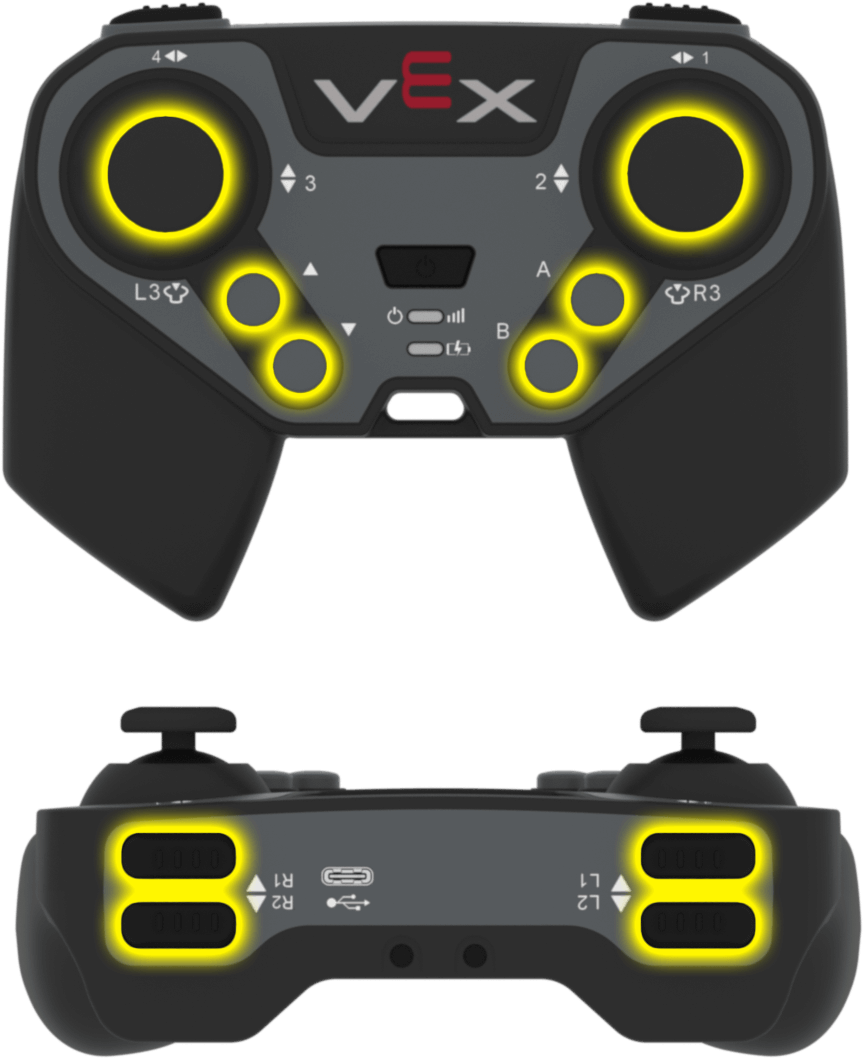
The front and top side of the EXP Controller with the joysticks, arrow buttons, and action buttons highlighted in yellow. On the surface of the controller are two joysticks on the left and right, with up and down arrow buttons on the left and A and B buttons on the right. On the top of the controller are L1 and L2 on the left side and R1 and R2 on the right side.
<Controller [L1 v] 按下了?>

Parameter

Description

button

Which button to check:

  • L1
  • L2
  • L3
  • R1
  • R2
  • R3
  • A
  • B

Example

当开始
[Drive forward while X is pressed.]
永久循环
如果 <Controller [R1 v] 按下了?> 那么
驱动 [向前 v]
否则
驱动停止

Controller position#

The Controller position block returns how far a joystick is moved along a specific axis from -100 to 100. A value of 0 means the joystick is centered.

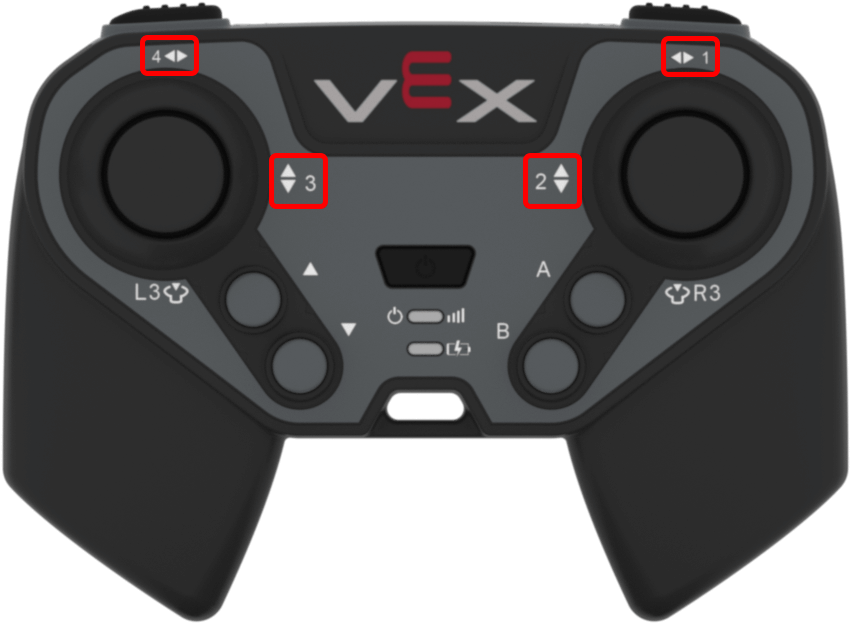
The front side of the EXP Controller with the joystick axis numbers highlighted in red. On the surface of the controller, the left joystick is labeled as Axis 4 for left and right movement and Axis 3 for up and down movement, while the right joystick is labeled as Axis 1 for left and right movement and Axis 2 for up and down movement.
(Controller [1 v] 位移)

Parameter

Description

axis

Which axis to check:

  • 1
  • 2
  • 3
  • 4

Example

当开始
[Drive forward while the left joystick is pushed up.]
永久循环
如果 <(Controller [3 v] 位移) [math_greater_than v] [0]> 那么
驱动 [向前 v]
否则
驱动停止

Controller enable/disable#

The Controller enable/disable block enables or disables Controller configured actions from the Devices menu for all connected controllers.

控制器 [Disable v]

Parameter

Description

state

What state to set the connected controller to:

  • Disable
  • Enable

当开始
[Disable controller configured actions until drive is done.]
控制器 [Disable v]
驱动 [向前 v] (6) [英寸 v] ▶
控制器 [Enable v]

when Controller button pressed#

The when Controller button pressed block runs the attached stack of blocks when a specified Controller button is pressed or released.

The front and top side of the EXP Controller with the joysticks, arrow buttons, and action buttons highlighted in yellow. On the surface of the controller are two joysticks on the left and right, with up and down arrow buttons on the left and A and B buttons on the right. On the top of the controller are L1 and L2 on the left side and R1 and R2 on the right side.
当Controller按键 [L1 v] [pressed v] :: hat events

Parameter

Description

button

Which button to check:

  • L1
  • L2
  • L3
  • R1
  • R2
  • R3
  • A
  • B

state

When the attached stack of blocks will be run:

  • pressed
  • released

Example

当Controller按键 [A v] [pressed v] :: hat events
[Drive forward 50 mm whenever the A button is pressed]
驱动 [向前 v] [200] [毫米 v] ▶

when Controller axis changed#

The when Controller axis changed block runs the attached stack of blocks whenever the value of a specified joystick axis changes.

The front side of the EXP Controller with the joystick axis numbers highlighted in red. On the surface of the controller, the left joystick is labeled as Axis 4 for left and right movement and Axis 3 for up and down movement, while the right joystick is labeled as Axis 1 for left and right movement and Axis 2 for up and down movement.
when Controller axis [1 v] changed :: hat events

Parameter

Description

device

Which controller to use, configured in the Devices window.

axis

Which axis to check:

  • 1
  • 2
  • 3
  • 4

Example

when Controller axis [3 v] changed :: hat events
[Move forward when left joystick is up, backwards if down.]
如果 <(Controller [3 v] 位移) [math_greater_than v] [0]> 那么
驱动 [向前 v]
否则如果 <(Controller [3 v] 位移) [math_less_than v] [0]> 那么
驱动 [反 v]
否则
驱动停止