
光学传感器#
介绍#
EXP 光学传感器 结合了 RGB 颜色传感器和接近传感器,可检测附近物体的颜色、亮度和是否存在。它还可以利用内置 LED 灯照亮物体,以实现更精确的检测。
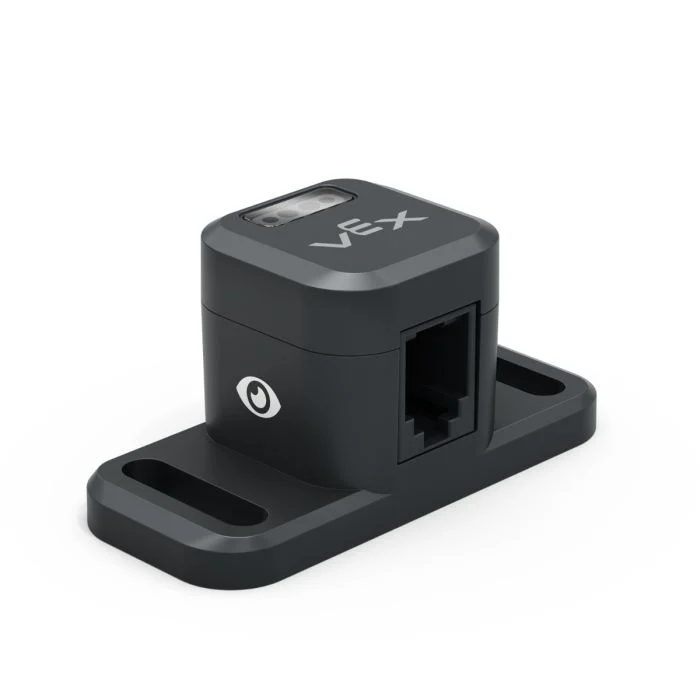
This page uses optical_sensor as the example Optical Sensor name. Replace it with your own configured name as needed.
以下是可用方法列表:
set_light– Turns the Optical Sensor’s LED on or off.set_light_power– Sets the Optical Sensor’s light power level.is_near_object– Returns whether the Optical Sensor detects an object within range.color– Returns the color detected by the Optical Sensor.brightness– Returns the amount of light reflected from the object.hue– Returns the hue detected by the Optical Sensor.object_detected– Registers a function to be called when the Optical Sensor detects an object.object_lost– Registers a function to be called when the Optical Sensor loses an object.
构造函数 - 手动初始化光学传感器。
Optical– Creates an Optical Sensor.
设置灯光#
set_light turns the Optical Sensor’s LED on or off. This can help increase the sensor’s accuracy when detecting colors.
Usage:
optical_sensor.set_light(state)
参数 |
描述 |
|---|---|
状态 |
Sets the LED on or off. |
# Turn on the sensor's LED
optical_sensor.set_light(LEDStateType.ON)
设置灯光功率#
set_light_power sets the brightness of the Optical Sensor’s LED. The light can help the Optical Sensor detect objects and colors more clearly.
如果光传感器的灯熄灭,将灯光功率设置为 0% 以上即可打开灯。
如果光传感器的指示灯亮着,将光功率设置为 0% 将关闭指示灯。
百分比越高,灯光越亮;百分比越低,灯光越暗。
Usage:
optical_sensor.set_light_power(percent, units)
参数 |
描述 |
|---|---|
百分比 |
将 LED 亮度设置为整数。 |
单位 |
Optional. The unit to represent the brightness: |
# Turn on the sensor's light at half brightness
optical_sensor.set_light_power(50, PERCENT)
靠近对象#
is_near_object returns a Boolean indicating whether or not the Optical Sensor detects an object within range.
True– The Optical Sensor detects an object.False– The Optical Sensor does not detect an object.
Usage:
optical_sensor.is_near_object()
参数 |
描述 |
|---|---|
此方法没有参数。 |
# Drive forward until an object is found
drivetrain.drive(FORWARD)
while not optical_sensor.is_near_object():
  pass
drivetrain.stop()
颜色#
color returns an instance of a Color class, based on the detected hue value. These can be compared to predefined Color objects to create conditional statements.
可选颜色有:
Color.BLACKColor.WHITEColor.RED- A hue value between 340° - 20°Color.GREEN- A hue value between 80° - 140°Color.BLUE- A hue value between 200° - 240°Color.YELLOW- A hue value between 40° - 60°Color.ORANGE- A hue value between 20° - 40°Color.PURPLE- A hue value between 240° - 280°Color.CYAN- A hue value between 140° - 200°
Note: The Optical Sensor is looking for hue ranges that match the specified color. For detecting specific hue ranges, see hue.
Usage:
optical_sensor.color()
参数 |
描述 |
|---|---|
此方法没有参数。 |
# Drive forward until red is found
drivetrain.drive(FORWARD)
while not optical_sensor.color() == Color.RED:
  pass
drivetrain.stop()
亮度#
brightness returns the amount of light reflected from the object as a decimal (float) representing a percent.
百分比越高,意味着反射回光学传感器的光线越多;百分比越低,意味着反射回的光线越少。
Usage:
optical_sensor.brightness()
参数 |
描述 |
|---|---|
此方法没有参数。 |
色调#
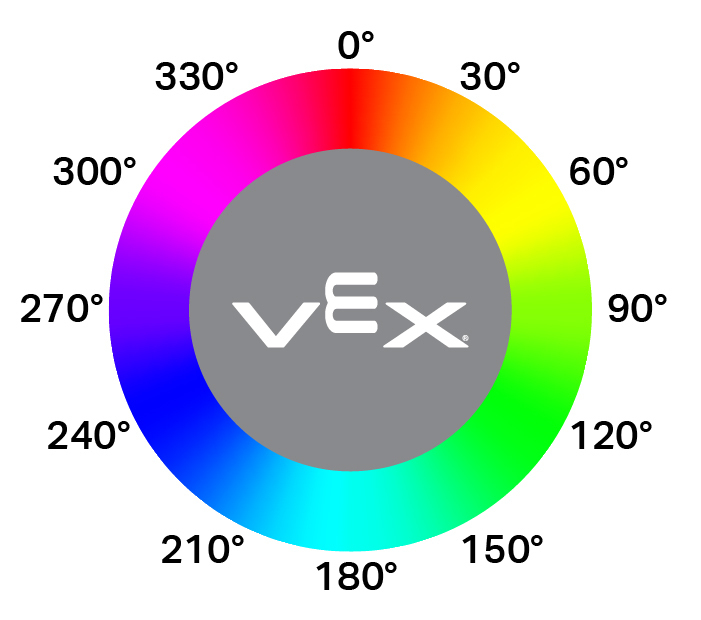
hue returns the hue value of the detected color as a decimal (float) from 0 to 359.
色相是用色轮上的数字来描述颜色的一种方法。
Usage:
optical_sensor.hue()
参数 |
描述 |
|---|---|
此方法没有参数。 |
# Look for the color pink using hue
while True:
  brain.screen.clear_screen()
  brain.screen.set_cursor(1, 1)

  if 300 < optical_sensor.hue() < 359:
    brain.screen.print("This is pink!")
  else:
    brain.screen.print("No pink detected!")
检测到目标#
object_detected registers a function to be called whenever the Optical Sensor detects a new object.
Usage:
optical_sensor.object_detected(callback, arg)
参数 |
描述 |
|---|---|
|
先前定义的 函数,当光学传感器检测到新物体时执行。 |
|
def my_function():
  brain.screen.print("Optical Sensor detected an object")

# Call my_function whenever optical_sensor detects an object
optical_sensor.object_detected(my_function)
丢失对象#
object_lost registers a function to be called whenever the Optical Sensor loses a detected object.
Usage:
optical_sensor.object_lost(callback, arg)
参数 |
描述 |
|---|---|
|
先前定义的 函数,当光学传感器丢失检测到的对象时执行。 |
|
def my_function():
  brain.screen.print("Optical Sensor lost an object")

# Call my_function whenever optical_sensor loses an object
optical_sensor.object_lost(my_function)
构造器#
Constructors are used to manually create Optical objects, which are necessary for configuring an Optical Sensor outside of VEXcode.
Optical#
Optical creates an Optical Sensor.
Usage:
Optical(smartport)
范围 |
描述 |
|---|---|
|
The Smart Port that the Optical Sensor is connected to, written as |
# Create an Optical Sensor in Port 10
optical_sensor = Optical(Ports.PORT10)