
Sensor óptico#
Introducción#
El Sensor Óptico EXP detecta el color, el brillo y la presencia de objetos cercanos mediante una combinación de un sensor de color RGB y un sensor de proximidad. Además, puede usar su LED integrado para iluminar los objetos y lograr una detección más precisa.
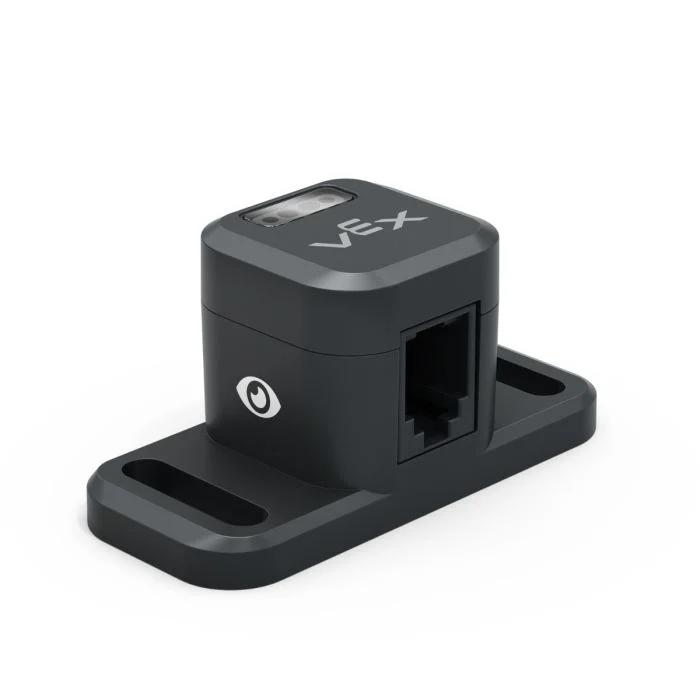
This page uses optical_sensor as the example Optical Sensor name. Replace it with your own configured name as needed.
A continuación se muestra una lista de los métodos disponibles:
set_light– Turns the Optical Sensor’s LED on or off.set_light_power– Sets the Optical Sensor’s light power level.is_near_object– Returns whether the Optical Sensor detects an object within range.color– Returns the color detected by the Optical Sensor.brightness– Returns the amount of light reflected from the object.hue– Returns the hue detected by the Optical Sensor.object_detected– Registers a function to be called when the Optical Sensor detects an object.object_lost– Registers a function to be called when the Optical Sensor loses an object.
Constructor: Inicializa manualmente un sensor óptico.
Optical– Creates an Optical Sensor.
establecer_luz#
set_light turns the Optical Sensor’s LED on or off. This can help increase the sensor’s accuracy when detecting colors.
Usage:
optical_sensor.set_light(state)
Parámetros |
Descripción |
|---|---|
estado |
Sets the LED on or off. |
# Turn on the sensor's LED
optical_sensor.set_light(LEDStateType.ON)
encender_luz#
set_light_power sets the brightness of the Optical Sensor’s LED. The light can help the Optical Sensor detect objects and colors more clearly.
Si la luz del sensor óptico está apagada, al ajustar la potencia de la luz por encima del 0% se encenderá la luz.
Si la luz del sensor óptico está encendida, al ajustar la potencia de la luz al 0%, esta se apagará.
Un porcentaje mayor hace que la luz sea más brillante. Un porcentaje menor hace que la luz sea más tenue.
Usage:
optical_sensor.set_light_power(percent, units)
Parámetros |
Descripción |
|---|---|
por ciento |
El nivel de brillo que se desea ajustar para el LED, expresado como un número entero. |
unidades |
Optional. The unit to represent the brightness: |
# Turn on the sensor's light at half brightness
optical_sensor.set_light_power(50, PERCENT)
is_near_object#
is_near_object returns a Boolean indicating whether or not the Optical Sensor detects an object within range.
True– The Optical Sensor detects an object.False– The Optical Sensor does not detect an object.
Usage:
optical_sensor.is_near_object()
Parámetros |
Descripción |
|---|---|
Este método no tiene parámetros. |
# Drive forward until an object is found
drivetrain.drive(FORWARD)
while not optical_sensor.is_near_object():
  pass
drivetrain.stop()
color#
color returns an instance of a Color class, based on the detected hue value. These can be compared to predefined Color objects to create conditional statements.
Los colores posibles son:
Color.BLACKColor.WHITEColor.RED- A hue value between 340° - 20°Color.GREEN- A hue value between 80° - 140°Color.BLUE- A hue value between 200° - 240°Color.YELLOW- A hue value between 40° - 60°Color.ORANGE- A hue value between 20° - 40°Color.PURPLE- A hue value between 240° - 280°Color.CYAN- A hue value between 140° - 200°
Note: The Optical Sensor is looking for hue ranges that match the specified color. For detecting specific hue ranges, see hue.
Usage:
optical_sensor.color()
Parámetros |
Descripción |
|---|---|
Este método no tiene parámetros. |
# Drive forward until red is found
drivetrain.drive(FORWARD)
while not optical_sensor.color() == Color.RED:
  pass
drivetrain.stop()
brillo#
brightness returns the amount of light reflected from the object as a decimal (float) representing a percent.
Un porcentaje más alto significa que se refleja más luz de vuelta al sensor óptico. Un porcentaje más bajo significa que se refleja menos luz.
Usage:
optical_sensor.brightness()
Parámetros |
Descripción |
|---|---|
Este método no tiene parámetros. |
matiz#
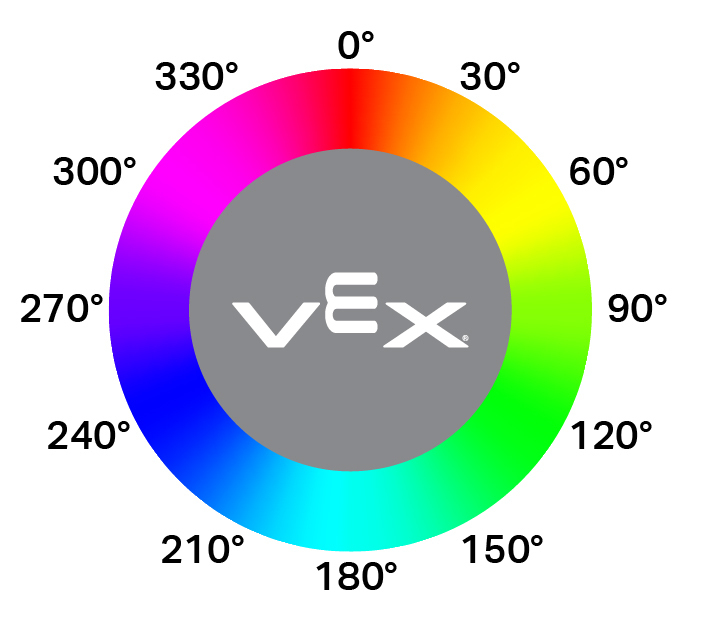
hue returns the hue value of the detected color as a decimal (float) from 0 to 359.
El matiz es una forma de describir el color utilizando números alrededor de una rueda de colores.
Usage:
optical_sensor.hue()
Parámetros |
Descripción |
|---|---|
Este método no tiene parámetros. |
# Look for the color pink using hue
while True:
  brain.screen.clear_screen()
  brain.screen.set_cursor(1, 1)

  if 300 < optical_sensor.hue() < 359:
    brain.screen.print("This is pink!")
  else:
    brain.screen.print("No pink detected!")
objeto_detectado#
object_detected registers a function to be called whenever the Optical Sensor detects a new object.
Usage:
optical_sensor.object_detected(callback, arg)
Parámetros |
Descripción |
|---|---|
|
Una función definida previamente que se ejecuta cuando el sensor óptico detecta un nuevo objeto. |
|
Opcional. Una tupla que contiene los argumentos que se pasarán a la función de devolución de llamada. Consulte Uso de funciones con parámetros para obtener más información. |
def my_function():
  brain.screen.print("Optical Sensor detected an object")

# Call my_function whenever optical_sensor detects an object
optical_sensor.object_detected(my_function)
objeto_perdido#
object_lost registers a function to be called whenever the Optical Sensor loses a detected object.
Usage:
optical_sensor.object_lost(callback, arg)
Parámetros |
Descripción |
|---|---|
|
Una función definida previamente que se ejecuta cuando el sensor óptico pierde un objeto detectado. |
|
Opcional. Una tupla que contiene los argumentos que se pasarán a la función de devolución de llamada. Consulte Uso de funciones con parámetros para obtener más información. |
def my_function():
  brain.screen.print("Optical Sensor lost an object")

# Call my_function whenever optical_sensor loses an object
optical_sensor.object_lost(my_function)
Constructor#
Constructors are used to manually create Optical objects, which are necessary for configuring an Optical Sensor outside of VEXcode.
Optical#
Optical creates an Optical Sensor.
Usage:
Optical(smartport)
Parámetro |
Descripción |
|---|---|
|
The Smart Port that the Optical Sensor is connected to, written as |
# Create an Optical Sensor in Port 10
optical_sensor = Optical(Ports.PORT10)