
安慰#
介绍#
VEXcode EXP 控制台显示在 VEXcode 的监视器窗口中。控制台方法可以在项目运行时显示文本、数字和变量值。它们还可以清除控制台、读取用户输入以及设置更改颜色后打印文本的颜色。
使用 VS Code 时,基于文本的控制台输出会出现在终端中,而不是 VEXcode 控制台中。
注意: 使用 VEXcode 控制台时,必须先连接到控制台串口,然后才能将任何输出打印到控制台。
以下是所有方法的列表:
操作——输出文本或清空控制台。
print— 在控制台或终端中显示文本、数字或变量值。clear_console— 清除控制台中的所有行。
Getter 方法——读取用户输入。
input— 显示可选的提示字符串,等待用户输入,并将响应作为文本返回。
Mutator — 格式化打印文本。
set_console_text_color— 设置控制台中打印的文本颜色。
行动#
print#
print 在控制台中显示文本、数字或变量值。在 VS Code 中, print 在终端中显示输出。
如果您希望打印消息中包含项目中的值(例如分数、计时器或传感器读数),请使用自定义字符串格式。有关更多信息,请参阅字符串格式页面。
默认情况下,每个 print() 语句\n\n。这会在打印值后将光标移动到下一行。可选的 end 参数用于更改打印值之后添加的内容。
Usage:
print(value, end=“\n”)
范围 |
描述 |
|---|---|
|
要在控制台或终端中显示的文本、数字或变量值。 |
|
可选。在 |
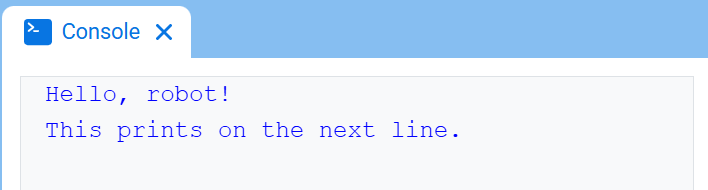
# Display two messages on separate lines
print("Hello, robot!")
print("This prints on the next line.")
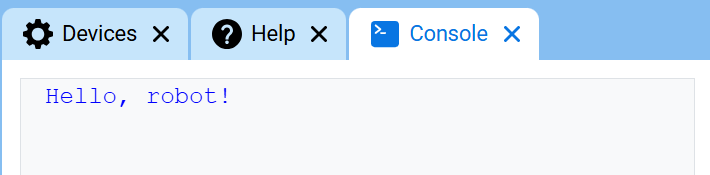
# Display two messages on the same line
print("Hello,", end=" ")
print("robot!")
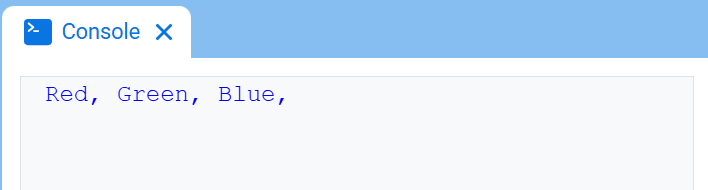
# Print three colors on one line, separated by commas
colors = ["Red", "Green", "Blue"]

for color in colors:
    print(color, end=", ")
转义序列#
转义序列是短代码,可以用 print 来打印,以改变文本在控制台中的显示方式。
对于大多数项目,可以使用 set_console_text_color 来更改文本颜色,使用 clear_console 来清除控制台。如果您想在 print 语句内部更改文本颜色或清除控制台,可以使用转义序列。 print
您可以通过打印 \033 后跟颜色代码来更改文本颜色。
颜色 |
转义序列 |
|---|---|
红色的 |
|
绿色的 |
|
蓝色的 |
|
黑色的 |
|
白色的 |
|
黄色的 |
|
橙子 |
|
紫色的 |
|
青色 |
|
透明的 |
|
# Print VEXcode in red
print("\033[31mVEXcode")
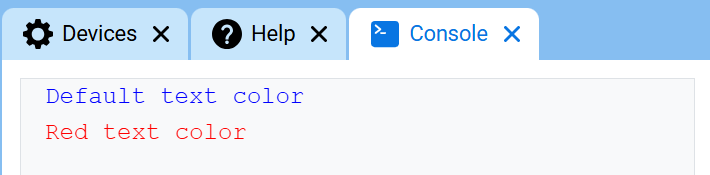
# Print text in different colors
print("Default text color")
print("\033[31m")
print("Red text color")
要使用转义序列清除整个控制台,请打印 \033[2J。这也会将光标移回第 1 行。
# Clear the Console after two seconds
print("VEXcode")
wait(2, SECONDS)
print("\033[2J")
clear_console#
clear_console 清除控制台中的所有行。
Usage:
clear_console()
参数 |
描述 |
|---|---|
此方法没有参数。 |
# Display text, then clear it after two seconds
print("This will disappear...")
wait(2, SECONDS)
clear_console()
Getter#
input#
input 显示一个可选的提示字符串,等待用户输入响应,然后将该响应作为文本返回。
项目会在执行到 input() 时暂停,直到在控制台中输入响应。在 VS Code 中,响应会在终端中输入。
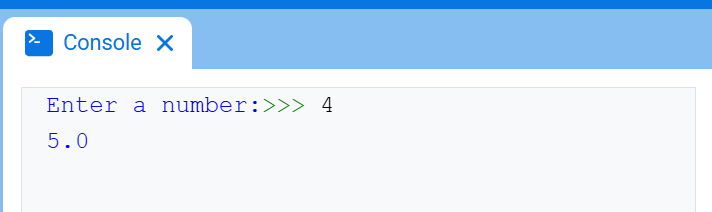
input() 是文本。要将响应用作数字,请先使用 int() 或 float()。
Usage:
input(prompt)
范围 |
描述 |
|---|---|
|
可选。在等待响应之前,要在控制台或终端中显示的字符串。如果未指定提示符,则在等待之前不显示任何消息。 |
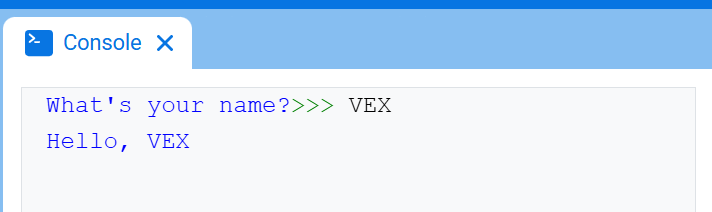
# Ask for a name, then print a greeting
answer = input("What's your name?")
print("Hello, " + answer)
# Ask for a number, then use it in math
answer = input("Enter a number:")
number = float(answer)
print(number + 1)
变异体#
set_console_text_color#
set_console_text_color 设置使用此方法后控制台中打印的文本颜色。在项目开始时,控制台文本颜色设置为 BLUE。
此方法可更改 VEXcode 控制台中的文本颜色。在 VS Code 中,不同终端对颜色的支持可能有所不同。
Usage:
set_console_text_color(color)
范围 |
描述 |
|---|---|
|
控制台打印文本使用的颜色:
|
# Print text in different colors
print("Default text color")
set_console_text_color(Color.RED)
print("Red text color")