
Οπτικός αισθητήρας#
Εισαγωγή#
Ο οπτικός αισθητήρας V5 ανιχνεύει το χρώμα, τη φωτεινότητα και την παρουσία κοντινών αντικειμένων χρησιμοποιώντας έναν συνδυασμό αισθητήρα χρώματος RGB και αισθητήρα εγγύτητας. Μπορεί επίσης να χρησιμοποιήσει την ενσωματωμένη λυχνία LED για να φωτίσει αντικείμενα για πιο ακριβή ανίχνευση.
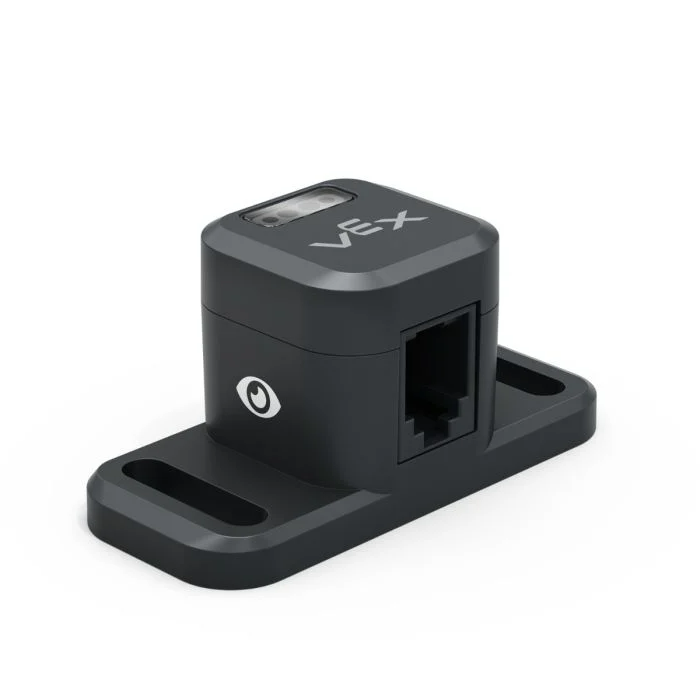
Αυτή η σελίδα χρησιμοποιεί optical_sensor ως παράδειγμα ονόματος οπτικού αισθητήρα. Αντικαταστήστε το με το δικό σας διαμορφωμένο όνομα, όπως απαιτείται.
Παρακάτω είναι μια λίστα με τις διαθέσιμες μεθόδους:
set_light– Ενεργοποιεί ή απενεργοποιεί τη λυχνία LED του οπτικού αισθητήρα.set_light_power– Ορίζει το επίπεδο ισχύος φωτός του οπτικού αισθητήρα.is_near_object– Επιστρέφει εάν ο οπτικός αισθητήρας ανιχνεύει ένα αντικείμενο εντός εμβέλειας.color– Επιστρέφει το χρώμα που ανιχνεύεται από τον οπτικό αισθητήρα.brightness– Επιστρέφει την ποσότητα φωτός που ανακλάται από το αντικείμενο.hue– Επιστρέφει την απόχρωση που ανιχνεύεται από τον οπτικό αισθητήρα.object_detected– Καταγράφει μια συνάρτηση που θα καλείται όταν ο οπτικός αισθητήρας ανιχνεύει ένα αντικείμενο.object_lost– Καταγράφει μια συνάρτηση που θα κληθεί όταν ο Οπτικός Αισθητήρας χάσει ένα αντικείμενο.
Κατασκευαστής – Χειροκίνητη αρχικοποίηση ενός οπτικού αισθητήρα.
Optical– Δημιουργεί έναν οπτικό αισθητήρα.
set_light#
set_light ενεργοποιεί ή απενεργοποιεί τη λυχνία LED του οπτικού αισθητήρα. Αυτό μπορεί να βοηθήσει στην αύξηση της ακρίβειας του αισθητήρα κατά την ανίχνευση χρωμάτων.
Usage:
optical_sensor.set_light(state)
Παράμετροι |
Περιγραφή |
|---|---|
κατάσταση |
Ενεργοποιεί ή απενεργοποιεί τη λυχνία LED. |
# Turn on the sensor's LED
optical_sensor.set_light(LEDStateType.ON)
set_light_power#
set_light_power ορίζει τη φωτεινότητα της λυχνίας LED του οπτικού αισθητήρα. Το φως μπορεί να βοηθήσει τον οπτικό αισθητήρα να ανιχνεύει αντικείμενα και χρώματα με μεγαλύτερη σαφήνεια.
Εάν το φως του οπτικού αισθητήρα είναι σβηστό, η ρύθμιση της ισχύος φωτός πάνω από 0% θα ανάψει το φως.
Εάν η λυχνία του οπτικού αισθητήρα είναι αναμμένη, η ρύθμιση της ισχύος του φωτός στο 0% θα το σβήσει.
Ένα υψηλότερο ποσοστό κάνει το φως πιο φωτεινό. Ένα χαμηλότερο ποσοστό κάνει το φως πιο αμυδρό.
Usage:
optical_sensor.set_light_power(percent, units)
Παράμετροι |
Περιγραφή |
|---|---|
τοις εκατό |
Η φωτεινότητα στην οποία θα οριστεί η λυχνία LED ως ακέραιος αριθμός. |
μονάδες |
Προαιρετικό. Η μονάδα που αντιπροσωπεύει τη φωτεινότητα: |
# Turn on the sensor's light at half brightness
optical_sensor.set_light_power(50, PERCENT)
είναι_κοντά_στο_αντικείμενο#
Η συνάρτηση is_near_object επιστρέφει μια λογική τιμή που υποδεικνύει εάν ο οπτικός αισθητήρας ανιχνεύει ένα αντικείμενο εντός εμβέλειας.
True– Ο οπτικός αισθητήρας ανιχνεύει ένα αντικείμενο.False– Ο οπτικός αισθητήρας δεν ανιχνεύει κάποιο αντικείμενο.
Usage:
optical_sensor.is_near_object()
Παράμετροι |
Περιγραφή |
|---|---|
Αυτή η μέθοδος δεν έχει παραμέτρους. |
# Drive forward until an object is found
drivetrain.drive(FORWARD)
while not optical_sensor.is_near_object():
  pass
drivetrain.stop()
χρώμα#
Η συνάρτηση color επιστρέφει μια παρουσία μιας κλάσης Color class, με βάση την ανιχνευμένη τιμή απόχρωσης. Αυτά μπορούν να συγκριθούν με προκαθορισμένα αντικείμενα Color για τη δημιουργία εντολών υπό όρους.
Πιθανά χρώματα είναι:
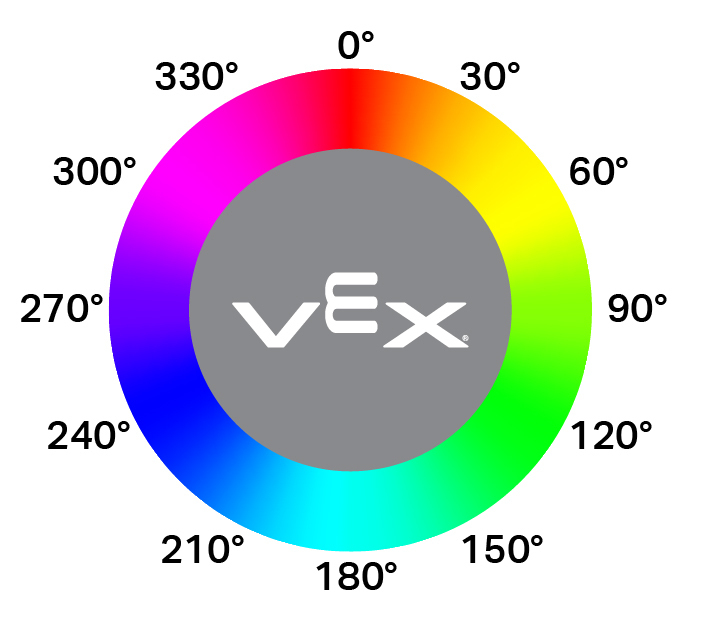
Color.BLACKColor.WHITEColor.RED- Τιμή απόχρωσης μεταξύ 340° - 20°Color.GREEN- Τιμή απόχρωσης μεταξύ 80° - 140°Color.BLUE- Τιμή απόχρωσης μεταξύ 200° - 240°Color.YELLOW- Τιμή απόχρωσης μεταξύ 40° - 60°Color.ORANGE- Τιμή απόχρωσης μεταξύ 20° - 40°Color.PURPLE- Τιμή απόχρωσης μεταξύ 240° - 280°Color.CYAN- Μια τιμή απόχρωσης μεταξύ 140° - 200°
Σημείωση: Ο οπτικός αισθητήρας αναζητά εύρη αποχρώσεων που ταιριάζουν με το καθορισμένο χρώμα. Για την ανίχνευση συγκεκριμένων εύρων αποχρώσεων, ανατρέξτε στην ενότητα hue.
Usage:
optical_sensor.color()
Παράμετροι |
Περιγραφή |
|---|---|
Αυτή η μέθοδος δεν έχει παραμέτρους. |
# Drive forward until red is found
drivetrain.drive(FORWARD)
while not optical_sensor.color() == Color.RED:
  pass
drivetrain.stop()
λάμψη#
brightness επιστρέφει την ποσότητα φωτός που ανακλάται από το αντικείμενο ως δεκαδικό ψηφίο (float) που αντιπροσωπεύει ένα ποσοστό.
Ένα υψηλότερο ποσοστό σημαίνει ότι περισσότερο φως ανακλάται πίσω στον οπτικό αισθητήρα. Ένα χαμηλότερο ποσοστό σημαίνει ότι λιγότερο φως ανακλάται πίσω.
Usage:
optical_sensor.brightness()
Παράμετροι |
Περιγραφή |
|---|---|
Αυτή η μέθοδος δεν έχει παραμέτρους. |
απόχρωση#
hue επιστρέφει την τιμή hue του ανιχνευμένου χρώματος ως δεκαδικό ψηφίο (float) από 0 έως 359.
Η απόχρωση είναι ένας τρόπος περιγραφής χρώματος χρησιμοποιώντας αριθμούς γύρω από έναν χρωματικό κύκλο.
Usage:
optical_sensor.hue()
Παράμετροι |
Περιγραφή |
|---|---|
Αυτή η μέθοδος δεν έχει παραμέτρους. |
# Look for the color pink using hue
while True:
  brain.screen.clear_screen()
  brain.screen.set_cursor(1, 1)

  if 300 < optical_sensor.hue() < 359:
    brain.screen.print("This is pink!")
  else:
    brain.screen.print("No pink detected!")
ανιχνευμένο_αντικείμενο#
object_detected καταγράφει μια συνάρτηση που θα καλείται κάθε φορά που ο οπτικός αισθητήρας ανιχνεύει ένα νέο αντικείμενο.
Usage:
optical_sensor.object_detected(callback, arg)
Παράμετροι |
Περιγραφή |
|---|---|
|
Μια προηγουμένως καθορισμένη συνάρτηση που εκτελείται όταν ο Οπτικός Αισθητήρας ανιχνεύει ένα νέο αντικείμενο. |
|
Προαιρετικό. Μια πλειάδα που περιέχει ορίσματα για να μεταβιβαστούν στη συνάρτηση επανάκλησης. Δείτε Χρήση Συναρτήσεων με Παραμέτρους για περισσότερες πληροφορίες. |
def my_function():
  brain.screen.print("Optical Sensor detected an object")

# Call my_function whenever optical_sensor detects an object
optical_sensor.object_detected(my_function)
αντικείμενο_χαμένο#
object_lost καταγράφει μια συνάρτηση που θα καλείται κάθε φορά που ο οπτικός αισθητήρας χάνει ένα ανιχνευμένο αντικείμενο.
Usage:
optical_sensor.object_lost(callback, arg)
Παράμετροι |
Περιγραφή |
|---|---|
|
Μια προηγουμένως καθορισμένη συνάρτηση που εκτελείται όταν ο Οπτικός Αισθητήρας χάνει ένα ανιχνευμένο αντικείμενο. |
|
Προαιρετικό. Μια πλειάδα που περιέχει ορίσματα για να μεταβιβαστούν στη συνάρτηση επανάκλησης. Δείτε Χρήση Συναρτήσεων με Παραμέτρους για περισσότερες πληροφορίες. |
def my_function():
  brain.screen.print("Optical Sensor lost an object")

# Call my_function whenever optical_sensor loses an object
optical_sensor.object_lost(my_function)
Κατασκευαστής#
Οι κατασκευαστές χρησιμοποιούνται για τη χειροκίνητη δημιουργία αντικειμένων Optical , τα οποία είναι απαραίτητα για τη διαμόρφωση ενός οπτικού αισθητήρα εκτός του VEXcode.
Optical#
Optical δημιουργεί έναν Οπτικό Αισθητήρα.
Usage:
Optical(smartport)
Παράμετρος |
Περιγραφή |
|---|---|
|
Η Έξυπνη Θύρα στην οποία είναι συνδεδεμένος ο Οπτικός Αισθητήρας, γράφεται ως |
# Create an Optical Sensor in Port 10
optical_sensor = Optical(Ports.PORT10)