
Python ειδικά για ρομπότ#
Εισαγωγή#
Το Hero Bot, Snapshot, περιλαμβάνει δύο επιλογές κινητήρα και τον οπτικό αισθητήρα.
Όλες οι τυπικές μέθοδοι VR VEXcode είναι διαθέσιμες για χρήση στην παιδική χαρά IQ 22-23 Slapshot.
Παρακάτω είναι μια λίστα με όλες τις διαθέσιμες μεθόδους ειδικά για ρομπότ:
Σύστημα μετάδοσης κίνησης – Μετακινήστε και περιστρέψτε το ρομπότ.
Ενέργειες
drive— Μετακινεί το ρομπότ προς τα εμπρός ή προς τα πίσω για πάντα.drive_for— Μετακινεί το ρομπότ προς τα εμπρός ή προς τα πίσω για μια συγκεκριμένη απόσταση.turn— Στρέφει το ρομπότ αριστερά ή δεξιά για πάντα.turn_for— Στρέφει το ρομπότ αριστερά ή δεξιά για έναν συγκεκριμένο αριθμό μοιρών.turn_to_heading— Στρέφει το ρομπότ ώστε να κοιτάζει προς μια συγκεκριμένη κατεύθυνση από -359 σε 359 μοίρες.turn_to_rotation— Στρέφει το ρομπότ σε μια συγκεκριμένη περιστροφή.stop— Σταματά την κίνηση του ρομπότ.
Μεταλλαγμένοι
set_heading— Αλλάζει την τρέχουσα κατεύθυνση του ρομπότ σε νέα.set_rotation— Αλλάζει την τρέχουσα περιστροφή του ρομπότ σε μια νέα περιστροφή.set_timeout— Ορίζει τον χρόνο που θα προσπαθήσει το ρομπότ να ολοκληρώσει μια κίνηση.set_drive_velocity— Υποδεικνύει στο ρομπότ πόσο γρήγορα πρέπει να οδηγήσει.set_turn_velocity— Υποδεικνύει στο ρομπότ πόσο γρήγορα πρέπει να στρίψει.
Αποκτητές
heading— Επιστρέφει την τρέχουσα κατεύθυνση του ρομπότ από 0 έως 359,99 μοίρες.rotation— Επιστρέφει την τρέχουσα περιστροφή του ρομπότ.is_done— Επιστρέφει εάν το ρομπότ έχει ολοκληρώσει την κίνησή του, ως λογική τιμή.is_moving— Επιστρέφει εάν το ρομπότ κινείται, ως λογική τιμή.velocity— Επιστρέφει την ταχύτητα με την οποία κινείται το ρομπότ.
Κίνηση - Μετακινήστε και παρακολουθήστε τους κινητήρες του ρομπότ.
Ενέργειες
spin— Περιστρέφει έναν κινητήρα προς τα εμπρός ή προς τα πίσω για πάντα.spin_for— Περιστρέφει έναν κινητήρα για μια συγκεκριμένη απόσταση.spin_to_position— Περιστρέφει έναν κινητήρα σε μια συγκεκριμένη θέση.stop— Σταματά την περιστροφή ενός κινητήρα.
Μεταλλαγμένοι
set_position— Αλλάζει την τρέχουσα θέση του κινητήρα σε μια νέα τιμή.set_velocity— Υποδεικνύει σε έναν κινητήρα πόσο γρήγορα πρέπει να περιστραφεί.set_timeout— Ορίζει τον χρόνο που ένας κινητήρας θα προσπαθήσει να ολοκληρώσει μια κίνηση.
Αποκτητές
is_done— Επιστρέφει εάν ο κινητήρας έχει ολοκληρώσει την κίνηση, ως λογική τιμή.is_spinning— Επιστρέφει εάν ο κινητήρας περιστρέφεται, ως λογική τιμή.position— Επιστρέφει την τρέχουσα θέση του κινητήρα.velocity— Επιστρέφει την ταχύτητα περιστροφής του κινητήρα.
Συμβάντα - Εκτέλεση κώδικα όταν ένας αισθητήρας αλλάζει κατάσταση.
Προφυλακτήρας
Οπτικός
object_detected– Καταγράφει μια συνάρτηση που θα καλείται όταν ο οπτικός αισθητήρας ανιχνεύει ένα αντικείμενο.object_lost– Καταγράφει μια συνάρτηση που θα κληθεί όταν ο Οπτικός Αισθητήρας χάσει ένα αντικείμενο.
Κονσόλα – Εκτύπωση στην Κονσόλα και παρακολούθηση τιμών.
Αποτύπωμα
brain.screen.print— Εμφανίζει κείμενο, αριθμούς ή τιμές μεταβλητών στην Κονσόλα.brain.screen.next_row— Μετακινεί τον κέρσορα της κονσόλας στην αρχή της επόμενης γραμμής.brain.screen.clear_screen— Διαγράφει όλες τις γραμμές από την Κονσόλα.
Ελεγκτής εκπομπών
monitor_variable— Προσθέτει μία ή περισσότερες προκαθορισμένες μεταβλητές στην καρτέλα Monitor.monitor_sensor— Προσθέτει μία ή περισσότερες τιμές αισθητήρα στην καρτέλα Monitor.
Αισθητήρες - Χρησιμοποιήστε τους διάφορους αισθητήρες του ρομπότ.
Προφυλακτήρας
pressing- Επιστρέφει εάν ο Προφυλακτήρας Εισαγωγής είναι πατημένος τη δεδομένη στιγμή.
Οπτικός
is_near_object– Επιστρέφει εάν ο οπτικός αισθητήρας ανιχνεύει ένα αντικείμενο εντός εμβέλειας.color– Επιστρέφει το χρώμα που ανιχνεύεται από τον οπτικό αισθητήρα.brightness– Επιστρέφει την ποσότητα φωτός που ανακλάται από το αντικείμενο.hue– Επιστρέφει την απόχρωση που ανιχνεύεται από τον οπτικό αισθητήρα.
Τα παραδείγματα σε αυτήν τη σελίδα χρησιμοποιούν την προεπιλεγμένη θέση έναρξης της Παιδικής Χαράς.
Σύστημα μετάδοσης κίνησης#
Το σύστημα μετάδοσης κίνησης ελέγχει τον τρόπο με τον οποίο το ρομπότ εικονικής πραγματικότητας (VR) κινείται και στρίβει. Το σύστημα μετάδοσης κίνησης μπορεί να κινείται προς τα εμπρός ή προς τα πίσω, να στρίβει αριστερά ή δεξιά, να στρίβει προς τις κατευθύνσεις και να παρακολουθεί την περιστροφή του.
Ενέργειες#
οδηγώ#
drive κινεί το ρομπότ προς τα εμπρός ή προς τα πίσω για πάντα. Το ρομπότ θα συνεχίσει να κινείται μέχρι να του δοθεί μια άλλη ενέργεια, όπως στροφή ή στάση.
Usage:
drivetrain.drive(direction)
Παράμετροι |
Περιγραφή |
|---|---|
|
Η κατεύθυνση κίνησης του ρομπότ: |
def main():
    # Drive forward then stop
    drivetrain.drive(FORWARD)
    wait(2, SECONDS)
    drivetrain.stop()

# VR threads — Do not delete
vr_thread(main)
μονάδα_δίσκου#
Η συνάρτηση drive_for μετακινεί το ρομπότ προς τα εμπρός ή προς τα πίσω για μια συγκεκριμένη απόσταση. Το έργο θα περιμένει μέχρι να ολοκληρωθεί η κίνηση του ρομπότ πριν εκτελεστεί η επόμενη γραμμή κώδικα.
Usage:
drivetrain.drive_for(direction, distance, units, wait)
Παράμετροι |
Περιγραφή |
|---|---|
|
Η κατεύθυνση κίνησης του ρομπότ: |
|
Η απόσταση που διανύει το ρομπότ. Αυτή μπορεί να είναι ένας ακέραιος αριθμός |
|
Η μονάδα απόστασης: |
|
Προαιρετικό. |
def main():
    # Drive forward and backward
    drivetrain.drive_for(FORWARD, 200, MM)
    drivetrain.drive_for(REVERSE, 200, MM)

# VR threads — Do not delete
vr_thread(main)
σειρά#
turn γυρίζει το ρομπότ αριστερά ή δεξιά για πάντα. Το ρομπότ θα συνεχίσει να γυρίζει μέχρι να του δοθεί μια άλλη ενέργεια, όπως οδήγηση ή στάση.
Usage:
drivetrain.turn(direction)
Παράμετροι |
Περιγραφή |
|---|---|
|
Η κατεύθυνση που γυρίζει το ρομπότ: |
def main():
    # Turn right and left, then stop
    drivetrain.turn(RIGHT)
    wait(2, SECONDS)
    drivetrain.turn(LEFT)
    wait(2, SECONDS)
    drivetrain.stop()

# VR threads — Do not delete
vr_thread(main)
στροφή_για#
turn_for γυρίζει το ρομπότ αριστερά ή δεξιά για έναν συγκεκριμένο αριθμό μοιρών. Η στροφή είναι σχετική με την τρέχουσα θέση του ρομπότ. Το έργο θα περιμένει μέχρι το ρομπότ να ολοκληρώσει την στροφή πριν εκτελεστεί η επόμενη γραμμή κώδικα.
Usage:
drivetrain.turn_for(direction, angle, units, wait)
Παράμετροι |
Περιγραφή |
|---|---|
|
Η κατεύθυνση που γυρίζει το ρομπότ: |
|
Ο αριθμός των μοιρών που περιστρέφεται το ρομπότ. Αυτός μπορεί να είναι ένας ακέραιος αριθμός |
|
Η μονάδα περιστροφής: |
|
Προαιρετικό. |
def main():
    # Turn the robot right and left
    drivetrain.turn_for(RIGHT, 90, DEGREES)
    wait(1, SECONDS)
    drivetrain.turn_for(LEFT, 90, DEGREES)

# VR threads — Do not delete
vr_thread(main)
στροφή_προς_την_κατεύθυνση#
Μια κατεύθυνση είναι η κατεύθυνση προς την οποία είναι στραμμένο το ρομπότ, μετρούμενη σε μοίρες. turn_to_heading γυρίζει το ρομπότ ώστε να στραφεί προς μια συγκεκριμένη κατεύθυνση από -359 σε 359 μοίρες. Το ρομπότ θα στρίψει προς τη συντομότερη κατεύθυνση για να φτάσει στην κατεύθυνση-στόχο.
Η αρχική κατεύθυνση του ρομπότ είναι 0 μοίρες.
Το έργο θα περιμένει μέχρι να ολοκληρώσει την περιστροφή του ρομπότ προτού εκτελεστεί η επόμενη γραμμή κώδικα.
Usage:
drivetrain.turn_to_heading(angle, units, wait)
Παράμετροι |
Περιγραφή |
|---|---|
|
Η κατεύθυνση προς την οποία πρέπει να είναι στραμμένο το ρομπότ, σε μοίρες. Αυτή μπορεί να είναι ένας ακέραιος αριθμός |
|
Η μονάδα περιστροφής: |
|
Προαιρετικό. |
def main():
    # Turn to face the cardinal directions
    drivetrain.turn_to_heading(90, DEGREES)
    wait(1, SECONDS)
    drivetrain.turn_to_heading(180, DEGREES)
    wait(1, SECONDS)
    drivetrain.turn_to_heading(270, DEGREES)
    wait(1, SECONDS)
    drivetrain.turn_to_heading(0, DEGREES)

# VR threads — Do not delete
vr_thread(main)
στροφή_σε_περιστροφή#
turn_to_rotation γυρίζει το ρομπότ σε μια συγκεκριμένη περιστροφή.
Η περιστροφή είναι η περιστροφή του ρομπότ, μετρούμενη σε μοίρες. Στην αρχή ενός έργου, η τιμή περιστροφής ορίζεται σε 0 μοίρες. Η περιστροφή μπορεί επίσης να οριστεί χρησιμοποιώντας τη μέθοδο set_rotation.
Οι τιμές περιστροφής είναι απόλυτες. Αυτό σημαίνει ότι η κατεύθυνση της στροφής εξαρτάται από την τρέχουσα περιστροφή του ρομπότ. Η στροφή προς τα δεξιά αυξάνει την περιστροφή και η στροφή προς τα αριστερά τη μειώνει.
Για παράδειγμα, αν το ρομπότ ξεκινήσει από 0 μοίρες και στρίψετε σε περιστροφή 720 μοιρών, θα στρίψει δεξιά δύο φορές. Αν στη συνέχεια στρίψετε σε περιστροφή 360 μοιρών, θα στρίψει αριστερά μία φορά, επειδή οι 360 μοίρες είναι μικρότερες από 720 μοίρες.
Το έργο θα περιμένει μέχρι να ολοκληρώσει την περιστροφή του ρομπότ προτού εκτελεστεί η επόμενη γραμμή κώδικα.
Usage:
drivetrain.turn_to_rotation(angle, units, wait)
Παράμετροι |
Περιγραφή |
|---|---|
|
Η τιμή περιστροφής, σε μοίρες, στην οποία θα στραφεί το ρομπότ. Αυτή μπορεί να είναι ένας ακέραιος αριθμός |
|
Η μονάδα περιστροφής: |
|
Προαιρετικό. |
def main():
    # Turn left, then spin in a circle
    # clockwise and face right
    drivetrain.turn_to_rotation(-90, DEGREES)
    wait(1, SECONDS)
    drivetrain.turn_to_rotation(450, DEGREES)

# VR threads — Do not delete
vr_thread(main)
στάση#
stop σταματά την κίνηση του ρομπότ.
Usage:
drivetrain.stop()
Παράμετροι |
Περιγραφή |
|---|---|
Αυτή η μέθοδος δεν έχει παραμέτρους. |
def main():
    # Drive forward then stop
    drivetrain.drive(FORWARD)
    wait(2, SECONDS)
    drivetrain.stop()

# VR threads — Do not delete
vr_thread(main)
Μεταλλάκτες#
set_heading#
Μια κατεύθυνση είναι η κατεύθυνση που βλέπει το ρομπότ, μετρούμενη σε μοίρες. set_heading αλλάζει την τρέχουσα κατεύθυνση του ρομπότ σε μια νέα τιμή κατεύθυνσης.
Για παράδειγμα, εάν το ρομπότ έχει στραφεί προς τα δεξιά, η ρύθμιση της κατεύθυνσης σε 0 μοίρες καθιστά αυτή τη θέση προς τα δεξιά τις νέες 0 μοίρες. Στη συνέχεια, το ρομπότ μπορεί να στραφεί σε άλλες θέσεις με βάση αυτήν τη νέα κατεύθυνση.
Usage:
drivetrain.set_heading(heading, units)
Παράμετροι |
Περιγραφή |
|---|---|
|
Η τιμή κατεύθυνσης, σε μοίρες, που θα οριστεί για το ρομπότ. Αυτή μπορεί να είναι ένας ακέραιος αριθμός |
|
Η μονάδα επικεφαλίδας: |
def main():
    # Face the new 0 degrees
    drivetrain.set_heading(90, DEGREES)
    drivetrain.turn_to_heading(0, DEGREES)

# VR threads — Do not delete
vr_thread(main)
set_rotation#
Η περιστροφή είναι η περιστροφή του ρομπότ, μετρούμενη σε μοίρες. Στην αρχή ενός έργου, η τιμή περιστροφής ορίζεται σε 0 μοίρες. set_rotation αλλάζει την τρέχουσα περιστροφή του ρομπότ σε μια νέα τιμή.
Για παράδειγμα, αν το ρομπότ έχει κάνει δύο πλήρεις στροφές προς τα δεξιά, η τιμή περιστροφής του θα είναι 720 μοίρες. Αν ορίσετε την περιστροφή σε 0 μοίρες, η περιστροφή θα επαναφερθεί από 720 σε 0 μοίρες. Στη συνέχεια, το ρομπότ μπορεί να στραφεί σε περιστροφές με βάση αυτήν τη νέα τιμή.
Usage:
drivetrain.set_rotation(rotation, units)
Παράμετροι |
Περιγραφή |
|---|---|
|
Η τιμή περιστροφής, σε μοίρες, που θα οριστεί για το ρομπότ. Αυτή μπορεί να είναι ένας ακέραιος αριθμός |
|
Η μονάδα περιστροφής: |
def main():
    # Spin counterclockwise two times
    drivetrain.set_rotation(720, DEGREES)
    drivetrain.turn_to_rotation(0, DEGREES)

# VR threads — Do not delete
vr_thread(main)
set_timeout#
set_timeout ορίζει τον χρόνο που το ρομπότ θα προσπαθήσει να ολοκληρώσει μια κίνηση. Εάν το ρομπότ δεν μπορεί να ολοκληρώσει σε αυτόν τον χρόνο, θα σταματήσει την προσπάθεια και θα προχωρήσει στην επόμενη γραμμή κώδικα. Αυτό εμποδίζει το ρομπότ να κολλήσει σε μια κίνηση.
Usage:
drivetrain.set_timeout(value, units)
Παράμετροι |
Περιγραφή |
|---|---|
|
Ο χρόνος που μπορεί να προσπαθήσει το ρομπότ για να ολοκληρώσει μια κίνηση. Αυτός μπορεί να είναι ένας θετικός |
|
Η μονάδα χρόνου: |
def main():
    # Turn right after driving forward
    drivetrain.set_timeout(1, SECONDS)
    drivetrain.drive_for(FORWARD, 25, INCHES)
    drivetrain.turn_for(RIGHT, 90)

# VR threads — Do not delete
vr_thread(main)
set_drive_velocity#
set_drive_velocity λέει στο ρομπότ πόσο γρήγορα πρέπει να οδηγήσει. Ένα υψηλότερο ποσοστό κάνει το ρομπότ να οδηγεί πιο γρήγορα και ένα χαμηλότερο ποσοστό κάνει το ρομπότ να οδηγεί πιο αργά.
Κάθε έργο ξεκινά με το ρομπότ να κινείται με ταχύτητα 50% από προεπιλογή.
Σημείωση: Μια υψηλότερη ταχύτητα κάνει το ρομπότ να κινείται πιο γρήγορα, αλλά μπορεί να είναι λιγότερο ακριβές. Μια χαμηλότερη ταχύτητα κάνει το ρομπότ να κινείται πιο αργά, αλλά μπορεί να είναι πιο ακριβές.
Usage:
drivetrain.set_drive_velocity(velocity, units)
Παράμετροι |
Περιγραφή |
|---|---|
|
Η ταχύτητα με την οποία θα οδηγηθεί το μηχάνημα κυμαίνεται από 0% έως 100%. Αυτή μπορεί να είναι ένας ακέραιος αριθμός |
|
Η μονάδα ταχύτητας: |
def main():
    # Drive forward at different velocities
    # Default velocity
    drivetrain.drive_for(FORWARD, 150, MM)
    wait(1, SECONDS)
    # Drive slower
    drivetrain.set_drive_velocity(20, PERCENT)
    drivetrain.drive_for(FORWARD, 150, MM)
    wait(1, SECONDS)
    # Drive faster
    drivetrain.set_drive_velocity(100, PERCENT)
    drivetrain.drive_for(FORWARD, 150, MM)

# VR threads — Do not delete
vr_thread(main)
ορισμός_ταχύτητας_στροφής#
set_turn_velocity λέει στο ρομπότ πόσο γρήγορα να στρίψει. Ένα υψηλότερο ποσοστό κάνει το ρομπότ να στρίψει πιο γρήγορα και ένα χαμηλότερο ποσοστό το κάνει να στρίψει πιο αργά.
Κάθε έργο ξεκινά με το ρομπότ να περιστρέφεται με ταχύτητα 50% από προεπιλογή.
Σημείωση: Μια υψηλότερη ταχύτητα κάνει το ρομπότ να περιστρέφεται πιο γρήγορα, αλλά μπορεί να είναι λιγότερο ακριβής. Μια χαμηλότερη ταχύτητα κάνει το ρομπότ να περιστρέφεται πιο αργά, αλλά μπορεί να είναι πιο ακριβής.
Usage:
drivetrain.set_turn_velocity(velocity, units)
Παράμετροι |
Περιγραφή |
|---|---|
|
Η ταχύτητα με την οποία θα περιστραφεί η περιστροφή κυμαίνεται από 0% έως 100%. Αυτή μπορεί να είναι ένας ακέραιος αριθμός |
|
Η μονάδα ταχύτητας: |
def main():
    # Turn at different velocities
    # Default velocity
    drivetrain.turn_for(RIGHT, 120, DEGREES)
    wait(1, SECONDS)
    # Turn slower
    drivetrain.set_turn_velocity(20, PERCENT)
    drivetrain.turn_for(RIGHT, 120, DEGREES)
    wait(1, SECONDS)
    # Turn faster
    drivetrain.set_turn_velocity(100, PERCENT)
    drivetrain.turn_for(RIGHT, 120, DEGREES)

# VR threads — Do not delete
vr_thread(main)
Αποκτητές#
επικεφαλίδα#
Η κατεύθυνση είναι η κατεύθυνση προς την οποία είναι στραμμένο το ρομπότ, μετρούμενη σε μοίρες. Η κατεύθυνση heading επιστρέφει την τρέχουσα κατεύθυνση του ρομπότ από 0 σε 359,99 μοίρες.
Η αρχική κατεύθυνση του ρομπότ είναι 0 μοίρες.
Usage:
drivetrain.heading(units)
Παράμετροι |
Περιγραφή |
|---|---|
|
Η μονάδα επικεφαλίδας: |
def main():
    # Display the heading after turning
    drivetrain.turn_for(RIGHT, 450, DEGREES)
    brain.screen.print("Heading: ")
    brain.screen.print(drivetrain.heading(DEGREES))

# VR threads — Do not delete
vr_thread(main)
περιστροφή#
Η περιστροφή είναι η περιστροφή του ρομπότ, μετρούμενη σε μοίρες. Στην αρχή ενός έργου, η τιμή περιστροφής ορίζεται σε 0 μοίρες. Η περιστροφή rotation επιστρέφουν την τρέχουσα περιστροφή του ρομπότ.
Η δεξιά στροφή αυξάνει την περιστροφή και η αριστερά τη μειώνει. Για παράδειγμα, κάνοντας δύο πλήρεις στροφές προς τα δεξιά θα επιστρέψει μια περιστροφή 720 μοιρών.
Usage:
drivetrain.rotation(units)
Παράμετροι |
Περιγραφή |
|---|---|
|
Η μονάδα περιστροφής: |
def main():
    # Display the rotation after turning
    drivetrain.turn_for(RIGHT, 450, DEGREES)
    brain.screen.print("Rotation: ")
    brain.screen.print(drivetrain.rotation(DEGREES))

# VR threads — Do not delete
vr_thread(main)
είναι_ολοκληρωμένο#
Η συνάρτηση is_done επιστρέφει εάν το ρομπότ έχει ολοκληρώσει την κίνησή του, ως λογική τιμή. Αυτή μπορεί να χρησιμοποιηθεί για τον έλεγχο του χρονισμού άλλων συμπεριφορών με βάση την κίνηση του ρομπότ.
True— Το ρομπότ έχει ολοκληρώσει την κίνηση.False— Το ρομπότ εξακολουθεί να κινείται.
Αυτή η μέθοδος λειτουργεί σε συνδυασμό με τις ακόλουθες μεθόδους Drivetrain που έχουν την παράμετρο wait : drive_for, turn_for, turn_to_heading και turn_to_rotation.
Usage:
drivetrain.is_done()
Παράμετροι |
Περιγραφή |
|---|---|
Αυτή η μέθοδος δεν έχει παραμέτρους. |
is_moving#
is_moving επιστρέφει εάν το ρομπότ κινείται, ως λογική τιμή. Αυτή μπορεί να χρησιμοποιηθεί για τον έλεγχο του χρονισμού άλλων συμπεριφορών με βάση την κίνηση του ρομπότ.
True— Το ρομπότ κινείται.False— Το ρομπότ δεν κινείται.
Usage:
drivetrain.is_moving()
Παράμετροι |
Περιγραφή |
|---|---|
Αυτή η μέθοδος δεν έχει παραμέτρους. |
ταχύτητα#
Η τιμή velocity επιστρέφει την ταχύτητα με την οποία κινείται το ρομπότ, ως ποσοστό από -100% έως 100%.
Usage:
drivetrain.velocity(units)
Παράμετροι |
Περιγραφή |
|---|---|
|
Η μονάδα ταχύτητας: |
Παράδειγμα
def main():
    # Display the velocity after driving
    drivetrain.drive_for(FORWARD, 150, MM)
    brain.screen.print("Velocity: ")
    brain.screen.print(drivetrain.velocity(PERCENT))
Κίνηση#
Το Snapshot χρησιμοποιεί τον κινητήρα εισαγωγής για να συλλέγει δίσκους ή να τους περιστρέφει για να τους χαράζει ή να τους ρίχνει. Ο κινητήρας του βραχίονα ανεβάζει και κατεβάζει τον βραχίονα για να απελευθερώνει δίσκους από τους διανομείς και να φτάνει στα στοιχεία πεδίου.
Κάθε κινητήρας έχει τη δική του συμπεριφορά κατεύθυνσης. Οι περιγραφές κατεύθυνσης εξηγούν πώς κάθε κατεύθυνση κινεί τον κινητήρα στο Snapshot.
Ενέργειες#
γνέθω#
spin spins a motor forward or reverse forever. The motor will continue to spin until it is given another action, like spinning in a different direction or stopping.
Χρήση:
Ένα από τα δύο διαθέσιμα αντικείμενα κινητήρα μπορεί να χρησιμοποιηθεί με αυτήν τη μέθοδο, όπως φαίνεται παρακάτω:
μοτέρ |
Εντολή |
|---|---|
|
|
|
|
Παράμετροι |
Περιγραφή |
|---|---|
|
Η κατεύθυνση περιστροφής του κινητήρα:
|
def main():
    # Spin the Intake Motor to collect a Disc
    intake_motor.spin(FORWARD)
    wait(1, SECONDS)
    intake_motor.stop()

# VR threads — Do not delete
vr_thread(main)
περιστροφή_για#
Η συνάρτηση spin_for περιστρέφει έναν κινητήρα για μια συγκεκριμένη απόσταση. Η περιστροφή είναι σχετική με την τρέχουσα θέση του κινητήρα. Το έργο θα περιμένει μέχρι να ολοκληρωθεί η περιστροφή του κινητήρα πριν εκτελεστεί η επόμενη γραμμή κώδικα.
Χρήση:
Ένα από τα δύο διαθέσιμα αντικείμενα κινητήρα μπορεί να χρησιμοποιηθεί με αυτήν τη μέθοδο, όπως φαίνεται παρακάτω:
μοτέρ |
Εντολή |
|---|---|
|
|
|
|
Παράμετροι |
Περιγραφή |
|---|---|
|
Η κατεύθυνση περιστροφής του κινητήρα:
|
|
Η απόσταση που περιστρέφεται ο κινητήρας. |
|
Προαιρετικά. Η μονάδα απόστασης: |
|
Προαιρετικό.
|
def main():
    # Collect the preloaded Disc
    intake_motor.spin_for(FORWARD, 180, DEGREES)

# VR threads — Do not delete
vr_thread(main)
περιστροφή_σε_θέση#
spin_to_position περιστρέφει έναν κινητήρα σε μια συγκεκριμένη θέση.
Η θέση ενός κινητήρα είναι η απόσταση περιστροφής του, μετρούμενη σε DEGREES ή TURNSΜία στροφή ισούται με 360 μοίρες. Στην αρχή ενός έργου, η θέση του κινητήρα ορίζεται σε 0 μοίρες. Η θέση του κινητήρα μπορεί επίσης να οριστεί χρησιμοποιώντας τη μέθοδο set_position.
Οι τιμές θέσης είναι απόλυτες. Αυτό σημαίνει ότι η κατεύθυνση της περιστροφής εξαρτάται από την τρέχουσα θέση του κινητήρα.
Για παράδειγμα, αν ο κινητήρας ξεκινήσει στις 0 μοίρες και περιστραφεί σε μια θέση 720 μοιρών, θα περιστραφεί προς τα εμπρός κατά δύο στροφές. Αν στη συνέχεια περιστραφεί σε μια θέση 360 μοιρών, θα περιστραφεί προς τα πίσω κατά μία στροφή, επειδή οι 360 μοίρες είναι μικρότερες από τις 720.
Χρήση:
Ένα από τα δύο διαθέσιμα αντικείμενα κινητήρα μπορεί να χρησιμοποιηθεί με αυτήν τη μέθοδο, όπως φαίνεται παρακάτω:
μοτέρ |
Εντολή |
|---|---|
|
|
|
|
Παράμετροι |
Περιγραφή |
|---|---|
|
Η τιμή θέσης στην οποία θα περιστραφεί ο κινητήρας. |
|
Προαιρετικά. Η μονάδα θέσης: |
|
Προαιρετικό.
|
def main():
    # Raise the Arm to reach over the barrier
    arm_motor.spin_to_position(600, DEGREES)

# VR threads — Do not delete
vr_thread(main)
κινητήρας διακοπής#
stop σταματά την περιστροφή ενός κινητήρα.
Χρήση:
Ένα από τα δύο διαθέσιμα αντικείμενα κινητήρα μπορεί να χρησιμοποιηθεί με αυτήν τη μέθοδο, όπως φαίνεται παρακάτω:
μοτέρ |
Εντολή |
|---|---|
|
|
|
|
Παράμετροι |
Περιγραφή |
|---|---|
Αυτή η μέθοδος δεν έχει παραμέτρους. |
def main():
    # Raise the Arm briefly, then stop it
    arm_motor.spin(FORWARD)
    wait(1, SECONDS)
    arm_motor.stop()

# VR threads — Do not delete
vr_thread(main)
Μεταλλάκτες#
ορισμός_θέσης#
Η θέση ενός κινητήρα είναι η απόσταση περιστροφής του, μετρούμενη σε DEGREES ή TURNSΜία στροφή ισούται με 360 μοίρες. set_position αλλάζει την τρέχουσα θέση του κινητήρα σε μια νέα τιμή.
Για παράδειγμα, εάν ένας κινητήρας έχει περιστραφεί στις 180 μοίρες, η ρύθμιση της θέσης σε 0 μοίρες θα επαναφέρει αυτήν τη θέση από 180 σε 0 μοίρες. Στη συνέχεια, ο κινητήρας μπορεί να περιστραφεί σε θέσεις με βάση αυτήν τη νέα τιμή.
Χρήση:
Ένα από τα δύο διαθέσιμα αντικείμενα κινητήρα μπορεί να χρησιμοποιηθεί με αυτήν τη μέθοδο, όπως φαίνεται παρακάτω:
μοτέρ |
Εντολή |
|---|---|
|
|
|
|
Παράμετροι |
Περιγραφή |
|---|---|
|
Η τιμή θέσης που θα οριστεί για τον κινητήρα. |
|
Προαιρετικά. Η μονάδα θέσης: |
def main():
    # Set the Intake Motor position, then return to 0 degrees
    intake_motor.set_position(180, DEGREES)
    intake_motor.spin_to_position(0, DEGREES)

# VR threads — Do not delete
vr_thread(main)
set_velocity#
set_velocity λέει σε έναν κινητήρα πόσο γρήγορα πρέπει να περιστραφεί. Ένα υψηλότερο ποσοστό κάνει τον κινητήρα να περιστρέφεται πιο γρήγορα και ένα χαμηλότερο ποσοστό κάνει τον κινητήρα να περιστρέφεται πιο αργά.
Κάθε έργο ξεκινά με κάθε κινητήρα να περιστρέφεται με ταχύτητα 50% από προεπιλογή.
Σημείωση: Μια υψηλότερη ταχύτητα κάνει τον κινητήρα να περιστρέφεται πιο γρήγορα, αλλά μπορεί να είναι λιγότερο ακριβής. Μια χαμηλότερη ταχύτητα κάνει τον κινητήρα να περιστρέφεται πιο αργά, αλλά μπορεί να είναι πιο ακριβής.
Χρήση:
Ένα από τα δύο διαθέσιμα αντικείμενα κινητήρα μπορεί να χρησιμοποιηθεί με αυτήν τη μέθοδο, όπως φαίνεται παρακάτω:
μοτέρ |
Εντολή |
|---|---|
|
|
|
|
Παράμετροι |
Περιγραφή |
|---|---|
|
Η ταχύτητα περιστροφής από -100% έως 100%. Αυτή μπορεί να είναι ένας ακέραιος αριθμός |
|
Η μονάδα ταχύτητας: |
def main():
    # Set the Intake Motor speed before collecting a Disc
    intake_motor.set_velocity(75, PERCENT)
    intake_motor.spin_for(FORWARD, 180, DEGREES)

# VR threads — Do not delete
vr_thread(main)
set_timeout#
set_timeout ορίζει τον χρόνο που ένας κινητήρας θα προσπαθήσει να ολοκληρώσει μια κίνηση. Εάν ο κινητήρας δεν μπορεί να ολοκληρώσει σε αυτό το χρονικό διάστημα, θα σταματήσει να προσπαθεί και θα προχωρήσει στην επόμενη γραμμή κώδικα. Αυτό εμποδίζει τον κινητήρα να κολλήσει σε μια κίνηση.
Χρήση:
Ένα από τα δύο διαθέσιμα αντικείμενα κινητήρα μπορεί να χρησιμοποιηθεί με αυτήν τη μέθοδο, όπως φαίνεται παρακάτω:
μοτέρ |
Εντολή |
|---|---|
|
|
|
|
Παράμετροι |
Περιγραφή |
|---|---|
|
Ο χρόνος που μπορεί να προσπαθήσει ο κινητήρας για να ολοκληρώσει μια κίνηση. Αυτός μπορεί να είναι ένας θετικός ακέραιος αριθμός |
|
Η μονάδα χρόνου: |
def main():
    # Limit how long the Arm Motor waits to reach its target
    arm_motor.set_timeout(2, SECONDS)
    arm_motor.spin_for(FORWARD, 1080, DEGREES)

# VR threads — Do not delete
vr_thread(main)
Αποκτητές#
είναι_ολοκληρωμένο#
Η συνάρτηση is_done επιστρέφει εάν ο κινητήρας έχει ολοκληρώσει την κίνησή του, ως δυαδική τιμή. Αυτή μπορεί να χρησιμοποιηθεί για τον έλεγχο του χρονισμού άλλων συμπεριφορών με βάση την κίνηση του κινητήρα.
True— Ο κινητήρας έχει ολοκληρώσει την κίνηση.False— Ο κινητήρας εξακολουθεί να κινείται.
Αυτή η μέθοδος λειτουργεί σε συνδυασμό με τις ακόλουθες μεθόδους κίνησης που έχουν την παράμετρο wait : spin_for και spin_to_position.
Χρήση:
Ένα από τα δύο διαθέσιμα αντικείμενα κινητήρα μπορεί να χρησιμοποιηθεί με αυτήν τη μέθοδο, όπως φαίνεται παρακάτω:
μοτέρ |
Εντολή |
|---|---|
|
|
|
|
Παράμετροι |
Περιγραφή |
|---|---|
Αυτή η μέθοδος δεν έχει παραμέτρους. |
περιστρέφεται#
is_spinning επιστρέφει εάν ο κινητήρας περιστρέφεται, ως δυαδική τιμή. Αυτό μπορεί να χρησιμοποιηθεί για τον έλεγχο του χρονισμού άλλων συμπεριφορών με βάση την κίνηση του κινητήρα.
True— Ο κινητήρας περιστρέφεται.False— Ο κινητήρας δεν περιστρέφεται.
Αυτή η μέθοδος λειτουργεί σε συνδυασμό με τις ακόλουθες μεθόδους κίνησης που έχουν την παράμετρο wait : spin_for και spin_to_position.
Χρήση:
Ένα από τα δύο διαθέσιμα αντικείμενα κινητήρα μπορεί να χρησιμοποιηθεί με αυτήν τη μέθοδο, όπως φαίνεται παρακάτω:
μοτέρ |
Εντολή |
|---|---|
|
|
|
|
Παράμετροι |
Περιγραφή |
|---|---|
Αυτή η μέθοδος δεν έχει παραμέτρους. |
θέση#
Η θέση ενός κινητήρα είναι η απόσταση περιστροφής του, μετρούμενη σε DEGREES ή TURNSΜία στροφή ισούται με 360 μοίρες. Η θέση position επιστρέφει την τρέχουσα θέση του κινητήρα.
Στην αρχή ενός έργου, η θέση του κινητήρα ορίζεται στις 0 μοίρες. Εάν ο κινητήρας περιστραφεί μία πλήρη στροφή προς τα εμπρός, η θέση θα είναι 360 μοίρες ή 1 στροφή. Εάν ο κινητήρας περιστραφεί προς την αντίθετη κατεύθυνση, η θέση θα είναι αρνητική.
Χρήση:
Ένα από τα δύο διαθέσιμα αντικείμενα κινητήρα μπορεί να χρησιμοποιηθεί με αυτήν τη μέθοδο, όπως φαίνεται παρακάτω:
μοτέρ |
Εντολή |
|---|---|
|
|
|
|
Παράμετροι |
Περιγραφή |
|---|---|
|
Η μονάδα για την επιστροφή της θέσης του κινητήρα σε: |
def main():
    # Print the current Arm Motor position
    brain.screen.print(arm_motor.position(DEGREES))

# VR threads — Do not delete
vr_thread(main)
ταχύτητα#
Η ταχύτητα velocity επιστρέφει την ταχύτητα περιστροφής του κινητήρα.
Μια θετική τιμή σημαίνει ότι ο κινητήρας περιστρέφεται προς τα εμπρός. Μια αρνητική τιμή σημαίνει ότι ο κινητήρας περιστρέφεται προς τα πίσω.
Χρήση:
Ένα από τα δύο διαθέσιμα αντικείμενα κινητήρα μπορεί να χρησιμοποιηθεί με αυτήν τη μέθοδο, όπως φαίνεται παρακάτω:
μοτέρ |
Εντολή |
|---|---|
|
|
|
|
Παράμετροι |
Περιγραφή |
|---|---|
|
Η μονάδα ταχύτητας που θα επιστραφεί: |
def main():
    # Print the current Intake Motor velocity
    brain.screen.print(intake_motor.velocity(PERCENT))

# VR threads — Do not delete
vr_thread(main)
Εκδηλώσεις#
Προφυλακτήρας#
πιεσμένο#
Αν πατηθεί pressed καταγράφει μια λειτουργία επανάκλησης για όταν πατηθεί ο Προφυλακτήρας Εισαγωγής.
Usage:
intake_bumper.pressed(callback)
Παράμετροι |
Περιγραφή |
|---|---|
|
Μια λειτουργία που θα καλείται όταν πατηθεί ο Προφυλακτήρας Εισαγωγής. |
def stop_intake():
    intake_motor.stop()

def main():
    # Stop the Intake Motor when a Disc reaches the Intake Bumper
    intake_bumper.pressed(stop_intake)
    intake_motor.spin(FORWARD)

# VR threads — Do not delete
vr_thread(main)
κυκλοφόρησε#
released καταγράφει μια συνάρτηση επανάκλησης για όταν απελευθερώνεται ο προφυλακτήρας εισαγωγής.
Usage:
intake_bumper.released(callback)
Παράμετροι |
Περιγραφή |
|---|---|
|
Μια συνάρτηση που θα καλείται όταν απελευθερωθεί ο προφυλακτήρας εισαγωγής. |
def lower_arm():
    arm_motor.spin_to_position(0, DEGREES)

def main():
    # Lower the Arm when the Intake Bumper is released
    intake_bumper.released(lower_arm)

# VR threads — Do not delete
vr_thread(main)
Οπτικός#
ανιχνευμένο_αντικείμενο#
object_detected καταγράφει μια συνάρτηση που θα καλείται κάθε φορά που ο οπτικός αισθητήρας ανιχνεύει ένα νέο αντικείμενο.
Usage:
front_optical.object_detected(callback, arg)
Παράμετροι |
Περιγραφή |
|---|---|
|
Μια προηγουμένως καθορισμένη συνάρτηση που εκτελείται όταν ο Οπτικός Αισθητήρας ανιχνεύει ένα νέο αντικείμενο. |
|
Προαιρετικό. Μια πλειάδα που περιέχει ορίσματα για να μεταβιβαστούν στη συνάρτηση επανάκλησης. Δείτε Χρήση Συναρτήσεων με Παραμέτρους για περισσότερες πληροφορίες. |
def stop_intake():
    intake_motor.stop()

def main():
    # Stop the Intake Motor when the Optical Sensor detects a Disc
    front_optical.object_detected(stop_intake)
    intake_motor.spin(FORWARD)

# VR threads — Do not delete
vr_thread(main)
αντικείμενο_χαμένο#
object_lost καταγράφει μια συνάρτηση που θα καλείται κάθε φορά που ο οπτικός αισθητήρας χάνει ένα ανιχνευμένο αντικείμενο.
Usage:
front_optical.object_lost(callback, arg)
Παράμετροι |
Περιγραφή |
|---|---|
|
Μια προηγουμένως καθορισμένη συνάρτηση που εκτελείται όταν ο Οπτικός Αισθητήρας χάνει ένα ανιχνευμένο αντικείμενο. |
|
Προαιρετικό. Μια πλειάδα που περιέχει ορίσματα για να μεταβιβαστούν στη συνάρτηση επανάκλησης. Δείτε Χρήση Συναρτήσεων με Παραμέτρους για περισσότερες πληροφορίες. |
def resume_intake():
    intake_motor.spin(FORWARD)

def main():
    # Restart the Intake Motor when the Optical Sensor no longer detects a Disc
    front_optical.object_lost(resume_intake)

# VR threads — Do not delete
vr_thread(main)
Κονσόλα#
Η Κονσόλα εμφανίζει κείμενο, αριθμούς και τιμές μεταβλητών ενώ εκτελείται ένα έργο. Οι μέθοδοι κονσόλας μπορούν επίσης να μετακινήσουν τον κέρσορα σε μια νέα γραμμή, να διαγράψουν την Κονσόλα και να προσθέσουν μεταβλητές ή τιμές αισθητήρων στην καρτέλα Παρακολούθηση.
Αποτύπωμα#
εγκέφαλος.οθόνη.εκτύπωση#
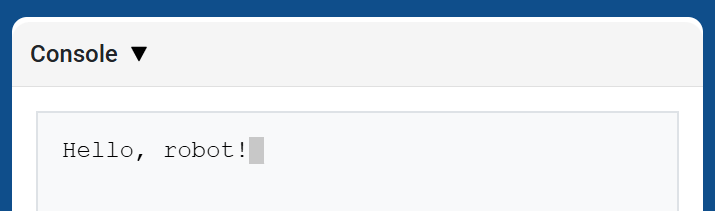
brain.screen.print εμφανίζει κείμενο, αριθμούς ή τιμές μεταβλητών στην Κονσόλα χρησιμοποιώντας την τρέχουσα θέση του κέρσορα. Συμπεριφέρεται όπως print στη σελίδα API της Κονσόλας.
Χρησιμοποιήστε την συνάρτηση brain.screen.next_row όταν θέλετε η επόμενη εκτυπωμένη τιμή να ξεκινά σε μια νέα γραμμή.
Usage:
brain.screen.print(value)
Παράμετροι |
Περιγραφή |
|---|---|
|
Το κείμενο, ο αριθμός ή η τιμή μεταβλητής που θα εμφανίζεται στην Κονσόλα. |
def main():
    # Display a message in the Console
    brain.screen.print("Hello, robot!")

# VR threads — Do not delete
vr_thread(main)
brain.screen.next_row#
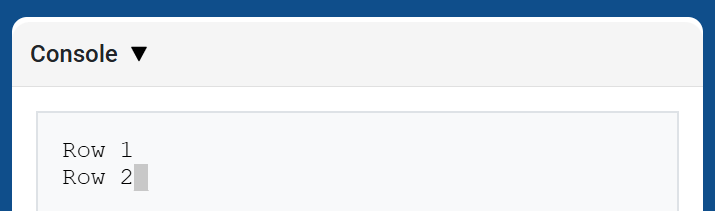
brain.screen.next_row μετακινεί τον κέρσορα στη στήλη 1 στην επόμενη γραμμή στην Κονσόλα. Η επόμενη τιμή που θα εκτυπωθεί θα εμφανιστεί σε αυτήν τη γραμμή.
Usage:
brain.screen.next_row()
Παράμετροι |
Περιγραφή |
|---|---|
Αυτή η μέθοδος δεν έχει παραμέτρους. |
def main():
    # Print on two rows
    brain.screen.print("Row 1")
    brain.screen.next_row()
    brain.screen.print("Row 2")

# VR threads — Do not delete
vr_thread(main)
brain.screen.clear_screen#
brain.screen.clear_screen διαγράφει όλες τις γραμμές από την Κονσόλα και μετακινεί τον κέρσορα πίσω στη Γραμμή 1.
Usage:
brain.screen.clear_screen()
Παράμετροι |
Περιγραφή |
|---|---|
Αυτή η μέθοδος δεν έχει παραμέτρους. |
def main():
    # Display text, then clear it after two seconds
    brain.screen.print("This will disappear...")
    wait(2, SECONDS)
    brain.screen.clear_screen()

# VR threads — Do not delete
vr_thread(main)
Ελεγκτής εκπομπών#
μεταβλητή_παρακολούθησης#
monitor_variable προσθέτει μία ή περισσότερες προκαθορισμένες μεταβλητές στην καρτέλα Monitor στο VEXcode. Αυτό σας επιτρέπει να παρακολουθείτε την αλλαγή της τιμής μιας μεταβλητής ενώ εκτελείται ένα έργο.
Οι μεταβλητές πρέπει να είναι καθολικές για να είναι δυνατή η επιτυχής παρακολούθησή τους από την παράμετρο monitor_variable Δώστε το όνομα κάθε μεταβλητής ως συμβολοσειρά.
Usage:
monitor_variable(“variable”)
monitor_variable(“variable1”, “variable2”)
Παράμετροι |
Περιγραφή |
|---|---|
|
Το όνομα μιας προκαθορισμένης καθολικής μεταβλητής προς παρακολούθηση, που δίνεται ως συμβολοσειρά. Για να παρακολουθείτε περισσότερες από μία μεταβλητές, διαχωρίστε κάθε όνομα μεταβλητής με κόμμα. |
def main():
    # Monitor the amount of loops
    global loops
    monitor_variable("loops")

    # Drive in a square 3 times
    for loops in range(12):
        drivetrain.turn_for(RIGHT, 90, DEGREES)
        drivetrain.drive_for(FORWARD, 150, MM)

# VR threads — Do not delete
vr_thread(main)
αισθητήρας_παρακολούθησης#
monitor_sensor προσθέτει μία ή περισσότερες τιμές αισθητήρων στην καρτέλα Monitor στο VEXcode. Αυτό σας επιτρέπει να παρακολουθείτε τις τιμές αισθητήρων να αλλάζουν ενώ εκτελείται ένα έργο.
Παρέχετε κάθε τιμή αισθητήρα ως συμβολοσειρά.
Usage:
monitor_sensor(“sensor”)
monitor_sensor(“sensor1”, “sensor2”)
Παράμετροι |
Περιγραφή |
|---|---|
|
The sensor value to monitor, given as a string. To monitor more than one sensor value, separate each sensor value with a comma. Supported sensor identifiers include:
|
def main():
    # Monitor the robot's heading
    monitor_sensor("drivetrain.heading")
    drivetrain.turn_for(RIGHT, 450, DEGREES)

# VR threads — Do not delete
vr_thread(main)
Εξεύρεση της φόρας#
Προφυλακτήρας#
πιεστικός#
Πατώντας το pressing επιστρέφει μια λογική τιμή που υποδεικνύει εάν ο Προφυλακτήρας Εισαγωγής είναι πατημένος τη δεδομένη στιγμή.
True- Ο προφυλακτήρας εισαγωγής είναι πατημένος.False- Ο προφυλακτήρας εισαγωγής δεν είναι πατημένος.
Usage:
intake_bumper.pressing()
Παράμετροι |
Περιγραφή |
|---|---|
Αυτή η μέθοδος δεν έχει παραμέτρους. |
def main():
    # Print whether the Intake Bumper is pressed
    brain.screen.print(intake_bumper.pressing())

# VR threads — Do not delete
vr_thread(main)
Οπτικός#
είναι_κοντά_στο_αντικείμενο#
Η συνάρτηση is_near_object επιστρέφει μια λογική τιμή που υποδεικνύει εάν ο οπτικός αισθητήρας ανιχνεύει ένα αντικείμενο εντός εμβέλειας.
True– Ο οπτικός αισθητήρας ανιχνεύει ένα αντικείμενο.False– Ο οπτικός αισθητήρας δεν ανιχνεύει κάποιο αντικείμενο.
Usage:
front_optical.is_near_object()
Παράμετροι |
Περιγραφή |
|---|---|
Αυτή η μέθοδος δεν έχει παραμέτρους. |
def main():
    # Print whether the Front Optical Sensor detects a nearby Disc
    brain.screen.print(front_optical.is_near_object())

# VR threads — Do not delete
vr_thread(main)
χρώμα#
Η συνάρτηση color επιστρέφει μια παρουσία μιας κλάσης Color , με βάση την ανιχνευμένη τιμή απόχρωσης. Αυτά μπορούν να συγκριθούν με προκαθορισμένα αντικείμενα Color για τη δημιουργία εντολών υπό όρους.
Πιθανά χρώματα είναι:
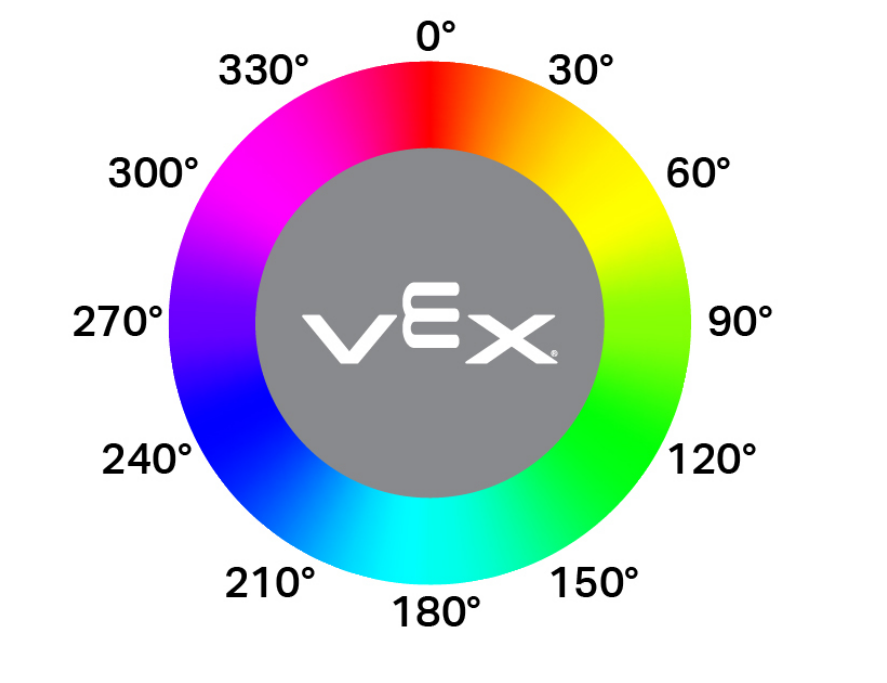
NONERED- Τιμή απόχρωσης μεταξύ 340° - 20°GREEN- Τιμή απόχρωσης μεταξύ 80° - 140°BLUE- Τιμή απόχρωσης μεταξύ 200° - 240°YELLOW- Τιμή απόχρωσης μεταξύ 40° - 60°ORANGE- Τιμή απόχρωσης μεταξύ 20° - 40°PURPLE- Τιμή απόχρωσης μεταξύ 240° - 280°CYAN- Τιμή απόχρωσης μεταξύ 140° - 200°
Σημείωση: Ο οπτικός αισθητήρας αναζητά εύρη αποχρώσεων που ταιριάζουν με το καθορισμένο χρώμα. Για την ανίχνευση συγκεκριμένων εύρων αποχρώσεων, ανατρέξτε στην ενότητα hue.
Usage:
front_optical.color()
Παράμετροι |
Περιγραφή |
|---|---|
Αυτή η μέθοδος δεν έχει παραμέτρους. |
def main():
    # Print the color detected by the Front Optical Sensor
    brain.screen.print(front_optical.color())

# VR threads — Do not delete
vr_thread(main)
λάμψη#
brightness επιστρέφει την ποσότητα φωτός που ανακλάται από το αντικείμενο ως δεκαδικό ψηφίο (float) που αντιπροσωπεύει ένα ποσοστό.
Ένα υψηλότερο ποσοστό σημαίνει ότι περισσότερο φως ανακλάται πίσω στον οπτικό αισθητήρα. Ένα χαμηλότερο ποσοστό σημαίνει ότι λιγότερο φως ανακλάται πίσω.
Usage:
front_optical.brightness()
Παράμετροι |
Περιγραφή |
|---|---|
Αυτή η μέθοδος δεν έχει παραμέτρους. |
def main():
    # Print the Front Optical Sensor brightness
    brain.screen.print(front_optical.brightness())

# VR threads — Do not delete
vr_thread(main)
απόχρωση#
hue επιστρέφει την τιμή hue του ανιχνευμένου χρώματος ως δεκαδικό ψηφίο (float) από 0 έως 359.
Η απόχρωση είναι ένας τρόπος περιγραφής χρώματος χρησιμοποιώντας αριθμούς γύρω από έναν χρωματικό κύκλο.
Usage:
front_optical.hue()
Παράμετροι |
Περιγραφή |
|---|---|
Αυτή η μέθοδος δεν έχει παραμέτρους. |
def main():
    # Print the hue detected by the Front Optical Sensor
    brain.screen.print(front_optical.hue())

# VR threads — Do not delete
vr_thread(main)