
ロボット専用のPython#
導入#
ヒーローボット「スナップショット」には、2種類のモーターオプションと光学センサーが付属しています。
すべての標準VEXcode VRメソッドは、IQ 22-23 Slapshot Playgroundで使用できます。
以下は、利用可能なロボット固有のメソッドの一覧です。
駆動系 – ロボットの移動と旋回。
アクション
drive— ロボットを永久に前進または後退させます。drive_for— ロボットを特定の距離だけ前進または後退させます。turn— ロボットを永久に左または右に回転させます。turn_for— ロボットを特定の角度だけ左または右に回転させます。turn_to_heading— ロボットを-359度から359度までの特定の方向に向けて回転させます。turn_to_rotation— ロボットを特定の回転方向に回転させます。stop— ロボットの動きを停止します。
ミューテーター
set_heading— ロボットの現在の進行方向を新しい進行方向に変更します。set_rotation— ロボットの現在の回転を新しい回転に変更します。set_timeout— ロボットが動作を完了しようとする時間を設定します。set_drive_velocity— ロボットに走行速度を指示します。set_turn_velocity— ロボットに旋回速度を指示します。
ゲッターズ
動作 - ロボットのモーターを動かし、追跡する。
アクション
spin— モーターを永久に正転または逆転させます。spin_for— モーターを特定の距離だけ回転させます。spin_to_position— モーターを特定の位置まで回転させます。stop— モーターの回転を停止します。
ミューテーター
set_position— モーターの現在の位置を新しい値に変更します。set_velocity— モーターに回転速度を指示します。set_timeout— モーターが動作を完了しようとする時間を設定します。
ゲッターズ
is_done— モーターの動作が完了したかどうかをブール値として返します。is_spinning— モーターが回転しているかどうかをブール値として返します。position— モーターの現在位置を返します。velocity— モーターの回転速度を返します。
イベント - センサーの状態が変化したときにコードを実行します。
バンパー
光学
object_detected– 光学センサーが物体を検出したときに呼び出される関数を登録します。object_lost– 光学センサーが物体を失ったときに呼び出される関数を登録します。
コンソール – コンソールに出力し、値を監視します。
印刷
brain.screen.print— コンソールにテキスト、数値、または変数値を表示します。brain.screen.next_row— コンソールカーソルを次の行の先頭に移動します。brain.screen.clear_screen— コンソールからすべての行をクリアします。
モニター
monitor_variable— 1 つ以上の定義済み変数をモニター タブに追加します。monitor_sensor— モニター タブに 1 つ以上のセンサー値を追加します。
センシング - ロボットの各種センサーを活用する。
バンパー
pressing- インテークバンパーが現在押されているかどうかを返します。
光学
is_near_object– 光学センサーが範囲内の物体を検出したかどうかを返します。color– 光学センサーによって検出された色を返します。brightness– オブジェクトから反射された光の量を返します。hue– 光学センサーによって検出された色相を返します。
このページに掲載されている例では、Playgroundのデフォルトの開始位置を使用しています。
パワートレイン#
駆動系は、VRロボットの走行と旋回を制御します。駆動系は、前進、後退、左折、右折、方向転換、回転などを行うことができます。
行動#
ドライブ#
ドライブdrive 組み合わせでは、ロボットは永久に前進または後退します。ロボットは、旋回や停止などの別の動作が与えられるまで動き続けます。
Usage:
drivetrain.drive(direction)
パラメータ |
説明 |
|---|---|
|
ロボットの移動方向: |
def main():
    # Drive forward then stop
    drivetrain.drive(FORWARD)
    wait(2, SECONDS)
    drivetrain.stop()

# VR threads — Do not delete
vr_thread(main)
ドライブ_for#
drive_for は、ロボットを特定の距離だけ前進または後退させます。プロジェクトは、ロボットの移動が完了するまで待機し、その後次のコードが実行されます。
Usage:
drivetrain.drive_for(direction, distance, units, wait)
パラメータ |
説明 |
|---|---|
|
ロボットの移動方向: |
|
ロボットが走行する距離。これは、 |
|
距離の単位: |
|
オプション |
def main():
    # Drive forward and backward
    drivetrain.drive_for(FORWARD, 200, MM)
    drivetrain.drive_for(REVERSE, 200, MM)

# VR threads — Do not delete
vr_thread(main)
振り向く#
turn ロボットを左右に永久に回転させます。ロボットは、走行や停止などの別の動作が与えられるまで回転し続けます。
Usage:
drivetrain.turn(direction)
パラメータ |
説明 |
|---|---|
|
ロボットが回転する方向: |
def main():
    # Turn right and left, then stop
    drivetrain.turn(RIGHT)
    wait(2, SECONDS)
    drivetrain.turn(LEFT)
    wait(2, SECONDS)
    drivetrain.stop()

# VR threads — Do not delete
vr_thread(main)
ターン_フォー#
turn_for は、ロボットを指定された角度だけ左右に回転させます。回転角度はロボットの現在位置を基準としています。プロジェクトは、ロボットの回転が完了するまで次のコード行を実行しません。
Usage:
drivetrain.turn_for(direction, angle, units, wait)
パラメータ |
説明 |
|---|---|
|
ロボットが回転する方向: |
|
ロボットが回転する角度。これは、整数 |
|
回転単位: |
|
オプション |
def main():
    # Turn the robot right and left
    drivetrain.turn_for(RIGHT, 90, DEGREES)
    wait(1, SECONDS)
    drivetrain.turn_for(LEFT, 90, DEGREES)

# VR threads — Do not delete
vr_thread(main)
見出しへ#
方位とは、ロボットが向いている方向のことで、度数で表されます。0 turn_to_heading 、ロボットを-359度から359度までの特定の方位に向けます。ロボットは、目標の方位に到達するために最短の方向へ旋回します。
ロボットの初期進行方向は0度です。
プロジェクトは、ロボットの旋回が完了するまで待機し、その後次のコードが実行されます。
Usage:
drivetrain.turn_to_heading(angle, units, wait)
パラメータ |
説明 |
|---|---|
|
ロボットが向くべき方向(度数) |
|
回転単位: |
|
オプション |
def main():
    # Turn to face the cardinal directions
    drivetrain.turn_to_heading(90, DEGREES)
    wait(1, SECONDS)
    drivetrain.turn_to_heading(180, DEGREES)
    wait(1, SECONDS)
    drivetrain.turn_to_heading(270, DEGREES)
    wait(1, SECONDS)
    drivetrain.turn_to_heading(0, DEGREES)

# VR threads — Do not delete
vr_thread(main)
回転#
turn_to_rotation はロボットを特定の回転方向に回転させます。
回転とは、ロボットがどれだけ回転したかを示すもので、度数で表されます。プロジェクトの開始時には、回転値は0度に設定されます。回転は、set_rotation メソッドを使用して設定することもできます。
回転値は絶対値です。つまり、旋回方向はロボットの現在の回転角度によって決まります。右に旋回すると回転角度が大きくなり、左に旋回すると回転角度が小さくなります。
例えば、ロボットが0度の位置から始まり、720度回転させると、右に2回転します。次に360度回転させると、360度は720度より小さいため、左に1回転します。
プロジェクトは、ロボットの旋回が完了するまで待機し、その後次のコードが実行されます。
Usage:
drivetrain.turn_to_rotation(angle, units, wait)
パラメータ |
説明 |
|---|---|
|
ロボットが回転する角度(度)。これは、整数 |
|
回転単位: |
|
オプション |
def main():
    # Turn left, then spin in a circle
    # clockwise and face right
    drivetrain.turn_to_rotation(-90, DEGREES)
    wait(1, SECONDS)
    drivetrain.turn_to_rotation(450, DEGREES)

# VR threads — Do not delete
vr_thread(main)
停止#
stop ロボットの動きを停止します。
Usage:
drivetrain.stop()
パラメータ |
説明 |
|---|---|
このメソッドにはパラメータがありません。 |
def main():
    # Drive forward then stop
    drivetrain.drive(FORWARD)
    wait(2, SECONDS)
    drivetrain.stop()

# VR threads — Do not delete
vr_thread(main)
変異誘発者#
見出しを設定#
方位とは、ロボットが向いている方向のことで、度数で表されます。0 set_heading ロボットの現在の方位を新しい方位値に変更します。
例えば、ロボットが右を向いた場合、方位を0度に設定すると、その右向きの位置が新たな0度になります。その後、ロボットはその新たな方位に基づいて他の位置に旋回することができます。
Usage:
drivetrain.set_heading(heading, units)
パラメータ |
説明 |
|---|---|
|
ロボットに設定する方位角の値(度)。これは、整数 |
|
見出し単位: |
def main():
    # Face the new 0 degrees
    drivetrain.set_heading(90, DEGREES)
    drivetrain.turn_to_heading(0, DEGREES)

# VR threads — Do not delete
vr_thread(main)
回転を設定する#
回転とは、ロボットがどれだけ回転したかを示すもので、度数で表されます。プロジェクトの開始時には、回転値は0度に設定されます。0 set_rotation 実行すると、ロボットの現在の回転が新しい値に変更されます。
例えば、ロボットが右に2回転した場合、回転角度は720度になります。回転角度を0度に設定すると、720度から0度にリセットされます。その後、ロボットはその新しい値に基づいて回転することができます。
Usage:
drivetrain.set_rotation(rotation, units)
パラメータ |
説明 |
|---|---|
|
ロボットに設定する回転値(度)。これは、整数 |
|
回転単位: |
def main():
    # Spin counterclockwise two times
    drivetrain.set_rotation(720, DEGREES)
    drivetrain.turn_to_rotation(0, DEGREES)

# VR threads — Do not delete
vr_thread(main)
set_timeout#
set_timeout は、ロボットが動作を完了しようとする時間を設定します。ロボットがその時間内に動作を完了できない場合、試行を停止して次のコード行に進みます。これにより、ロボットが動作中に停止してしまうのを防ぎます。
Usage:
drivetrain.set_timeout(value, units)
パラメータ |
説明 |
|---|---|
|
ロボットが動作を完了しようと試みる時間。これは、正の整数 |
|
時間単位: |
def main():
    # Turn right after driving forward
    drivetrain.set_timeout(1, SECONDS)
    drivetrain.drive_for(FORWARD, 25, INCHES)
    drivetrain.turn_for(RIGHT, 90)

# VR threads — Do not delete
vr_thread(main)
set_drive_velocity#
set_drive_velocity は、ロボットの走行速度を指定します。パーセンテージが高いほどロボットは速く走行し、低いほど遅く走行します。
すべてのプロジェクトは、ロボットがデフォルトで50%の速度で走行するところから始まります。
注: 速度を速くするとロボットの走行速度は速くなりますが、精度が低下する可能性があります。速度を遅くするとロボットの走行速度は遅くなりますが、精度は向上する可能性があります。
Usage:
drivetrain.set_drive_velocity(velocity, units)
パラメータ |
説明 |
|---|---|
|
0%から100%までの走行速度。0は整数、 |
|
速度の単位: |
def main():
    # Drive forward at different velocities
    # Default velocity
    drivetrain.drive_for(FORWARD, 150, MM)
    wait(1, SECONDS)
    # Drive slower
    drivetrain.set_drive_velocity(20, PERCENT)
    drivetrain.drive_for(FORWARD, 150, MM)
    wait(1, SECONDS)
    # Drive faster
    drivetrain.set_drive_velocity(100, PERCENT)
    drivetrain.drive_for(FORWARD, 150, MM)

# VR threads — Do not delete
vr_thread(main)
set_turn_velocity#
set_turn_velocity は、ロボットの旋回速度を指定します。パーセンテージが高いほどロボットの旋回速度は速くなり、低いほど旋回速度は遅くなります。
すべてのプロジェクトは、ロボットがデフォルトで50%の速度で旋回するところから始まります。
注: 速度が速いほどロボットの旋回速度は速くなりますが、精度が低下する可能性があります。速度が遅いほどロボットの旋回速度は遅くなりますが、精度は向上する可能性があります。
Usage:
drivetrain.set_turn_velocity(velocity, units)
パラメータ |
説明 |
|---|---|
|
0%から100%までの旋回速度。0は整数、 |
|
速度の単位: |
def main():
    # Turn at different velocities
    # Default velocity
    drivetrain.turn_for(RIGHT, 120, DEGREES)
    wait(1, SECONDS)
    # Turn slower
    drivetrain.set_turn_velocity(20, PERCENT)
    drivetrain.turn_for(RIGHT, 120, DEGREES)
    wait(1, SECONDS)
    # Turn faster
    drivetrain.set_turn_velocity(100, PERCENT)
    drivetrain.turn_for(RIGHT, 120, DEGREES)

# VR threads — Do not delete
vr_thread(main)
ゲッター#
見出し#
方位とは、ロボットが向いている方向のことで、度数で表されます。0 heading は ロボットの現在の方位を0度から359.99度の範囲で返します。
ロボットの初期進行方向は0度です。
Usage:
drivetrain.heading(units)
パラメータ |
説明 |
|---|---|
|
見出し単位: |
def main():
    # Display the heading after turning
    drivetrain.turn_for(RIGHT, 450, DEGREES)
    brain.screen.print("Heading: ")
    brain.screen.print(drivetrain.heading(DEGREES))

# VR threads — Do not delete
vr_thread(main)
回転#
Rotation is how much the robot has turned, measured in degrees. At the beginning of a project, the rotation value is set to 0 degrees. rotation returns the robot’s current rotation.
右に回すと回転角度が大きくなり、左に回すと回転角度が小さくなります。例えば、右に2回転すると720度回転します。
Usage:
drivetrain.rotation(units)
パラメータ |
説明 |
|---|---|
|
回転単位: |
def main():
    # Display the rotation after turning
    drivetrain.turn_for(RIGHT, 450, DEGREES)
    brain.screen.print("Rotation: ")
    brain.screen.print(drivetrain.rotation(DEGREES))

# VR threads — Do not delete
vr_thread(main)
完了しました#
is_doneが 場合は、ロボットの移動が完了したかどうかをブール値で返します。1の場合は、ロボットの移動に基づいて他の動作のタイミングを制御するために使用できます。
True— ロボットの移動が完了しました。False— ロボットはまだ動いています。
このメソッドは、 wait パラメータを持つ以下の Drivetrain メソッドと連携して動作します: drive_for、turn_for、turn_to_heading、および turn_to_rotation。
Usage:
drivetrain.is_done()
パラメータ |
説明 |
|---|---|
このメソッドにはパラメータがありません。 |
動いている#
is_moving は、ロボットが移動中かどうかをブール値で返します。これは、ロボットの動きに基づいて他の動作のタイミングを制御するために使用できます。
True— ロボットが動いています。False— ロボットは動いていません。
Usage:
drivetrain.is_moving()
パラメータ |
説明 |
|---|---|
このメソッドにはパラメータがありません。 |
速度#
velocity ロボットの走行速度を -100% から 100% までのパーセンテージで返します。
Usage:
drivetrain.velocity(units)
パラメータ |
説明 |
|---|---|
|
速度の単位: |
例
def main():
    # Display the velocity after driving
    drivetrain.drive_for(FORWARD, 150, MM)
    brain.screen.print("Velocity: ")
    brain.screen.print(drivetrain.velocity(PERCENT))
モーション#
スナップショットは、インテークモーターを使用してディスクを収集したり、回転させてディスクを排出したり、落下させたりします。アームモーターはアームを上下させ、ディスペンサーからディスクを放出し、フィールド要素に到達させます。
各モーターにはそれぞれ独自の動作方向があります。方向の説明には、Snapshot上で各方向がモーターをどのように動かすかが説明されています。
行動#
スピン#
spin モーターを正転または逆転させ、永久に回転させます。モーターは、別の方向に回転させたり停止させたりするなど、別の動作が与えられるまで回転し続けます。
使用方法:
このメソッドでは、以下に示すように、使用可能な2つのモーターオブジェクトのうちの1つを使用できます。
モーター |
指示 |
|---|---|
|
|
|
|
パラメータ |
説明 |
|---|---|
|
モーターの回転方向:
|
def main():
    # Spin the Intake Motor to collect a Disc
    intake_motor.spin(FORWARD)
    wait(1, SECONDS)
    intake_motor.stop()

# VR threads — Do not delete
vr_thread(main)
スピン_for#
spin_for は、モーターを特定の距離だけ回転させます。回転はモーターの現在位置を基準としています。プロジェクトは、モーターの回転が終了するまで待機してから、次のコードを実行します。
使用方法:
このメソッドでは、以下に示すように、使用可能な2つのモーターオブジェクトのうちの1つを使用できます。
モーター |
指示 |
|---|---|
|
|
|
|
パラメータ |
説明 |
|---|---|
|
モーターの回転方向:
|
|
モーターが回転する距離。0 |
|
オプション。距離の単位: |
|
オプション。
|
def main():
    # Collect the preloaded Disc
    intake_motor.spin_for(FORWARD, 180, DEGREES)

# VR threads — Do not delete
vr_thread(main)
スピン位置#
spin_to_position はモーターを特定の位置まで回転させます。
モーターの位置は、回転した角度を表し、 DEGREES または TURNSで測定されます。1回転は360度に相当します。プロジェクトの開始時には、モーターの位置は0度に設定されます。モーターの位置は、set_positionメソッドを使用して設定することもできます。
位置値は絶対値です。つまり、回転方向はモーターの現在位置によって決まります。
例えば、モーターが0度の位置から始まり、720度の位置まで回転した場合、2回転前進します。その後、360度の位置まで回転した場合、360度は720度より小さいため、1回転後退します。
使用方法:
このメソッドでは、以下に示すように、使用可能な2つのモーターオブジェクトのうちの1つを使用できます。
モーター |
指示 |
|---|---|
|
|
|
|
パラメータ |
説明 |
|---|---|
|
モーターが回転する位置の値 |
|
オプション。位置単位: |
|
オプション。
|
def main():
    # Raise the Arm to reach over the barrier
    arm_motor.spin_to_position(600, DEGREES)

# VR threads — Do not delete
vr_thread(main)
モーターを停止する#
stop モーターの回転を停止します。
使用方法:
このメソッドでは、以下に示すように、使用可能な2つのモーターオブジェクトのうちの1つを使用できます。
モーター |
指示 |
|---|---|
|
|
|
|
パラメータ |
説明 |
|---|---|
このメソッドにはパラメータがありません。 |
def main():
    # Raise the Arm briefly, then stop it
    arm_motor.spin(FORWARD)
    wait(1, SECONDS)
    arm_motor.stop()

# VR threads — Do not delete
vr_thread(main)
変異誘発者#
位置を設定する#
A motor’s position is how far it has spun, measured in DEGREES or TURNS. One turn is equal to 360 degrees. set_position changes the motor’s current position to a new value.
例えば、モーターが180度まで回転している場合、位置を0度に設定すると、その位置は180度から0度にリセットされます。その後、モーターはその新しい値に基づいて回転できるようになります。
使用方法:
このメソッドでは、以下に示すように、使用可能な2つのモーターオブジェクトのうちの1つを使用できます。
モーター |
指示 |
|---|---|
|
|
|
|
パラメータ |
説明 |
|---|---|
|
モーターに設定する位置値 |
|
オプション。位置単位: |
def main():
    # Set the Intake Motor position, then return to 0 degrees
    intake_motor.set_position(180, DEGREES)
    intake_motor.spin_to_position(0, DEGREES)

# VR threads — Do not delete
vr_thread(main)
速度を設定する#
set_velocity は、モーターの回転速度を指定します。パーセンテージが高いほどモーターは速く回転し、低いほど遅く回転します。
すべてのプロジェクトは、各モーターがデフォルトで50%の速度で回転する状態から始まります。
注: 速度を速くするとモーターの回転速度は速くなりますが、精度が低下する可能性があります。速度を遅くするとモーターの回転速度は遅くなりますが、精度は向上する可能性があります。
使用方法:
このメソッドでは、以下に示すように、使用可能な2つのモーターオブジェクトのうちの1つを使用できます。
モーター |
指示 |
|---|---|
|
|
|
|
パラメータ |
説明 |
|---|---|
|
回転速度は-100%から100%までです。これは |
|
速度の単位: |
def main():
    # Set the Intake Motor speed before collecting a Disc
    intake_motor.set_velocity(75, PERCENT)
    intake_motor.spin_for(FORWARD, 180, DEGREES)

# VR threads — Do not delete
vr_thread(main)
set_timeout#
set_timeout set_timeout は、モーターが動作を完了するまでの試行時間を設定します。モーターがその時間内に動作を完了できない場合、試行を停止して次のコード行に進みます。これにより、モーターが動作中に停止してしまうのを防ぎます。
使用方法:
このメソッドでは、以下に示すように、使用可能な2つのモーターオブジェクトのうちの1つを使用できます。
モーター |
指示 |
|---|---|
|
|
|
|
パラメータ |
説明 |
|---|---|
|
The amount of time the motor can try to finish a movement. This can be a positive |
|
時間単位: |
def main():
    # Limit how long the Arm Motor waits to reach its target
    arm_motor.set_timeout(2, SECONDS)
    arm_motor.spin_for(FORWARD, 1080, DEGREES)

# VR threads — Do not delete
vr_thread(main)
ゲッター#
完了しました#
is_done は、モーターの動作が完了したかどうかをブール値で返します。これは、モーターの動作に基づいて他の動作のタイミングを制御するために使用できます。
True— モーターの動作が完了しました。False— モーターはまだ動いています。
このメソッドは、 wait パラメータを持つ次のモーションメソッドと連携して動作します: spin_for および spin_to_position。
使用方法:
このメソッドでは、以下に示すように、使用可能な2つのモーターオブジェクトのうちの1つを使用できます。
モーター |
指示 |
|---|---|
|
|
|
|
パラメータ |
説明 |
|---|---|
このメソッドにはパラメータがありません。 |
回転している#
is_spinning は、モーターが回転しているかどうかをブール値で返します。これは、モーターの動きに基づいて他の動作のタイミングを制御するために使用できます。
True— モーターが回転しています。False— モーターが回転していません。
このメソッドは、 wait パラメータを持つ次のモーションメソッドと連携して動作します: spin_for および spin_to_position。
使用方法:
このメソッドでは、以下に示すように、使用可能な2つのモーターオブジェクトのうちの1つを使用できます。
モーター |
指示 |
|---|---|
|
|
|
|
パラメータ |
説明 |
|---|---|
このメソッドにはパラメータがありません。 |
位置#
A motor’s position is how far it has spun, measured in DEGREES or TURNS. One turn is equal to 360 degrees. position returns the motor’s current position.
プロジェクト開始時、モーターの位置は0度に設定されます。モーターが正方向に1回転すると、位置は360度、つまり1回転となります。モーターが逆方向に回転すると、位置は負の値になります。
使用方法:
このメソッドでは、以下に示すように、使用可能な2つのモーターオブジェクトのうちの1つを使用できます。
モーター |
指示 |
|---|---|
|
|
|
|
パラメータ |
説明 |
|---|---|
|
モーターの位置を戻すためのユニット: |
def main():
    # Print the current Arm Motor position
    brain.screen.print(arm_motor.position(DEGREES))

# VR threads — Do not delete
vr_thread(main)
速度#
velocity モーターの回転速度を返します。
正の値はモーターが正方向に回転していることを意味し、負の値はモーターが逆方向に回転していることを意味します。
使用方法:
このメソッドでは、以下に示すように、使用可能な2つのモーターオブジェクトのうちの1つを使用できます。
モーター |
指示 |
|---|---|
|
|
|
|
パラメータ |
説明 |
|---|---|
|
戻る速度単位: |
def main():
    # Print the current Intake Motor velocity
    brain.screen.print(intake_motor.velocity(PERCENT))

# VR threads — Do not delete
vr_thread(main)
イベント#
バンパー#
押された#
pressed 押され、吸気バンパーが押されたときにコールバック関数が登録されます。
Usage:
intake_bumper.pressed(callback)
パラメータ |
説明 |
|---|---|
|
インテークバンパーが押されたときに呼び出される関数。 |
def stop_intake():
    intake_motor.stop()

def main():
    # Stop the Intake Motor when a Disc reaches the Intake Bumper
    intake_bumper.pressed(stop_intake)
    intake_motor.spin(FORWARD)

# VR threads — Do not delete
vr_thread(main)
リリース#
released インテークバンパーがリリースされたときのコールバック関数を登録します。
Usage:
intake_bumper.released(callback)
パラメータ |
説明 |
|---|---|
|
インテークバンパーが解放されたときに呼び出される関数。 |
def lower_arm():
    arm_motor.spin_to_position(0, DEGREES)

def main():
    # Lower the Arm when the Intake Bumper is released
    intake_bumper.released(lower_arm)

# VR threads — Do not delete
vr_thread(main)
光学#
オブジェクトが検出されました#
object_detected 光学センサーが新しい物体を検出するたびに呼び出される関数を登録します。
Usage:
front_optical.object_detected(callback, arg)
パラメータ |
説明 |
|---|---|
|
光学センサーが新しい物体を検出したときに実行される、事前に定義された関数。 |
|
Optional. A tuple containing arguments to pass to the callback function. See Using Functions with Parameters for more information. |
def stop_intake():
    intake_motor.stop()

def main():
    # Stop the Intake Motor when the Optical Sensor detects a Disc
    front_optical.object_detected(stop_intake)
    intake_motor.spin(FORWARD)

# VR threads — Do not delete
vr_thread(main)
オブジェクトが失われた#
object_lost は、光学センサーが検出したオブジェクトを失ったときに呼び出される関数を登録します。
Usage:
front_optical.object_lost(callback, arg)
パラメータ |
説明 |
|---|---|
|
光学センサーが検出対象物を失ったときに実行される、事前に定義された関数。 |
|
Optional. A tuple containing arguments to pass to the callback function. See Using Functions with Parameters for more information. |
def resume_intake():
    intake_motor.spin(FORWARD)

def main():
    # Restart the Intake Motor when the Optical Sensor no longer detects a Disc
    front_optical.object_lost(resume_intake)

# VR threads — Do not delete
vr_thread(main)
コンソール#
コンソールには、プロジェクトの実行中にテキスト、数値、変数値が表示されます。コンソールのメソッドを使用すると、カーソルを新しい行に移動したり、コンソールをクリアしたり、変数やセンサー値をモニタータブに追加したりすることもできます。
印刷#
脳スクリーン印刷#
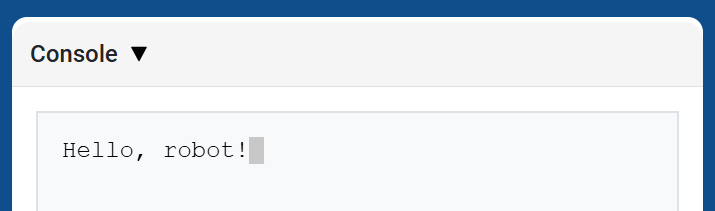
brain.screen.print 、現在のカーソル位置を使用してコンソールにテキスト、数値、または変数値を表示します。これは、コンソール API ページの print と同様の動作をします。
次の印刷値を新しい行から開始したい場合は、brain.screen.next_row を使用します。
Usage:
brain.screen.print(value)
パラメータ |
説明 |
|---|---|
|
コンソールに表示するテキスト、数値、または変数値。 |
def main():
    # Display a message in the Console
    brain.screen.print("Hello, robot!")

# VR threads — Do not delete
vr_thread(main)
脳の画面の次の行#
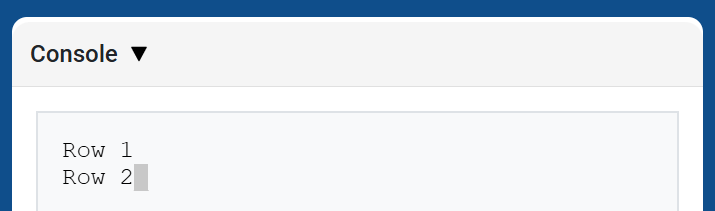
brain.screen.next_row は、コンソールの次の行の 1 列目にカーソルを移動します。次に表示される値はその行に表示されます。
Usage:
brain.screen.next_row()
パラメータ |
説明 |
|---|---|
このメソッドにはパラメータがありません。 |
def main():
    # Print on two rows
    brain.screen.print("Row 1")
    brain.screen.next_row()
    brain.screen.print("Row 2")

# VR threads — Do not delete
vr_thread(main)
脳スクリーンクリアスクリーン#
brain.screen.clear_screen はコンソールからすべての行をクリアし、カーソルを 1 行目に戻します。
Usage:
brain.screen.clear_screen()
パラメータ |
説明 |
|---|---|
このメソッドにはパラメータがありません。 |
def main():
    # Display text, then clear it after two seconds
    brain.screen.print("This will disappear...")
    wait(2, SECONDS)
    brain.screen.clear_screen()

# VR threads — Do not delete
vr_thread(main)
モニター#
モニター変数#
monitor_variable 、VEXcode のモニター タブに 1 つ以上の定義済み変数を追加します。これにより、プロジェクトの実行中に変数の値の変化を監視できます。
変数を正常に監視するには monitor_variable グローバルである必要があります。各変数名は文字列として指定してください。
Usage:
monitor_variable(“variable”)
monitor_variable(“variable1”, “variable2”)
パラメータ |
説明 |
|---|---|
|
監視対象となる定義済みグローバル変数の名前を文字列で指定します。複数の変数を監視する場合は、各変数名をカンマで区切ってください。 |
def main():
    # Monitor the amount of loops
    global loops
    monitor_variable("loops")

    # Drive in a square 3 times
    for loops in range(12):
        drivetrain.turn_for(RIGHT, 90, DEGREES)
        drivetrain.drive_for(FORWARD, 150, MM)

# VR threads — Do not delete
vr_thread(main)
モニターセンサー#
monitor_sensor は、VEXcode のモニター タブに 1 つ以上のセンサー値を追加します。これにより、プロジェクトの実行中にセンサー値の変化を監視できます。
各センサー値を文字列として指定してください。
Usage:
monitor_sensor(“sensor”)
monitor_sensor(“sensor1”, “sensor2”)
パラメータ |
説明 |
|---|---|
|
The sensor value to monitor, given as a string. To monitor more than one sensor value, separate each sensor value with a comma. Supported sensor identifiers include:
|
def main():
    # Monitor the robot's heading
    monitor_sensor("drivetrain.heading")
    drivetrain.turn_for(RIGHT, 450, DEGREES)

# VR threads — Do not delete
vr_thread(main)
センシング#
バンパー#
押す#
pressing 返され、吸気バンパーが現在押されているかどうかを示すブール値が返されます。
True- インテークバンパーが押されています。False- インテークバンパーが押されていません。
Usage:
intake_bumper.pressing()
パラメータ |
説明 |
|---|---|
このメソッドにはパラメータがありません。 |
def main():
    # Print whether the Intake Bumper is pressed
    brain.screen.print(intake_bumper.pressing())

# VR threads — Do not delete
vr_thread(main)
光学#
is_near_object#
is_near_object は、光学センサーが範囲内の物体を検出したかどうかを示すブール値を返します。
True– 光学センサーが物体を検出します。False– 光学センサーが物体を検出しません。
Usage:
front_optical.is_near_object()
パラメータ |
説明 |
|---|---|
このメソッドにはパラメータがありません。 |
def main():
    # Print whether the Front Optical Sensor detects a nearby Disc
    brain.screen.print(front_optical.is_near_object())

# VR threads — Do not delete
vr_thread(main)
色#
color 検出された色相値に基づいて、 Color クラスのインスタンスを返します。これらは、定義済みの Color オブジェクトと比較することで、条件文を作成できます。
選択可能な色は以下のとおりです。
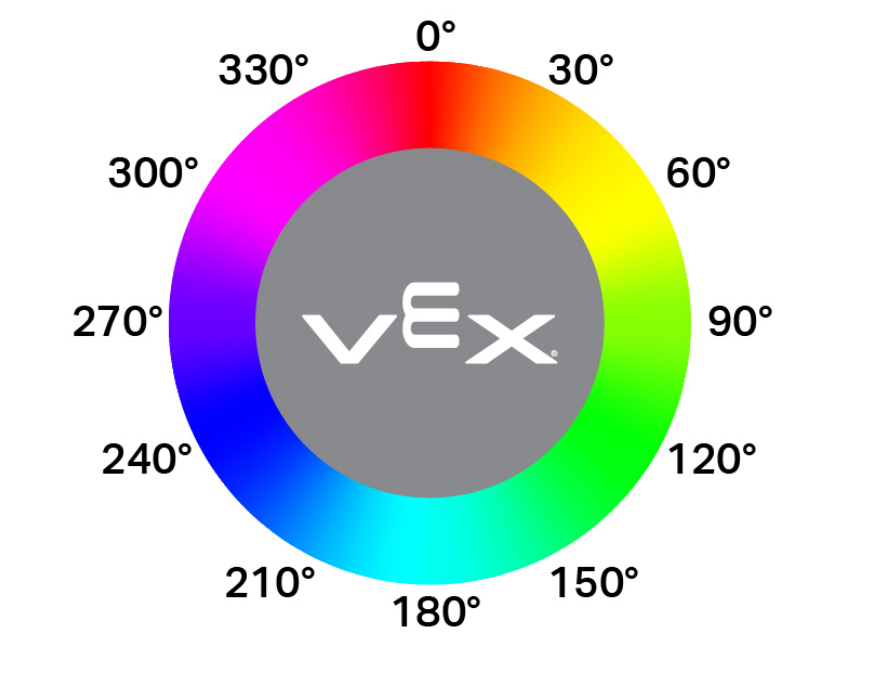
NONERED- 340°~20°の間の色相値GREEN- 色相値が80°~140°BLUE- 色相値が200°~240°YELLOW- 色相値が40°~60°ORANGE- 色相値が20°~40°PURPLE- 色相値が240°~280°CYAN- 140°~200°の色相値
注: 光学センサーは、指定された色に一致する色相範囲を探します。特定の色相範囲を検出するには、hue を参照してください。
Usage:
front_optical.color()
パラメータ |
説明 |
|---|---|
このメソッドにはパラメータがありません。 |
def main():
    # Print the color detected by the Front Optical Sensor
    brain.screen.print(front_optical.color())

# VR threads — Do not delete
vr_thread(main)
輝度#
brightness 、オブジェクトから反射された光の量をパーセントを表す小数 (float) として返します。
パーセンテージが高いほど、光学センサーに反射される光の量が多くなります。パーセンテージが低いほど、反射される光の量が少なくなります。
Usage:
front_optical.brightness()
パラメータ |
説明 |
|---|---|
このメソッドにはパラメータがありません。 |
def main():
    # Print the Front Optical Sensor brightness
    brain.screen.print(front_optical.brightness())

# VR threads — Do not delete
vr_thread(main)
色合い#
hue 、検出された色の色相値を 0 から 359 までの小数 (float) として返します。
色相とは、色相環上の数字を用いて色を表現する方法のことです。
Usage:
front_optical.hue()
パラメータ |
説明 |
|---|---|
このメソッドにはパラメータがありません。 |
def main():
    # Print the hue detected by the Front Optical Sensor
    brain.screen.print(front_optical.hue())

# VR threads — Do not delete
vr_thread(main)