
Μάτι#
Εισαγωγή#
Το ρομπότ VEX 123 διαθέτει ενσωματωμένο αισθητήρα ματιού που μπορεί να ανιχνεύσει αντικείμενα και χρώματα. Μπορεί επίσης να αναφέρει πόσο φως αντανακλάται πίσω στον αισθητήρα και την τιμή απόχρωσης του ανιχνευμένου χρώματος.
Ο αισθητήρας ματιού διαθέτει ένα φως που μπορεί να ενεργοποιηθεί ή να απενεργοποιηθεί για να βλέπει αντικείμενα και χρώματα πιο καθαρά.
Υπάρχουν πολλοί τρόποι για να κωδικοποιήσετε τον αισθητήρα ματιών. Παρακάτω είναι μια λίστα με όλες τις μεθόδους ματιών:
Μεταλλαγμένοι παράγοντες — Προσαρμόστε τις ρυθμίσεις του αισθητήρα ματιών.
set_light— Ενεργοποιεί ή απενεργοποιεί το φως του αισθητήρα ματιού.set_light_power— Ορίζει το επίπεδο ισχύος φωτός του αισθητήρα ματιού.
Λήπτες — Επιστρέφουν ό,τι ανιχνεύει ο αισθητήρας ματιού.
get_hue— Επιστρέφει την απόχρωση που ανιχνεύεται από τον αισθητήρα ματιού.get_brightness— Επιστρέφει τη φωτεινότητα που ανιχνεύεται από τον αισθητήρα ματιών.is_object_detected— Επιστρέφει εάν ο αισθητήρας ματιού ανιχνεύει ένα αντικείμενο εντός εμβέλειας.is_color_detected— Επιστρέφει εάν ο αισθητήρας ματιού ανιχνεύει ένα συγκεκριμένο χρώμα.is_bright— Επιστρέφει εάν ο αισθητήρας ματιού ανιχνεύει ένα φωτεινό αντικείμενο.
Μεταλλάκτες#
set_light#
set_light ενεργοποιεί ή απενεργοποιεί το φως του αισθητήρα ματιού.
Usage:
robot.eye.set_light(state)
Παράμετροι |
Περιγραφή |
|---|---|
|
Η κατάσταση φωτισμού του αισθητήρα ματιού: |
# Continuously blink the light.
while True:
    robot.eye.set_light(ON)
    wait(2, SECONDS)
    robot.eye.set_light(OFF)
    wait(2, SECONDS)
set_light_power#
set_light_power ορίζει πόσο έντονο είναι το φως του αισθητήρα ματιού. Το φως μπορεί να βοηθήσει τον αισθητήρα ματιού να ανιχνεύει αντικείμενα και χρώματα με μεγαλύτερη σαφήνεια.
Ένα υψηλότερο ποσοστό κάνει το φως πιο φωτεινό. Ένα χαμηλότερο ποσοστό κάνει το φως πιο αμυδρό.
Εάν το φως του αισθητήρα ματιού είναι σβηστό, η ρύθμιση της ισχύος φωτός πάνω από 0% θα ανάψει το φως.
Εάν το φως του αισθητήρα ματιού είναι αναμμένο, η ρύθμιση της ισχύος φωτός στο 0% θα το σβήσει.
Usage:
robot.eye.set_light_power(value)
Παράμετροι |
Περιγραφή |
|---|---|
|
Η φωτεινότητα στην οποία θα ρυθμιστεί το φως του αισθητήρα ματιού, από 0% έως 100%. Χρησιμοποιήστε ακέραιους αριθμούς. |
# Set the light to different power levels.
robot.eye.set_light_power(25)
wait(2, SECONDS)
robot.eye.set_light_power(50)
wait(2, SECONDS)
robot.eye.set_light_power(100)
Αποκτητές#
get_hue#
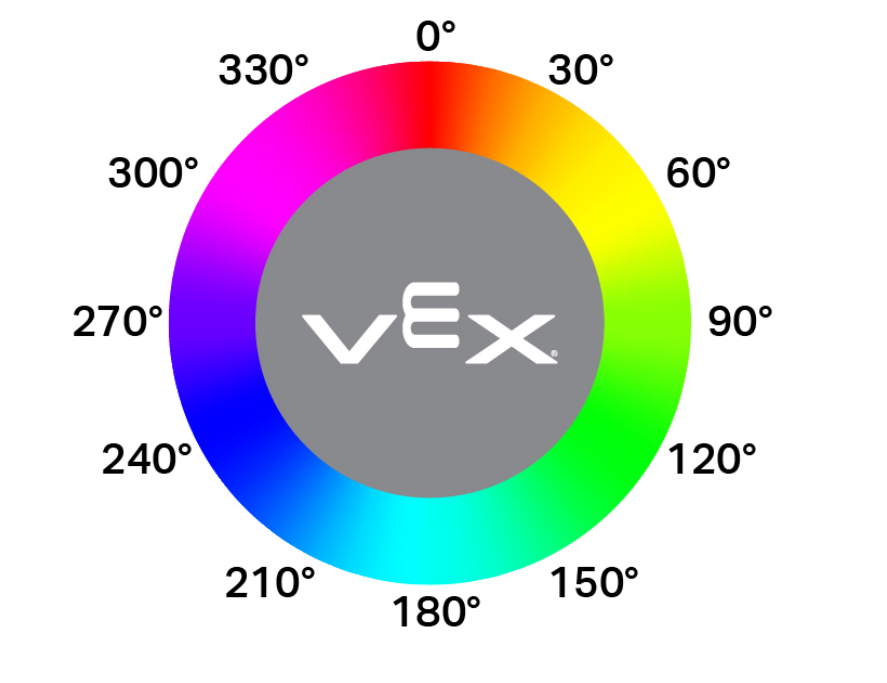
Η συνάρτηση get_hue επιστρέφει το χρώμα που ανιχνεύεται από τον αισθητήρα ματιού ως ακέραιο αριθμό από 0 έως 359,00 μοίρες.
Η απόχρωση είναι ένας τρόπος περιγραφής χρώματος χρησιμοποιώντας αριθμούς γύρω από έναν χρωματικό κύκλο.
Usage:
robot.eye.get_hue()
Παράμετροι |
Περιγραφή |
|---|---|
Αυτή η μέθοδος δεν έχει παραμέτρους. |
# Display if an object is pink.
while True:
    console.clear()
    if 290 < robot.eye.get_hue() < 350:
        console.print("Pink!")
    else:
        console.print("Not pink!")
    wait(0.1, SECONDS)
get_brightness#
get_brightness επιστρέφει πόσο φωτεινό είναι το ανιχνευμένο φως, ως ακέραιο αριθμό από 0% έως 100%.
Ένα υψηλότερο ποσοστό σημαίνει ότι περισσότερο φως ανακλάται πίσω στον αισθητήρα ματιών. Ένα χαμηλότερο ποσοστό σημαίνει ότι λιγότερο φως ανακλάται πίσω.
Usage:
robot.eye.get_brightness()
Παράμετροι |
Περιγραφή |
|---|---|
Αυτή η μέθοδος δεν έχει παραμέτρους. |
# Display whether a detected object is bright.
robot.eye.set_light_power(100)
robot.drive(FORWARD)
while not robot.eye.is_object_detected():
    wait(0.1, SECONDS)
wait(0.1, SECONDS)
if robot.eye.get_brightness() < 70:
    console.print("Object not bright.")
else:
    console.print("Bright object!")
is_object_detected#
is_object_detected επιστρέφει μια Boolean που αναφέρει εάν ο αισθητήρας ματιού ανιχνεύει ένα αντικείμενο εντός εμβέλειας.
True— Ο αισθητήρας ματιού ανιχνεύει ένα αντικείμενο.False— Ο αισθητήρας ματιού δεν ανιχνεύει κάποιο αντικείμενο.
Usage:
robot.eye.is_object_detected()
Παράμετροι |
Περιγραφή |
|---|---|
Αυτή η μέθοδος δεν έχει παραμέτρους. |
# Stop driving after detecting an object.
robot.eye.set_light(ON)
robot.drive(FORWARD)
wait(0.1, SECONDS)
while not robot.eye.is_object_detected():
    wait(0.1, SECONDS)
robot.stop()
is_color_detected#
Η συνάρτηση is_color_detected επιστρέφει μια Boolean που αναφέρει εάν ο αισθητήρας ματιού ανιχνεύει ένα συγκεκριμένο χρώμα, με βάση την τιμή απόχρωσης που ανιχνεύθηκε.
True— Ο αισθητήρας ματιού ανιχνεύει το επιλεγμένο χρώμα.False— Ο αισθητήρας ματιού δεν ανιχνεύει το επιλεγμένο χρώμα.
Ο αισθητήρας ματιού λειτουργεί καλύτερα όταν το αντικείμενο είναι κοντά και ο φωτισμός είναι καθαρός.
Usage:
robot.eye.is_color_detected(color)
Παράμετροι |
Περιγραφή |
|---|---|
|
Το χρώμα που θα ελέγξει ο αισθητήρας ματιού:
|
# Stop driving after detecting a green object.
robot.eye.set_light(ON)
robot.drive(FORWARD)
wait(0.1, SECONDS)
while not robot.eye.is_color_detected(GREEN):
    wait(0.1, SECONDS)
robot.stop()
is_bright#
Η συνάρτηση is_bright επιστρέφει μια Boolean που αναφέρει εάν το αντικείμενο που ανιχνεύεται από τον αισθητήρα ματιού είναι φωτεινό.
Ένα αντικείμενο θεωρείται φωτεινό όταν αντανακλά περισσότερο από 70% φωτεινότητα πίσω στον αισθητήρα ματιού.
True— Το ανιχνευμένο αντικείμενο αντανακλά φωτεινότητα μεγαλύτερη από 70%.False— Το ανιχνευμένο αντικείμενο αντανακλά φωτεινότητα 70% ή λιγότερο.
Usage:
robot.eye.is_bright()
Παράμετροι |
Περιγραφή |
|---|---|
Αυτή η μέθοδος δεν έχει παραμέτρους. |
# Display whether a detected object is bright.
robot.eye.set_light_power(100)
robot.drive(FORWARD)
while not robot.eye.is_object_detected():
    wait(0.1, SECONDS)
wait(0.1, SECONDS)
if robot.eye.is_bright():
    console.print("Bright object!")
else:
    console.print("Object not bright.")