
Sensor óptico#
Introducción#
La categoría de Detección Óptica incluye bloques que controlan y recuperan datos del sensor óptico VEX IQ. Este sensor puede detectar objetos, identificar colores y medir el brillo y el tono.
El sensor óptico dispone de una luz que se puede encender o apagar. Esta luz ayuda al sensor óptico a detectar objetos y colores con mayor claridad.
A continuación se muestra una lista de todos los bloques:
configurar luz óptica — Enciende o apaga la luz del sensor óptico.
establecer potencia de luz óptica — Establece el brillo de la luz del sensor óptico.
¿El sensor óptico encontró un objeto? — Informa si se detectó un objeto.
¿Detección óptica de color? — Informa si se detecta un color específico.
Nombre del color óptico — Informa el nombre del color detectado.
Brillo óptico — Informa el brillo detectado por el sensor.
Tono óptico — Informa el valor del tono del color detectado.
Cuando óptico — Ejecuta la pila de bloques adjunta cuando el sensor óptico detecta o pierde un objeto.
establecer luz óptica#
El bloque configurar luz óptica activa o desactiva la luz del sensor óptico. Esta luz permite que el sensor óptico vea mejor los objetos que se encuentran en zonas oscuras.
establecer luz de [Optical1 v] [encendido v]
Parámetros |
Descripción |
|---|---|
sensor óptico |
Qué sensor óptico utilizar, configurado en la ventana Dispositivos. |
estado |
Estado de la luz del sensor óptico a configurar:
|
Ejemplo
cuando inicie
[Repeatedly flash the Optical Sensor's lights.]
por siempre
establecer luz de [Optical1 v] [encendido v]
esperar (1) segundos
establecer luz de [Optical1 v] [apagado v]
esperar (1) segundos
establecer potencia de luz óptica#
El bloque Ajustar potencia de la luz óptica permite configurar el brillo de la luz del sensor óptico. Esta luz ayuda al sensor óptico a detectar objetos y colores con mayor claridad.
Un porcentaje mayor hace que la luz sea más brillante. Un porcentaje menor hace que la luz sea más tenue.
Si la luz del sensor óptico está apagada, al ajustar la potencia de la luz por encima del 0% se encenderá la luz.
Si la luz del sensor óptico está encendida, al ajustar la potencia de la luz al 0%, esta se apagará.
establecer potencia de luz de [Optical1 v] a (50) %
Nota: Si la luz del sensor óptico está apagada, este bloque encenderá la luz.
Parámetros |
Descripción |
|---|---|
sensor óptico |
Qué sensor óptico utilizar, configurado en la ventana Dispositivos. |
brillo |
El brillo de la luz del sensor óptico de 0 a 100 como porcentaje. |
Ejemplo
cuando inicie
[Repeatedly change the brightness of the Optical Sensor's lights.]
por siempre
establecer potencia de luz de [Optical1 v] a (10) %
esperar (2) segundos
establecer potencia de luz de [Optical1 v] a (50) %
esperar (2) segundos
establecer potencia de luz de [Optical1 v] a (100) %
esperar (2) segundos
¿El sistema óptico detectó algún objeto?#
El bloque booleano ¿El sensor óptico detectó un objeto? indica si el sensor óptico detecta un objeto dentro de su alcance.
Verdadero — El sensor óptico ha detectado un objeto.
Falso — El sensor óptico no ha detectado ningún objeto.
<¿[Optical1 v] encontró un objeto?>
Parámetros |
Descripción |
|---|---|
sensor óptico |
Qué sensor óptico utilizar, configurado en la ventana Dispositivos. |
Ejemplo
cuando inicie
[Turn until the Optical Sensor detects an object.]
establecer velocidad de giro a (10) [% v]
establecer potencia de luz de [Optical1 v] a [75] %
girar [derecha v]
esperar hasta <¿[Optical1 v] encontró un objeto?>
imprimir [Object detected] en pantalla ◀ y mover cursor a la siguiente fila
detener conducción
¿La tecnología óptica detecta el color?#
El bloque booleano ¿Detecta el color el sensor óptico? indica si el sensor óptico detecta un color específico.
Verdadero — El sensor óptico ha detectado el color especificado.
Falso — El sensor óptico no ha detectado el color especificado.
<¿[Optical1 v] detecta [rojo v]?>
Parámetros |
Descripción |
|---|---|
sensor óptico |
Qué sensor óptico utilizar, configurado en la ventana Dispositivos. |
color |
¿Qué color comprobar?:
|
Ejemplo
cuando inicie
[Turn until the Optical Sensor detects a red object.]
establecer velocidad de giro a (10) [% v]
establecer potencia de luz de [Optical1 v] a [75] %
girar [derecha v]
esperar hasta <¿[Optical1 v] detecta [rojo v]?>
imprimir [Red detected] en pantalla ◀ y mover cursor a la siguiente fila
detener conducción
Nombre del color óptico#
El bloque de informe Nombre del color óptico informa el nombre del color detectado por el sensor óptico.
Los colores posibles son:
rojo
verde
azul
amarillo
naranja
púrpura
cian
Nota: Este bloque se puede insertar en el bloque establecer color del LED táctil para que el LED táctil coincida con el color detectado.
(nombre de color de [Optical1 v])
Parámetros |
Descripción |
|---|---|
sensor óptico |
Qué sensor óptico utilizar, configurado en la ventana Dispositivos. |
Ejemplo
cuando inicie
[Display a message when the Optical Sensor detects red.]
esperar hasta <¿[Optical1 v] detecta [rojo v]?>
imprimir (nombre de color de [Optical1 v]) en pantalla ◀ y mover cursor a la siguiente fila
Brillo óptico#
El bloque de indicadores de brillo óptico informa sobre el nivel de brillo de la luz detectada, expresado como un porcentaje del 0% al 100%.
Un porcentaje más alto significa que el sensor óptico detecta más luz. Un porcentaje más bajo significa que el sensor óptico detecta menos luz.
(brillo de [Optical1 v] en %)
Parámetros |
Descripción |
|---|---|
sensor óptico |
Qué sensor óptico utilizar, configurado en la ventana Dispositivos. |
Ejemplo
cuando inicie
[Display the brightness when the Optical Sensor detects red.]
esperar hasta <¿[Optical1 v] detecta [rojo v]?>
imprimir (brillo de [Optical1 v] en %) en pantalla ◀ y mover cursor a la siguiente fila
Tono óptico#
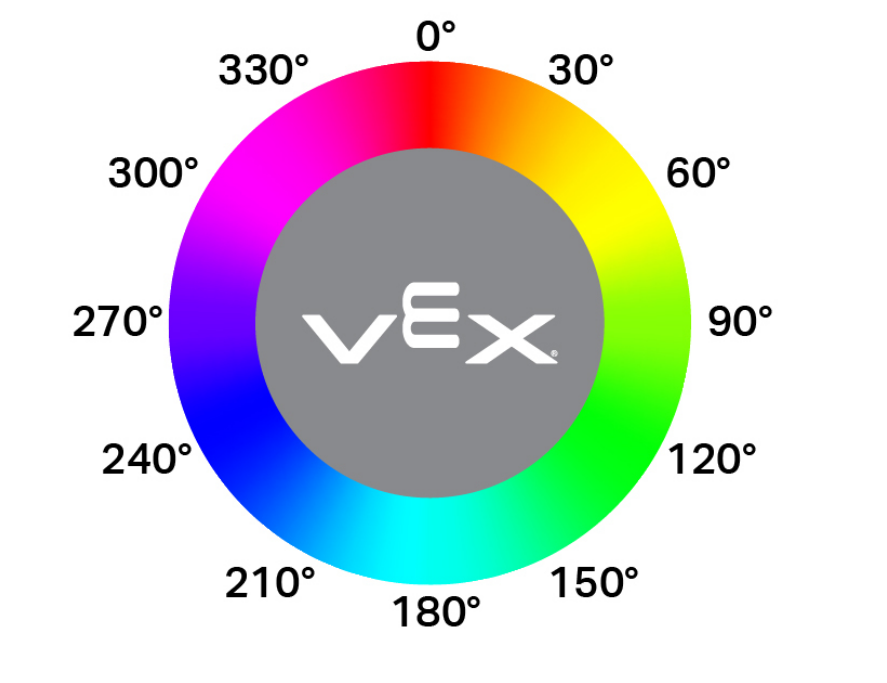
El bloque de informe de tono óptico informa el tono detectado por el sensor óptico como un número de 0 a 359 grados.
El matiz es una forma de describir el color utilizando números alrededor de una rueda de colores, como se muestra a continuación:
(tono de [Optical1 v] en grados)
Parámetros |
Descripción |
|---|---|
sensor óptico |
Qué sensor óptico utilizar, configurado en la ventana Dispositivos. |
Ejemplo
cuando inicie
[Print when the Optical Sensor detects pink.]
por siempre
limpiar pantalla
mover cursor a fila (1) columna (1) en pantalla
si <<(tono de [Optical1 v] en grados) [math_greater_than v] [290]> [y v] <(tono de [Optical1 v] en grados) [math_less_than v] [350]>> entonces
imprimir [Pink!] en pantalla ▶
esperar (0.1) segundos
si no
imprimir [Not pink.] en pantalla ▶
esperar (0.1) segundos
Cuando Óptico#
El bloque When Optical ejecuta la pila de bloques adjunta cuando el sensor óptico seleccionado detecta o pierde un objeto.
cuando [Optical1 v] [detecta v] un objeto
Parámetros |
Descripción |
|---|---|
sensor óptico |
Qué sensor óptico utilizar, configurado en la ventana Dispositivos. |
estado |
Cuando se ejecute la pila de bloques adjunta:
|
Ejemplo
cuando [Optical1 v] [detecta v] un objeto
[Find an object when it is lost.]
girar [derecha v]
esperar hasta <¿[Optical1 v] encontró un objeto?>
detener conducción