
カラーセンサー#
導入#
colorsensor クラスは、カラーセンサーからのデータにアクセスするために使用されます。反射光を利用して物体を検出し、色を識別し、明るさと色相を測定します。
クラスコンストラクタ#
colorsensor Color1 = colorsensor(index);
クラスデストラクタ#
colorsensor オブジェクトを破棄し、関連するリソースを解放します。
virtual ~colorsensor();
パラメータ#
パラメータ |
タイプ |
説明 |
|---|---|---|
|
|
カラーセンサーが接続されているスマートポートは、 |
例#
// Create an colorsensor instance in Port 1
colorsensor Color1 = colorsensor(PORT1);
メンバーの機能#
colorsensor クラスには、以下のメンバ関数が含まれています。
setLight– カラーセンサーのLEDをオン、オフ、または設定された明るさレベルに切り替えます。isNearObject– オブジェクトがカラーセンサーに近いかどうかを返します。detects検出 – 指定された色がカラーセンサーによって検出されたかどうかを返します。colorname– カラーセンサーによって検出された色の名前を返します。brightness– オブジェクトの検出された明るさを返します。hue– 検出された色相値を返します。
colorsensor メンバ関数を呼び出す前に、以下に示すように、 colorsensor インスタンスを作成する必要があります。
/* This constructor is required when using VS Code.
Color Sensor configuration is generated automatically
in VEXcode using the Device Menu. Replace the values
as needed. */

// Create an colorsensor instance in Port 1
colorsensor Color1 = colorsensor(PORT1);
setLight#
カラーセンサーのLEDの光量を設定します。光量を調整することで、カラーセンサーが物体や色をより鮮明に検出できるようになります。
カラーセンサーのライトが消灯している場合、ライトの明るさを0%以上に設定するとライトが点灯します。
カラーセンサーのランプが点灯している場合、ランプの明るさを0%に設定するとランプが消灯します。
パーセンテージが高いほど光は明るくなり、パーセンテージが低いほど光は暗くなります。
Available Functions1 —
ledStateを使用して LED をオンまたはオフにします。void setLight( ledState state );
Parameters2 — LEDを特定の光度で点灯します。
void setLight(
  int32_t      intensity,
  percentUnits units = percent );
パラメータ |
タイプ |
説明 |
|---|---|---|
|
|
Sets the LED on or off. |
|
|
ライトの明るさを0~100の範囲で設定します。 |
|
|
光の強度を表す単位: |
この関数は値を返しません。
Examples// Set the light power to 50 percent.
Color1.setLight(50, percent);
isNearObject#
カラーセンサーが近くの物体を検出した場合に返します。
Available Functionsbool isNearObject();
この関数は引数を受け付けません。
Return Valuesこの関数は、近くの物体が検出されたかどうかを示すブール値を返します。
true– カラーセンサーが物体を検出します。false– カラーセンサーが物体を検出していません。
// If an object is detected by the Color Sensor, print
// "near object".
if (Color1.isNearObject()){
  Brain.Screen.print("near object");
}
detects#
カラーセンサーが指定された色を検出しているかどうかを返します。
Available Functions1 — Detects a
colorType.bool detects( colorType color );
Parameters2 — Detects a
vex::color.bool detects( vex::color color );
パラメータ |
タイプ |
説明 |
|---|---|---|
|
|
有効な色:
|
|
|
有効なカスタムカラー、または上記にリストされている定義済みのカラーのいずれか。 |
true– カラーセンサーが色を検出します。false– カラーセンサーが色を検出しません。
int main() {
  // Initializing Robot Configuration. DO NOT REMOVE!
  vexcodeInit();

  // Drive until a red object is seen
  Drivetrain.drive(forward);
  while (true) {
    if (Color1.detects(red)) {
      Drivetrain.stop();
      break;
    }
    wait(0.5, seconds);
  }
}
colorname#
検出された色の中で最も近い色を返します。
Available FunctionscolorType colorname();
この関数は引数を受け付けません。
Return Values直接印刷すると、その色に関連付けられた数値が表示されます。
色 |
数値 |
|---|---|
|
0 |
|
1 |
|
2 |
|
3 |
|
4 |
|
5 |
|
6 |
|
7 |
|
8 |
|
9 |
|
10 |
|
11 |
|
12 |
|
13 |
|
14 |
|
15 |
|
16 |
|
17 |
関数
convertColorToString、デバイスウィンドウでカラーセンサーを設定すると、VEXcode によって自動的に作成されます。この関数は VEXcode IQ プロジェクト内でのみ使用可能で、他の環境では動作しません。VEXcode の外で
colornameを使用する場合は、colorType値、つまりcolorType::で始まる任意の色 (たとえば、colorType::greenまたはcolorType::red) と直接比較する必要があります。
int main() {
  // Initializing Robot Configuration. DO NOT REMOVE!
  vexcodeInit();

  // Continuously check the detected color
  while (true) {

    // Compare the color name with "red"
    if (convertColorToString(Color1.colorname()) == "red") {
      Brain.Screen.print("Red object!");
    } else {
      Brain.Screen.print("Not red");
    }

    wait(0.5, seconds);
    Brain.Screen.clearScreen();
    Brain.Screen.setCursor(1, 1);
  }
}
int main() {
  // Initializing Robot Configuration. DO NOT REMOVE!
  vexcodeInit();

  // Continuously check the detected color
  while (true) {

    // Compare the color name with the colorType
    if (Color1.colorname() == colorType::red) {
      Brain.Screen.print("Red object!");
    } else {
      Brain.Screen.print("Not red");
    }

    wait(0.5, seconds);
    Brain.Screen.clearScreen();
    Brain.Screen.setCursor(1, 1);
  }
}
brightness#
物体から反射された光の量を返します。
パーセンテージが高いほど、カラーセンサーに反射される光の量が多くなります。パーセンテージが低いほど、反射される光の量が少なくなります。
Available Functionsdouble brightness(bool bRaw = false);
パラメータ |
タイプ |
説明 |
|---|---|---|
|
|
輝度データをパーセンテージではなく生データとして読み込むためのブール値。デフォルト値は |
カラーセンサーによって検出された明るさを表すdouble型の値(0~100%の範囲)、またはセンサーによって検出された生データを表すdouble型の値。
Examples// Set a variable, brightness, to the value of the brightness
// detected by the Color Sensor
double brightness = Color1.brightness();
// Print the brightness detected by the Color Sensor to the
// Brain's screen
Brain.Screen.print(brightness);
hue#
カラーセンサーによって検出された色相を返します。
色相とは、色相環上の数字を用いて色を表現する方法のことです。
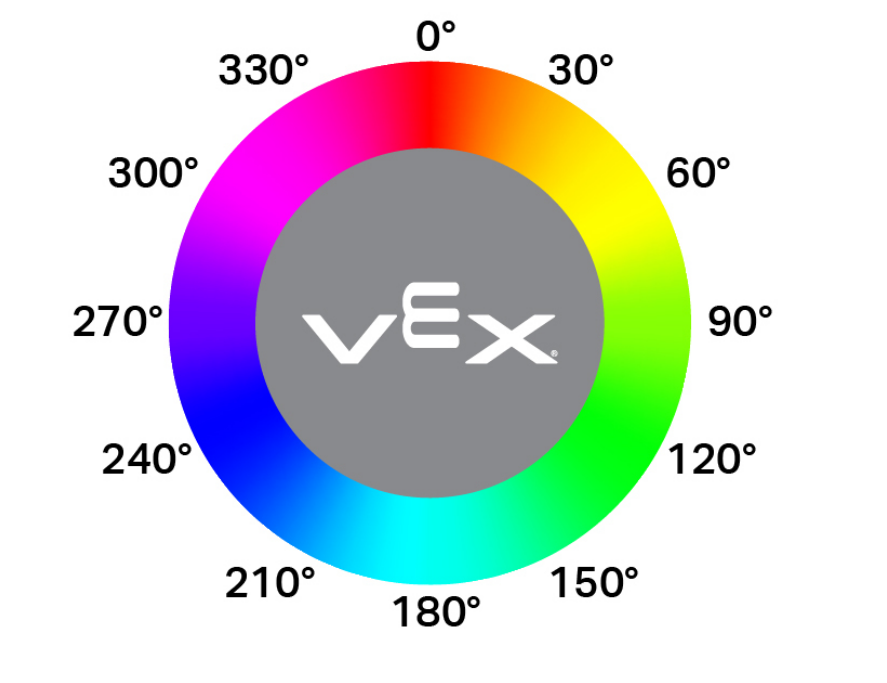
double hue();
この関数は引数を受け付けません。
Return Valuesカラーセンサーによって検出された色相の値を表すdouble型の値(範囲は0~359.00)。
Examples// Set a variable, hue, to the value of the hue detected
// by the Color Sensor.
double hue = Color1.hue();