
Control#
Introducción#
El lenguaje de control en Python te permite indicarle al robot cuándo esperar, cuándo repetir acciones, cómo tomar decisiones y cuándo finalizar el proyecto.
A continuación se muestra una lista de los controles disponibles, incluidos los métodos y las palabras clave principales de Python:
wait— Pauses the project for a given time.for— Repeats code for each item in a sequence.if— Runs code if a condition is true.if/else— Runs different code depending on a condition.if/elif/else— Checks multiple conditions in order.while— Repeats code while a condition is true.break— Exits a loop immediately.stop_program— Ends the running program.pass— Placeholder used when no action is needed.
esperar#
wait pauses for a specific amount of time before moving to the next line of code.
Usage:wait(time, units)
Parámetros |
Descripción |
|---|---|
|
El tiempo de espera, expresado como un número entero positivo o decimal. |
|
The unit that represents the wait time: |
# Turn right for one second, then stop
drivetrain.turn(RIGHT)
wait(1, SECONDS)
drivetrain.stop()
para#
for repeats a set of actions a specific number of times. for can be used to loop through items in lists, tuples, dictionaries, sets, strings, or for a specified amount of loops with range.
Uso:
for value in expression_list:
    pass
Componentes |
Descripción |
|---|---|
|
Una variable temporal que almacena el elemento actual en la iteración. |
|
La colección de elementos que se recorren en un bucle (por ejemplo, lista, cadena, rango). |
# Move in a square path
for index in range(4):
    drivetrain.drive_for(FORWARD, 100, MM)
    drivetrain.turn_for(RIGHT, 90)
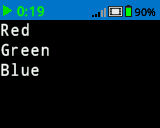
# Print each item in the list
colors = ["Red", "Green", "Blue"]

for color in colors:
    brain.screen.print(color)
    brain.screen.next_row()
si#
if runs the indented block of code if the condition is True.
Uso:
if condition:
    pass
Componentes |
Descripción |
|---|---|
|
An expression or variable that is checked when the statement runs. If it is |
# Turn right when a button is pressed
while True:
    if brain.buttonCheck.pressing():
        drivetrain.turn_for(RIGHT, 90)
    wait(0.1, SECONDS)
si/si no#
if and else determine which indented block of code runs based on whether the condition is True or False.
Uso:
if condition:
    pass
else:
    pass
Componentes |
Descripción |
|---|---|
|
An expression or variable that is checked when the statement runs. If it is |
# Turn right when a button is pressed, and remain still
# when the button is not pressed
while True:
    if brain.buttonCheck.pressing():
        drivetrain.turn(RIGHT)
    else:
        drivetrain.stop()
    wait(0.1, SECONDS)
si/si/de lo contrario#
The if/elif/else structure selects which indented block of code runs based on conditions:
ifruns its block if the condition isTrue.elifchecks additional conditions only if all previous conditions areFalse. Multipleelifstatements can be used.elseruns its block only if none of the previous conditions areTrue.
Uso:
if condition:
    pass
elif condition:
    pass
else:
    pass
Componentes |
Descripción |
|---|---|
|
An expression or variable that is checked when the statement runs. The first condition that is |
# Turn depending on what button is pressed
while True:
    if brain.buttonRight.pressing():
        drivetrain.turn(RIGHT)
    elif brain.buttonLeft.pressing():
        drivetrain.turn(LEFT)
    else:
        drivetrain.stop()
    wait(0.1, SECONDS)
mientras#
while repeatedly runs code as long as the condition is True. It can also be used like a “forever” by using True as the condition, or a “wait until” by adding not to the condition, as shown in the examples below.
Uso:
while condition:
    pass
Componentes |
Descripción |
|---|---|
|
An expression or variable that is checked before each iteration. If it is |
# Keep the screen green while the robot is moving
drivetrain.drive_for(FORWARD, 200, MM, wait=False)
while drivetrain.is_moving():
    brain.screen.clear_screen(Color.GREEN)
    wait(50, MSEC)

brain.screen.clear_screen(Color.BLACK)
while True:
    # Move in a square path forever
    drivetrain.drive_for(FORWARD, 150, MM)
    drivetrain.turn_for(RIGHT, 90)
# Wait until a button is pressed to stop driving
drivetrain.drive(FORWARD)
while not brain.buttonCheck.pressing():
    wait(50, MSEC)
drivetrain.stop()
romper#
break exits a loop immediately. break can be used to leave loops that otherwise would loop forever.
# Stop turning after a button is pressed
while True:
    drivetrain.turn(RIGHT)
    if brain.buttonCheck.pressing():
        break
drivetrain.stop()
brain.play_sound(SoundType.POWER_DOWN)
detener_programa#
program_stop ends a running project.
Usage:brain.program_stop()
Parámetros |
Descripción |
|---|---|
Este método no tiene parámetros. |
# Stop the project after a button is pressed
while True:
    drivetrain.turn(RIGHT)
    if brain.buttonCheck.pressing():
        brain.program_stop()
    brain.play_sound(SoundType.POWER_DOWN)
aprobar#
pass is a placeholder for future code and can be used to avoid errors in empty loops, conditionals, and functions.
if condition:
    pass
def function():
    pass