
Python específico para robots#
Introducción#
El robot Hero Bot, Huey, incluye dos opciones de motor, el sensor de visión con IA IQ, el sensor óptico y el LED táctil.
Todos los métodos VEXcode VR estándar están disponibles para su uso en el IQ 25-26 Mix & Match.
A continuación se muestra una lista de todos los métodos disponibles específicos para Robot:
Sistema de transmisión: Mover y girar el robot.
Comportamiento
drive— Moves the robot forward or reverse forever.drive_for— Moves the robot forward or reverse for a specific distance.turn— Turns the robot left or right forever.turn_for— Turns the robot left or right for a specific number of degrees.turn_to_heading— Turns the robot to face a specific heading from -359 to 359 degrees.turn_to_rotation— Turns the robot to a specific rotation.stop— Stops the robot’s movement.
Mutadores
set_heading— Changes the robot’s current heading to a new heading.set_rotation— Changes the robot’s current rotation to a new rotation.set_timeout— Sets how much time the robot will try to finish a movement.set_drive_velocity— Tells the robot how fast to drive.set_turn_velocity— Tells the robot how fast to turn.
Obtenidos
heading— Returns the robot’s current heading from 0 to 359.99 degrees.rotation— Returns the robot’s current rotation.is_done— Returns whether the robot is finished moving, as a Boolean value.is_moving— Returns whether the robot is moving, as a Boolean value.velocity— Returns how fast the robot is driving.
Movimiento: Mueve y rastrea los motores del robot.
Comportamiento
spin— Spins a motor forward or reverse forever.spin_for— Spins a motor for a specific distance.spin_to_position— Spins a motor to a specific position.stop— Stops a motor from spinning.
Mutadores
set_position— Changes the motor’s current position to a new value.set_velocity— Tells a motor how fast to spin.set_timeout— Sets how much time a motor will try to finish a movement.
Obtenidos
is_done— Returns whether the motor is finished moving, as a Boolean value.is_spinning— Returns whether the motor is spinning, as a Boolean value.position— Returns the motor’s current position.velocity— Returns how fast the motor is spinning.
Visión por IA: Captura y analiza objetos utilizando el sensor de visión por IA IQ.
Obtenidos
take_snapshot- Returns a tuple of detected objects for a specific signature.
Propiedades
width- Width of the detected object in pixels.height- Height of the detected object in pixels.centerX- X position of the object’s center in pixels.centerY- Y position of the object’s center in pixels.originX- X position of the object’s top-left corner in pixels.originY- Y position of the object’s top-left corner in pixels.id- Classification or tag ID of the object.
Consola: Imprime en la consola y monitoriza los valores.
Imprimir
brain.screen.print— Displays text, numbers, or variable values in the Console.brain.screen.next_row— Moves the Console cursor to the start of the next row.brain.screen.clear_screen— Clears all rows from the Console.
Monitor
monitor_variable— Adds one or more predefined variables to the Monitor tab.monitor_sensor— Adds one or more sensor values to the Monitor tab.
Detección: Utilice los diversos sensores del robot.
LED táctil
set_color- Sets the Touch LED to a selected color.
Óptico
is_near_object– Returns whether the Optical Sensor detects an object within range.color– Returns the color detected by the Optical Sensor.brightness– Returns the amount of light reflected from the object.hue– Returns the hue detected by the Optical Sensor.object_detected– Registers a function to be called when the Optical Sensor detects an object.object_lost– Registers a function to be called when the Optical Sensor loses an object.
Los ejemplos de esta página utilizan la posición de inicio predeterminada del Playground.
Tren de transmisión#
El sistema de transmisión controla cómo se desplaza y gira el robot de realidad virtual. Este sistema puede avanzar o retroceder, girar a la izquierda o a la derecha, orientarse y seguir su propio movimiento de rotación.
Comportamiento#
conducir#
drive moves the robot forward or reverse forever. The robot will continue to move until it is given another action, like turning or stopping.
Usage:
drivetrain.drive(direction)
Parámetros |
Descripción |
|---|---|
|
The direction the robot moves: |
def main():
    # Drive forward then stop
    drivetrain.drive(FORWARD)
    wait(2, SECONDS)
    drivetrain.stop()

# VR threads — Do not delete
vr_thread(main)
impulso_por#
drive_for moves the robot forward or reverse for a specific distance. The project will wait until the robot is done moving before the next line of code runs.
Usage:
drivetrain.drive_for(direction, distance, units, wait)
Parámetros |
Descripción |
|---|---|
|
The direction the robot moves: |
|
The distance the robot drives. This can be an |
|
Optional. The distance unit: |
|
Optional. |
def main():
    # Drive forward and backward
    drivetrain.drive_for(FORWARD, 200, MM)
    drivetrain.drive_for(REVERSE, 200, MM)

# VR threads — Do not delete
vr_thread(main)
doblar#
turn turns the robot left or right forever. The robot will continue to turn until it is given another action, like driving or stopping.
Usage:
drivetrain.turn(direction)
Parámetros |
Descripción |
|---|---|
|
The direction the robot turns: |
def main():
    # Turn right and left, then stop
    drivetrain.turn(RIGHT)
    wait(2, SECONDS)
    drivetrain.turn(LEFT)
    wait(2, SECONDS)
    drivetrain.stop()

# VR threads — Do not delete
vr_thread(main)
turno_para#
turn_for turns the robot left or right for a specific number of degrees. The turn is relative to the current position of the robot. The project will wait until the robot is done turning before the next line of code runs.
Usage:
drivetrain.turn_for(direction, angle, units, wait)
Parámetros |
Descripción |
|---|---|
|
The direction the robot turns: |
|
The number of degrees the robot turns. This can be an |
|
Optional. The rotation unit: |
|
Optional. |
def main():
    # Turn the robot right and left
    drivetrain.turn_for(RIGHT, 90, DEGREES)
    wait(1, SECONDS)
    drivetrain.turn_for(LEFT, 90, DEGREES)

# VR threads — Do not delete
vr_thread(main)
girar_hacia_rumbo#
A heading is the direction the robot is facing, measured in degrees. turn_to_heading turns the robot to face a specific heading from -359 to 359 degrees. The robot will turn the shortest direction to reach the target heading.
La dirección inicial del robot es de 0 grados.
El proyecto esperará a que el robot termine de girar antes de ejecutar la siguiente línea de código.
Usage:
drivetrain.turn_to_heading(angle, units, wait)
Parámetros |
Descripción |
|---|---|
|
The direction the robot should face, in degrees. This can be an |
|
Optional. The rotation unit: |
|
Optional. |
def main():
    # Turn to face the cardinal directions
    drivetrain.turn_to_heading(90, DEGREES)
    wait(1, SECONDS)
    drivetrain.turn_to_heading(180, DEGREES)
    wait(1, SECONDS)
    drivetrain.turn_to_heading(270, DEGREES)
    wait(1, SECONDS)
    drivetrain.turn_to_heading(0, DEGREES)

# VR threads — Do not delete
vr_thread(main)
girar_a_rotación#
turn_to_rotation turns the robot to a specific rotation.
Rotation is how much the robot has turned, measured in degrees. At the beginning of a project, the rotation value is set to 0 degrees. Rotation can also be set using the set_rotation method.
Los valores de rotación son absolutos. Esto significa que la dirección del giro depende de la rotación actual del robot. Girar a la derecha aumenta la rotación, y girar a la izquierda la disminuye.
Por ejemplo, si el robot comienza en 0 grados y se le da una rotación de 720 grados, girará dos veces a la derecha. Si luego se le da una rotación de 360 grados, girará una vez a la izquierda, ya que 360 es menor que 720.
El proyecto esperará a que el robot termine de girar antes de ejecutar la siguiente línea de código.
Usage:
drivetrain.turn_to_rotation(angle, units, wait)
Parámetros |
Descripción |
|---|---|
|
The rotation value, in degrees, that the robot will turn to. This can be an |
|
Optional. The rotation unit: |
|
Optional. |
def main():
    # Turn left, then spin in a circle
    # clockwise and face right
    drivetrain.turn_to_rotation(-90, DEGREES)
    wait(1, SECONDS)
    drivetrain.turn_to_rotation(450, DEGREES)

# VR threads — Do not delete
vr_thread(main)
detener#
stop stops the robot’s movement.
Usage:
drivetrain.stop()
Parámetros |
Descripción |
|---|---|
Este método no tiene parámetros. |
def main():
    # Drive forward then stop
    drivetrain.drive(FORWARD)
    wait(2, SECONDS)
    drivetrain.stop()

# VR threads — Do not delete
vr_thread(main)
Mutadores#
establecer_encabezado#
A heading is the direction the robot is facing, measured in degrees. set_heading changes the robot’s current heading to a new heading value.
Por ejemplo, si el robot ha girado para mirar hacia la derecha, al establecer la orientación a 0 grados, esa posición mirando hacia la derecha se convierte en la nueva posición de 0 grados. Entonces, el robot puede girar a otras posiciones en función de esa nueva orientación.
Usage:
drivetrain.set_heading(heading, units)
Parámetros |
Descripción |
|---|---|
|
The heading value, in degrees, to set for the robot. This can be an |
|
Optional. The heading unit: |
def main():
    # Face the new 0 degrees
    drivetrain.set_heading(90, DEGREES)
    drivetrain.turn_to_heading(0, DEGREES)

# VR threads — Do not delete
vr_thread(main)
establecer_rotación#
Rotation is how much the robot has turned, measured in degrees. At the beginning of a project, the rotation value is set to 0 degrees. set_rotation changes the robot’s current rotation to a new value.
Por ejemplo, si el robot ha dado dos vueltas completas a la derecha, su valor de rotación será de 720 grados. Si se establece la rotación en 0 grados, esta volverá a su valor original. A partir de ahí, el robot podrá girar según ese nuevo valor.
Usage:
drivetrain.set_rotation(rotation, units)
Parámetros |
Descripción |
|---|---|
|
The rotation value, in degrees, to set for the robot. This can be an |
|
Optional. The rotation unit: |
def main():
    # Spin counterclockwise two times
    drivetrain.set_rotation(720, DEGREES)
    drivetrain.turn_to_rotation(0, DEGREES)

# VR threads — Do not delete
vr_thread(main)
establecer_tiempo_de_espera#
set_timeout sets how much time the robot will try to finish a movement. If the robot cannot finish in that time, it will stop trying and move on to the next line of code. This keeps the robot from getting stuck on a movement.
Usage:
drivetrain.set_timeout(value, units)
Parámetros |
Descripción |
|---|---|
|
The amount of time the robot can try to finish a movement. This can be a positive |
|
The time unit: |
def main():
    # Turn right after driving forward
    drivetrain.set_timeout(1, SECONDS)
    drivetrain.drive_for(FORWARD, 25, INCHES)
    drivetrain.turn_for(RIGHT, 90)

# VR threads — Do not delete
vr_thread(main)
establecer_velocidad_de_conducción#
set_drive_velocity tells the robot how fast to drive. A higher percentage makes the robot drive faster and a lower percentage makes the robot drive slower.
Todos los proyectos comienzan con el robot conduciendo al 50% de su velocidad por defecto.
Nota: Una mayor velocidad hace que el robot se desplace más rápido, pero puede ser menos preciso. Una menor velocidad hace que el robot se desplace más despacio, pero puede ser más preciso.
Usage:
drivetrain.set_drive_velocity(velocity, units)
Parámetros |
Descripción |
|---|---|
|
The velocity to drive with from 0% to 100%. This can be an |
|
Optional. The velocity unit: |
def main():
    # Drive forward at different velocities
    # Default velocity
    drivetrain.drive_for(FORWARD, 150, MM)
    wait(1, SECONDS)
    # Drive slower
    drivetrain.set_drive_velocity(20, PERCENT)
    drivetrain.drive_for(FORWARD, 150, MM)
    wait(1, SECONDS)
    # Drive faster
    drivetrain.set_drive_velocity(100, PERCENT)
    drivetrain.drive_for(FORWARD, 150, MM)

# VR threads — Do not delete
vr_thread(main)
establecer_velocidad_de_giro#
set_turn_velocity tells the robot how fast to turn. A higher percentage makes the robot turn faster and a lower percentage makes the robot turn slower.
Todos los proyectos comienzan con el robot girando al 50% de su velocidad por defecto.
Nota: Una mayor velocidad hace que el robot gire más rápido, pero puede ser menos preciso. Una menor velocidad hace que el robot gire más despacio, pero puede ser más preciso.
Usage:
drivetrain.set_turn_velocity(velocity, units)
Parámetros |
Descripción |
|---|---|
|
The velocity to turn with from 0% to 100%. This can be an |
|
Optional. The velocity unit: |
def main():
    # Turn at different velocities
    # Default velocity
    drivetrain.turn_for(RIGHT, 120, DEGREES)
    wait(1, SECONDS)
    # Turn slower
    drivetrain.set_turn_velocity(20, PERCENT)
    drivetrain.turn_for(RIGHT, 120, DEGREES)
    wait(1, SECONDS)
    # Turn faster
    drivetrain.set_turn_velocity(100, PERCENT)
    drivetrain.turn_for(RIGHT, 120, DEGREES)

# VR threads — Do not delete
vr_thread(main)
Getters#
título#
A heading is the direction the robot is facing, measured in degrees. heading returns the robot’s current heading from 0 to 359.99 degrees.
La dirección inicial del robot es de 0 grados.
Usage:
drivetrain.heading(units)
Parámetros |
Descripción |
|---|---|
|
Optional. The heading unit: |
def main():
    # Display the heading after turning
    drivetrain.turn_for(RIGHT, 450, DEGREES)
    brain.screen.print("Heading: ")
    brain.screen.print(drivetrain.heading(DEGREES))

# VR threads — Do not delete
vr_thread(main)
rotación#
Rotation is how much the robot has turned, measured in degrees. At the beginning of a project, the rotation value is set to 0 degrees. rotation returns the robot’s current rotation.
Girar a la derecha aumenta la rotación, y girar a la izquierda la disminuye. Por ejemplo, dar dos vueltas completas a la derecha produce una rotación de 720 grados.
Usage:
drivetrain.rotation(units)
Parámetros |
Descripción |
|---|---|
|
Optional. The rotation unit: |
def main():
    # Display the rotation after turning
    drivetrain.turn_for(RIGHT, 450, DEGREES)
    brain.screen.print("Rotation: ")
    brain.screen.print(drivetrain.rotation(DEGREES))

# VR threads — Do not delete
vr_thread(main)
está_hecho#
is_done returns whether the robot is finished moving, as a Boolean value. This can be used to control the timing of other behaviors based on the robot’s movement.
True— The robot is finished moving.False— The robot is still moving.
This method works together with the following Drivetrain methods that have the wait parameter: drive_for, turn_for, turn_to_heading, and turn_to_rotation.
Usage:
drivetrain.is_done()
Parámetros |
Descripción |
|---|---|
Este método no tiene parámetros. |
se está moviendo#
is_moving returns whether the robot is moving, as a Boolean value. This can be used to control the timing of other behaviors based on the robot’s movement.
True— The robot is moving.False— The robot is not moving.
Usage:
drivetrain.is_moving()
Parámetros |
Descripción |
|---|---|
Este método no tiene parámetros. |
velocidad#
velocity returns how fast the robot is driving, as a percentage from -100% to 100%.
Usage:
drivetrain.velocity(units)
Parámetros |
Descripción |
|---|---|
|
Optional. The velocity unit: |
Ejemplo
def main():
    # Display the velocity after driving
    drivetrain.drive_for(FORWARD, 150, MM)
    brain.screen.print("Velocity: ")
    brain.screen.print(drivetrain.velocity(PERCENT))
Movimiento#
Huey utiliza el motor de la garra para abrirla y cerrarla, permitiendo así recoger o soltar los pasadores y las vigas. El motor de elevación sube y baja los pasadores o las vigas para que puedan unirse entre sí.
Cada motor tiene su propio comportamiento direccional. Las descripciones de las direcciones explican cómo se mueve cada motor en Huey.
Comportamiento#
girar#
spin spins a motor forward or reverse forever. The motor will continue to spin until it is given another action, like spinning in a different direction or stopping.
Uso:
Se puede utilizar uno de los dos objetos de motor disponibles con este método, como se muestra a continuación:
motor |
Dominio |
|---|---|
|
|
|
|
Parámetros |
Descripción |
|---|---|
|
The direction the motor spins:
|
def main():
    # Raise the lift, drive forward, then open the claw.
    lift_motor.spin_for(REVERSE, 600, DEGREES)
    drivetrain.drive_for(FORWARD, 140, MM)
    claw_motor.spin(FORWARD)

# VR threads — Do not delete
vr_thread(main)
girar_para#
spin_for spins a motor for a specific distance. The spin is relative to the current position of the motor. The project will wait until the motor is done spinning before the next line of code runs.
Uso:
Se puede utilizar uno de los dos objetos de motor disponibles con este método, como se muestra a continuación:
motor |
Dominio |
|---|---|
|
|
|
|
Parámetros |
Descripción |
|---|---|
|
The direction the motor spins:
|
|
The distance the motor spins. |
|
Optional. The distance unit: |
|
Optional.
|
def main():
    # Raise the lift, drive forward, then open the claw.
    lift_motor.spin_for(REVERSE, 600, DEGREES)
    drivetrain.drive_for(FORWARD, 140, MM)
    claw_motor.spin(FORWARD)

# VR threads — Do not delete
vr_thread(main)
girar_a_posición#
spin_to_position spins a motor to a specific position.
A motor’s position is how far it has spun, measured in DEGREES or TURNS. One turn is equal to 360 degrees. At the beginning of a project, the motor position is set to 0 degrees. The motor position can also be set using the set_position method.
Los valores de posición son absolutos. Esto significa que la dirección de giro depende de la posición actual del motor.
Por ejemplo, si el motor parte de 0 grados y gira hasta una posición de 720 grados, girará dos vueltas hacia adelante. Si luego gira hasta una posición de 360 grados, girará una vuelta hacia atrás, ya que 360 es menor que 720.
Uso:
Se puede utilizar uno de los dos objetos de motor disponibles con este método, como se muestra a continuación:
motor |
Dominio |
|---|---|
|
|
|
|
Parámetros |
Descripción |
|---|---|
|
The position value the motor will spin to. |
|
Optional. The position unit: |
|
Optional.
|
def main():
    # Raise the lift to a known position, drive, then open the claw
    lift_motor.spin_to_position(-720, DEGREES)
    drivetrain.drive_for(FORWARD, 140, MM)
    claw_motor.spin(FORWARD)

# VR threads — Do not delete
vr_thread(main)
motor de parada#
stop stops a motor from spinning.
Uso:
Se puede utilizar uno de los dos objetos de motor disponibles con este método, como se muestra a continuación:
motor |
Dominio |
|---|---|
|
|
|
|
Parámetros |
Descripción |
|---|---|
Este método no tiene parámetros. |
def main():
    # Raise the lift for 2 seconds, then stop
    lift_motor.spin(REVERSE)
    wait(2, SECONDS)
    lift_motor.stop()
    drivetrain.drive_for(FORWARD, 140, MM)
    claw_motor.spin(FORWARD)

# VR threads — Do not delete
vr_thread(main)
Mutadores#
posición_de_establecer#
A motor’s position is how far it has spun, measured in DEGREES or TURNS. One turn is equal to 360 degrees. set_position changes the motor’s current position to a new value.
Por ejemplo, si un motor ha girado 180 grados, al ajustar la posición a 0 grados, dicha posición volverá a su estado original. A partir de ahí, el motor podrá girar a posiciones que dependan de ese nuevo valor.
Uso:
Se puede utilizar uno de los dos objetos de motor disponibles con este método, como se muestra a continuación:
motor |
Dominio |
|---|---|
|
|
|
|
Parámetros |
Descripción |
|---|---|
|
The position value to set for the motor. |
|
Optional. The position unit: |
def main():
    # Reset the lift position, then move to a new target.
    lift_motor.set_position(100, DEGREES)
    lift_motor.spin_to_position(-500, DEGREES)
    drivetrain.drive_for(FORWARD, 140, MM)
    claw_motor.spin(FORWARD)

# VR threads — Do not delete
vr_thread(main)
establecer_velocidad#
set_velocity tells a motor how fast to spin. A higher percentage makes the motor spin faster and a lower percentage makes the motor spin slower.
Cada proyecto comienza con cada motor girando al 50% de su velocidad máxima por defecto.
Nota: Una mayor velocidad hace que el motor gire más rápido, pero puede ser menos preciso. Una menor velocidad hace que el motor gire más lento, pero puede ser más preciso.
Uso:
Se puede utilizar uno de los dos objetos de motor disponibles con este método, como se muestra a continuación:
motor |
Dominio |
|---|---|
|
|
|
|
Parámetros |
Descripción |
|---|---|
|
The velocity to spin with from 0% to 100%. This can be an |
|
The velocity unit: |
def main():
    # Set lift speed, then raise it.
    lift_motor.set_velocity(100, PERCENT)
    lift_motor.spin_for(REVERSE, 600, DEGREES)
    drivetrain.drive_for(FORWARD, 140, MM)
    claw_motor.spin(FORWARD)

# VR threads — Do not delete
vr_thread(main)
establecer_tiempo_de_espera#
set_timeout sets how much time a motor will try to finish a movement. If the motor cannot finish in that time, it will stop trying and move on to the next line of code. This keeps the motor from getting stuck on a movement.
Uso:
Se puede utilizar uno de los dos objetos de motor disponibles con este método, como se muestra a continuación:
motor |
Dominio |
|---|---|
|
|
|
|
Parámetros |
Descripción |
|---|---|
|
The amount of time the motor can try to finish a movement. This can be a positive |
|
The time unit: |
def main():
    # Limit how long the lift waits to reach its target.
    lift_motor.set_timeout(2, SECONDS)
    lift_motor.spin_for(REVERSE, 1800, DEGREES)
    drivetrain.drive_for(FORWARD, 140, MM)
    claw_motor.spin(FORWARD)

# VR threads — Do not delete
vr_thread(main)
Getters#
está_hecho#
is_done returns whether the motor is finished moving, as a Boolean value. This can be used to control the timing of other behaviors based on the motor’s movement.
True— The motor is finished moving.False— The motor is still moving.
This method works together with the following Motion methods that have the wait parameter: spin_for and spin_to_position.
Uso:
Se puede utilizar uno de los dos objetos de motor disponibles con este método, como se muestra a continuación:
motor |
Dominio |
|---|---|
|
|
|
|
Parámetros |
Descripción |
|---|---|
Este método no tiene parámetros. |
def main():
    # Flash the Touch LED while the lift is moving.
    lift_motor.spin_for(REVERSE, 600, DEGREES, wait=False)
    wait(0.1, SECONDS)
    while not lift_motor.is_done():
        touchled.set_color(RED)
        wait(0.5, SECONDS)
        touchled.set_color(NONE)
        wait(0.5, SECONDS)

# VR threads — Do not delete
vr_thread(main)
está_girando#
is_spinning returns whether the motor is spinning, as a Boolean value. This can be used to control the timing of other behaviors based on the motor’s movement.
True— The motor is spinning.False— The motor is not spinning.
This method works together with the following Motion methods that have the wait parameter: spin_for and spin_to_position.
Uso:
Se puede utilizar uno de los dos objetos de motor disponibles con este método, como se muestra a continuación:
motor |
Dominio |
|---|---|
|
|
|
|
Parámetros |
Descripción |
|---|---|
Este método no tiene parámetros. |
def main():
    # Flash the Touch LED while the lift is spinning.
    lift_motor.spin_for(REVERSE, 600, DEGREES, wait=False)
    wait(0.1, SECONDS)
    while lift_motor.is_spinning():
        touchled.set_color(RED)
        wait(0.5, SECONDS)
        touchled.set_color(NONE)
        wait(0.5, SECONDS)

# VR threads — Do not delete
vr_thread(main)
posición#
A motor’s position is how far it has spun, measured in DEGREES or TURNS. One turn is equal to 360 degrees. position returns the motor’s current position.
Al inicio del proyecto, la posición del motor se establece en 0 grados. Si el motor gira una vuelta completa hacia adelante, la posición será de 360 grados o 1 vuelta. Si el motor gira en sentido contrario, la posición será negativa.
Uso:
Se puede utilizar uno de los dos objetos de motor disponibles con este método, como se muestra a continuación:
motor |
Dominio |
|---|---|
|
|
|
|
Parámetros |
Descripción |
|---|---|
|
The unit to return the motor position in: |
def main():
    # Raise the lift until it reaches roughly 600 degrees.
    lift_motor.spin(REVERSE)
    while not lift_motor.position(DEGREES) <= -600:
        wait(2, MSEC)
    lift_motor.stop()
    drivetrain.drive_for(FORWARD, 140, MM)
    claw_motor.spin(FORWARD)

# VR threads — Do not delete
vr_thread(main)
velocidad#
velocity returns how fast the motor is spinning.
Un valor positivo significa que el motor gira hacia adelante. Un valor negativo significa que el motor gira hacia atrás.
Uso:
Se puede utilizar uno de los dos objetos de motor disponibles con este método, como se muestra a continuación:
motor |
Dominio |
|---|---|
|
|
|
|
Parámetros |
Descripción |
|---|---|
|
The velocity unit to return: |
def main():
    # Print the lift velocity while it is moving.
    lift_motor.set_velocity(100, PERCENT)
    lift_motor.spin_for(REVERSE, 600, DEGREES, wait=False)
    wait(0.5, SECONDS)
    brain.screen.print(lift_motor.velocity(PERCENT))

# VR threads — Do not delete
vr_thread(main)
Visión por IA#
Getters#
tomar_instantánea#
take_snapshot filters data from the IQ AI Vision Sensor frame to a single signature — a saved description of something the sensor can recognize, such as a game element on the field — and returns a tuple.
La tupla almacena objetos ordenados de mayor a menor ancho, comenzando en el índice#propertiesSe puede acceder a las propiedades de cada objeto mediante su índice. Se devuelve una tupla vacía si no se detectan objetos coincidentes.
Usage:
ai_vision.take_snapshot(signature)
Parámetros |
Descripción |
|---|---|
|
Filters the dataset to only include data of the given signature. Available signatures are:
|
def main():
    # Place the Red Pin on the top-left Blue Pin.
    lift_motor.spin_for(REVERSE, 600, DEGREES)
    drivetrain.turn_for(LEFT, 38, DEGREES)

    ai_objects = ai_vision.take_snapshot(AiVision.ALL_AIOBJS)
    while not ai_objects[0].width > 48:
        ai_objects = ai_vision.take_snapshot(AiVision.ALL_AIOBJS)
        drivetrain.drive(FORWARD)

    drivetrain.drive_for(FORWARD, 160, MM)
    claw_motor.spin(FORWARD)

# VR threads — Do not delete
vr_thread(main)
Propiedades#
There are seven properties that are included with each object stored in a tuple after take_snapshot is used.
All property values except .id describe the detected object’s position and size in the IQ AI Vision Sensor’s view at the moment take_snapshot was used. These values are measured in pixels, based on the sensor’s 320 by 240 pixel resolution.
.ancho#
.width returns the width of the detected object in pixels, which is an integer between 1 and 320.
def main():
    ai_objects = ai_vision.take_snapshot(AiVision.ALL_AIOBJS)
    if len(ai_objects) > 0:
        brain.screen.print(ai_objects[0].width)

# VR threads — Do not delete
vr_thread(main)
.altura#
.height returns the height of the detected object in pixels, which is an integer between 1 and 240.
def main():
    ai_objects = ai_vision.take_snapshot(AiVision.ALL_AIOBJS)
    if len(ai_objects) > 0:
        brain.screen.print(ai_objects[0].height)

# VR threads — Do not delete
vr_thread(main)
.centerX#
.centerX returns the x-coordinate of the detected object’s center in pixels, which is an integer between 0 and 320.
def main():
    ai_objects = ai_vision.take_snapshot(AiVision.ALL_AIOBJS)
    if len(ai_objects) > 0:
        brain.screen.print(ai_objects[0].centerX)

# VR threads — Do not delete
vr_thread(main)
.centroY#
.centerY returns the y-coordinate of the detected object’s center in pixels, which is an integer between 0 and 240.
def main():
    ai_objects = ai_vision.take_snapshot(AiVision.ALL_AIOBJS)
    if len(ai_objects) > 0:
        brain.screen.print(ai_objects[0].centerY)

# VR threads — Do not delete
vr_thread(main)
.originX#
.originX returns the x-coordinate of the top-left corner of the detected object’s bounding box in pixels, which is an integer between 0 and 320.
def main():
    ai_objects = ai_vision.take_snapshot(AiVision.ALL_AIOBJS)
    if len(ai_objects) > 0:
        brain.screen.print(ai_objects[0].originX)

# VR threads — Do not delete
vr_thread(main)
.origenY#
.originY returns the y-coordinate of the top-left corner of the detected object’s bounding box in pixels, which is an integer between 0 and 240.
def main():
    ai_objects = ai_vision.take_snapshot(AiVision.ALL_AIOBJS)
    if len(ai_objects) > 0:
        brain.screen.print(ai_objects[0].originY)

# VR threads — Do not delete
vr_thread(main)
.identificación#
.id returns the ID of the detected AI Classification as an integer.
Clasificación de IA |
identificación |
Firma |
|---|---|---|
Haz |
0 |
|
Pin azul |
1 |
|
Pin rojo |
2 |
|
Pin naranja |
3 |
|
def main():
    # Find the nearest Blue Pin in the current snapshot.
    lift_motor.spin_for(REVERSE, 600, DEGREES)
    object_count = 1
    ai_objects = ai_vision.take_snapshot(AiVision.ALL_AIOBJS)

    if len(ai_objects) > 0:
        for repeat_count in range(len(ai_objects)):
            if ai_objects[repeat_count].id == GameElements.BLUE_PIN:
                brain.screen.print(str("Closest Blue Pin is ") + str(object_count))
                break
            object_count = object_count + 1

# VR threads — Do not delete
vr_thread(main)
Consola#
La consola muestra texto, números y valores de variables mientras se ejecuta un proyecto. Los métodos de la consola también permiten mover el cursor a una nueva fila, borrar la consola y agregar variables o valores de sensores a la pestaña Monitor.
Imprimir#
pantalla del cerebro impresión#
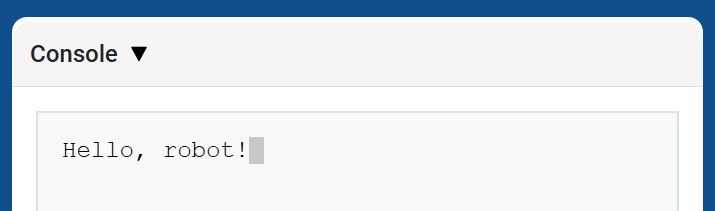
brain.screen.print displays text, numbers, or variable values in the Console using the current cursor position. It behaves like print on the Console API page.
Use brain.screen.next_row when you want the next printed value to start on a new row.
Usage:
brain.screen.print(value)
Parámetros |
Descripción |
|---|---|
|
El texto, número o valor de variable que se mostrará en la consola. |
def main():
    # Display a message in the Console
    brain.screen.print("Hello, robot!")

# VR threads — Do not delete
vr_thread(main)
pantalla.siguiente_fila#
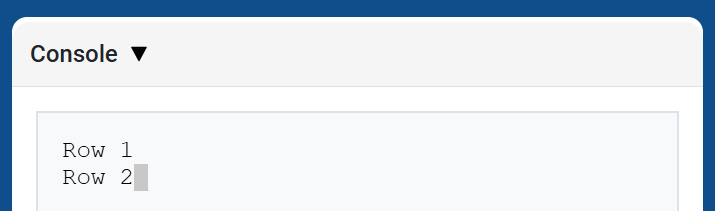
brain.screen.next_row moves the cursor to column 1 on the next row in the Console. The next value printed will appear on that row.
Usage:
brain.screen.next_row()
Parámetros |
Descripción |
|---|---|
Este método no tiene parámetros. |
def main():
    # Print on two rows
    brain.screen.print("Row 1")
    brain.screen.next_row()
    brain.screen.print("Row 2")

# VR threads — Do not delete
vr_thread(main)
pantalla.cerebro.pantalla_limpia#
brain.screen.clear_screen clears all rows from the Console and moves the cursor back to Row 1.
Usage:
brain.screen.clear_screen()
Parámetros |
Descripción |
|---|---|
Este método no tiene parámetros. |
def main():
    # Display text, then clear it after two seconds
    brain.screen.print("This will disappear...")
    wait(2, SECONDS)
    brain.screen.clear_screen()

# VR threads — Do not delete
vr_thread(main)
Monitor#
variable_de_monitor#
monitor_variable adds one or more predefined variables to the Monitor tab in VEXcode. This lets you watch a variable’s value change while a project is running.
Variables must be global for monitor_variable to monitor them successfully. Provide each variable name as a string.
Usage:
monitor_variable(“variable”)
monitor_variable(“variable1”, “variable2”)
Parámetros |
Descripción |
|---|---|
|
El nombre de una variable global predefinida que se desea monitorizar, especificado como una cadena de texto. Para monitorizar más de una variable, separe cada nombre con una coma. |
def main():
    # Monitor the amount of loops
    global loops
    monitor_variable("loops")

    # Drive in a square 3 times
    for loops in range(12):
        drivetrain.turn_for(RIGHT, 90, DEGREES)
        drivetrain.drive_for(FORWARD, 150, MM)

# VR threads — Do not delete
vr_thread(main)
sensor_de_monitor#
monitor_sensor adds one or more sensor values to the Monitor tab in VEXcode. This lets you watch sensor values change while a project is running.
Proporcione cada valor del sensor como una cadena de texto.
Usage:
monitor_sensor(“sensor”)
monitor_sensor(“sensor1”, “sensor2”)
Parámetros |
Descripción |
|---|---|
|
The sensor value to monitor, given as a string. To monitor more than one sensor value, separate each sensor value with a comma. Supported sensor identifiers include:
|
def main():
    # Monitor the robot's heading
    monitor_sensor("drivetrain.heading")
    drivetrain.turn_for(RIGHT, 450, DEGREES)

# VR threads — Do not delete
vr_thread(main)
Detección#
LED táctil#
establecer_color#
set_color sets the color of the Touch LED.
Usage:
touchled.set_color(color)
Parámetros |
Descripción |
|---|---|
|
The color to set the Touch LED to:
|
def main():
    # Light the Touch LED while placing a Pin.
    touchled.set_color(RED)
    lift_motor.spin_for(REVERSE, 600, DEGREES)
    drivetrain.drive_for(FORWARD, 140, MM)
    claw_motor.spin(FORWARD)
    touchled.set_color(NONE)

# VR threads — Do not delete
vr_thread(main)
Óptico#
is_near_object#
is_near_object returns a Boolean indicating whether or not the Optical Sensor detects an object within range.
True– The Optical Sensor detects an object.False– The Optical Sensor does not detect an object.
Usage:
optical.is_near_object()
Parámetros |
Descripción |
|---|---|
Este método no tiene parámetros. |
def main():
    # Wait until the claw no longer detects an object, then lower the lift.
    lift_motor.spin_for(REVERSE, 600, DEGREES)
    drivetrain.drive_for(FORWARD, 140, MM)
    claw_motor.spin(FORWARD)
    while optical.is_near_object():
        wait(2, MSEC)
    lift_motor.spin_to_position(0, DEGREES)

# VR threads — Do not delete
vr_thread(main)
color#
color returns an instance of a Color class, based on the detected hue value. These can be compared to predefined Color objects to create conditional statements.
Los colores posibles son:
NONERED- A hue value between 340° - 20°GREEN- A hue value between 80° - 140°BLUE- A hue value between 200° - 240°YELLOW- A hue value between 40° - 60°ORANGE- A hue value between 20° - 40°PURPLE- A hue value between 240° - 280°CYAN- A hue value between 140° - 200°
Note: The Optical Sensor is looking for hue ranges that match the specified color. For detecting specific hue ranges, see hue.
Usage:
optical.color()
Parámetros |
Descripción |
|---|---|
Este método no tiene parámetros. |
def main():
    # Wait until the Optical Sensor detects red, then lower the lift.
    lift_motor.spin_for(REVERSE, 600, DEGREES)
    drivetrain.drive_for(FORWARD, 140, MM)
    claw_motor.spin(FORWARD)
    while not optical.color() == RED:
        wait(5, MSEC)
    lift_motor.spin_to_position(0, DEGREES)

# VR threads — Do not delete
vr_thread(main)
brillo#
brightness returns the amount of light reflected from the object as a decimal (float) representing a percent.
Un porcentaje más alto significa que se refleja más luz de vuelta al sensor óptico. Un porcentaje más bajo significa que se refleja menos luz.
Usage:
optical.brightness()
Parámetros |
Descripción |
|---|---|
Este método no tiene parámetros. |
def main():
    # Lower the lift once the claw sees a darker object.
    lift_motor.spin_for(REVERSE, 600, DEGREES)
    drivetrain.drive_for(FORWARD, 140, MM)
    claw_motor.spin(FORWARD)
    while not 30 > optical.brightness():
        wait(5, MSEC)
    lift_motor.spin_to_position(0, DEGREES)

# VR threads — Do not delete
vr_thread(main)
matiz#
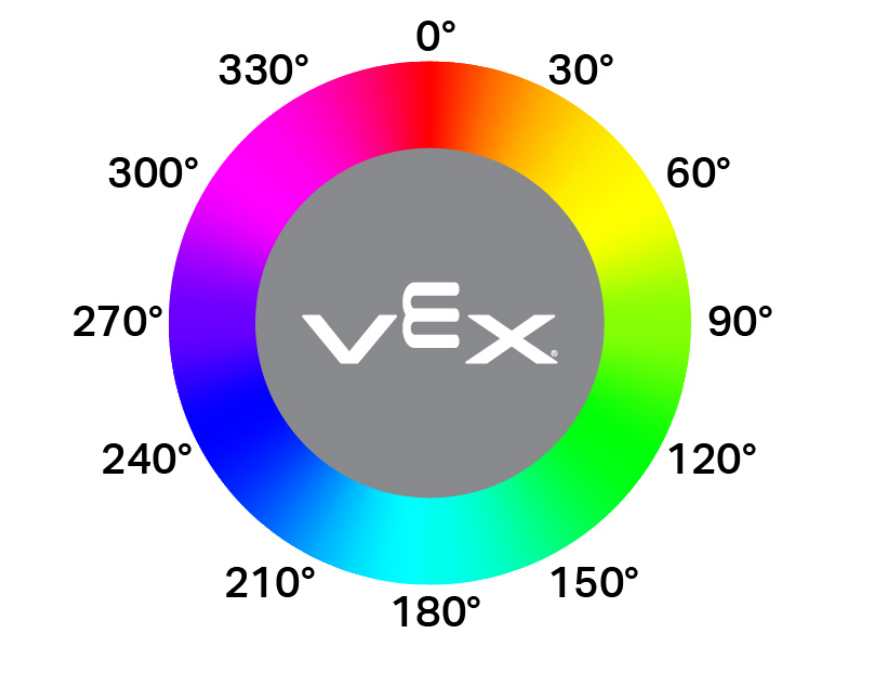
hue returns the hue value of the detected color as a decimal (float) from 0 to 359.
El matiz es una forma de describir el color utilizando números alrededor de una rueda de colores.
Usage:
optical.hue()
Parámetros |
Descripción |
|---|---|
Este método no tiene parámetros. |
def main():
    # Lower the lift once the Optical Sensor reports a hue value.
    lift_motor.spin_for(REVERSE, 600, DEGREES)
    drivetrain.drive_for(FORWARD, 140, MM)
    claw_motor.spin(FORWARD)
    while not optical.hue() > 0:
        wait(5, MSEC)
    lift_motor.spin_to_position(0, DEGREES)

# VR threads — Do not delete
vr_thread(main)
objeto_detectado#
object_detected registers a function to be called whenever the Optical Sensor detects a new object.
Usage:
optical.object_detected(callback, arg)
Parámetros |
Descripción |
|---|---|
|
Una función definida previamente que se ejecuta cuando el sensor óptico detecta un nuevo objeto. |
|
Opcional. Una tupla que contiene los argumentos que se pasarán a la función de devolución de llamada. Consulte Uso de funciones con parámetros para obtener más información. |
def pin_in_claw():
    touchled.set_color(RED)

def main():
    # Change the Touch LED color when the claw detects an object.
    optical.object_detected(pin_in_claw)
    touchled.set_color(GREEN)
    lift_motor.spin_for(REVERSE, 600, DEGREES)
    drivetrain.drive_for(FORWARD, 140, MM)
    claw_motor.spin(FORWARD)

# VR threads — Do not delete
vr_thread(main)
objeto_perdido#
object_lost registers a function to be called whenever the Optical Sensor loses a detected object.
Usage:
optical.object_lost(callback, arg)
Parámetros |
Descripción |
|---|---|
|
Una función definida previamente que se ejecuta cuando el sensor óptico pierde un objeto detectado. |
|
Opcional. Una tupla que contiene los argumentos que se pasarán a la función de devolución de llamada. Consulte Uso de funciones con parámetros para obtener más información. |
def lower_lift():
    # Lower the lift when the claw no longer holds an object.
    lift_motor.spin_to_position(0, DEGREES)

def main():
    optical.object_lost(lower_lift)
    lift_motor.spin_for(REVERSE, 600, DEGREES)
    drivetrain.drive_for(FORWARD, 140, MM)
    claw_motor.spin(FORWARD)

# VR threads — Do not delete
vr_thread(main)