
机器人专用 Python#
介绍#
英雄机器人 Huey 包含两种电机选项、IQ AI 视觉传感器、光学传感器和触摸 LED。
所有标准的 VEXcode VR 方法都可以在 IQ 25-26 Mix & Match Playground 中使用。
以下是所有可用的机器人专用方法列表:
驱动系统——控制机器人的移动和转向。
操作
drive— Moves the robot forward or reverse forever.drive_for— Moves the robot forward or reverse for a specific distance.turn— Turns the robot left or right forever.turn_for— Turns the robot left or right for a specific number of degrees.turn_to_heading— Turns the robot to face a specific heading from -359 to 359 degrees.turn_to_rotation— Turns the robot to a specific rotation.stop— Stops the robot’s movement.
变异因子
set_heading— Changes the robot’s current heading to a new heading.set_rotation— Changes the robot’s current rotation to a new rotation.set_timeout— Sets how much time the robot will try to finish a movement.set_drive_velocity— Tells the robot how fast to drive.set_turn_velocity— Tells the robot how fast to turn.
Getters
heading— Returns the robot’s current heading from 0 to 359.99 degrees.rotation— Returns the robot’s current rotation.is_done— Returns whether the robot is finished moving, as a Boolean value.is_moving— Returns whether the robot is moving, as a Boolean value.velocity— Returns how fast the robot is driving.
运动控制 - 控制机器人电机的移动和跟踪。
操作
spin— Spins a motor forward or reverse forever.spin_for— Spins a motor for a specific distance.spin_to_position— Spins a motor to a specific position.stop— Stops a motor from spinning.
变异因子
set_position— Changes the motor’s current position to a new value.set_velocity— Tells a motor how fast to spin.set_timeout— Sets how much time a motor will try to finish a movement.
Getters
is_done— Returns whether the motor is finished moving, as a Boolean value.is_spinning— Returns whether the motor is spinning, as a Boolean value.position— Returns the motor’s current position.velocity— Returns how fast the motor is spinning.
AI视觉——使用IQ AI视觉传感器捕捉和分析物体。
Getters
take_snapshot- Returns a tuple of detected objects for a specific signature.
特性
width- Width of the detected object in pixels.height- Height of the detected object in pixels.centerX- X position of the object’s center in pixels.centerY- Y position of the object’s center in pixels.originX- X position of the object’s top-left corner in pixels.originY- Y position of the object’s top-left corner in pixels.id- Classification or tag ID of the object.
控制台 – 将信息打印到控制台并监控数值。
打印
brain.screen.print— Displays text, numbers, or variable values in the Console.brain.screen.next_row— Moves the Console cursor to the start of the next row.brain.screen.clear_screen— Clears all rows from the Console.
监视器
monitor_variable— Adds one or more predefined variables to the Monitor tab.monitor_sensor— Adds one or more sensor values to the Monitor tab.
感知——利用机器人的各种传感器。
触摸式LED灯
set_color- Sets the Touch LED to a selected color.
光学的
is_near_object– Returns whether the Optical Sensor detects an object within range.color– Returns the color detected by the Optical Sensor.brightness– Returns the amount of light reflected from the object.hue– Returns the hue detected by the Optical Sensor.object_detected– Registers a function to be called when the Optical Sensor detects an object.object_lost– Registers a function to be called when the Optical Sensor loses an object.
本页示例使用 Playground 的默认起始位置。
传动系统#
动力系统控制着VR机器人的行驶和转向。动力系统可以前进或后退、左转或右转、转向特定航向并跟踪其旋转。
行动#
驾驶#
drive moves the robot forward or reverse forever. The robot will continue to move until it is given another action, like turning or stopping.
Usage:
drivetrain.drive(direction)
参数 |
描述 |
|---|---|
|
The direction the robot moves: |
def main():
    # Drive forward then stop
    drivetrain.drive(FORWARD)
    wait(2, SECONDS)
    drivetrain.stop()

# VR threads — Do not delete
vr_thread(main)
驱动#
drive_for moves the robot forward or reverse for a specific distance. The project will wait until the robot is done moving before the next line of code runs.
Usage:
drivetrain.drive_for(direction, distance, units, wait)
参数 |
描述 |
|---|---|
|
The direction the robot moves: |
|
The distance the robot drives. This can be an |
|
Optional. The distance unit: |
|
Optional. |
def main():
    # Drive forward and backward
    drivetrain.drive_for(FORWARD, 200, MM)
    drivetrain.drive_for(REVERSE, 200, MM)

# VR threads — Do not delete
vr_thread(main)
转动#
turn turns the robot left or right forever. The robot will continue to turn until it is given another action, like driving or stopping.
Usage:
drivetrain.turn(direction)
参数 |
描述 |
|---|---|
|
The direction the robot turns: |
def main():
    # Turn right and left, then stop
    drivetrain.turn(RIGHT)
    wait(2, SECONDS)
    drivetrain.turn(LEFT)
    wait(2, SECONDS)
    drivetrain.stop()

# VR threads — Do not delete
vr_thread(main)
转弯#
turn_for turns the robot left or right for a specific number of degrees. The turn is relative to the current position of the robot. The project will wait until the robot is done turning before the next line of code runs.
Usage:
drivetrain.turn_for(direction, angle, units, wait)
参数 |
描述 |
|---|---|
|
The direction the robot turns: |
|
The number of degrees the robot turns. This can be an |
|
Optional. The rotation unit: |
|
Optional. |
def main():
    # Turn the robot right and left
    drivetrain.turn_for(RIGHT, 90, DEGREES)
    wait(1, SECONDS)
    drivetrain.turn_for(LEFT, 90, DEGREES)

# VR threads — Do not delete
vr_thread(main)
转向航向#
A heading is the direction the robot is facing, measured in degrees. turn_to_heading turns the robot to face a specific heading from -359 to 359 degrees. The robot will turn the shortest direction to reach the target heading.
机器人的初始航向角为0度。
程序会等到机器人完成转向后才运行下一行代码。
Usage:
drivetrain.turn_to_heading(angle, units, wait)
参数 |
描述 |
|---|---|
|
The direction the robot should face, in degrees. This can be an |
|
Optional. The rotation unit: |
|
Optional. |
def main():
    # Turn to face the cardinal directions
    drivetrain.turn_to_heading(90, DEGREES)
    wait(1, SECONDS)
    drivetrain.turn_to_heading(180, DEGREES)
    wait(1, SECONDS)
    drivetrain.turn_to_heading(270, DEGREES)
    wait(1, SECONDS)
    drivetrain.turn_to_heading(0, DEGREES)

# VR threads — Do not delete
vr_thread(main)
转向旋转#
turn_to_rotation turns the robot to a specific rotation.
Rotation is how much the robot has turned, measured in degrees. At the beginning of a project, the rotation value is set to 0 degrees. Rotation can also be set using the set_rotation method.
旋转角度是绝对值。这意味着转弯方向取决于机器人当前的旋转角度。向右转弯会增加旋转角度,向左转弯会减少旋转角度。
例如,如果机器人从0度开始,你将其旋转720度,它会向右转两次。如果你再将其旋转360度,它会向左转一次,因为360小于720。
程序会等到机器人完成转向后才运行下一行代码。
Usage:
drivetrain.turn_to_rotation(angle, units, wait)
参数 |
描述 |
|---|---|
|
The rotation value, in degrees, that the robot will turn to. This can be an |
|
Optional. The rotation unit: |
|
Optional. |
def main():
    # Turn left, then spin in a circle
    # clockwise and face right
    drivetrain.turn_to_rotation(-90, DEGREES)
    wait(1, SECONDS)
    drivetrain.turn_to_rotation(450, DEGREES)

# VR threads — Do not delete
vr_thread(main)
停止#
stop stops the robot’s movement.
Usage:
drivetrain.stop()
参数 |
描述 |
|---|---|
此方法没有参数。 |
def main():
    # Drive forward then stop
    drivetrain.drive(FORWARD)
    wait(2, SECONDS)
    drivetrain.stop()

# VR threads — Do not delete
vr_thread(main)
变异体#
设置标题#
A heading is the direction the robot is facing, measured in degrees. set_heading changes the robot’s current heading to a new heading value.
例如,如果机器人转向右侧,将航向设置为 0 度,则该右侧位置将成为新的 0 度航向。然后,机器人可以根据新的航向转向其他位置。
Usage:
drivetrain.set_heading(heading, units)
参数 |
描述 |
|---|---|
|
The heading value, in degrees, to set for the robot. This can be an |
|
Optional. The heading unit: |
def main():
    # Face the new 0 degrees
    drivetrain.set_heading(90, DEGREES)
    drivetrain.turn_to_heading(0, DEGREES)

# VR threads — Do not delete
vr_thread(main)
设置旋转#
Rotation is how much the robot has turned, measured in degrees. At the beginning of a project, the rotation value is set to 0 degrees. set_rotation changes the robot’s current rotation to a new value.
例如,如果机器人向右转了两圈,它的旋转角度将为 720 度。将旋转角度设置为 0 度会将旋转角度从 720 度重置为 0 度。然后,机器人可以根据这个新的旋转角度进行旋转。
Usage:
drivetrain.set_rotation(rotation, units)
参数 |
描述 |
|---|---|
|
The rotation value, in degrees, to set for the robot. This can be an |
|
Optional. The rotation unit: |
def main():
    # Spin counterclockwise two times
    drivetrain.set_rotation(720, DEGREES)
    drivetrain.turn_to_rotation(0, DEGREES)

# VR threads — Do not delete
vr_thread(main)
设置超时#
set_timeout sets how much time the robot will try to finish a movement. If the robot cannot finish in that time, it will stop trying and move on to the next line of code. This keeps the robot from getting stuck on a movement.
Usage:
drivetrain.set_timeout(value, units)
参数 |
描述 |
|---|---|
|
The amount of time the robot can try to finish a movement. This can be a positive |
|
The time unit: |
def main():
    # Turn right after driving forward
    drivetrain.set_timeout(1, SECONDS)
    drivetrain.drive_for(FORWARD, 25, INCHES)
    drivetrain.turn_for(RIGHT, 90)

# VR threads — Do not delete
vr_thread(main)
设置驱动速度#
set_drive_velocity tells the robot how fast to drive. A higher percentage makes the robot drive faster and a lower percentage makes the robot drive slower.
每个项目开始时,机器人默认以 50% 的速度行驶。
**注意:**速度越高,机器人行驶速度越快,但精度可能越低;速度越低,机器人行驶速度越慢,但精度可能越高。
Usage:
drivetrain.set_drive_velocity(velocity, units)
参数 |
描述 |
|---|---|
|
The velocity to drive with from 0% to 100%. This can be an |
|
Optional. The velocity unit: |
def main():
    # Drive forward at different velocities
    # Default velocity
    drivetrain.drive_for(FORWARD, 150, MM)
    wait(1, SECONDS)
    # Drive slower
    drivetrain.set_drive_velocity(20, PERCENT)
    drivetrain.drive_for(FORWARD, 150, MM)
    wait(1, SECONDS)
    # Drive faster
    drivetrain.set_drive_velocity(100, PERCENT)
    drivetrain.drive_for(FORWARD, 150, MM)

# VR threads — Do not delete
vr_thread(main)
设置转弯速度#
set_turn_velocity tells the robot how fast to turn. A higher percentage makes the robot turn faster and a lower percentage makes the robot turn slower.
每个项目开始时,机器人默认以 50% 的速度旋转。
**注意:**速度越高,机器人转弯越快,但精度可能越低;速度越低,机器人转弯越慢,但精度可能越高。
Usage:
drivetrain.set_turn_velocity(velocity, units)
参数 |
描述 |
|---|---|
|
The velocity to turn with from 0% to 100%. This can be an |
|
Optional. The velocity unit: |
def main():
    # Turn at different velocities
    # Default velocity
    drivetrain.turn_for(RIGHT, 120, DEGREES)
    wait(1, SECONDS)
    # Turn slower
    drivetrain.set_turn_velocity(20, PERCENT)
    drivetrain.turn_for(RIGHT, 120, DEGREES)
    wait(1, SECONDS)
    # Turn faster
    drivetrain.set_turn_velocity(100, PERCENT)
    drivetrain.turn_for(RIGHT, 120, DEGREES)

# VR threads — Do not delete
vr_thread(main)
获取器#
标题#
A heading is the direction the robot is facing, measured in degrees. heading returns the robot’s current heading from 0 to 359.99 degrees.
机器人的初始航向角为0度。
Usage:
drivetrain.heading(units)
参数 |
描述 |
|---|---|
|
Optional. The heading unit: |
def main():
    # Display the heading after turning
    drivetrain.turn_for(RIGHT, 450, DEGREES)
    brain.screen.print("Heading: ")
    brain.screen.print(drivetrain.heading(DEGREES))

# VR threads — Do not delete
vr_thread(main)
旋转#
Rotation is how much the robot has turned, measured in degrees. At the beginning of a project, the rotation value is set to 0 degrees. rotation returns the robot’s current rotation.
向右转会增加旋转角度,向左转会减少旋转角度。例如,向右转两圈将得到 720 度的旋转角度。
Usage:
drivetrain.rotation(units)
参数 |
描述 |
|---|---|
|
Optional. The rotation unit: |
def main():
    # Display the rotation after turning
    drivetrain.turn_for(RIGHT, 450, DEGREES)
    brain.screen.print("Rotation: ")
    brain.screen.print(drivetrain.rotation(DEGREES))

# VR threads — Do not delete
vr_thread(main)
已完成#
is_done returns whether the robot is finished moving, as a Boolean value. This can be used to control the timing of other behaviors based on the robot’s movement.
True— The robot is finished moving.False— The robot is still moving.
This method works together with the following Drivetrain methods that have the wait parameter: drive_for, turn_for, turn_to_heading, and turn_to_rotation.
Usage:
drivetrain.is_done()
参数 |
描述 |
|---|---|
此方法没有参数。 |
正在移动#
is_moving returns whether the robot is moving, as a Boolean value. This can be used to control the timing of other behaviors based on the robot’s movement.
True— The robot is moving.False— The robot is not moving.
Usage:
drivetrain.is_moving()
参数 |
描述 |
|---|---|
此方法没有参数。 |
速度#
velocity returns how fast the robot is driving, as a percentage from -100% to 100%.
Usage:
drivetrain.velocity(units)
参数 |
描述 |
|---|---|
|
Optional. The velocity unit: |
例子
def main():
    # Display the velocity after driving
    drivetrain.drive_for(FORWARD, 150, MM)
    brain.screen.print("Velocity: ")
    brain.screen.print(drivetrain.velocity(PERCENT))
运动#
休伊利用爪式电机来打开和关闭爪子,以便抓取或放下销钉和梁。升降电机则负责升降销钉或梁,使它们能够相互连接。
每个电机都有其自身的运动方向。方向描述解释了休伊直升机上每个电机的运动方向。
行动#
旋转#
spin spins a motor forward or reverse forever. The motor will continue to spin until it is given another action, like spinning in a different direction or stopping.
用法:
此方法可以使用两种可用的电机对象之一,如下所示:
发动机 |
命令 |
|---|---|
|
|
|
|
参数 |
描述 |
|---|---|
|
The direction the motor spins:
|
def main():
    # Raise the lift, drive forward, then open the claw.
    lift_motor.spin_for(REVERSE, 600, DEGREES)
    drivetrain.drive_for(FORWARD, 140, MM)
    claw_motor.spin(FORWARD)

# VR threads — Do not delete
vr_thread(main)
spin_for#
spin_for spins a motor for a specific distance. The spin is relative to the current position of the motor. The project will wait until the motor is done spinning before the next line of code runs.
用法:
此方法可以使用两种可用的电机对象之一,如下所示:
发动机 |
命令 |
|---|---|
|
|
|
|
参数 |
描述 |
|---|---|
|
The direction the motor spins:
|
|
The distance the motor spins. |
|
Optional. The distance unit: |
|
Optional.
|
def main():
    # Raise the lift, drive forward, then open the claw.
    lift_motor.spin_for(REVERSE, 600, DEGREES)
    drivetrain.drive_for(FORWARD, 140, MM)
    claw_motor.spin(FORWARD)

# VR threads — Do not delete
vr_thread(main)
自旋至位置#
spin_to_position spins a motor to a specific position.
A motor’s position is how far it has spun, measured in DEGREES or TURNS. One turn is equal to 360 degrees. At the beginning of a project, the motor position is set to 0 degrees. The motor position can also be set using the set_position method.
位置值是绝对值。这意味着旋转方向取决于电机的当前位置。
例如,如果电机从0度开始旋转到720度,它将正转两圈。如果它接着旋转到360度,它将反转一圈,因为360小于720。
用法:
此方法可以使用两种可用的电机对象之一,如下所示:
发动机 |
命令 |
|---|---|
|
|
|
|
参数 |
描述 |
|---|---|
|
The position value the motor will spin to. |
|
Optional. The position unit: |
|
Optional.
|
def main():
    # Raise the lift to a known position, drive, then open the claw
    lift_motor.spin_to_position(-720, DEGREES)
    drivetrain.drive_for(FORWARD, 140, MM)
    claw_motor.spin(FORWARD)

# VR threads — Do not delete
vr_thread(main)
停止电机#
stop stops a motor from spinning.
用法:
此方法可以使用两种可用的电机对象之一,如下所示:
发动机 |
命令 |
|---|---|
|
|
|
|
参数 |
描述 |
|---|---|
此方法没有参数。 |
def main():
    # Raise the lift for 2 seconds, then stop
    lift_motor.spin(REVERSE)
    wait(2, SECONDS)
    lift_motor.stop()
    drivetrain.drive_for(FORWARD, 140, MM)
    claw_motor.spin(FORWARD)

# VR threads — Do not delete
vr_thread(main)
变异体#
设置位置#
A motor’s position is how far it has spun, measured in DEGREES or TURNS. One turn is equal to 360 degrees. set_position changes the motor’s current position to a new value.
例如,如果电机旋转了 180 度,将其位置设置为 0 度会将该位置从 180 度重置为 0 度。然后,电机可以根据这个新值旋转到其他位置。
用法:
此方法可以使用两种可用的电机对象之一,如下所示:
发动机 |
命令 |
|---|---|
|
|
|
|
参数 |
描述 |
|---|---|
|
The position value to set for the motor. |
|
Optional. The position unit: |
def main():
    # Reset the lift position, then move to a new target.
    lift_motor.set_position(100, DEGREES)
    lift_motor.spin_to_position(-500, DEGREES)
    drivetrain.drive_for(FORWARD, 140, MM)
    claw_motor.spin(FORWARD)

# VR threads — Do not delete
vr_thread(main)
设置速度#
set_velocity tells a motor how fast to spin. A higher percentage makes the motor spin faster and a lower percentage makes the motor spin slower.
每个项目开始时,每个电机默认以 50% 的速度旋转。
**注意:**更高的速度会使电机转速更快,但精度可能会降低。更低的速度会使电机转速更慢,但精度可能会更高。
用法:
此方法可以使用两种可用的电机对象之一,如下所示:
发动机 |
命令 |
|---|---|
|
|
|
|
参数 |
描述 |
|---|---|
|
The velocity to spin with from 0% to 100%. This can be an |
|
The velocity unit: |
def main():
    # Set lift speed, then raise it.
    lift_motor.set_velocity(100, PERCENT)
    lift_motor.spin_for(REVERSE, 600, DEGREES)
    drivetrain.drive_for(FORWARD, 140, MM)
    claw_motor.spin(FORWARD)

# VR threads — Do not delete
vr_thread(main)
设置超时#
set_timeout sets how much time a motor will try to finish a movement. If the motor cannot finish in that time, it will stop trying and move on to the next line of code. This keeps the motor from getting stuck on a movement.
用法:
此方法可以使用两种可用的电机对象之一,如下所示:
发动机 |
命令 |
|---|---|
|
|
|
|
参数 |
描述 |
|---|---|
|
The amount of time the motor can try to finish a movement. This can be a positive |
|
The time unit: |
def main():
    # Limit how long the lift waits to reach its target.
    lift_motor.set_timeout(2, SECONDS)
    lift_motor.spin_for(REVERSE, 1800, DEGREES)
    drivetrain.drive_for(FORWARD, 140, MM)
    claw_motor.spin(FORWARD)

# VR threads — Do not delete
vr_thread(main)
获取器#
已完成#
is_done returns whether the motor is finished moving, as a Boolean value. This can be used to control the timing of other behaviors based on the motor’s movement.
True— The motor is finished moving.False— The motor is still moving.
This method works together with the following Motion methods that have the wait parameter: spin_for and spin_to_position.
用法:
此方法可以使用两种可用的电机对象之一,如下所示:
发动机 |
命令 |
|---|---|
|
|
|
|
参数 |
描述 |
|---|---|
此方法没有参数。 |
def main():
    # Flash the Touch LED while the lift is moving.
    lift_motor.spin_for(REVERSE, 600, DEGREES, wait=False)
    wait(0.1, SECONDS)
    while not lift_motor.is_done():
        touchled.set_color(RED)
        wait(0.5, SECONDS)
        touchled.set_color(NONE)
        wait(0.5, SECONDS)

# VR threads — Do not delete
vr_thread(main)
正在旋转#
is_spinning returns whether the motor is spinning, as a Boolean value. This can be used to control the timing of other behaviors based on the motor’s movement.
True— The motor is spinning.False— The motor is not spinning.
This method works together with the following Motion methods that have the wait parameter: spin_for and spin_to_position.
用法:
此方法可以使用两种可用的电机对象之一,如下所示:
发动机 |
命令 |
|---|---|
|
|
|
|
参数 |
描述 |
|---|---|
此方法没有参数。 |
def main():
    # Flash the Touch LED while the lift is spinning.
    lift_motor.spin_for(REVERSE, 600, DEGREES, wait=False)
    wait(0.1, SECONDS)
    while lift_motor.is_spinning():
        touchled.set_color(RED)
        wait(0.5, SECONDS)
        touchled.set_color(NONE)
        wait(0.5, SECONDS)

# VR threads — Do not delete
vr_thread(main)
位置#
A motor’s position is how far it has spun, measured in DEGREES or TURNS. One turn is equal to 360 degrees. position returns the motor’s current position.
项目开始时,电机位置设置为 0 度。如果电机正向旋转一周,则位置为 360 度或 1 圈。如果电机反向旋转,则位置为负值。
用法:
此方法可以使用两种可用的电机对象之一,如下所示:
发动机 |
命令 |
|---|---|
|
|
|
|
参数 |
描述 |
|---|---|
|
The unit to return the motor position in: |
def main():
    # Raise the lift until it reaches roughly 600 degrees.
    lift_motor.spin(REVERSE)
    while not lift_motor.position(DEGREES) <= -600:
        wait(2, MSEC)
    lift_motor.stop()
    drivetrain.drive_for(FORWARD, 140, MM)
    claw_motor.spin(FORWARD)

# VR threads — Do not delete
vr_thread(main)
速度#
velocity returns how fast the motor is spinning.
正值表示电机正转,负值表示电机反转。
用法:
此方法可以使用两种可用的电机对象之一,如下所示:
发动机 |
命令 |
|---|---|
|
|
|
|
参数 |
描述 |
|---|---|
|
The velocity unit to return: |
def main():
    # Print the lift velocity while it is moving.
    lift_motor.set_velocity(100, PERCENT)
    lift_motor.spin_for(REVERSE, 600, DEGREES, wait=False)
    wait(0.5, SECONDS)
    brain.screen.print(lift_motor.velocity(PERCENT))

# VR threads — Do not delete
vr_thread(main)
人工智能视觉#
获取器#
拍摄快照#
take_snapshot filters data from the IQ AI Vision Sensor frame to a single signature — a saved description of something the sensor can recognize, such as a game element on the field — and returns a tuple.
该元组按宽度从大到小排序存储对象,索引从 0 开始。每个对象的属性 (#properties) 可以通过其索引访问。如果没有检测到匹配的对象,则返回空元组。
Usage:
ai_vision.take_snapshot(signature)
参数 |
描述 |
|---|---|
|
Filters the dataset to only include data of the given signature. Available signatures are:
|
def main():
    # Place the Red Pin on the top-left Blue Pin.
    lift_motor.spin_for(REVERSE, 600, DEGREES)
    drivetrain.turn_for(LEFT, 38, DEGREES)

    ai_objects = ai_vision.take_snapshot(AiVision.ALL_AIOBJS)
    while not ai_objects[0].width > 48:
        ai_objects = ai_vision.take_snapshot(AiVision.ALL_AIOBJS)
        drivetrain.drive(FORWARD)

    drivetrain.drive_for(FORWARD, 160, MM)
    claw_motor.spin(FORWARD)

# VR threads — Do not delete
vr_thread(main)
特性#
There are seven properties that are included with each object stored in a tuple after take_snapshot is used.
All property values except .id describe the detected object’s position and size in the IQ AI Vision Sensor’s view at the moment take_snapshot was used. These values are measured in pixels, based on the sensor’s 320 by 240 pixel resolution.
。宽度#
.width returns the width of the detected object in pixels, which is an integer between 1 and 320.
def main():
    ai_objects = ai_vision.take_snapshot(AiVision.ALL_AIOBJS)
    if len(ai_objects) > 0:
        brain.screen.print(ai_objects[0].width)

# VR threads — Do not delete
vr_thread(main)
。高度#
.height returns the height of the detected object in pixels, which is an integer between 1 and 240.
def main():
    ai_objects = ai_vision.take_snapshot(AiVision.ALL_AIOBJS)
    if len(ai_objects) > 0:
        brain.screen.print(ai_objects[0].height)

# VR threads — Do not delete
vr_thread(main)
.centerX#
.centerX returns the x-coordinate of the detected object’s center in pixels, which is an integer between 0 and 320.
def main():
    ai_objects = ai_vision.take_snapshot(AiVision.ALL_AIOBJS)
    if len(ai_objects) > 0:
        brain.screen.print(ai_objects[0].centerX)

# VR threads — Do not delete
vr_thread(main)
.centerY#
.centerY returns the y-coordinate of the detected object’s center in pixels, which is an integer between 0 and 240.
def main():
    ai_objects = ai_vision.take_snapshot(AiVision.ALL_AIOBJS)
    if len(ai_objects) > 0:
        brain.screen.print(ai_objects[0].centerY)

# VR threads — Do not delete
vr_thread(main)
.originX#
.originX returns the x-coordinate of the top-left corner of the detected object’s bounding box in pixels, which is an integer between 0 and 320.
def main():
    ai_objects = ai_vision.take_snapshot(AiVision.ALL_AIOBJS)
    if len(ai_objects) > 0:
        brain.screen.print(ai_objects[0].originX)

# VR threads — Do not delete
vr_thread(main)
.originY#
.originY returns the y-coordinate of the top-left corner of the detected object’s bounding box in pixels, which is an integer between 0 and 240.
def main():
    ai_objects = ai_vision.take_snapshot(AiVision.ALL_AIOBJS)
    if len(ai_objects) > 0:
        brain.screen.print(ai_objects[0].originY)

# VR threads — Do not delete
vr_thread(main)
。ID#
.id returns the ID of the detected AI Classification as an integer.
人工智能分类 |
ID |
签名 |
|---|---|---|
光束 |
0 |
|
蓝色别针 |
1 |
|
红针 |
2 |
|
橙色别针 |
3 |
|
def main():
    # Find the nearest Blue Pin in the current snapshot.
    lift_motor.spin_for(REVERSE, 600, DEGREES)
    object_count = 1
    ai_objects = ai_vision.take_snapshot(AiVision.ALL_AIOBJS)

    if len(ai_objects) > 0:
        for repeat_count in range(len(ai_objects)):
            if ai_objects[repeat_count].id == GameElements.BLUE_PIN:
                brain.screen.print(str("Closest Blue Pin is ") + str(object_count))
                break
            object_count = object_count + 1

# VR threads — Do not delete
vr_thread(main)
安慰#
项目运行时,控制台会显示文本、数字和变量值。控制台方法还可以将光标移动到新行、清除控制台以及向“监视器”选项卡添加变量或传感器值。
打印#
脑屏幕打印#
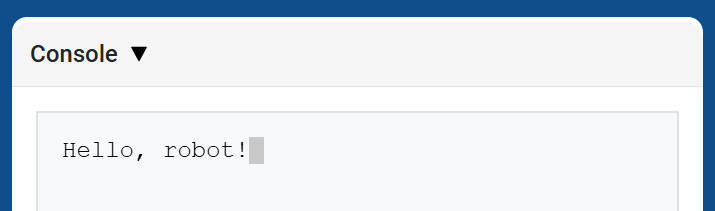
brain.screen.print displays text, numbers, or variable values in the Console using the current cursor position. It behaves like print on the Console API page.
Use brain.screen.next_row when you want the next printed value to start on a new row.
Usage:
brain.screen.print(value)
参数 |
描述 |
|---|---|
|
要在控制台中显示的文本、数字或变量值。 |
def main():
    # Display a message in the Console
    brain.screen.print("Hello, robot!")

# VR threads — Do not delete
vr_thread(main)
brain.screen.下一行#
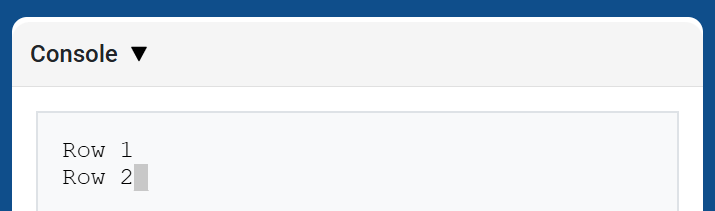
brain.screen.next_row moves the cursor to column 1 on the next row in the Console. The next value printed will appear on that row.
Usage:
brain.screen.next_row()
参数 |
描述 |
|---|---|
此方法没有参数。 |
def main():
    # Print on two rows
    brain.screen.print("Row 1")
    brain.screen.next_row()
    brain.screen.print("Row 2")

# VR threads — Do not delete
vr_thread(main)
brain.screen.clear_screen#
brain.screen.clear_screen clears all rows from the Console and moves the cursor back to Row 1.
Usage:
brain.screen.clear_screen()
参数 |
描述 |
|---|---|
此方法没有参数。 |
def main():
    # Display text, then clear it after two seconds
    brain.screen.print("This will disappear...")
    wait(2, SECONDS)
    brain.screen.clear_screen()

# VR threads — Do not delete
vr_thread(main)
监视器#
监控变量#
monitor_variable adds one or more predefined variables to the Monitor tab in VEXcode. This lets you watch a variable’s value change while a project is running.
Variables must be global for monitor_variable to monitor them successfully. Provide each variable name as a string.
Usage:
monitor_variable(“variable”)
monitor_variable(“variable1”, “variable2”)
参数 |
描述 |
|---|---|
|
要监控的预定义全局变量的名称,以字符串形式给出。要监控多个变量,请用逗号分隔每个变量名。 |
def main():
    # Monitor the amount of loops
    global loops
    monitor_variable("loops")

    # Drive in a square 3 times
    for loops in range(12):
        drivetrain.turn_for(RIGHT, 90, DEGREES)
        drivetrain.drive_for(FORWARD, 150, MM)

# VR threads — Do not delete
vr_thread(main)
监控传感器#
monitor_sensor adds one or more sensor values to the Monitor tab in VEXcode. This lets you watch sensor values change while a project is running.
请以字符串形式提供每个传感器的值。
Usage:
monitor_sensor(“sensor”)
monitor_sensor(“sensor1”, “sensor2”)
参数 |
描述 |
|---|---|
|
The sensor value to monitor, given as a string. To monitor more than one sensor value, separate each sensor value with a comma. Supported sensor identifiers include:
|
def main():
    # Monitor the robot's heading
    monitor_sensor("drivetrain.heading")
    drivetrain.turn_for(RIGHT, 450, DEGREES)

# VR threads — Do not delete
vr_thread(main)
传感#
触摸 LED#
设置颜色#
set_color sets the color of the Touch LED.
Usage:
touchled.set_color(color)
参数 |
描述 |
|---|---|
|
The color to set the Touch LED to:
|
def main():
    # Light the Touch LED while placing a Pin.
    touchled.set_color(RED)
    lift_motor.spin_for(REVERSE, 600, DEGREES)
    drivetrain.drive_for(FORWARD, 140, MM)
    claw_motor.spin(FORWARD)
    touchled.set_color(NONE)

# VR threads — Do not delete
vr_thread(main)
光学的#
靠近对象#
is_near_object returns a Boolean indicating whether or not the Optical Sensor detects an object within range.
True– The Optical Sensor detects an object.False– The Optical Sensor does not detect an object.
Usage:
optical.is_near_object()
参数 |
描述 |
|---|---|
此方法没有参数。 |
def main():
    # Wait until the claw no longer detects an object, then lower the lift.
    lift_motor.spin_for(REVERSE, 600, DEGREES)
    drivetrain.drive_for(FORWARD, 140, MM)
    claw_motor.spin(FORWARD)
    while optical.is_near_object():
        wait(2, MSEC)
    lift_motor.spin_to_position(0, DEGREES)

# VR threads — Do not delete
vr_thread(main)
颜色#
color returns an instance of a Color class, based on the detected hue value. These can be compared to predefined Color objects to create conditional statements.
可选颜色有:
NONERED- A hue value between 340° - 20°GREEN- A hue value between 80° - 140°BLUE- A hue value between 200° - 240°YELLOW- A hue value between 40° - 60°ORANGE- A hue value between 20° - 40°PURPLE- A hue value between 240° - 280°CYAN- A hue value between 140° - 200°
Note: The Optical Sensor is looking for hue ranges that match the specified color. For detecting specific hue ranges, see hue.
Usage:
optical.color()
参数 |
描述 |
|---|---|
此方法没有参数。 |
def main():
    # Wait until the Optical Sensor detects red, then lower the lift.
    lift_motor.spin_for(REVERSE, 600, DEGREES)
    drivetrain.drive_for(FORWARD, 140, MM)
    claw_motor.spin(FORWARD)
    while not optical.color() == RED:
        wait(5, MSEC)
    lift_motor.spin_to_position(0, DEGREES)

# VR threads — Do not delete
vr_thread(main)
亮度#
brightness returns the amount of light reflected from the object as a decimal (float) representing a percent.
百分比越高,意味着反射回光学传感器的光线越多;百分比越低,意味着反射回的光线越少。
Usage:
optical.brightness()
参数 |
描述 |
|---|---|
此方法没有参数。 |
def main():
    # Lower the lift once the claw sees a darker object.
    lift_motor.spin_for(REVERSE, 600, DEGREES)
    drivetrain.drive_for(FORWARD, 140, MM)
    claw_motor.spin(FORWARD)
    while not 30 > optical.brightness():
        wait(5, MSEC)
    lift_motor.spin_to_position(0, DEGREES)

# VR threads — Do not delete
vr_thread(main)
色调#
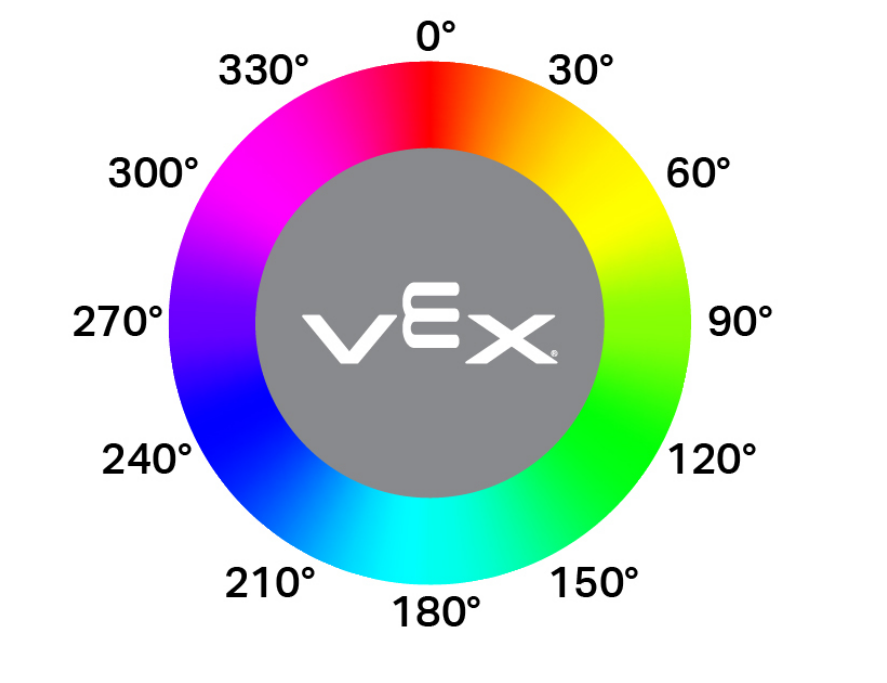
hue returns the hue value of the detected color as a decimal (float) from 0 to 359.
色相是用色轮上的数字来描述颜色的一种方法。
Usage:
optical.hue()
参数 |
描述 |
|---|---|
此方法没有参数。 |
def main():
    # Lower the lift once the Optical Sensor reports a hue value.
    lift_motor.spin_for(REVERSE, 600, DEGREES)
    drivetrain.drive_for(FORWARD, 140, MM)
    claw_motor.spin(FORWARD)
    while not optical.hue() > 0:
        wait(5, MSEC)
    lift_motor.spin_to_position(0, DEGREES)

# VR threads — Do not delete
vr_thread(main)
检测到目标#
object_detected registers a function to be called whenever the Optical Sensor detects a new object.
Usage:
optical.object_detected(callback, arg)
参数 |
描述 |
|---|---|
|
先前定义的 函数,当光学传感器检测到新物体时执行。 |
|
def pin_in_claw():
    touchled.set_color(RED)

def main():
    # Change the Touch LED color when the claw detects an object.
    optical.object_detected(pin_in_claw)
    touchled.set_color(GREEN)
    lift_motor.spin_for(REVERSE, 600, DEGREES)
    drivetrain.drive_for(FORWARD, 140, MM)
    claw_motor.spin(FORWARD)

# VR threads — Do not delete
vr_thread(main)
丢失对象#
object_lost registers a function to be called whenever the Optical Sensor loses a detected object.
Usage:
optical.object_lost(callback, arg)
参数 |
描述 |
|---|---|
|
先前定义的 函数,当光学传感器丢失检测到的对象时执行。 |
|
def lower_lift():
    # Lower the lift when the claw no longer holds an object.
    lift_motor.spin_to_position(0, DEGREES)

def main():
    optical.object_lost(lower_lift)
    lift_motor.spin_for(REVERSE, 600, DEGREES)
    drivetrain.drive_for(FORWARD, 140, MM)
    claw_motor.spin(FORWARD)

# VR threads — Do not delete
vr_thread(main)